Addressing Node.js Brotli decoder and Next.js vulnerabilities on Windows 11
Social Share:
Thursday, October 22, 2026 at 11:39 PM | 12 min read
Last modified on Saturday, October 24, 2026 at 8:20 PM
#brotli, #cybersecurity, #fnm, #nextjs, #nodejs, #windows 11

Photo by Markus Spiske on unsplash.com
Table of Contents
- The focus of the security vulnerabilities
- The Brotli decoder
- The Brotli decoder bug
- October 21 Node.js vulnerabilities and fixes
- Patching Node.js on Windows 11
- Patching the Next.js blog site
- Running npm test after running npm run build
- Deploying the site to Vercel
- Conclusion
- Related Resources
- Footnotes
Yesterday morning, I went into my Gmail account as I do every morning, and came across my daily email alert from The Hacker News. I opened it to find that serious vulnerabilities had been discovered in Node.js versions 22.x, 24.x, and 26.x (26.12.0 had just shipped October 14, 2026), and I had installed 26.12.0 on my Dell around the same time. I immediately updated my Dell's Node.js to the patched version, 26.12.1. It is especially important these days to stay on top of what is going on in the world of cybersecurity, and how it might be affecting daily tech workflows. So, I decided to write a post about my Node.js patch process and what else the flaws affected in my workflow.
The focus of the security vulnerabilities
The focus of the post I saw was a Brotli decoder bug. In fact, that was the only thing that was mentioned in the post title: "Node.js Brotli Decoder Bug Could Allow Remote Code Execution in All Supported Versions." So at first, I thought that was the only vulnerability addressed in the Node.js security release. But it turned out not to be the case. There were 10 different security vulnerabilities addressed in the release, and they were all pretty important ones. But first comes the Brotli decoder bug, since that one attracted the most attention.
The Brotli decoder
So what is the Brotli decoder? According to Google Research:
Brotli is an open source general-purpose data compressor introduced by Google in late 2013 and now adopted in most known browsers and Web servers. It is publicly available on GitHub and its data format was submitted as RFC 7932 in July 2016. Brotli is based on the Lempel-Ziv compression scheme and planned as a generic replacement of Gzip and ZLib. The main goal in its design was to compress data on the Internet, which meant optimizing the resources used at decoding time, while achieving maximal compression density. — Alakuijala, J., Farruggia, A., Ferragina, P., Kliuchnikov, E., Obryk, R., Szabadka, Z., & Vandevenne, L. (2019). Brotli: A General-Purpose Data Compressor. ACM Transactions on Information Systems.
In other words, a Google library implemented just about everywhere on the web, and adopted by Node.js as well. Node.js bundles its own copy.
The Brotli decoder bug
So who would have known that such a little thing created a long time ago would end up being such a big deal for all the wrong reasons?
The Brotli decoder bug, which went viral October 21, and was rated high severity, refers to malformed compressed input that makes the decoder write past the end of its buffer, which is an out-of-bounds write.
According to the NIST (National Institute of Standards and Technology) National Vulnerability Database (NVD), there was:
A buffer overflow vulnerability in the Brotli decoder ... [that] allows a remote unauthenticated attacker to corrupt adjacent decoder state memory, disclose sensitive memory contents, cause a denial of service, or potentially execute arbitrary code using a crafted Brotli-compressed stream.
According to the Node.js Project on their blog, updates were available on October 21, 2026, for the 26.x, 24.x, and 22.x versions of Node.js.
October 21 Node.js vulnerabilities and fixes
| CVE | Description | Severity | Affected versions |
|---|---|---|---|
| (CVE-2026-105482) | dns.resolve truncates names containing NUL char | High | Node.js 26.x, 24.x, and 22.x |
| (CVE-2026-105483) | TLS certificate hostname bypass when the IP is written fullwidth digits | High | Node.js 26.x and 24.x |
| (CVE-2026-106069) | TLS certificate hostname bypass when the host loosely resolves to an IP address | High | Node.js 26.x, 24.x, and 22.x |
| (CVE-2026-111497) | Node.js Brotli decoder out-of-bounds write permits remote code execution | High | Node.js 26.x, 24.x, and 22.x |
| (CVE-2026-105481) | Keep-alive socket process a response that was written before the request was sent | Medium | Node.js 26.x, 24.x, and 22.x |
| (CVE-2026-106072) | Improper certificate validation for non-canonical IPv4 hostnames allows DNS SANs to authenticate IP endpoints | Medium | Node.js 26.x, 24.x, and 22.x |
| (CVE-2026-106074) | crypto.randomUUID() and randomInt() entropy caches are saved into user-land startup snapshots and SEAs, so every process repeats the same values | Medium | Node.js 26.x, 24.x, and 22.x |
| (CVE-2026-106070) | Node.js ZipFile returns attacker-controlled prefix bytes after failed ZIP header validation | Low | Node.js 26.x |
| (CVE-2026-106071) | Permission Model filesystem over-grant via wildcard radix lookup | Low | Node.js 26.x |
| (CVE-2026-106073) | Permission Model bypass with fs.realpathSync | Low | Node.js 26.x, 24.x, and 22.x |
There will be no patches for Node.js 20.x and earlier, which are end-of-life. Google’s Brotli versions 1.2.1, 1.1.1, and 1.0.10 were fixed, so other software that bundles Brotli may also need to be updated.
CVE-2026-105482 in more detail
What happens with the Node.js DNS resolution flaw is that dns.resolve*() and dns.reverse() silently truncate hostnames that contain a NUL byte. Also important to note is that this resulted from an incomplete fix of an earlier CVE, CVE-2026-48930, which had covered only dns.lookup() and the net/tls host options. The first patch missed these functions.
Why does it matter? Applications that validate a hostname and then resolve it with these functions may end up acting on records for a different name.
To view "Required CVE Record Information" itself on cve.org, please visit CVE-2026-105482.
CVE-2026-105483 in more detail
This vulnerability was a regression. An earlier CVE fix (CVE-2026-48618) introduced it. The issue was that fullwidth digits are Unicode characters that look like regular digits but aren’t, such as 127.0.0.1. tls.checkServerIdentity(), the function that checks whether a server’s certificate matches the host you’re connecting to, “did not recognize such hosts as IP addresses.” It checked them against DNS names instead of IP addresses. A certificate containing DNS:127.0.0.1 or DNS:*.0.0.1 could therefore be accepted for an IP endpoint it was not issued for.
Why does this matter? Certificate checks are made to confirm who I'm talking to, and this bug allowed a mismatched certificate to pass that check.
To view the "Required CVE Record Information" itself on cve.org, please visit CVE-2026-105483.
CVE-2026-106069 in more detail
The Node.js TLS hostname verification is similar to the DNS flaw. The tls.checkServerIdentity() and the operating system resolver read the same input differently.
So the client connects to one address while checking the certificate against another, and a server can be authenticated with a certificate issued for a different IP.
To view the "Required CVE Record Information" itself on cve.org, please visit CVE-2026-106069.
Patching Node.js on Windows 11
Just listing the CVEs that were addressed in the Node.js security release is not enough. I had to patch Node.js on my Windows 11 machine.
As it happened, I installed Node.js 26.12.0 last Sunday, October 18, and this was the first ever Node.js install on my Windows 11 machine and four days after the release of Node.js 26.12.0. So when I heard on October 22 that it contained serious vulnerabilities, I immediately updated Node.js to its patched version: 26.12.1.
I had to check where I installed Node.js on my machine, so I ran:
$ which node
/c/Users/Owner/AppData/Local/fnm_multishells/18408_1792677694979/node
This showed that I installed Node with the Fast Node Manager (fnm) on Windows. And fnm_multishells is a directory created by fnm to manage Node.js and npm symlinks in each open terminal session or tab.
Note: when I tried fnm install 26, it didn’t fetch the patch because a 26.x was already installed.
To install the patch for Node.js 26.12.0, I ran:
# to install the patch version
$ fnm install 26.12.1
# to set it as the default
$ fnm default 26.12.1
# to use it in the current terminal session
$ fnm use 26.12.1
# to make sure the version I am using is 26.12.1
$ node --version
# which returned:
v26.12.1
Since the node version showed 26.12.1, it meant my Windows machine was patched.
I also had to make sure that System Node also was no longer running 26.12.0:
$ fnm exec --using=system node --version
v26.12.1
It matched, but I had to make sure that it was a separate install. The system lookup could have been finding fnm’s own Node on my PATH instead of another copy.
To list node.exe Windows can find:
$ where.exe node
C:\Users\Owner\AppData\Local\fnm_multishells\18408_1792677694979\node.exe
Since only fnm_multishells paths appeared, there was no separate system install and I was completely done.
If something like C:\Program Files\nodejs\node.exe had shown up, I could have checked that one’s version directly:
$ "/c/Program Files/nodejs/node.exe" --version
I did run $ "/c/Program Files/nodejs/node.exe" --version, and it returned:
bash: /c/Program Files/nodejs/node.exe: No such file or directory
Again, this confirmed that there was no installer-based Node on my machine. fnm’s v26.12.1 was the only Node there, and it was patched.
Patching the Next.js blog site
Next.js had its own set of vulnerabilities to patch. And I had my own updates to implement as well.
I wanted to set Node to the highest version possible that Vercel, where I host my blog site, accepts. And that is the 24.x line.
I had already patched my 26.x version, but still had to download the 24.x version to match Vercel's default, so that local and deployed versions would match.
I ran the following commands inside my Next.js blog repo:
$ fnm install 24
# returned:
Installing Node v24.22.1 (x64)
00:00:08 ██████████████████████████████████████████████████████ 36.00 MiB/36.00 MiB (4.19 MiB/s, 0s)
# Node v24.22.1 is the patched release on the 24 line
$ fnm use 24
# which returned:
Using Node v24.22.1
$ node --version
# which returned:
v24.22.1
$ npm ci > output.txt 2>&1
$ npm outdated >> output.txt 2>&1
When I got to npm ci1, npm gave me a EBADENGINE warning, and then the run hung at 26.12.1. This is what I got when I ran it:
$ npm ci > output.txt
npm warn EBADENGINE Unsupported engine {
npm warn EBADENGINE   package: 'fullstack-blog@0.1.0',
npm warn EBADENGINE   required: { node: '24.x' },
npm warn EBADENGINE   current: { node: 'v26.12.1', npm: '11.20.0' }
npm warn EBADENGINE }
What happened was that the repo required Node v24.x, and it was picking up on v26.x. I ran fnm use 24 in a standalone Git Bash session, and then ran npm ci in VSCodium's integrated terminal, so it fell back to the v26.x default. The reason I ended up with npm warn EBADENGINE here was that I ran npm ci > output.txt instead of npm ci > output.txt 2>&1. Omitting 2>&1 redirects the output to the terminal.
The way that fnm use vs fnm default works is:
fnm default <version> sets the Node.js version that is used for new sessions if one is not explicitly set for a session with fnm use <version>. So if I close a window where I ran fnm use, and then open a new one, the default Node version will be used. So when I ran npm ci, it did not work. So once I ran fnm use 24 again, I was able to execute npm ci successfully:
$ npm ci
npm warn deprecated stable@0.1.8: Modern JS already guarantees Array#sort() is a stable sort, so this library is deprecated. See the compatibility table on MDN: https://developer.mozilla.org/en-US/docs/Web/JavaScript/Reference/Global_Objects/Array/sort#browser_compatibility
This time, the EBADENGINE warning was gone. This meant npm was running under the right version of Node.
This is what npm outdated returned after downloading its clean install of the local repository:
Package                      Current   Wanted   Latest  Location                                  Depended by
@eslint/eslintrc               3.3.6    3.3.7    3.3.7  node_modules/@eslint/eslintrc             nextjs-fullstack-blog
...
@next/bundle-analyzer         16.3.7   16.4.2   16.4.2  node_modules/@next/bundle-analyzer        nextjs-fullstack-blog
@next/mdx                     16.3.7   16.4.2   16.4.2  node_modules/@next/mdx                    nextjs-fullstack-blog
...
@vitejs/plugin-react           5.2.0    5.2.0    6.1.2  node_modules/@vitejs/plugin-react         nextjs-fullstack-blog
@vitest/coverage-v8           4.1.11   4.1.12    5.0.5  node_modules/@vitest/coverage-v8          nextjs-fullstack-blog
...
eslint                        9.39.5   9.39.5  10.13.0  node_modules/eslint                       nextjs-fullstack-blog
eslint-config-next            16.3.7   16.4.2   16.4.2  node_modules/eslint-config-next           nextjs-fullstack-blog
...
next                          16.3.7   16.4.2   16.4.2  node_modules/next                         nextjs-fullstack-blog
next-seo                      5.15.0   5.15.0    7.3.0  node_modules/next-seo                     nextjs-fullstack-blog
...
react                         19.2.6   19.3.1   19.3.1  node_modules/react                        nextjs-fullstack-blog
react-dom                     19.2.6   19.3.1   19.3.1  node_modules/react-dom                    nextjs-fullstack-blog
...
vitest                                  4.1.11   4.1.12    5.0.5  node_modules/vitest                       nextjs-fullstack-blog
First and foremost, next 16.3.7 was vulnerable.
Next.js shipped an out-of-band security update on October 14 fixing two critical remote code execution flaws (CVSS 9.5) and a denial-of-service flaw. Next.js 16.0.0-16.4.0 were affected, which meant that 16.3.7 was also affected. And since Vercel builds from my lock file, the live site was running it too.
There was an SVG flaw (Code execution through SVG images (CVE-2026-96889, GHSA-2464-fhr4-w9xw)), that is processed by sharp. And when running on the Node runtime, sharp handles the image rendering for next/og social cards. I use @vercel/og, so it probably affected the blog site as well.
According to The Hacker News, "Apps on the Pages Router, or with no Server Actions, are not affected." If my nodemailer contact form used a Server Action, it would have been affected as well. But it didn't. It uses the Pages Router.
The Hacker News article also states that some of the advisories listed weren't in the npm feed yet (at the time of the post's publication). npm might not have warned me about them, so I could not rely on it.
Looking at npm outdated, the "Wanted" column already pointed to the Next.js 16.4.2 security update for next, @next/mdx, @next/bundle-analyzer, and eslint-config-next, so it made sense to patch those packages together. The react and react-dom upgrade to 19.3.1 should be considered part of the same security update. React 19.3.1 wasn't just a compatibility bump; it contained the security fix for the advisory behind Next.js's use cache issue (GHSA-xqc2-xf4c-x3h3). To learn more about this, please visit Unauthenticated Remote Code Execution in React Server Components in the react repo Security Advisories on GitHub.
If you use Next.js and keep a close eye on dependency vulnerabilities, you've probably noticed that sharp appears in security advisories with surprising frequency. There's a structural reason for that. sharp is essentially a JavaScript layer on top of native libraries such as libvips, librsvg, and libheif, all of which are responsible for parsing complex image formats that may come from untrusted sources. That combination of memory-unsafe code and attacker-controlled input creates the same class of risk seen in the Brotli vulnerability. As noted in the Hacker News svg processing article, this is reportedly the third image-processing remote code execution issue affecting Next.js since August. In this case, the framework's fix was simply to update the bundled sharp dependency.
I don't manage sharp directly because it isn't listed in my package.json. The fix came along when I upgraded Next.js, which pulled in the updated version of sharp. I verified that by running npm ls sharp and confirming the installed version.
So I ran the following to update next:
$ npm install next@16.4.2 @next/mdx@16.4.2 @next/bundle-analyzer@16.4.2 eslint-config-next@16.4.2 react@19.3.1 react-dom@19.3.1
If I had any peer-dep conflicts, they would appear here.
After my successful update, I ran:
$ git status
  (use "git restore <file>..." to discard changes in working directory)
        modified:   package-lock.json
        modified:   package.json

no changes added to commit (use "git add" and/or "git commit -a")
Then I ran npm ls sharp to see if its version had changed:
$ npm ls sharp
fullstack-blog@0.1.0 C:\Users\Owner\Desktop\development\nextjs-fullstack-blog
└─┬ next@16.4.2
  └── sharp@0.35.5
And it did.
When I ran npm run build, it was successful.
Running npm test after running npm run build
I ran npm test . as a final confirmation that my Next.js patch was ready to commit. However, when I ran the command, I got back the following:
 npm test .

fullstack-blog@0.1.0 test
vitest run --coverage .

 RUN  v4.1.11 C:/Users/Owner/Desktop/development/nextjs-fullstack-blog
      Coverage enabled with v8

 ❯ __tests__/get-tag-link.test.js [queued]
 ❯ __tests__/hero.test.js [queued]
 ❯ __tests__/next-btn.test.js [queued]

warn - You have enabled experimental features: optimizeUniversalDefaults
warn - Experimental features in Tailwind CSS are not covered by semver, may introduce breaking changes, and can change at any time.

 ❯ __tests__/get-tag-link.test.js [queued]
 ❯ __tests__/hero.test.js [queued]
 ❯ __tests__/next-btn.test.js [queued]

 ❯ __tests__/get-tag-link.test.js 0/1
 ❯ __tests__/hero.test.js [queued]
 ❯ __tests__/next-btn.test.js 0/1
 ✓ __tests__/prev-btn.test.js (1 test) 71ms
stdout | __tests__/post-item.test.js > PostItem > renders a post item in the posts grid
Post Item props are truthy

 ✓ __tests__/next-btn.test.js (1 test) 89ms
 ✓ __tests__/post-item.test.js (1 test) 7ms
 ❯ __tests__/get-tag-link.test.js (1 test | 1 failed) 108ms
     × renders a tag link 102ms

 ✓ __tests__/post-header.test.js (1 test) 48ms
 ✓ __tests__/pagination.test.js (1 test) 48ms
 ✓ __tests__/hero.test.js (1 test) 9ms

⎯⎯⎯⎯⎯⎯⎯⎯⎯⎯⎯⎯⎯⎯⎯⎯⎯⎯⎯⎯⎯⎯⎯⎯⎯⎯⎯⎯⎯⎯⎯⎯⎯⎯⎯⎯⎯⎯⎯⎯⎯⎯⎯⎯⎯⎯⎯⎯⎯⎯⎯⎯⎯ Failed Tests 1 ⎯⎯⎯⎯⎯⎯⎯⎯⎯⎯⎯⎯⎯⎯⎯⎯⎯⎯⎯⎯⎯⎯⎯⎯⎯⎯⎯⎯⎯⎯⎯⎯⎯⎯⎯⎯⎯⎯⎯⎯⎯⎯⎯⎯⎯⎯⎯⎯⎯⎯⎯⎯⎯

 FAIL  __tests__/get-tag-link.test.js > getTagLink > renders a tag link
Error: expect(element).toHaveClass("tag")

Expected the element to have class:
  tag
Received:
  post-tag
 ❯ __tests__/get-tag-link.test.js:13:16
     11|   expect(link).toHaveAttribute('href', '/blog/tag/macOS')
     12|   expect(link).toHaveTextContent('#macOS')
     13|   expect(link).toHaveClass('tag')
       |                ^
     14|  })
     15| })

⎯⎯⎯⎯⎯⎯⎯⎯⎯⎯⎯⎯⎯⎯⎯⎯⎯⎯⎯⎯⎯⎯⎯⎯⎯⎯⎯⎯⎯⎯⎯⎯⎯⎯⎯⎯⎯⎯⎯⎯⎯⎯⎯⎯⎯⎯⎯⎯⎯⎯⎯⎯⎯⎯⎯⎯⎯⎯⎯⎯⎯⎯⎯⎯⎯⎯⎯⎯⎯⎯⎯⎯⎯⎯⎯⎯⎯⎯⎯⎯⎯⎯⎯⎯⎯⎯⎯⎯⎯⎯⎯⎯⎯⎯⎯⎯⎯⎯⎯⎯⎯⎯⎯⎯⎯⎯⎯⎯⎯⎯⎯⎯⎯⎯⎯⎯[1/1]⎯

 Test Files  1 failed | 6 passed (7)
      Tests  1 failed | 6 passed (7)
   Start at  10:46:16
   Duration  9.43s (transform 3.08s, setup 6.26s, import 6.67s, tests 381ms, environment 46.42s
This, however, was not due to the Next.js upgrade. It ended up being because of a stale post tag class. Before I had separated the Blog posts from the Project entries, I used the className "tag" in a single JS file called get-tag-link.js. Then, when I separated blog posts from project entries which resulted in a Blog feed and Projects feed, I updated the classNames in get-tag-link.js and a new file called get-project-tag-link.js, but not in the get-tag-link.test.js file. There, I failed to change the line expect(link).toHaveClass('tag') to expect(link).toHaveClass('post-tag'). And that is what caused that test to fail. Once I updated the className to 'post-tag', the test passed.
# I committed the test fix first, then the patch, on the patch-nextjs-16-4-2 branch
$ git add __tests__/get-tag-link.test.js
$ git commit
# Then I committed the package updates related to the Next.js patch
$ git add package.json package-lock.json
$ git commit
# I switched from the patch-nextjs-16-4-2 feature branch into main
$ git switch main
Deploying the site to Vercel
The final piece in the puzzle was to successfully deploy my blog site to Vercel:
# I merged the patch-nextjs-16-4-2 feature branch into main
$ git merge patch-nextjs-16-4-2 --no-ff
# I pushed the changes to remote
$ git push origin main
Then I went into my Vercel dashboard to make sure that the deployment was successful:
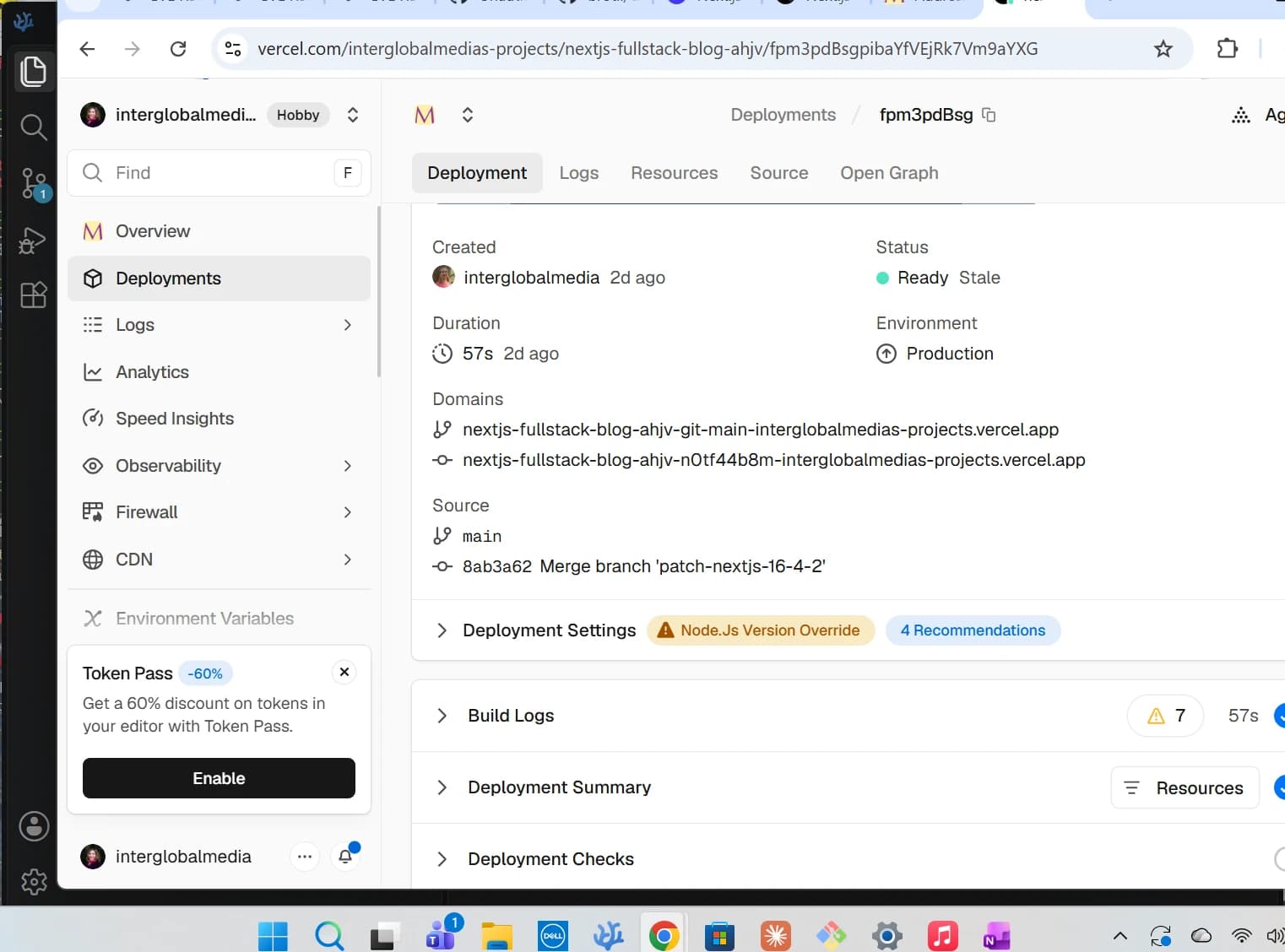
Screenshot of blog site successful deployment to Vercel
Conclusion
In this post, I discuss how coming across the Brotli decoder bug in the news was only part of the story. It initially led me to believe that there was only one security vulnerability involved. But when I dug deeper into the post that I came across as well as the advisories involved, I found out that there were 10 different vulnerabilities affecting the Node.js 22.x, 24.x, and 26.x lines. And the Next.js advisory was listed among the top stories on the same Hacker News page as the Brotli article. Both sets affected my work. Along the way to patching my Node.js and Next.js versions, I ran important commands such as where.exe to confirm that there was only one patched Node.js copy on my Dell. I ran npm ls sharp to confirm that sharp had been updated to its patched version, and npm test pointed me to a stale test that needed updating before I made my commits. So discovering what seemed to be a single bug resulted in my own version patches and updating a stale test. That's why it is so important to stay on top of the status of your tools and repositories!
Related Resources
- Wednesday, October 21, 2026 Security Releases: The Node.js Project
- Node.js Brotli Decoder Bug Could Allow Remote Code Execution in All Supported Versions: by Swati Khandelwal, The Hacker News
- Brotli: A General-Purpose Data Compressor: by Alakuijala, J., Farruggia, A., Ferragina, P., Kliuchnikov, E., Obryk, R., Szabadka, Z., & Vandevenne, L. (2019). Brotli: A General-Purpose Data Compressor. ACM Transactions on Information Systems, Google Research
- CVE-2026-111497 Detail: NIST National Vulnerability Database
- Node.js security advisory: Brotli decoder RCE (CVE-2026-111497): Vercel Knowledge Base/Security Bulletin
- Next.js Security Update for Upstream Vulnerabilities: by Sebastian Silbermann, Josh Story, and Karim Rahal, Next.js blog in Security
- Next.js Ships Out-of-Band Patch for Two Critical RCE Flaws in Caching and SVG Processing: by Swati Khandelwal, The Hacker News
- 19.3.1 (October 14th, 2026): react repository on GitHub
- Unauthenticated Remote Code Execution in React Server Components: react security advisories on GitHub
- Denial of Service in Server Functions: react security advisories on GitHub
- brotli/CHANGELOG.md: google brotli repository on GitHub
- CVE-2026-105482: Required CVE Record Information: cve.org
- URL Living Standard — Last Updated 19 October 2026: whatwg.org
- CVE-2026-105483: cve.org
- CVE-2026-106069: cve.org
Footnotes
-
npm ci means a clean install. It deletes node_modules and installs exactly what’s in package-lock.json. ↩