Enabling the auto-complete feature in Git with Z-shell
Social Share:
Saturday, May 30, 2020 at 2:34 PM | 1 min read
Last modified on Saturday, May 30, 2020 at 2:34 PM

Photo by Philippe Delberghe on unsplash.com
Not only can you auto-complete command line commands in Zsh, for example, but you can auto-complete commands in Git as well! And it is quite simple.
First, go to the Git repository on Github and to the following link:
There, you will see a number of files for different Git shell environments. Bash, Zsh, Prompt (for Windows), to name a couple. I use Zsh, so I downloaded the git-completion.zsh file to my desktop and then moved it into my ~ (Home) directory. After that, I added the following to my .zshrc file (also located in my home directory):
source ~/git-completion.zsh
I placed this line right above my PATH exports.
I made sure to quit Terminal and then open a new Terminal window instance before testing out my new Git auto-complete feature. And it works! For example, if I type che followed by the tab key, I get the following in Terminal:
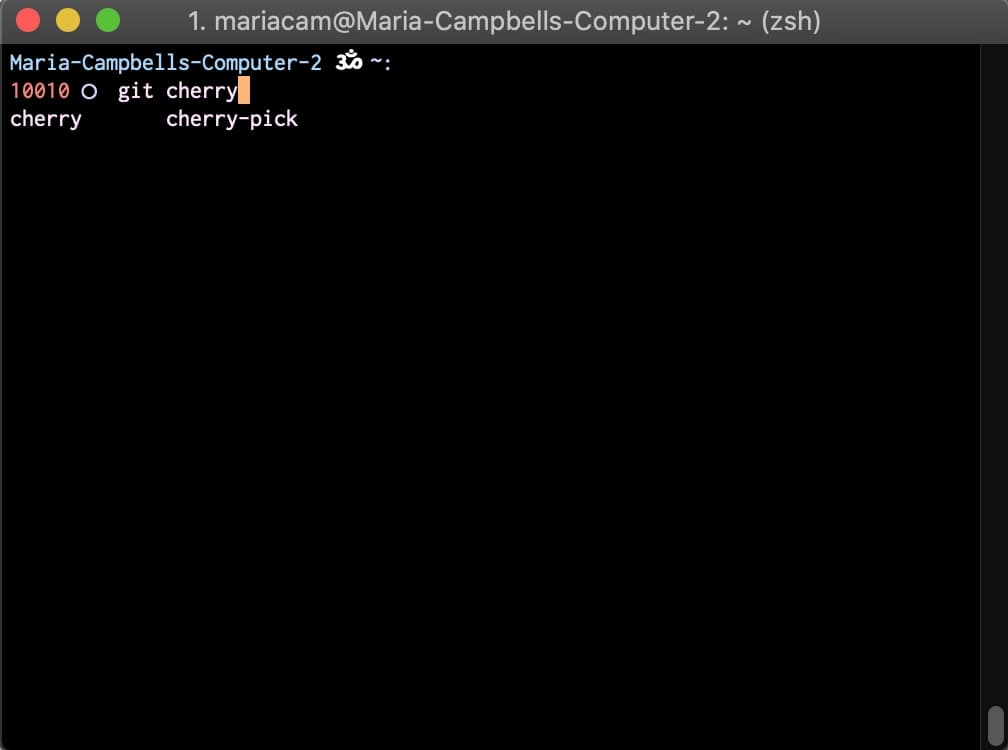
Git auto-complete feature in action
There are other ways of getting the git-completion.zsh file onto your desktop from Github such as with git pull, but I will get into that in another post.