Creating the official Django Polls app Part 6
Social Share:
Friday, January 10, 2025 at 1:24 PM | 3 min read
Last modified on Friday, July 3, 2026 at 7:36 PM
#fullstack development, #macOS, #django, #python3, #local development, #series, #staticfiles, #static template tag, #tutorial

Photo by David Clode on unsplash.com
Table of Contents
- Customizing my app's look and feel
- Static file namespacing
- Adding CSS to styles.css
- Adding the static template tag to polls/index.html
- Adding a background image to style.css
- Warning: the static template tag doesn't work inside static files
- Code associated with this post
- Conclusion
- Related Resources
- Related Posts
Update (July 2026): This walkthrough was written against Django 5.1, which reached full end-of-life in December 2025 and is no longer receiving security patches. Run python -m django --version to check which version you have.
Customizing my app's look and feel
Besides HTML generated by the server, web applications usually also need to serve additional files such as images, JavaScript, or CSS. These add functionality (JavaScript) and visual polish (CSS) to the page. In Django, these files are referred to as “static files”.
In order to make this happen, first I have to create a static directory inside my polls directory. Django will look for static files there. This is similar to how Django finds templates inside polls/templates/.
Next, I add a polls directory inside static, and inside polls, I add a style.css file.
STATICFILES_FINDERS setting
Django doesn't add STATICFILES_FINDERS to settings.py by default, but it contains a list of finders that know how to discover static files from various sources. One of the defaults is AppDirectoriesFinder, which looks for a “static” subdirectory in each of the INSTALLED_APPS, like the one in polls I just created. The admin site uses the same directory structure for its static files.
My styles should now be inside polls/static/polls/styles.css. Because of how the AppDirectoriesFinder staticfile finder works, I can refer to this static file in Django as polls/style.css, similar to how I referenced the path for templates.
Static file namespacing
According to the Django tutorial part 6 documentation,
Just like templates, we might be able to get away with putting our static files directly in polls/static (rather than creating another polls subdirectory), but it would actually be a bad idea. Django will choose the first static file it finds whose name matches, and if you had a static file with the same name in a different application, Django would be unable to distinguish between them. We need to be able to point Django at the right one, and the best way to ensure this is by namespacing them. That is, by putting those static files inside another directory named for the application itself.
Adding CSS to styles.css
I can also add the following CSS inside styles.css:
li a {
	color: green;
}
Adding the static template tag to polls/index.html
I can add the following template tag inside index.html:
<!-- polls/index.html -->
<!-- new -->
{% load static %}
<!DOCTYPE html>
<html lang="en">
  <head>
    <meta charset="UTF-8">
    <meta name="description" content="This is the Django Polls Home Page.">
    <meta name="keywords"
          content="Django, Python, polls, questions, choices, votes">
    <title>
      {% block title %}
        Django Polls Home Page
      {% endblock title %}
    </title>
    {% block stylesheet %}
      <!-- new -->
      <link rel="stylesheet" href="{% static 'polls/style.css' %}">
    {% endblock stylesheet %}
  </head>
  <body>
    {% block body %}
      {% if latest_question_list %}
        <ul>
          {% for question in latest_question_list %}
            <li>
              <a href="{% url 'polls:detail' question.id %}">{{ question.question_text }}</a>
            </li>
          {% endfor %}
        </ul>
      {% else %}
        <p>No polls available.</p>
      {% endif %}
    {% endblock body %}
  </body>
</html>
Now I can run the development server and see what adding a static directory with a style.css file did for my application:
python3 manage.py runserver
Then, I went to the browser at http://127.0.0.1:8000/polls/, and the following appeared:

Result of adding a static directory and style.css file
The {% static %} template tag generates the absolute URL of static files. That’s all I need to do for development.
Adding a background image to style.css
body {
	background: white url('../images/david-clode-J_5xvghAvmc-unsplash.jpg')
		center center no-repeat;
	height: 100vh;
	width: 100vw;
	overflow: hidden;
}

li a {
	color: #00ffff;
}
Now, when I go to the browser at http://127.0.0.1:8000/polls/, the index.html page looks like the following:
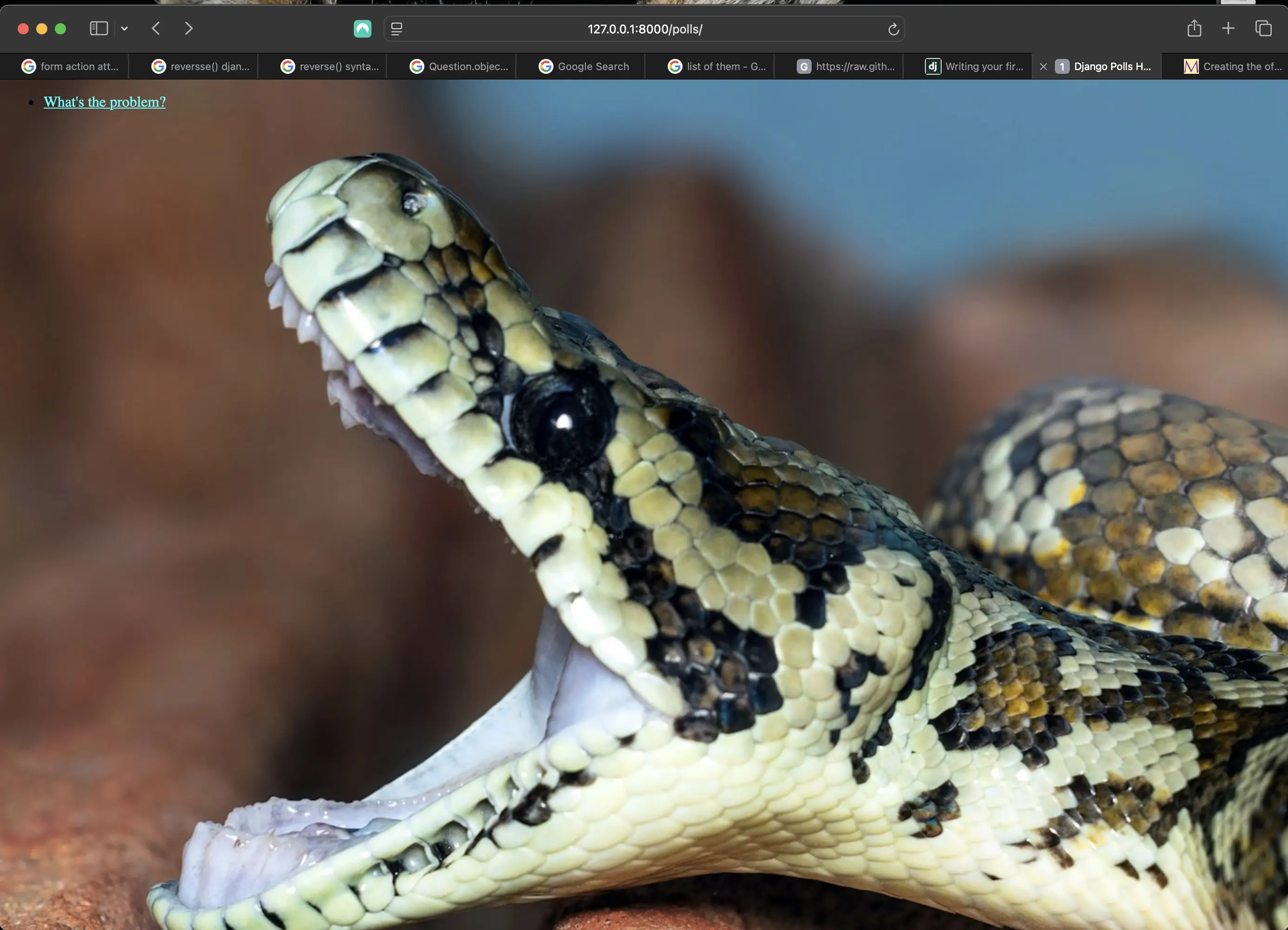
Adding background to index.html
Warning: the static template tag doesn't work inside static files
Django's "Writing your first Django app, part 6" documentation states,
The {% static %} template tag is not available for use in static files which aren’t generated by Django, like your stylesheet. You should always use relative paths to link your static files between each other, because then you can change STATIC_URL (used by the static template tag to generate its URLs) without having to modify a bunch of paths in your static files as well.
These are the staticfiles basics. For more details on settings and other bits included with the framework, see the static files howto and the staticfiles reference. Deploying static files discusses how to use static files on a real server.
Code associated with this post
To view the code associated with this post, please visit 918aa62. It also includes the code added in part 5.
Conclusion
In this section, I added static files to my Django Polls application configured for local development.
Related Resources
- Writing your first Django app, part 6: Django documentation
Related Posts
- Creating the official Django Polls app table of contents: mariadcampbell.com