tag: macOS

Coordinating Git Pushes Between macOS and Linux Mint
Maria D. Campbell
Learn how a solo developer coordinates Git pushes to remote origin from two machines.

Show Git Branch and Status in Your Bash Prompt on Linux Mint
Maria D. Campbell
Learn how to customize your Git prompt in your bare-bones Linux Mint configuration.

Storage Fun with Forms Original vs Rebuilt: A Comparison
Maria D. Campbell
In this post, I compare the original Storage Fun with forms with the rebuilt one created with the help of Claude AI.
#macOS, #coverage, #istanbul, #jasmine standalone, #javascript, #tests, #unit testing, #vanilla template, #vite, #vite config, #vitest

Storage Fun with Forms Rebuilt: A Modern Pass with Claude Table of Contents
Maria D. Campbell
A table of contents of all posts in the Storage Fun with Forms rebuild series, covering Vite setup, Vitest testing, modularization, and a side-by-side comparison with the original build.
#macOS, #coverage, #istanbul, #jasmine standalone, #javascript, #rolldown, #series, #tests, #vanilla template, #vite, #vite config, #vitest, #unit testing

Storage Fun with Forms Rebuild: Testing the Code
Maria D. Campbell
Learn how to test your JavaScript code with Vitest and how to add code coverage to your vanilla JavaScript project using Istanbul and what it means.
#macOS, #coverage, #istanbul, #javascript, #series, #tests, #unit testing, #vanilla template, #vite, #vitest

Storage Fun with Forms Rebuild: Working through the Code
Maria D. Campbell
In this post, I set up the Storage Fun with Forms app to work with Vitest. But I come to realize that the code structure in main.js is not suitable for complete test coverage of the Storage Fun with Forms rebuild. I also realized that Jasmine tests did not translate in Vitest.
#macOS, #tests, #vanilla template, #javascript, #series, #vite, #vitest

Storage Fun with Forms: Working through the Code
Maria D. Campbell
In this post, I work through the Storage Fun with Forms JavaScript code and describe how I used Jasmine standalone to test for bugs.
#macOS, #jasmine standalone, #javascript, #series, #tests, #unit testing

Storage Fun With Forms, Rebuilt: A Modern Pass with Claude
Maria D. Campbell
Walk through a step by step process of creating a Vite project using the current latest version. This is the first part of a series on rebuilding Storage Fun with Forms.
#macOS, #rolldown, #vanilla template, #vite, #javascript, #series, #vite config

How to check what is being ignored in your local git repository using command line
Maria D. Campbell
Learn how to verify what is being ignored in your local Git repository using command line. This way, you never lose data that may be stored in such files.
Editing your zsh history
Maria D. Campbell
Learn how to open and edit your .zsh_history file directly in Vim — using command, insert, and visual mode — to remove duplicate commands and typos from your Zsh shell history.
#macOS, #command line, #history, #terminal history, #vim, #zsh
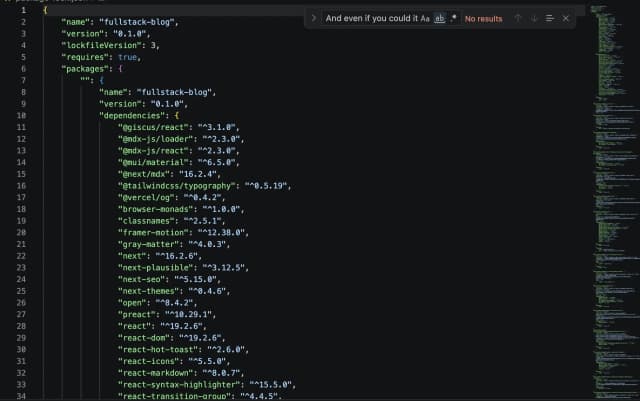
How a stray package-lock.json can break your Next.js Turbopack build
Maria D. Campbell
How to avoid the Turbopack multiple lockfiles warning while developing a Next.js application.
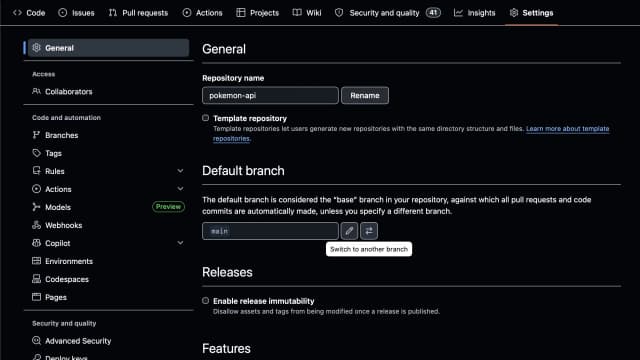
Changing the Git master branch to main
Maria D. Campbell
In this post, I discuss why GitHub changed the name of the default branch from master to main, and I talk about how I made the default-branch switch locally and on GitHub.
#default branch, #git, #github, #macOS, #main branch, #master branch

How to create copy link with highlight link
Maria D. Campbell
Learn how to link to specific highlighted text on any web page using Safari's copy link with highlight, Chrome's copy link to highlight, and Firefox Nightly's equivalent feature.
#chrome, #copy link with highlight, #firefox, #macOS, #microsoft edge, #opera, #safari, #vivaldi

AbstractUser vs AbstractBaseUser vs User extended profile in Django Part 2
Maria D. Campbell
A step-by-step walkthrough of building a custom Django user model using AbstractUser, including a custom manager, tests-first setup, migrations, and admin configuration.
#fullstack development, #macOS, #django, #python3, #abstractuser, #admin, #forms, #model manager, #tests, #unittest, #user model, #schema, #series, #superuser

AbstractUser vs AbstractBaseUser vs User extended profile in Django Table of Contents
Maria D. Campbell
A table of contents for my series on Django's AbstractUser, AbstractBaseUser, and extended User profile approaches — covering custom user models, migrations, forms, admin configuration, and testing.
#fullstack development, #macOS, #django, #python3, #abstractuser, #abstractbaseuser, #admin, #forms, #model manager, #tests, #unittest, #user model, #schema, #series, #superuser

AbstractUser vs AbstractBaseUser vs User extended profile in Django Part 1
Maria D. Campbell
A test-driven walkthrough of building a custom user model with AbstractBaseUser in Django, including the model manager, migrations, forms, and admin configuration.
#fullstack development, #macOS, #django, #python3, #abstractbaseuser, #admin, #forms, #model manager, #tests, #unittest, #user model, #schema, #series, #superuser

How to reuse an app created in one Django project in another Django project
Maria D. Campbell
In this post, I discuss how to reuse an app created in one Django project in another, so I don't have to re-create it from scratch.
#fullstack development, #macOS, #django, #python3, #reusable app, #local development

Adding pre-commit hooks to a Django project
Maria D. Campbell
Learn how to add and configure the pre-commit framework in a Django project, including Black, isort, Flake8, and djLint, to automate code quality on every commit.
#fullstack development, #macOS, #django, #python3, #code formatting, #djlint, #flake8, #isort, #linting, #pre-commit hook

Django official advanced tutorial on writing reusable apps
Maria D. Campbell
In this post, I discuss why reusability matters, how I can make my apps reusable, what a Python package is, how to install my prerequisites, how to package my app, and how to install and uninstall my newly packaged app.

How to upgrade the Python version in a virtual environment
Maria D. Campbell
In this post, I show how to upgrade the Python version being used in a Django application's virtual environment.
#fullstack development, #macOS, #django, #pip, #python3, #dependencies, #django commons, #django debug toolbar, #third-party packages, #venv, #virtual environment

Creating the official Django Polls app Part 8
Maria D. Campbell
In this section, I discussed how to install and configure the Django Debug Toolbar, introduced resources where I could access other third-party applications and provided next steps.
#fullstack development, #macOS, #django, #python3, #django commons, #django debug toolbar, #django settings, #pip, #series, #third-party packages, #tutorial

Creating the official Django Polls app Part 7
Maria D. Campbell
In this section, I customize the Question admin form, add Choice related objects to the admin form, customize the admin change list, add search capability to the admin interface, customize the admin look and feel, and customize my project's templates.
#fullstack development, #macOS, #django, #python3, #admin change list customization, #admin form, #admin interface, #search, #series, #template customization, #tutorial

Creating the official Django Polls app Part 6
Maria D. Campbell
In this section, I add static files to my Django Polls application configured for local development.
#fullstack development, #macOS, #django, #python3, #local development, #series, #staticfiles, #static template tag, #tutorial

Creating the official Django Polls app Part 5
Maria D. Campbell
This is the fifth installment in a series called Creating the official Django Polls app. Continue following this series with this fifth part. I walk through test-driven development in Django, finding and fixing a real bug in Question.recently_published(), and then build out view tests for the polls index and detail pages.
#fullstack development, #macOS, #fixing bugs, #identifying bugs, #series, #test client, #testing strategies, #tutorial, #unittest

Creating the official Django Polls app Part 3
Maria D. Campbell
This is the third installment in a series called Creating the official Django Polls app. Continue following this series with this third part. Learn how to create the index template, use the render() shortcut, implement raising a 404 error in the detail view, use template tags, and namespace URL names.
#fullstack development, #macOS, #django, #python3, #404, #model manager, #render shortcut, #series, #templates, #template namespacing, #tutorial, #urlpatterns, #views

Creating the official Django Polls app Part 4
Maria D. Campbell
This is the fourth installment in a series called Creating the official Django Polls app. Continue following this series with this fourth part. Learn how to add a minimal form to your HTML template, update a function based view, refactor urls.py to match generic views, and install djLint to format your Django templates.
#fullstack development, #macOS, #djlint, #forms, #function-based views, #generic class based views, #series, #tutorial

Creating the official Django Polls app Part 2
Maria D. Campbell
This is the second installment in a series called Creating the official Django Polls app. Continue following this series with this second part to learn how to set up a database in Django, create models, use the interactive Python shell, and get to know the Django admin interface.
#fullstack development, #macOS, #django, #python3, #admin forms, #installed apps, #language code, #number grouping, #series, #time zone, #tutorial, #use i18n, #use thousand separator, #use tz

Creating the official Django Polls app table of contents
Maria D. Campbell
I wrote this series because I thought the best way to become even more familiar with the Django documentation would be to follow their Django Polls tutorial and create a Django Polls application.
#fullstack development, #macOS, #django, #python3, #series, #tutorial

Creating the official Django Polls app Part 1
Maria D. Campbell
This is the first installment in a series called Creating the Official Django Polls app. Follow this series starting with this post to learn how to create a Django application: how to install Django, check if it is installed, create a virtual environment, create a project, create an app, initialize Git, create your first view, create a URLconf for the index view, and configure the global URL configuration.
#fullstack development, #macOS, #django, #django app, #django project, #development server, #git, #pip, #python3, #python interpreter, #runserver, #series, #tutorial, #urlconf, #views, #virtualenv, #virtual environment

How to create a fullstack application using Django and Python Part 33
Maria D. Campbell
In this section, I get a custom domain for my Django Boards application from Namecheap, connect the custom domain to Render, configure domain verification with Namecheap for Mailtrap backend email service, add a new app called faqs, create the models for faqs, create a view for faqs, create a URLconf for the faqs_index view, configure the global URL configuration for faqs_index view in django_boards/urls.py, migrate faqs, and make the faqs app modifiable in the admin interface.
#fullstack development, #macOS, #django, #python3, #custom domain, #domain verification, #backend email service, #makemigrations, #migrate, #mailtrap, #namecheap, #series, #views

How to create a fullstack application using Django and Python Part 32
Maria D. Campbell
In this section, I prepare my django-boards application for deployment to Render.
#code refactoring, #debugging, #deployment, #django, #os.environ, #fullstack development, #local environment, #macOS, #persistent disk, #production environment, #python-decouple, #python-dotenv, #python3, #python3 shell, #render, #scp, #series, #settings directory, #ssh, #transferring files

How to create a fullstack application using Django and Python Part 31
Maria D. Campbell
In this section, I modify settings in django_boards/settings.py for deployment on Heroku. I create a new SECRET_KEY for use on Heroku, add gunicorn, dj-database-url, psycopg2 and psycopg2-binary packages. I create a requirements.txt file, a Procfile, a .python-version file, and discuss the purpose of the os module. I set DEBUG to false on Heroku, configure database access, run the collectstatic command for serving static files in production, and install and configure whitenoise.
#fullstack development, #macOS, #heroku, #deployment, #django, #python3, #database configuration, #development, #gunicorn, #heroku postgres, #procfile, #production, #static files, #whitenoise, #series

How to create a fullstack application using Django and Python Part 30
Maria D. Campbell
In this section, I place the default Django authentication system related templates into a new directory called registration inside the templates directory, I move the associated URLs into accounts/urls.py, and add the associated default url pattern to django_boards/urls.py. This helps ensure that django-boards deployment to Heroku would be successful.
#fullstack development, #macOS, #django default authentication, #django, #python3, #series

How to create a fullstack application using Django and Python Part 29
Maria D. Campbell
In this section, I create tests for the like_post view and then fix them after submitting them for code review. In the process, I realize how important code reviews are and that I can't develop applications in a bubble.
#fullstack development, #macOS, #django, #python3, #like post, #series, #tests, #unittest

How to create a fullstack application using Django and Python Part 28
Maria D. Campbell
In this section, I add a like button to the post_detail.html template. I add a likes field to my Post model, create a function-based like_post view in boards/views.py, and create JavaScript using the fetch() method for the Like button functionality on the client side. I implement history.go(0) in the JavaScript to reload the page after the Like button is clicked to update the number of likes. I also create a like URL in boards/urls.py, and add post.likes to templates/post_detail.html.
#fullstack development, #macOS, #django, #python3, #fetch api, #manytomany, #function-based views, #jsonresponse
How to create a fullstack application using Django and Python Part 27
Maria D. Campbell
In this section, I make some adjustments to existing functionalities, sanitize my Markdown, and add code formatting and highlighting to my Markdown. I create tests for the ProfileListView, protect the function-based profile view, and profile_detail view. I update accounts/tests/test_form_signup_test.py, fix the topic posts avatar issue, and explain the extended profile functionality.
#fullstack development, #macOS, #bootstrap, #django, #python3, #code refactoring, #markdown, #nh3, #sanitization, #fenced code, #code highlighting, #pygments, #series, #tests, #unittest

How to create a fullstack application using Django and Python Part 26
Maria D. Campbell
In this section, I extend the built-in Django User with a Profile model containing extra fields, create the Profile model in accounts/models.py, and extend the User model using a one-to-one relationship with the built-in User. I add a profile URL to accounts.urls.py, move the account URL in boards/urls.py to accounts/urls.py, and install the pillow package to enable use of the ImageField in the Profile model. I configure urls.py for user-uploaded media files during development, implement signals in the accounts app, and create an update profile form. I also create a profile.html template, delete existing users pre User profile and create new ones, and make styling adjustments to various templates.
#fullstack development, #macOS, #django, #extended built-in user, #imagefield, #one-to-one relationship, #pillow, #python3, #series

How to create a fullstack application using Django and Python Part 25
Maria D. Campbell
In this section, I add the Humanize package to my templates/topics.html, add the Gravatar package for user gravatars, and add the django-avatar package for automatic implementation of a user avatar when one is absent.
#fullstack development, #macOS, #django, #django-avatar, #gravatar, #humanize, #python3, #series

How to create a fullstack application using Django and Python Part 24
Maria D. Campbell
In this section, I add markdown functionality to the Post model, the reply_topic.html and topic_posts.html templates, and I implement ES6 modules to my JavaScript code.
#fullstack development, #macOS, #django, #code refactoring, #es6 modules, #javascript, #markdown, #series

How to create a fullstack application using Django and Python Part 23
Maria D. Campbell
In this section, I create a generic class based view called UserUpdateView (My Account view), associated tests, a URL, and template.
#fullstack development, #macOS, #django, #generic class based views, #python3, #series, #tests, #unittest

How to create a fullstack application using Django and Python Part 21
Maria D. Campbell
In this section, I create a generic class-based (GCBV) PostUpdateView, PostDeleteView, and PostDetailView, and associated urls and templates. I also create the PostUpdateView, PostDeleteView, and PostDetailView tests, and debug the code and tests. Lastly, I check the test coverage of the django_boards project code.
#fullstack development, #macOS, #coverage, #context, #dispatch, #django, #python3, #generic class based views, #method decorators, #series, #tests, #unittest

How to create a fullstack application using Django and Python Part 22
Maria D. Campbell
In this section, I implement a Generic Class Based View and pagination to the index/home view, add pagination to the topics view and topic_posts view, and add pagination to the associated templates. I refactor the associated urls in urls.py, and refactor the associated tests. I also add a copy link button to copy the link to a topic's replies, a scroll top and scroll bottom button using JavaScript to enable their functionality, and JavaScript code to make the scrollbar return to the bottom of the page when a pagination item is clicked.
#fullstack development, #macOS, #django, #bootstrap pagination, #code refactoring, #clipboard api, #generic class based views, #python3, #scroll behavior, #series, #tests, #unittest
How to create a fullstack application using Django and Python Part 20
Maria D. Campbell
In this section, I re-organize the accounts and boards tests content, refactor password reset-related django_boards/urls.py, fix the password reset-related accounts tests failures, add the password_change URL to templates/base.html, fix the 302 redirect-related failure in the boards.tests.test_view_reply_topic_tests, and add the reply_topic URL to templates/topic_posts.html.
#fullstack development, #macOS, #django, #django 5.1, #python3, #authentication, #code refactoring, #debug code, #default password reset, #fix urls, #fix redirects, #resolve, #reverse, #security, #series, #tests, #unittest

How to create a fullstack application using Django and Python Part 19
Maria D. Campbell
In this section, I implement protecting views and create related tests, and I discuss QuerySets and use them to improve the index/home view.
#fullstack development, #macOS, #django, #annotate, #login redirect, #protecting views, #python3, #queryset, #series, #tests, #unittest

How to measure test coverage in Django
Maria D. Campbell
Coverage.py is the go-to tool for measuring how much of your Django application your tests actually exercise. Here's how to install it, run it against a real project, and interpret the results.
#command line, #terminal, #fullstack development, #macOS, #django, #python3, #tests, #coverage, #coverage.py

How to create a fullstack application using Django and Python Part 18
Maria D. Campbell
In this section, I create the password_reset routes, views, tests, and templates. The results of the password reset process are output to the Terminal console. I debug the password_reset_confirm_tests tests to find out what the actual csrf token is and hard code it into the test_csrf (function) test. I re-use the Beautiful Soup 4 and Soup Sieve packages to refactor the test_form_inputs (function) test.
#fullstack development, #django, #macOS, #python3, #password reset, #security, #series, #beautifulsoup4, #html5lib, #html parser, #soupsieve, #coverage.py, #coverage, #tests, #unittest
How to create a fullstack application using Django and Python Part 17
Maria D. Campbell
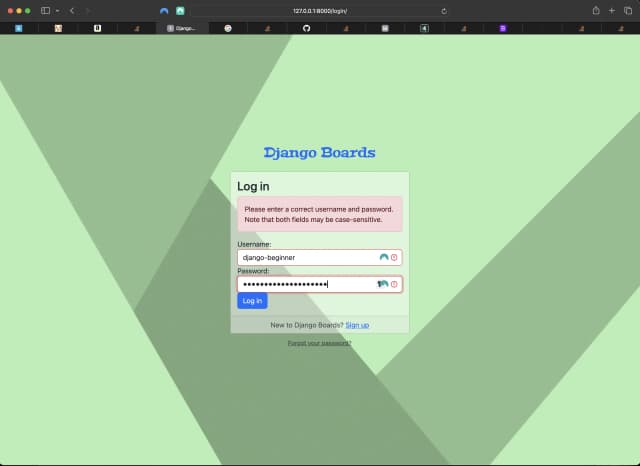
In this section, I improve signup.html template design, add a logout view and route, create a dropdown menu for logged in users, create a login.html template, url, and redirect, create a reusable template, add non-field errors to login.html, create custom template tags to use in form.html, and test the template tags.
#fullstack development, #macOS, #django, #bootstrap 5, #custom template tags, #python3, #series, #tests, #unittest
How to create a fullstack application using Django and Python Part 16
Maria D. Campbell
In this section, I demonstrate an alternative to the original test_form_inputs test in which I used the .assertContains() method to verify the existence of specific inputs residing in the signup form. I install Beautiful Soup 4 and Soup Sieve along with the html5lib HTML parser, and then re-create the test_form_inputs test using those packages. The test is much shorter, and my approach to discovering the ids of the inputs I want to grab by inspecting the signup form element in the browser is quicker and much easier to read!
#fullstack development, #macOS, #django, #beautifulsoup4, #soupsieve, #html5lib, #html parser, #python3, #series, #tests, #unittest

How to create a fullstack application using Django and Python Part 15
Maria D. Campbell
In this section, I create an accounts app where everything related to user accounts resides.
#fullstack development, #macOS, #user authentication, #django, #python3, #tests, #code modularization, #series
How to create a fullstack application using Django and Python Part 14
Maria D. Campbell
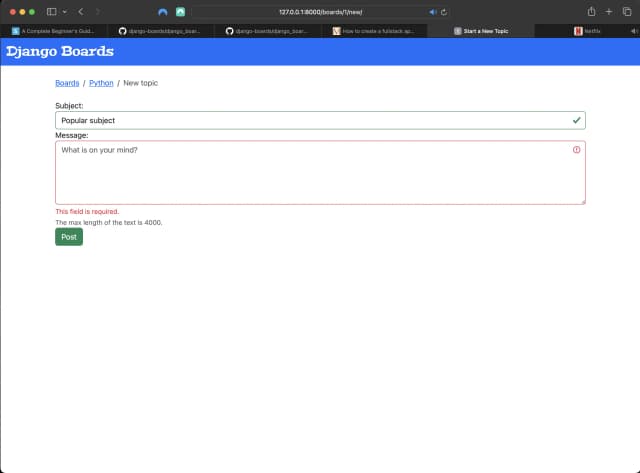
In this section, I build a NewTopicForm, view, and route. I also add NewTopicTests to boards/tests.py.
#fullstack development, #macOS, #django, #django forms api, #bootstrap, #csrf token, #django-widget-tweaks, #python3, #response context attribute, #security, #series, #tests, #unittest
How to create a fullstack application using Django and Python Part 13
Maria D. Campbell
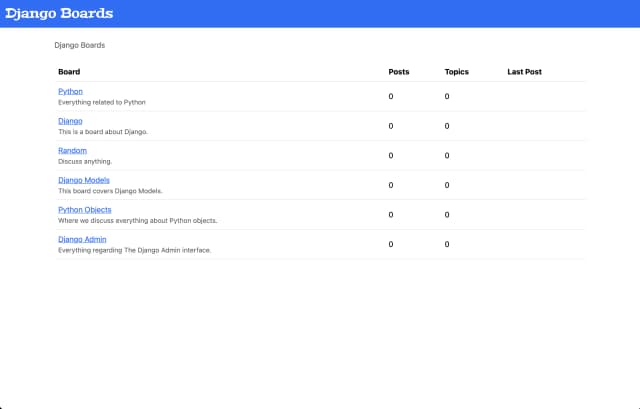
In this section, I create a reusable, base template called base.html, integrate it into index.html, integrate it into topics.html, test django_boards after making those changes, add a navigation menu to base.html, create an app.css file in the static/css directory, change the logo font with a Google font which I import into app.css, and tweak the logo styling with CSS.
#fullstack development, #css, #django, #macOS, #python3, #reusable templates, #series, #template extending, #template tags
How to create a fullstack application using Django and Python Part 12
Maria D. Campbell
In this section, I add the IndexTests class to boards/tests.py, update templates/index.html to make a failed test pass, write a test for linking back to the index/home page from the single Board page, update templates/topics.html to link back to the index/home page, and update templates/topics.html so a failed test would pass.
#fullstack development, #macOS, #django, #dynamic urls, #python3, #series, #tests, #unittest

How to create a fullstack application using Django and Python Part 11
Maria D. Campbell
In this section, I update the class models in boards/models.py to include PostLike, migrate the updated models, add the dynamic path for a single board in django_boards/urls.py, create the board_topics view inside boards/views.py, create the topics.html template inside the templates directory, and create/run tests for BoardTopics.
#fullstack development, #macOS, #django, #django shortcuts, #dynamic urls, #python3, #series, #tests, #unittest

How to create a fullstack application using Django and Python Part 10
Maria D. Campbell
In this section, I update the UML Class Diagrams and wireframe(s) to include the PostLike Model, and I clarify the concepts of "topic" and "post".
#macOS, #django, #fullstack development, #python3, #series, #uml class diagram, #uml, #wireframe
How to create a fullstack application using Django and Python Part 9
Maria D. Campbell
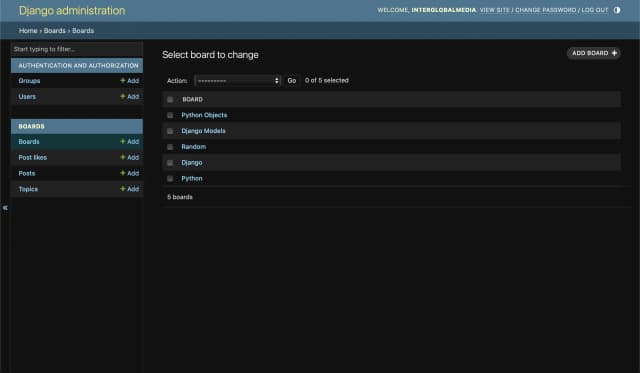
In this section, I introduce the Django Admin, configure the Django Admin by creating a superuser, register the boards app in boards/admin.py, add a board in the Django Admin interface, and delete a board in the Django Admin interface.
#macOS, #django, #fullstack development, #python3, #django admin, #superuser, #register app, #series
How to create a fullstack application using Django and Python Part 8
Maria D. Campbell
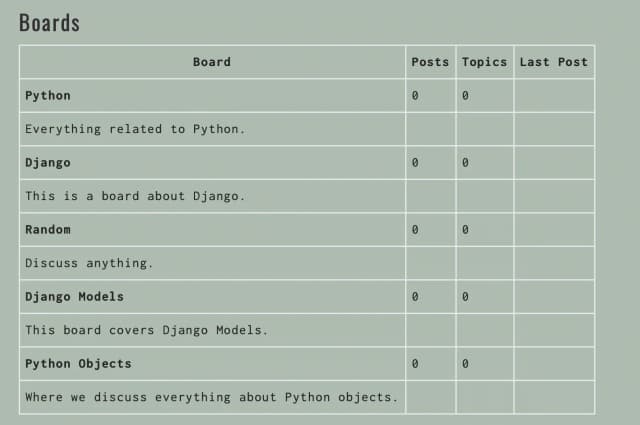
In this section, I add an index.html template to a directory called static, test the index (home) page, set up the static files, download Bootstrap, configure the static directory in settings.py, discuss the collectstatic command, load the Bootstrap CSS file in index.html, and edit index.html to include Bootstrap styling.
#macOS, #django, #fullstack development, #python3, #python3 shell, #bootstrap, #static, #collectstatic, #series, #tests

How to create a fullstack application using Django and Python Table of Contents
Maria D. Campbell
This is the full index of my 33-part Django Boards series, with links to every part and the companion GitHub repository.
#macOS, #django, #fullstack development, #python3, #table of contents, #series
How to add tables to React Markdown
Maria D. Campbell
React Markdown doesn't support tables natively — here's how to enable them using remark-gfm 3.0.1, rehype-raw, and remarkRehypeOptions to avoid the TypeError Cannot set properties of undefined error.
#macOS, #react markdown, #remark gfm, #rehype-raw, #tables, #scss
How to create a fullstack application using Django and Python Part 7
Maria D. Campbell
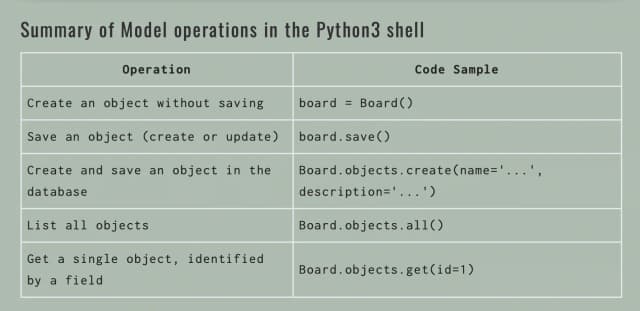
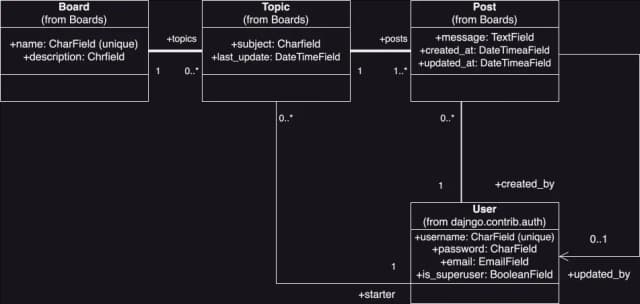
In this section, I discuss the Django model basics, I compare the UML Class Fields Diagram to the models.py source code, I migrate the models with the makemigrations command, apply the model migrations with the migrate command, play with the Models API, and discuss the Django model Manager.
#macOS, #django, #fullstack development, #makemigrations, #migrate, #model operations, #model manager, #python3, #python3 shell, #queryset, #series
How to create a fullstack application using Django and Python Part 6
Maria D. Campbell
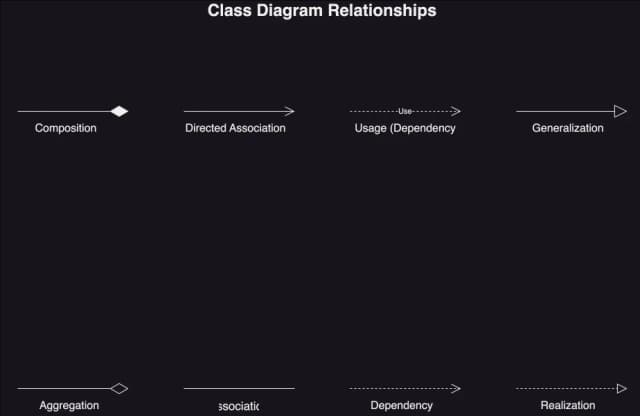
In this section, I go over aspects of designing Django Boards. I discuss the basic functionalities and structure of Django Boards, the difference between a standard and admin user, use case diagrams, UML class diagrams, class diagram relationships, and wireframes.
#macOS, #django, #site design, #use case diagram, #uml class diagram, #uml, #class diagram relationships, #standard user, #admin user, #multiplicity, #wireframe, #series

How to create a fullstack application using Django and Python Part 5
Maria D. Campbell
In this section, I discuss and show how I changed a project name after it has already been created and migrated. It's really not as difficult as it sounds!
#macOS, #django, #env, #fullstack development, #grep, #pipe, #python3, #series, #vim, #virtualenv, #vscode

How to create a fullstack application using Django and Python Part 4
Maria D. Campbell
In this section, I discuss how to install the python-dotenv package and why it is crucial to do so as to safeguard sensitive information the Django application depends on.
#macOS, #environment variables, #.env, #fullstack development, #git, #gitignore, #python3, #django, #python-dotenv, #security, #series
How to create a fullstack application using Django and Python Part 3
Maria D. Campbell
In this section, I compare Django projects vs apps, create my first app in the Django project, configure the boards app in the django_boards project, write the first boards app view, tell the Django project when to serve the view, break down the code in urls.py, and run the development server to view the results of the changes made to views.py and urls.py.
#macOS, #fullstack development, #django, #admin site, #migrations, #models, #views, #python3, #django project, #django app, #urlpatterns, #series
How to create a fullstack application using Django and Python Part 2
Maria D. Campbell
In this section, I created a Django project inside the Django Boards application, broke down the project structure and described what each component means and does, and after creating the Django project, I started up the development server.
#macOS, #django, #fullstack development, #python3, #django project, #runserver, #series

How to create a fullstack application using Django and Python Part 1
Maria D. Campbell
In this section, I create the project directory, install pyenv with Homebrew, install Python 3.12.5 with pyenv, execute the pyenv local command, install virtualenv and create a virtual environment, activate and deactivate the environment, and install Django.
#django, #fullstack development, #grep, #pipe, #homebrew, #macOS, #pyenv, #pyenv local, #python3, #virtualenv, #series

How to find an unclosed quote in your .zshrc file in macOS
Maria D. Campbell
In this post, I walk through creating a command to find an unclosed quote in my .zshrc file using grep and regex. I also break down what each character in the regular expression means.

Setting your default browser via Command Line in macOS
Maria D. Campbell
Learn how to use the defaultbrowser Homebrew package to set your default browser from the macOS command line, and why AppleScript-based approaches stopped working in Ventura.
#applescript, #command line, #macOS, #default browser, #homebrew, #terminal

The su command in Linux and Unix (macOS)
Maria D. Campbell
How su, sudo su, and su --login differ in Linux and Unix, and why login shells matter for environment variables.

setuid, setgid, and sticky bit in Linux and Unix (macOS)
Maria D. Campbell
Learn how setuid, setgid, and sticky bit work in Linux and macOS — what they do, how to set and remove them with chmod, and when to use each one.
#chmod, #file permissions, #linux, #linux mint, #unix, #macOS, #principle of least privilege, #special permissions, #setuid, #setgid, #sticky bit

The chown command in Linux and Unix (macOS)
Maria D. Campbell
A hands-on walkthrough of the chown command for changing user and group ownership of files and directories on Linux and macOS.
#linux, #unix, #macOS, #chmod, #chown, #cybersecurity, #identity and access management, #user ownership

Changing permissions using symbolic mode and numeric mode in Linux and Unix (macOS)
Maria D. Campbell
A practical walkthrough of the chmod command in both symbolic and numeric mode, with real terminal output from Linux Mint and macOS.
#linux, #macOS, #unix, #file permissions, #numeric mode, #symbolic mode

The pipe (|) and tee commands in Linux and Unix (macOS)
Maria D. Campbell
In this post, I discuss the pipe and tee commands and how they interact with commands such as cat and wc, which accept stdin. I also talk about how the history command interacts with pipe and tee, and I provide live, practical examples of how these commands work together.
#command line, #linux, #unix, #macOS, #pipe, #tee, #wc, #cat, #history

Using pipe (|) and grep in Linux and Unix (macOS)
Maria D. Campbell
How the | operator and grep work together in Linux and Unix, plus a hands-on look at named pipes and why I ended up not using them.
#macOS, #linux, #grep, #fifo, #named pipe, #pipe, #redirect operator, #unix

Redirect operators in Linux and Unix (macOS)
Maria D. Campbell
In this post, I describe what redirect operators are, some different types of redirect operators, and how they differ.
#command line, #linux, #macOS, #redirect operator, #stdin, #stdout

Shell script for turning your macOS laptop's Wi-Fi off and on
Maria D. Campbell
A step-by-step walkthrough of writing a zsh script to toggle macOS Wi-Fi off and on, including the chmod permissions needed to run it.
#chmod, #command line, #file permissions, #macOS, #networksetup, #shell scripting, #wifi, #zsh

How to write protect a file in macOS
Maria D. Campbell
How to write protect a file in macOS.
#chflags, #command line, #macOS, #modify file flags, #schg, #system immutable flag, #uchg, #user immutable flag, #write protect files

Encrypting and Decrypting Files and Strings
Maria D. Campbell
In this post, I show how to encrypt and decrypt files with a Python encryption/decryption application using the Python Fernet symmetric encryption method and via Command Line using GnuPG.
#decryption, #encryption, #gnupg, #symmetric encryption, #command line, #macOS, #python3, #security
Linux/Unix Command Line Commands applicable to Cybersecurity
Maria D. Campbell
In this post, I gather together some commands with live examples which I believe to be applicable to cybersecurity. They pertain to access control, network visibility, and investigation/forensics.

Wireshark vs tcpdump (macOS)
Maria D. Campbell
First, in order to be able to compare Wireshark tot tcpdump, I had to install them.
#command line, #command line utility, #cybersecurity, #macOS, #network protocol analyzer, #network traffic analyzer, #network traffic capture, #tcpdump, #wireshark

Reinstalling Git with Homebrew to Get the Latest Version
Maria D. Campbell
Installing Git with Homebrew on macOS gives you faster, easier updates than relying on Xcode. Here's how to do it using the Git alias command.
#command line, #homebrew, #git, #git upgrade, #macOS, #macOS tahoe, #sip, #system integrity protection, #Xcode

Why You Should Use the NPKILL Node Module
Maria D. Campbell
In this post, I describe how I was introduced to the NPKILL module and why it is such a great tool.

Compressing and uncompressing directories from the command line
Maria D. Campbell
How to compress and uncompress directories from the command line and why one way may be preferable over another.
#command line, #compressing directories, #macOS, #tar, #unix