Fixing a silent bug in the input_class template filter
Social Share:
Monday, July 6, 2026 at 6:26 PM | 6 min read
Last modified on Wednesday, July 8, 2026 at 4:02 AM
#fullstack development, #debug code, #django, #django boards, #series, #filters, #python3, #custom template tags

Photo by Mireille Raad on unsplash.com
Table of Contents
- The silent code bug that wouldn't go away
- non_field_errors()
- UsernameInput
- Adding a redefined test_valid_bound_field to test_templatetags.py
- The bug that most probably was accidentally harmless, but still wrong
- Why the bug was not necessarily good but ended up being harmless
- A technical explanation of the bug and its side effects
- Code associated with this post
- Conclusion
- Related Resources
- Related Posts
Update (July 2026): This walkthrough was written against Django 5.1, which reached full end-of-life in December 2025 and is no longer receiving security patches. Run python -m django --version to check which version you have.
The silent code bug that wouldn't go away
In this post, I want to discuss a code bug in my Django Boards application that I initially modified, never pushing the original piece of code to remote.
Vitor Freitas' original code was the following:
# boards/templatetags/form_tags.py

from django import template

register = template.Library()

@register.filter
def field_type(bound_field):
    return bound_field.field.widget.__class__.__name__


@register.filter
def input_class(bound_field):
    css_class = ''
    if bound_field.form.is_bound:
        if bound_field.errors:
            css_class = 'is-invalid'
        elif field_type(bound_field) != 'PasswordInput':
            css_class = 'is-valid'
    return 'form-control {}'.format(css_class)
But I changed it to the following:
from django import template

register = template.Library()


@register.filter
def field_type(bound_field):
    return bound_field.field.widget.__class__.__name__


@register.filter
def input_class(bound_field):
    css_class = ""
    if bound_field.form.is_bound:
        if bound_field.errors:
            css_class = "is-invalid"
        elif field_type(bound_field) != "UsernameInput":
            css_class = "is-invalid"
        elif field_type(bound_field) != "PasswordInput":
            css_class = "is-valid"
    return "form-control {}".format(css_class)
The above code resided in boards/templatetags/form_tags.py and appeared in the file's initial commit.
The following is the test code Vitor Freitas had for the boards/templatetags/form_tags.py file:
from django import forms
from django.test import TestCase
from ..templatetags.form_tags import field_type, input_class

class ExampleForm(forms.Form):
    name = forms.CharField()
    password = forms.CharField(widget=forms.PasswordInput())
    class Meta:
        fields = ('name', 'password')

class FieldTypeTests(TestCase):
    def test_field_widget_type(self):
        form = ExampleForm()
        self.assertEquals('TextInput', field_type(form['name']))
        self.assertEquals('PasswordInput', field_type(form['password']))

class InputClassTests(TestCase):
    def test_unbound_field_initial_state(self):
        form = ExampleForm()  # unbound form
        self.assertEquals('form-control ', input_class(form['name']))

    def test_valid_bound_field(self):
        form = ExampleForm({'name': 'john', 'password': '123'})  # bound form (field + data)
        self.assertEquals('form-control is-valid', input_class(form['name']))
        self.assertEquals('form-control ', input_class(form['password']))

    def test_invalid_bound_field(self):
        form = ExampleForm({'name': '', 'password': '123'})  # bound form (field + data)
        self.assertEquals('form-control is-invalid', input_class(form['name']))
And this is what I tweaked it to:
from django import forms
from django.test import TestCase

from ..templatetags.form_tags import field_type, input_class


class ExampleForm(forms.Form):
    name = forms.CharField()
    password = forms.CharField(widget=forms.PasswordInput())

    class Meta:
        fields = ("name", "password")


class FieldTypeTests(TestCase):
    def test_field_widget_type(self):
        form = ExampleForm()
        self.assertEqual("TextInput", field_type(form["name"]))
        self.assertEqual("PasswordInput", field_type(form["password"]))


class InputClassTests(TestCase):
    def test_unbound_field_initial_state(self):
        form = ExampleForm()  # unbound form
        self.assertEqual("form-control ", input_class(form["name"]))

    def test_valid_bound_field(self):
        form = ExampleForm(
            {"name": "john", "password": "123"}
        )  # bound form (field + data)
        # this actually reflects logic in templatetags/form_tags.py to fix invalid data passing as valid
        self.assertEqual("form-control is-invalid", input_class(form["name"]))
        self.assertEqual("form-control is-invalid", input_class(form["password"]))

    def test_invalid_bound_field(self):
        form = ExampleForm({"name": "", "password": "123"})  # bound form (field + data)
        self.assertEqual("form-control is-invalid", input_class(form["name"]))
Which returned the following results:
python3 manage.py test boards.tests.test_templatetags
media/ media root in development
media/ media root
<module 'django_boards.settings.development' from '/Users/mariacam/Python-Development/django-boards/django_boards/settings/development.py'> in development
Found 4 test(s).
Creating test database for alias 'default'...
System check identified no issues (0 silenced).
....
----------------------------------------------------------------------
Ran 4 tests in 0.001s

OK
Destroying test database for alias 'default'...
According to Vitor Freitas in his A Complete Beginner's Guide to Django - Part 4, I created custom template filters in boards/templatetags/form_tags.py. These filters were meant to simplify the includes/form.html, which is responsible for creating green borders around the form inputs when a user submits the correct username and password or red borders around the form inputs when a user submits the incorrect username and password.
According to Vitor, when a user submits their username and password but provides the wrong username in the login form, it should look like the following:
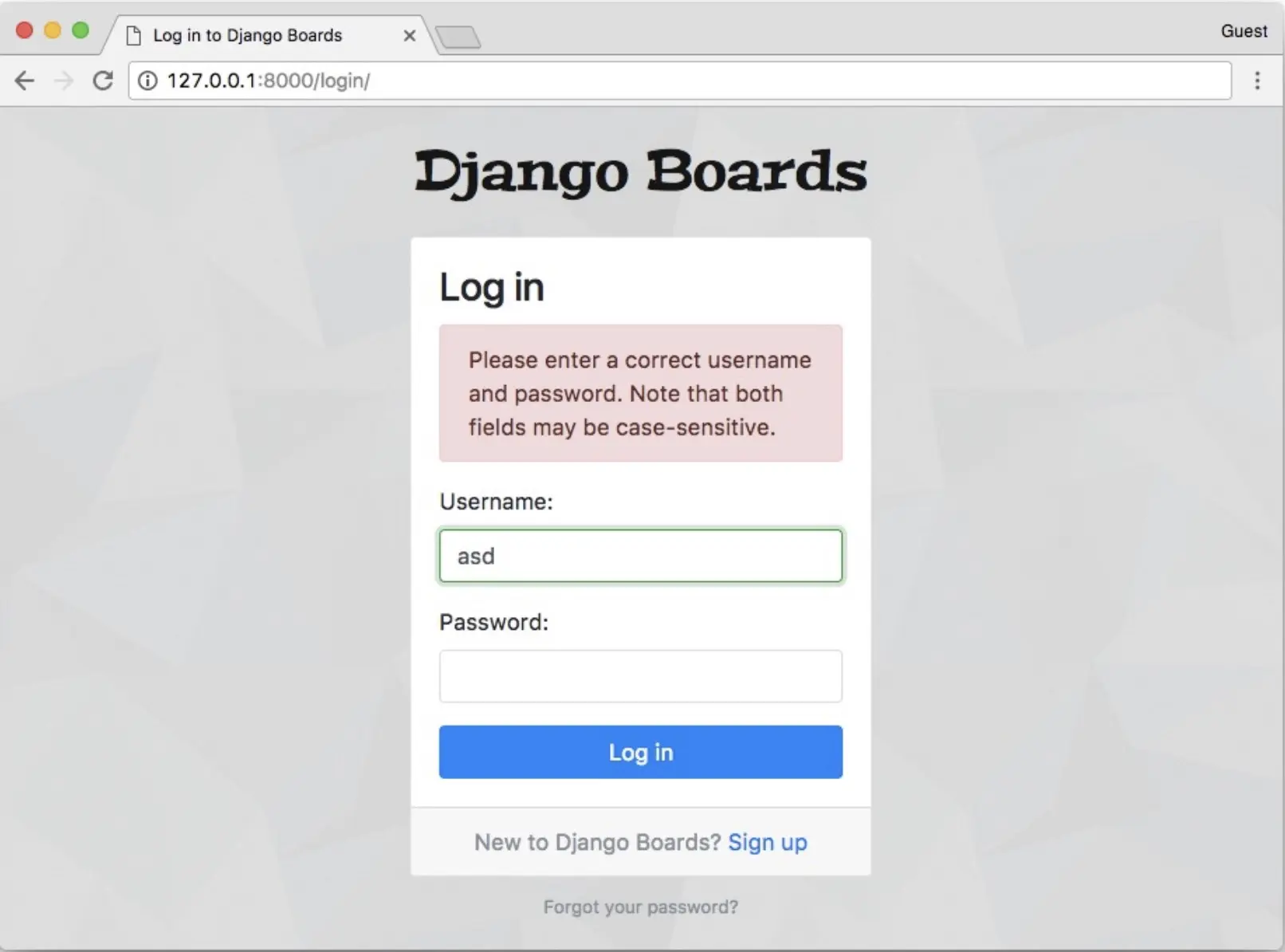
What the login form should look like when a user submits their username and password but provides the wrong username according to Vitor Freitas
While researching this post, I switched to Vitor's approach in boards/templatetags/form_tags.py to see if it solved the always-red problem. It didn't. It just replaced it with the false-positive-green problem his own screenshots show. I discovered that my modification didn't improve upon his. As shown in the screenshots in How to create a fullstack application using Django and Python Part 17, my version of input_class was similar to his, just the color class differed. Whether I submitted an incorrect username and password, a correct username and incorrect password, or an incorrect username and correct password, the input fields contained a red border. That user experience was equally misleading and equally wrong.
In my case, the modified code resulted in the following behavior:
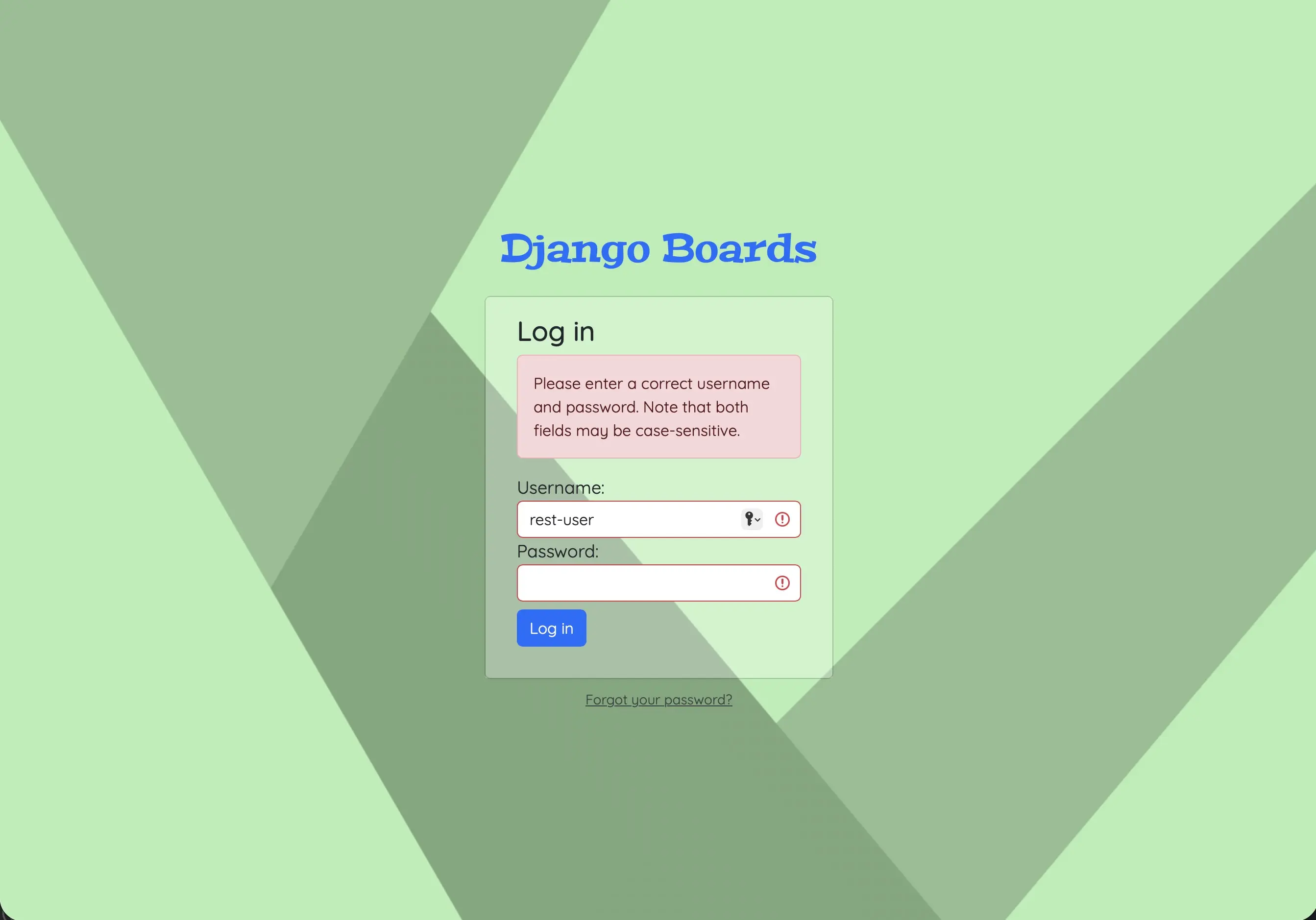
What my login form looked like when a user submitted their username and password but provided the wrong username and password
I reverted to Vitor's original code, but not because his was so much better than mine. The reason was purely technical.
non_field_errors()
The non_field_errors() is conflicting and misleading. The top text in red is fine. That lets the user know that they should be providing their username and password, and in many cases, it does not go away until the user has provided the relevant information. However, the green border around the input along with the green check mark when an incorrect username has been provided is wrong.
UsernameInput
As mentioned earlier, the UsernameInput is something I added to the custom form_tags to get rid of the green class and it never existed as a Django widget class. I made it up. It renders through the TextInput widget. field_type(bound_field) returns 'TextInput' for a username field and not UsernameInput. This means that field_type(bound_field) != 'UsernameInput' is always true. The first elif branch (in the modified form_tags code) is triggered for any non-password field, and the second elif, which detects when an input is valid, becomes unreachable because of the first elif behavior. That is why test_valid_bound_field submits valid-looking data but asserts 'is-invalid' for both username and password fields for the modified form_tags. This is due to logic, not chance.
Adding a redefined test_valid_bound_field to test_templatetags.py
Finally, I added a redefined test_valid_bound_field test to boards/tests/test_templatetags.py:
# boards/tests/test_templatetags.py
def test_valid_bound_field(self):
    form = ExampleForm({'name': 'john', 'password': '123'})
    self.assertEqual('form-control is-valid', input_class(form['name']))
    self.assertEqual('form-control ', input_class(form['password']))
The test checks to make sure that the name and password the user submits are valid. So even though the behavior of the form may be misleading, this test asserts that input_class behaves as expected in isolation, but it can't stand in for a real login attempt. That's because ExampleForm was never wired to the User model the way AuthenticationForm is. This is also the test which Vitor had in his test code for form_tags.py. Essentially I added back the original test called test_valid_bound_field when I reverted to Vitor's version of form_tags.py. My modified version failed with Vitor's version of input_class custom template tag code.
The bug that most probably was accidentally harmless, but still wrong
The bug addressed here most probably was accidentally harmless, but it was still wrong. Why? Because if it was clear whether or not a username or a password was specifically incorrect, the information would be beneficial to a hacker trying to access the site. Intentionally misleading a user or hacker regarding which piece of information is incorrect safeguards the site from potential harm.
Why the bug was not necessarily good but ended up being harmless
Even though the input_class filter bug could confuse hackers and help prevent them from figuring out correct usernames and passwords, it does not mean that this is necessarily a "good" thing for valid users who want to access the site. They too are being misled and will not necessarily know whether they typed in an invalid username or password. Is this harmful to anyone? No. Is it annoying and perhaps a bit disruptive? Maybe. Perhaps the user has to retrieve their username and/or reset their password. It is harmless, even if accidentally so.
A technical explanation of the bug and its side effects
Technically speaking, Django's AuthenticationForm, a built-in form used for user authentication, never associates a field-level error to the username or password in either scenario — whether the username is wrong, or the username is right but the password is wrong. Both scenarios produce the same generic non-field error and "Please enter a correct username and password. Note that both fields may be case-sensitive." message. And input_class renders the green class either way. There's no differential signal here for an attacker to read. The green border showing up anyway is not intentional, just accidentally harmless.
So the side effect of the "bug" is "accidental safety", which should be differentiated from "designed correctly". It is designed incorrectly, but in its current exact form, it is harmless.
Code associated with this post
To view the code associated with this post, please visit 973a39f and b0ee736.
Conclusion
In this post, I address a bug I found in the original Django Boards code. It is located in the custom template file, form_tags.py, and it incorrectly identifies a username input as being correct whether it actually is or not. After some research and testing, I came to the conclusion that even though the bug was designed incorrectly, an accidental side effect of that flaw helped protect the site from malicious hackers. No longer pursuing the issue doesn't mean I thought the design was correct: only that it happened not to make things worse. My own UsernameInput mistake was fixed; the deeper limitation in how input_class checks only field-level errors is one I'm aware of now, and may revisit at another time.
Related Resources
- How to create a fullstack application using Django and Python Part 17: mariadcampbell.com
- The Forms API: Official Django documentation
- Widgets: Official Django documentation
- How to create custom template tags and filters: Official Django documentation
- A07:2025 Authentication Failures: owasp.org
- OWASP Web Security Testing Guide — Testing for Account Enumeration and Guessable User Account: owasp.org
- OWASP Application Security Verification Standard (annotated) — 2.18 No username enumeration:: owasp.org
- OWASP Cheat Sheet Series — Authentication Cheat Sheet: owasp.org
- Rapid7 Blog — User Enumeration Explained: Techniques and Prevention Tips: rapid7.com
- ControlGap Blog — How to protect against username enumeration on login, registration, and password reset forms: controlgap.com
Related Posts
- How to create a fullstack application using Django and Python Table of Contents: mariadcampbell.com
- How to create a fullstack application using Django and Python Part 17: mariadcampbell.com