How to create a fullstack application using Django and Python Part 11
Social Share:
Tuesday, September 10, 2024 at 9:35 AM | 11 min read
Last modified on Thursday, July 16, 2026 at 11:54 AM
#fullstack development, #macOS, #django, #django shortcuts, #dynamic urls, #python3, #series, #tests, #unittest

Photo by Erik Mclean on unsplash.com
Important Note: Before committing anything to Git or pushing anything to remote, please visit How to create a fullstack application using Django and Python Part 4 where I discuss how to add the python-dotenv package to the Django site and why it is crucial to do it. This article assumes you have a working knowledge of Git.
Table of Contents
- Updating Class models in boards/models.py
- Migrating the updated class models
- Why the str method everywhere?
- django_boards/urls.py
- path() syntax
- Checking for Django version
- Creating Dynamic URLs using path
- Creating the topics.html template in the templates directory
- Testing BoardTopics
- Running the tests
- Code associated with this post
- Conclusion
- Related Resources
- Related Posts
Update (July 2026): This walkthrough was written against Django 5.1, which reached full end-of-life in December 2025 and is no longer receiving security patches. Run python -m django --version to check which version you have.
I wrote this series as a live process, so sometimes it might seem confusing, but it all works out in the end.
Updating Class models in boards/models.py
If you are following what I am doing and want to add likes to posts, make sure that you have the following inside your boards/models.py:
from django.db import models
from django.contrib.auth.models import User

# Create your models here.

class Board(models.Model):
  name = models.CharField(max_length=30, unique=True)
  description = models.CharField(max_length=100)

  def __str__(self):
    return self.name

class Topic(models.Model):
  subject = models.CharField(max_length=255)
  last_updated = models.DateTimeField(auto_now_add=True)
  board = models.ForeignKey(Board, on_delete=models.CASCADE, related_name='topics')
  starter = models.ForeignKey(User, on_delete=models.CASCADE, related_name='topics')

  def __str__(self):
    return self.subject

class Post(models.Model):
  message = models.TextField(max_length=4000)
  topic = models.ForeignKey(Topic, on_delete=models.CASCADE, related_name='posts')
  created_at = models.DateTimeField(auto_now_add=True)
  updated_at = models.DateTimeField(null=True)
  created_by = models.ForeignKey(User, on_delete=models.CASCADE, related_name='posts')
  updated_by = models.ForeignKey(User, on_delete=models.CASCADE, null=True, related_name='+')
  post_liked_by = models.ManyToManyField(User, default=None, blank=True, related_name='post_liked_by')

  def __str__(self):
    return self.message

  @property
  def post_num_likes(self):
    return self.post_liked_by.all().count()

POST_LIKE_CHOICES = (
  ('♥️', '♥️'),
  ('♡', '♡'),
)

class PostLike(models.Model):
  user = models.ForeignKey(User, on_delete=models.CASCADE)
  post = models.ForeignKey(Post, on_delete=models.CASCADE)
  post_like_value = models.CharField(choices=POST_LIKE_CHOICES, default='♥️', max_length=2)

  def __str__(self):
    return str(self.post)
If you have made changes to your boards/models.py, make sure to run python3 manage.py makemigrations and then python3 manage.py migrate before continuing. Make sure that you have activated the virtual environment before you migrate your models!
# to activate the virtual environment inside the directory that contains your venv/ directory
source venv/bin/activate
Migrating the updated class models
Next, run the following commands to migrate your updated class models:
# first:
python3 manage.py makemigrations
# second:
python3 manage.py migrate
Why the str method everywhere?
If I don't apply the __str__() method to my class models, I would not be able to see the actual name of a Board, the subject of a Topic, the message of a Post, or post of a PostLike. If I don't apply the __str__() method, I get a generic object. Remove instances of the __str__() method for yourself and see what happens when you go to the Django Admin dashboard (http://127.0.0.1:8000/admin/boards/).
django_boards/urls.py
Up till now, I had the following inside my django_boards/urls.py:
from django.contrib import admin
from django.urls import path

from boards import views

urlpatterns = [
    path('', views.index, name='index'),
    path('admin/', admin.site.urls),
]
If I revert the code to the following as per the beginning of Vitor's A Complete Beginner's Guide to Django - Part 3:
from django.conf.urls import url
from django.contrib import admin

from boards import views

urlpatterns = [
    url(r'^$', views.home, name='home'),
    url(r'^boards/(?P<pk>\d+)/$', views.board_topics, name='board_topics'),
    url(r'^admin/', admin.site.urls),
]
I get the following error in Terminal:
python3 manage.py runserver
Watching for file changes with StatReloader
Performing system checks...

Exception in thread django-main-thread:
Traceback (most recent call last):
  File "/Users/mariacam/.pyenv/versions/3.12.5/lib/python3.12/site-packages/django/core/checks/urls.py", line 136, in check_custom_error_handlers
    handler = resolver.resolve_error_handler(status_code)
              ^^^^^^^^^^^^^^^^^^^^^^^^^^^^^^^^^^^^^^^^^^^
  File "/Users/mariacam/.pyenv/versions/3.12.5/lib/python3.12/site-packages/django/urls/resolvers.py", line 732, in resolve_error_handler
    callback = getattr(self.urlconf_module, "handler%s" % view_type, None)
                       ^^^^^^^^^^^^^^^^^^^
  File "/Users/mariacam/.pyenv/versions/3.12.5/lib/python3.12/site-packages/django/utils/functional.py", line 47, in __get__
    res = instance.__dict__[self.name] = self.func(instance)
                                         ^^^^^^^^^^^^^^^^^^^
  File "/Users/mariacam/.pyenv/versions/3.12.5/lib/python3.12/site-packages/django/urls/resolvers.py", line 711, in urlconf_module
    return import_module(self.urlconf_name)
           ^^^^^^^^^^^^^^^^^^^^^^^^^^^^^^^^
  File "/Users/mariacam/.pyenv/versions/3.12.5/lib/python3.12/importlib/__init__.py", line 90, in import_module
    return _bootstrap._gcd_import(name[level:], package, level)
           ^^^^^^^^^^^^^^^^^^^^^^^^^^^^^^^^^^^^^^^^^^^^^^^^^^^^
  File "<frozen importlib._bootstrap>", line 1387, in _gcd_import
  File "<frozen importlib._bootstrap>", line 1360, in _find_and_load
  File "<frozen importlib._bootstrap>", line 1331, in _find_and_load_unlocked
  File "<frozen importlib._bootstrap>", line 935, in _load_unlocked
  File "<frozen importlib._bootstrap_external>", line 995, in exec_module
  File "<frozen importlib._bootstrap>", line 488, in _call_with_frames_removed
  File "/Users/mariacam/Python-Development/django-boards/django_boards/django_boards/urls.py", line 19, in <module>
    from django.conf.urls import url
ImportError: cannot import name 'url' from 'django.conf.urls' (/Users/mariacam/.pyenv/versions/3.12.5/lib/python3.12/site-packages/django/conf/urls/__init__.py)

During handling of the above exception, another exception occurred:

Traceback (most recent call last):
  File "/Users/mariacam/.pyenv/versions/3.12.5/lib/python3.12/threading.py", line 1075, in _bootstrap_inner
    self.run()
  File "/Users/mariacam/.pyenv/versions/3.12.5/lib/python3.12/threading.py", line 1012, in run
    self._target(*self._args, **self._kwargs)
  File "/Users/mariacam/.pyenv/versions/3.12.5/lib/python3.12/site-packages/django/utils/autoreload.py", line 64, in wrapper
    fn(*args, **kwargs)
  File "/Users/mariacam/.pyenv/versions/3.12.5/lib/python3.12/site-packages/django/core/management/commands/runserver.py", line 134, in inner_run
    self.check(display_num_errors=True)
  File "/Users/mariacam/.pyenv/versions/3.12.5/lib/python3.12/site-packages/django/core/management/base.py", line 486, in check
    all_issues = checks.run_checks(
                 ^^^^^^^^^^^^^^^^^^
  File "/Users/mariacam/.pyenv/versions/3.12.5/lib/python3.12/site-packages/django/core/checks/registry.py", line 88, in run_checks
    new_errors = check(app_configs=app_configs, databases=databases)
                 ^^^^^^^^^^^^^^^^^^^^^^^^^^^^^^^^^^^^^^^^^^^^^^^^^^^
  File "/Users/mariacam/.pyenv/versions/3.12.5/lib/python3.12/site-packages/django/core/checks/urls.py", line 138, in check_custom_error_handlers
    path = getattr(resolver.urlconf_module, "handler%s" % status_code)
                   ^^^^^^^^^^^^^^^^^^^^^^^
  File "/Users/mariacam/.pyenv/versions/3.12.5/lib/python3.12/site-packages/django/utils/functional.py", line 47, in __get__
    res = instance.__dict__[self.name] = self.func(instance)
                                         ^^^^^^^^^^^^^^^^^^^
  File "/Users/mariacam/.pyenv/versions/3.12.5/lib/python3.12/site-packages/django/urls/resolvers.py", line 711, in urlconf_module
    return import_module(self.urlconf_name)
           ^^^^^^^^^^^^^^^^^^^^^^^^^^^^^^^^
  File "/Users/mariacam/.pyenv/versions/3.12.5/lib/python3.12/importlib/__init__.py", line 90, in import_module
    return _bootstrap._gcd_import(name[level:], package, level)
           ^^^^^^^^^^^^^^^^^^^^^^^^^^^^^^^^^^^^^^^^^^^^^^^^^^^^
  File "<frozen importlib._bootstrap>", line 1387, in _gcd_import
  File "<frozen importlib._bootstrap>", line 1360, in _find_and_load
  File "<frozen importlib._bootstrap>", line 1331, in _find_and_load_unlocked
  File "<frozen importlib._bootstrap>", line 935, in _load_unlocked
  File "<frozen importlib._bootstrap_external>", line 995, in exec_module
  File "<frozen importlib._bootstrap>", line 488, in _call_with_frames_removed
  File "/Users/mariacam/Python-Development/django-boards/django_boards/django_boards/urls.py", line 19, in <module>
    from django.conf.urls import url
ImportError: cannot import name 'url' from 'django.conf.urls' (/Users/mariacam/.pyenv/versions/3.12.5/lib/python3.12/site-packages/django/conf/urls/__init__.py)
Instead, I should add the following using path, just as I had started to do:
from django.contrib import admin
from django.urls import path
# from django.conf.urls import url

from boards import views

urlpatterns = [
    path('', views.index, name='index'),
    path('boards/<str:pk>/', views.board_topics, name='board_topics'), # added
    path(r'^admin/', admin.site.urls),
]
path() syntax
path() is from the (new) URL syntax added in Django 2.0.
The syntax for the path function is the following:
path(route, view, kwargs=None, name=None)
The route and view arguments (options) are required, and the kwargs and name arguments are optional. However, I recommend including name because it provides a unique identifier for a URL.
Checking for Django version
The code from django.conf.urls import url reflects Django 1.11, but I am at Django 5.1! I can check for the Django version by running the following in Terminal:
python3 -m django --version
Which in my case, returns:
5.1
Make sure that you have your virtual environment activated when running the command.
When I check to see what happens when I try to access http://127.0.0.1:8000/boards/1/, I get back the following:
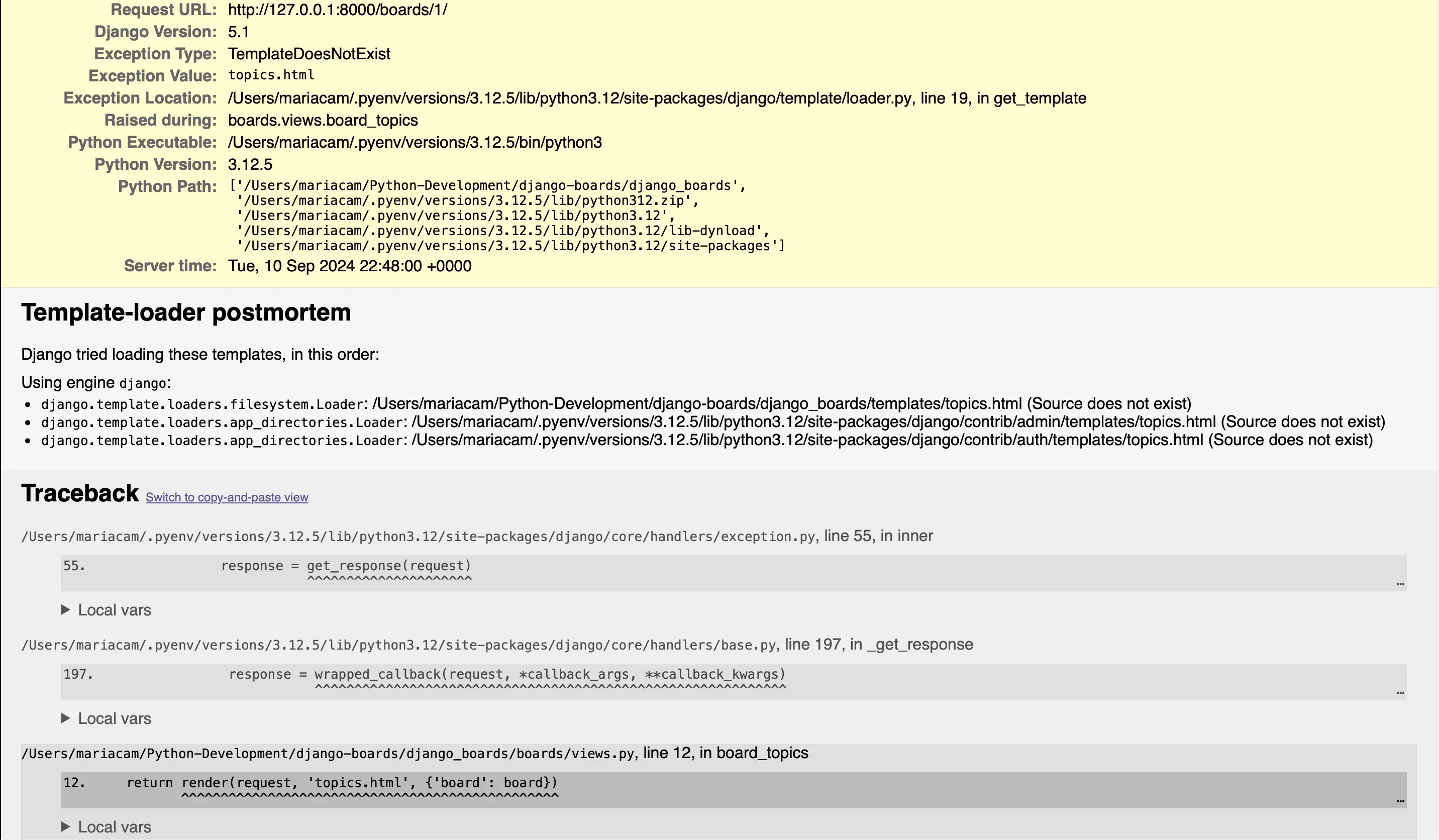
topics.html template Does not exist
This is true. I have not set up a topics.html template yet!
Creating Dynamic URLs using path
I can create dynamic URLs using the path object instead of url. But before I even do that, let's discuss what is the ROOT_URLCONF setting in settings.py and what a dynamic URL is.
ROOT_URLCONF setting in settings.py
In django_projects/settings.py, I have the ROOT_URLCONF setting:
# in django_projects/settings.py
ROOT_URLCONF = 'django_boards.urls'
It already comes configured when I create a project, so I don't have to do anything with it.
When Django receives a request in an app views (boards/views.py), it searches for a match in the project’s URLconf. It starts with the first entry of the urlpatterns variable, and tests for the requested URL against each url entry.
If Django finds a match, it will pass the request to the view function, which is the second parameter of path. The order in the urlpatterns matters, because Django will stop searching as soon as it finds a match. If Django doesn’t find a match in the URLconf, it will raise a 404 exception, the error status code for Page Not Found.
What is a dynamic URL?
Without dynamic routing, navigating web pages would be very hard. I would have to hard code the full path of every page I visit in the browser.
Dynamic Uniform Resource Locators (URLs) allow me to navigate to different pages. Django makes it easy to create dynamic URLs with with its URL configuration model (URLconf) which is a mapping between URL expressions to Python functions (my views).
A dynamic URL is a URL that can change. In my case, the named parameter pk can change. I also don't know in advance which pk will be queried in the first place. That is where dynamic URLs come in.
Importing path from Django URLs to create paths for the view
Inside django_boards/urls.py, I import path from Django URLs to create paths for my corresponding views:
# in django_boards/urls.py

from django.contrib import admin
from django.urls import path

from boards import views

urlpatterns = [
    path('', views.index, name='index'),
     # where path converter resides as part of the first argument to path: <str:pk>
    path('boards/<str:pk>/', views.board_topics, name='board_topics'),
    path(r'^admin/', admin.site.urls),
]
'boards/<str:pk>/' is an example of a dynamic path (or url). Specifically, <str:pk> represents a str dynamic URL path converter. To prevent my view function from running into database errors because of unexpected user inputs, I should add validation to avoid those types of errors.
In Django, this can be done with a path converter. A path converter can be added to a path() inside angle brackets and separated from the variable name of the captured component via a colon, as displayed above. To learn more about what types of dynamic URL path converters are available in Django, please visit the above link.
Creating the board_topics view inside boards/views.py
Now I can create the board_topics view (function) inside boards/views.py:
# in boards/views.py

def board_topics(request, pk):
    board = Board.objects.get(pk=pk)
    return render(request, 'topics.html', {'board': board})
In path('boards/<str:pk>/', views.board_topics, name='board_topics'), I point to <str:pk> because I pass in a parameter called pk to the board_topics function. I could call that parameter whatever I want. I could call it "id" instead, for example. I will change it to "id", because it better describes what it represents. So in urlpatterns:
# in django_boards/urls.py

urlpatterns = [
    path('', views.index, name='index'),
    path('boards/<str:id>/', views.board_topics, name='board_topics'),
    path(r'^admin/', admin.site.urls),
]
And in the board_topics function:
# in boards/views.py

def board_topics(request, id):
    board = Board.objects.get(id=id)
    return render(request, 'topics.html', {'board': board})
Creating the topics.html template in the templates directory
Next, I create a topics.html template inside the templates directory where my index.html file resides, and then I add the following html markup inside:
{% load static %}<!DOCTYPE html>
<html>
	<head>
		<meta charset="utf-8" />
		<title>{{ board.name }}</title>
		<link rel="stylesheet" href="{% static 'css/bootstrap.min.css' %}" />
	</head>
	<body>
		<div class="container">
			<ol class="breadcrumb my-4">
				<li class="breadcrumb-item">Boards</li>
				<li class="breadcrumb-item active">{{ board.name }}</li>
			</ol>
		</div>
	</body>
</html>
Next, I can visit the URL http://127.0.0.1:8000/boards/1/ and something like the following appears:
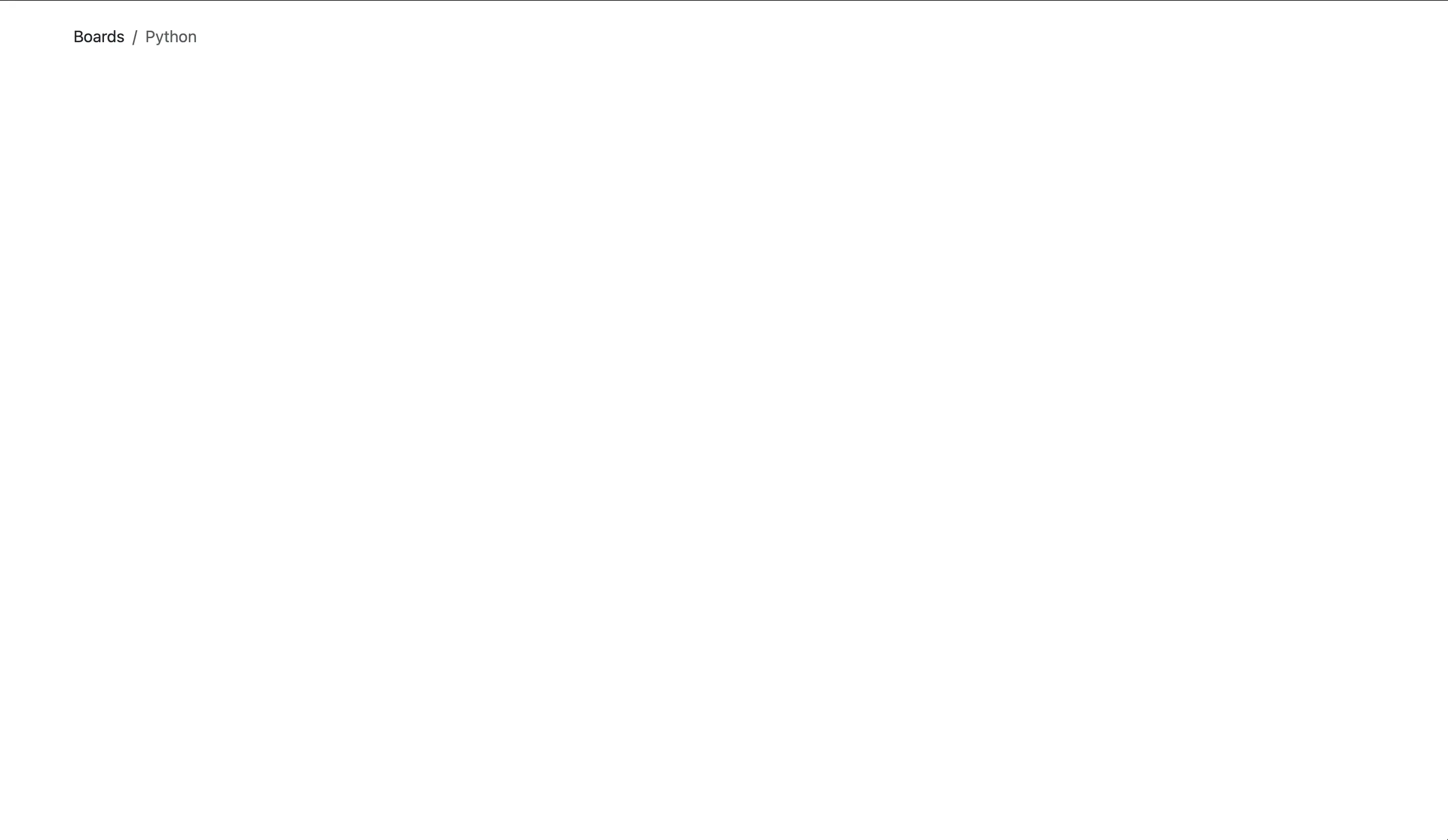
Rendering of Board id=1 to the page
Testing BoardTopics
# in boards/tests.py
from django.urls import reverse
from django.test import TestCase
from django.urls import resolve
from .views import index, board_topics
from .models import Board

class BoardTopicsTests(TestCase):

  def setUp(self):
    Board.objects.create(name='Python', description='Everything related to Python')

  def test_board_topics_view_success_status_code(self):
    url = reverse('board_topics', kwargs={'id': 1})
    response = self.client.get(url)
    self.assertEqual(response.status_code, 200)

  def test_board_topics_view_not_found_status_code(self):

    url = reverse('board_topics', kwargs={'id': 99})
    response = self.client.get(url)
    self.assertEqual(response.status_code, 404)

  def test_board_topics_url_resolves_board_topics_view(self):

    view = resolve('/boards/1/')
    self.assertEqual(view.func, board_topics)
There is a difference between how I set up class IndexTests(TestCase) and class BoardTopicsTests(TestCase). With def BoardTopicsTests(TestCase), I include def setUp(self). In def setUp(self), I create a Board instance to use in the tests.
The reverse() function and kwargs
kwargs in reverse() is the variable that goes into my URL to make it unique. In the cases above, it is the id of the board.
The reverse() function is used to find the URL of a given resource/page. reverse() allows me to pass in the name of my URL path defined in my urlpatterns, and Django will find the right URL.
First, I declare the url to be framed in the value of the url variable. Future references of the url will happen from there.
Next, I go to the view, and in the view, the reverse function has to be declared with the variable name of the url hardcoded in it. This reverses the url field name into a valid url value.
self.client.get()
self.client.get() is the built-in Django test client. According to answer in the thread entitled usage of self.client.get() vs self.browser.get() on stackoverflow,
self.client, is the built-in Django test client. This isn't a real browser, and doesn't even make real requests. It just constructs a Django HttpRequest object and passes it through the request/response process - middleware, URL resolver, view, template - and returns whatever Django produces. It won't parse that response at all, or render it, and won't make other requests driven by the HTML for assets etc. -- answered by Daniel Roseman Aug 9, 2019 at 8:21
Basically, self.client.get(url) gets the requested URL.
self.assertEqual()
The self.assertEqual() function is a Python unittest library function used in unittesting to check the equality of two values. In my case, to check the equality of response.status_code and 200. In other words, whether my response status code is equal to 200. If my test passes, it means that the status code was equal to 200.
Finally, I have the test_board_topics_url_resolves_board_topics_view function. This function is different from the others. It is the resolve function.
In Django testing, the resolve function takes a URL as an argument and returns a view that is associated with it. In the test_board_topics_url_resolves_board_topics_view function, I generate my URL '/boards/1/' using reverse, and then I use resolve to see if the URL directs to the correct view, which here is board_topics. board_topics is the name of the function which targets the dynamic URL of path('boards/<str:id>/', views.board_topics, name='board_topics') in urls.py. The view targeted there is views.board_topics.
BoardTopicsTests summary
- In the setUp() function, I create a Board instance to use in the tests. I set up the environment for running the tests, thereby building a simulation.
- In the test_board_topics_view_success_status_code function, I check to see if Django returns a 200 status code for an existing Board.
- In the test_board_topics_view_not_found_status_code, I test to see if Django returns a 404 status code for a non-existent Board.
- In the test_board_topics_url_resolves_board_topics_view, I test to see if Django is using the right view function to render the topics.
Running the tests
Now I am ready to run my tests:
# run test in directory that contains manage.py

python3 manage.py test
Which should return the following output in Terminal:
Found 5 test(s).
Creating test database for alias 'default'...
System check identified no issues (0 silenced).
.E...
======================================================================
ERROR: test_board_topics_view_not_found_status_code (boards.tests.BoardTopicsTests.test_board_topics_view_not_found_status_code)
----------------------------------------------------------------------
Traceback (most recent call last):
  File "/Users/mariacam/Python-Development/django-boards/django_boards/boards/tests.py", line 33, in test_board_topics_view_not_found_status_code
    response = self.client.get(url)
               ^^^^^^^^^^^^^^^^^^^^
  File "/Users/mariacam/.pyenv/versions/3.12.5/lib/python3.12/site-packages/django/test/client.py", line 1129, in get
    response = super().get(
               ^^^^^^^^^^^^
  File "/Users/mariacam/.pyenv/versions/3.12.5/lib/python3.12/site-packages/django/test/client.py", line 479, in get
    return self.generic(
           ^^^^^^^^^^^^^
  File "/Users/mariacam/.pyenv/versions/3.12.5/lib/python3.12/site-packages/django/test/client.py", line 676, in generic
    return self.request(**r)
           ^^^^^^^^^^^^^^^^^
  File "/Users/mariacam/.pyenv/versions/3.12.5/lib/python3.12/site-packages/django/test/client.py", line 1092, in request
    self.check_exception(response)
  File "/Users/mariacam/.pyenv/versions/3.12.5/lib/python3.12/site-packages/django/test/client.py", line 805, in check_exception
    raise exc_value
  File "/Users/mariacam/.pyenv/versions/3.12.5/lib/python3.12/site-packages/django/core/handlers/exception.py", line 55, in inner
    response = get_response(request)
               ^^^^^^^^^^^^^^^^^^^^^
  File "/Users/mariacam/.pyenv/versions/3.12.5/lib/python3.12/site-packages/django/core/handlers/base.py", line 197, in _get_response
    response = wrapped_callback(request, *callback_args, **callback_kwargs)
               ^^^^^^^^^^^^^^^^^^^^^^^^^^^^^^^^^^^^^^^^^^^^^^^^^^^^^^^^^^^^
  File "/Users/mariacam/Python-Development/django-boards/django_boards/boards/views.py", line 11, in board_topics
    board = Board.objects.get(id=id)
            ^^^^^^^^^^^^^^^^^^^^^^^^
  File "/Users/mariacam/.pyenv/versions/3.12.5/lib/python3.12/site-packages/django/db/models/manager.py", line 87, in manager_method
    return getattr(self.get_queryset(), name)(*args, **kwargs)
           ^^^^^^^^^^^^^^^^^^^^^^^^^^^^^^^^^^^^^^^^^^^^^^^^^^^
  File "/Users/mariacam/.pyenv/versions/3.12.5/lib/python3.12/site-packages/django/db/models/query.py", line 649, in get
    raise self.model.DoesNotExist(
boards.models.Board.DoesNotExist: Board matching query does not exist.

----------------------------------------------------------------------
Ran 5 tests in 0.042s

FAILED (errors=1)
Destroying test database for alias 'default'...
One of my tests did not pass. The test_board_topics_view_not_found_status_code test. The test found that there is no board with an id of "99". This is confirmed in the Traceback at the top:
File "/Users/mariacam/Python-Development/django-boards/django_boards/boards/tests.py", line 33, in test_board_topics_view_not_found_status_code
    response = self.client.get(url)
               ^^^^^^^^^^^^^^^^^^^^
I can even check this in the browser:
# first run python3 manage.py runserver
python3 manage.py runserver
# then put the following url in the browser address bar:
127.0.0.1:8000/boards/99
The result of 127.0.0.1:8000/boards/99 in the browser:
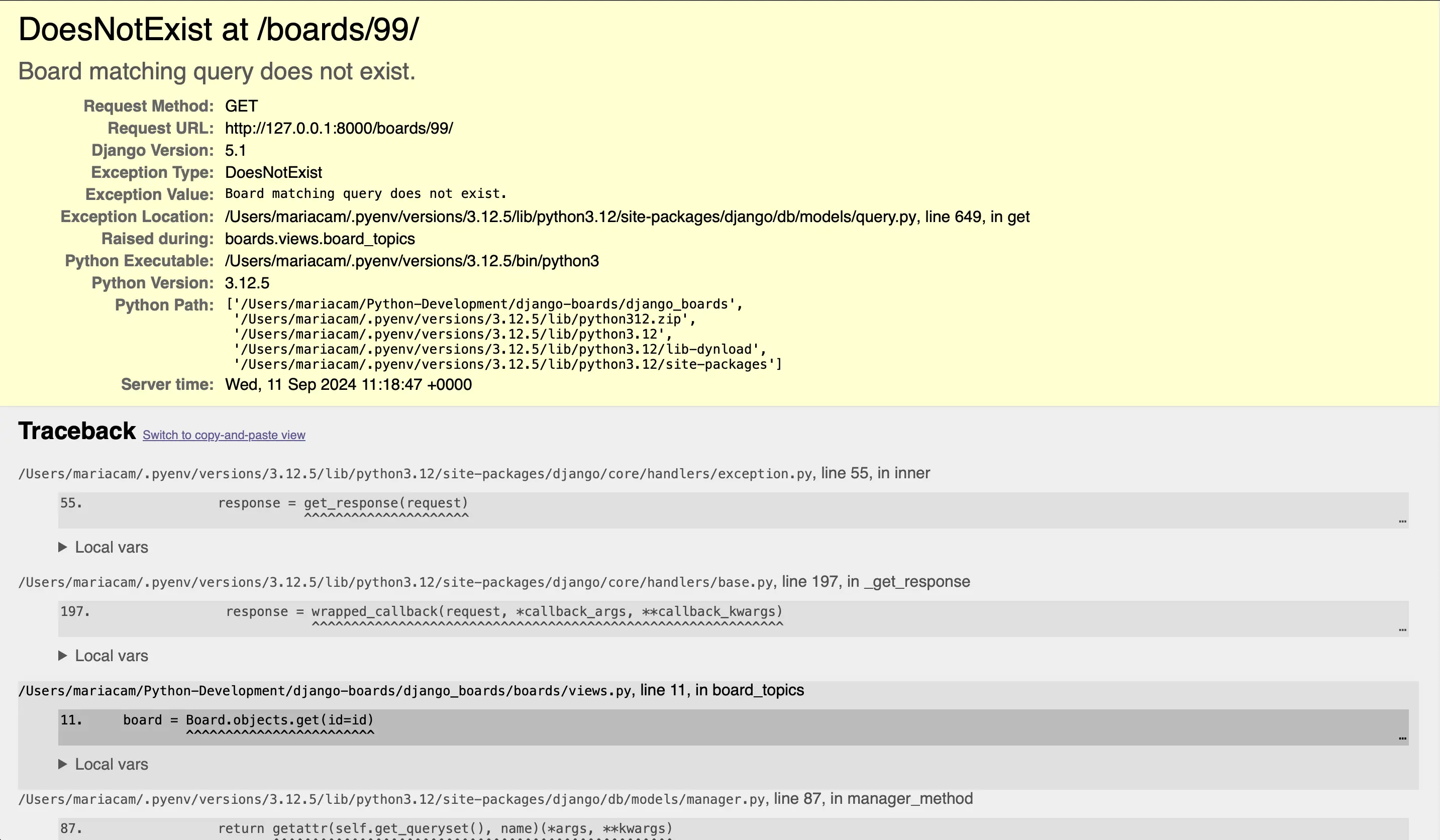
The result of 127.0.0.1:8000/boards/99 in the browser
In production, I would be setting DEBUG=False, and the visitor would see a 500 Internal Server Error page. But that’s not what I want here.
Adding try/except block to board_topics function
I want to show a 404 Page Not Found. That means I have to refactor my board_topics view:
# in boards/views.py
# before:
from django.shortcuts import render
from django.http import HttpResponse
from .models import Board

def board_topics(request, id):
  board = Board.objects.get(id=id)
  return render(request, 'topics.html', {'board': board})
# after:
from django.shortcuts import render
from django.http import HttpResponse
from django.http import Http404
from .models import Board
def board_topics(request, id):
  try:
      board = Board.objects.get(id=id)
  except Board.DoesNotExist:
      raise Http404
  return render(request, 'topics.html', {'board': board})
Now let's run my tests again:
# in Terminal:
python3 manage.py test
Which should return:
Found 5 test(s).
Creating test database for alias 'default'...
System check identified no issues (0 silenced).
.....
----------------------------------------------------------------------
Ran 5 tests in 0.013s

OK
Destroying test database for alias 'default'...
If I go back to 127.0.0.1:8000/boards/99 in the browser:
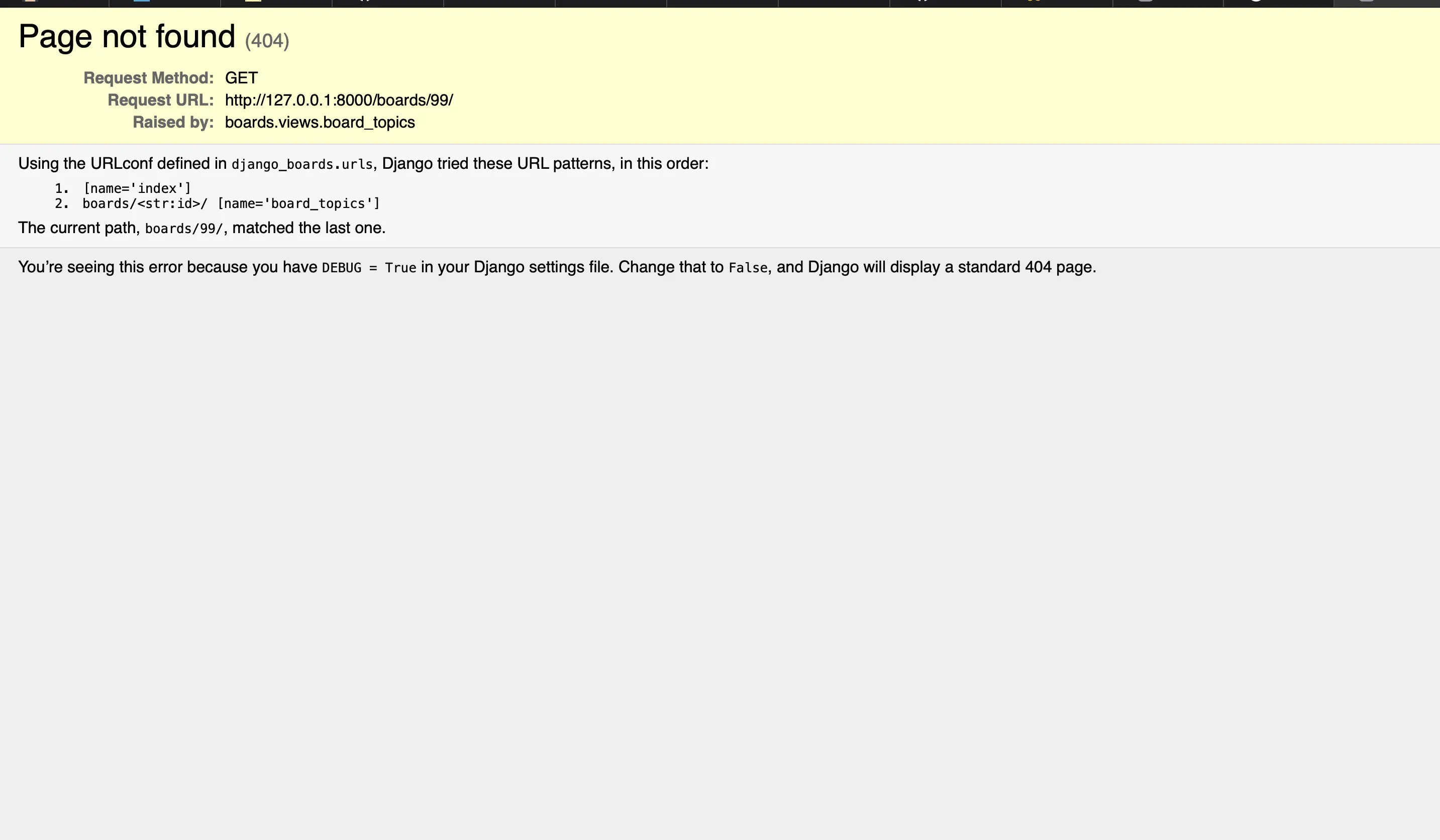
PageNotFound (404)
Django renders a PageNotFound (404) page. Just what I want!
This is the default page that Django displays when DEBUG=True during development. In production, it will be DEBUG=False, and I will be able to customize the 404 page to display whatever I want.
Replacing try/except in board_topics function with Django shortcut
Now let's re-refactor the board_topics view:
# before:
from django.shortcuts import render
from django.http import HttpResponse
from django.http import Http404
from .models import Board

def board_topics(request, id):
  try:
      board = Board.objects.get(id=id)
  except Board.DoesNotExist:
      raise Http404
  return render(request, 'topics.html', {'board': board})
# after:
from django.shortcuts import render, get_object_or_404
from django.http import HttpResponse
from django.http import Http404
from .models import Board

def board_topics(request, id):
  board = get_object_or_404(Board, id=id)
  return render(request, 'topics.html', {'board': board})
Which should return the following when running python3 manage.py test:
Found 5 test(s).
Creating test database for alias 'default'...
System check identified no issues (0 silenced).
.....
----------------------------------------------------------------------
Ran 5 tests in 0.011s

OK
Destroying test database for alias 'default'...
The get_object_or_404 shortcut function
The Django get_object_or_404 shortcut function is used for getting an object from a database using django.shortcut and raises an Http404 exception if the object is not found. This is what I did in long form previously. As in the case here, it is used in views to get a single object based on a query and handle the case where the object does not exist.
get_object_or_404 calls the targeted model, and retrieves an object from it. If that object does not exist, it returns a 404 error.
Code associated with this post
To view the code associated with this post, please visit fceae19.
Conclusion
In this section, I update the class models in boards/models.py to include PostLike, migrate the updated models, add the dynamic path for a single board in django_boards/urls.py, create the board_topics view inside boards/views.py, create the topics.html template inside the templates directory, and create/run tests for BoardTopics.
Related Resources
- Django Boards repository on GitHub
- URL dispatcher
- How to Use Dynamic Routing With Django: makeuseof
- Django Reverse
- get_object_or_404 method in Django Models: Geeks for Geeks