How to create a fullstack application using Django and Python Part 14
Social Share:
Thursday, September 12, 2024 at 10:25 AM | 16 min read
Last modified on Thursday, July 16, 2026 at 12:03 PM
#fullstack development, #macOS, #django, #django forms api, #bootstrap, #csrf token, #django-widget-tweaks, #python3, #response context attribute, #security, #series, #tests, #unittest
new_topic.html including form.html
Important Note: Before committing anything to Git or pushing anything to remote, please visit How to create a fullstack application using Django and Python Part 4 where I discuss how to add the python-dotenv package to the Django site and why it is crucial to do it. This article assumes you have a working knowledge of Git.
Table of Contents
- Building the New Topic form
- Adding NewTopicTests to boards/tests.py
- Creating the new_topic form
- A naive implementation of the new_topic view that takes the data from the HTML form and starts a new topic
- Redirecting user to board topics list page instead of posts within a topic
- Updating templates/topics.html to include a listing of all topics
- Creating the button that goes to the new_topic view in templates/topics.html
- Testing whether the user can reach the new_topic view from templates/topics.html
- Testing the form view
- Running python3 manage.py test including updated NewTopicTests
- Creating forms correctly
- Refactoring boards/views.py to include form validation
- Updating templates/new_topic.html to fully use Django Forms API
- Rendering Bootstrap Form Styling
- Re-usable forms templates
- Adding more tests to NewTopicTests
- Code associated with this post
- Conclusion
- Related Resources
- Related Posts
Update (July 2026): This walkthrough was written against Django 5.1, which reached full end-of-life in December 2025 and is no longer receiving security patches. Run python -m django --version to check which version you have.
I wrote this series as a live process, so sometimes it might seem confusing, but it all works out in the end.
Building the New Topic form
Before I build the New Topic form, I have to discuss how forms work in Django.
Forms in Django
Handling forms is complex in Django's admin, there are several types of data that may need to be displayed in a form, rendered as HTML, edited using a suitable interface, sent back to the server, validated and cleaned up, and then saved or passed on for further processing.
Django's form functionality can simplify and automate large parts of form development, and can do it more securely than if programmers developed the forms on their own.
Django handles three aspects of form development:
-
preparing and restructuring data for rendering
-
creating HTML forms for the data
-
receiving and processing submitted forms and data from the client
In the context of a web application, "form" might refer to an HTML form, to the Django Form (class) that produces it, to the structured data returned when it is submitted, or the end-to-end form development process.
How to save user input in the database
Creating a new url route called new_topic in django_boards/urls.py
For starters, let's create a new url route named new_topic:
# in django_boards/urls.py
urlpatterns = [
    path('', views.index, name='index'),
    path('boards/<str:id>/', views.board_topics, name='board_topics'),
    path('boards/<str:id>/new/', views.new_topic, name='new_topic'), # added
    path('admin/', admin.site.urls),
]
The structure of the new_topic path will help me identify the correct Board to point to.
Creating a new_topic view in boards/views.py
Next, I create a new_topic view in boards/views.py:
# in boards/views.py
def new_topic(request, id):
  board = get_object_or_404(Board, id=id)
  return render(request, 'new_topic.html', {'board': board})
Creating the templates/new_topic.html form template
<!-- templates/new_topic.html -->
{% extends 'base.html' %}
{% block title %}Start a New Topic{% endblock title %}

{% block breadcrumb %}
  <li class="breadcrumb-item"><a href="{% url 'index' %}">Django Boards</a></li>
  <li class="breadcrumb-item"><a href="{% url 'board_topics' board.id %}">{{ board.name }}</a></li>
  <li class="breadcrumb-item active">New Topic</li>
{% endblock breadcrumb %}

{% block content %}
{% endblock content %}
Viewing new_topic.html in the browser

new_topic.html in the browser
Adding NewTopicTests to boards/tests.py
# in boards/tests.py
from django.urls import reverse
from django.test import TestCase
from django.urls import resolve
from .views import index, board_topics, new_topic # added
from .models import Board

class NewTopicTests(TestCase):

  def setUp(self):
    Board.objects.create(name='Python', description='Everything related to Python')

  def test_new_topic_view_success_status_code(self):
    url = reverse('new_topic', kwargs={'id': 1})
    response = self.client.get(url)
    self.assertEqual(response.status_code, 200)

  def test_new_topic_view_not_found_status_code(self):
    url = reverse('new_topic', kwargs={'id': 99})
    response = self.client.get(url)
    self.assertEqual(response.status_code, 404)

  def test_new_topic_url_resolves_new_topic_view(self):
    view = resolve('/boards/1/new/')
    self.assertEqual(view.func, new_topic)

  def test_new_topic_view_contains_link_back_to_board_topics_view(self):
    new_topic_url = reverse('new_topic', kwargs={'id': 1})
    board_topics_url = reverse('board_topics', kwargs={'id': 1})
    response = self.client.get(new_topic_url)
    self.assertContains(response, 'href="{0}'.format(board_topics_url))
NewTopicTests class summary
- setUp creates a new Board instance to be used for testing.
- test_new_topic_view_success_status_code checks if the view request returns a response success status code of 200.
- test_new_topic_view_not_found_status_code checks to see if a response status code of 404 (Not Found) is returned for a non-existent Board.
- test_new_topic_url_resolves_new_topic_view checks to see if the right view is being rendered.
- test_new_topic_view_contains_link_back_to_board_topics_view checks to see if the link back to the list of topics is correct.
Running the NewTopicTests
# run the following in Terminal inside the directory that contains manage.py file:
python3 manage.py test
Which should return the following:
Found 11 test(s).
Creating test database for alias 'default'...
System check identified no issues (0 silenced).
...........
----------------------------------------------------------------------
Ran 11 tests in 0.018s

OK
Destroying test database for alias 'default'...
Creating the new_topic form
<!-- templates/new_topic.html -->
{% extends 'base.html' %}
{% block title %}Start a New Topic{% endblock title %}

{% block breadcrumb %}
<li class="breadcrumb-item"><a href="{% url 'index' %}">Boards</a></li>
<li class="breadcrumb-item"><a href="{% url 'board_topics' board.id %}">{{ board.name }}</a></li>
<li class="breadcrumb-item active">New Topic</li>
{% endblock breadcrumb %}

{% block content %}
<form method="post">
  {% csrf_token %}
  <div class="form-group">
    <label for="id_subject">Subject</label>
    <input type="text" class="form-control" id="id_subject" name="subject">
  </div>
  <div class="form-group">
    <label for="id_message">Message</label>
    <textarea class="form-control" id="id_message" name="message" rows="5"></textarea>
  </div>
  <button type="submit" class="btn btn-success">Post</button>
</form>
{% endblock content %}
The form looks like the following:
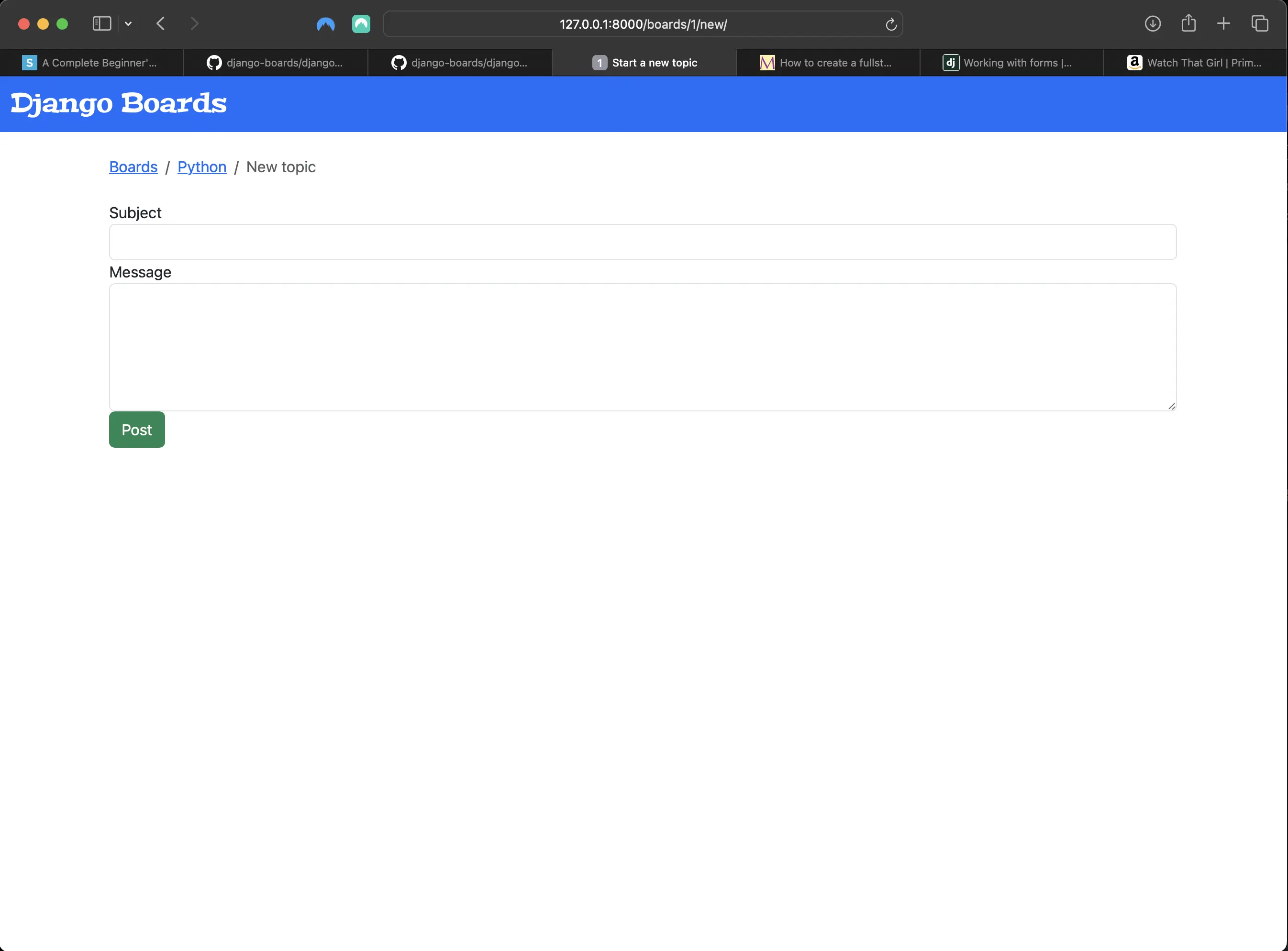
The new_top.html form
The form element
The form HTML element is a container for different types of input elements such as text fields, checkboxes, radio buttons, and submit buttons.
In the form tag, I have the method attribute. The method attribute specifies how to send form data specified in the action attribute. For the most part, the method attribute accepts the GET and POST methods.
| Value | Description | Example |
|---|---|---|
| GET | used to retrieve data from the server, appends form-data into the URL in browser address bar in name/value pairs, values are limited to 1000 characters, and it's suitable for non-sensitive data | Every time I click on a link or type a URL in the browser, I am creating a GET request |
| POST | Is used when I want to change data on the server, appends form-data inside the body of the HTTP request (data is not shown is in URL), there are no size limits, and are secure for sensitive data | Whenever I send data to the server, i.e. via form data submission creating or updating the state of an object or resource, I should use POST requests |
The action attribute specifies the route that the form data should be sent to when a form is submitted.
action attribute syntax:
<form action="URL"></form>
action attribute values:
| Value | Description |
|---|---|
| URL | Where to send the form-data when the form is submitted. |
| Absolute URL | Points to another website, i.e. action="https://www.example.com/example.htm" |
| Relative URL | Points to a file within a website, i.e. action="example.html" |
Django CSRF csrf_token (Cross-Site Request Forgery Token)
The Django csrf_token is meant to protect a site from cross-site request forgery attacks. This type of attack forces authenticated users to submit a request to a Web application to which they are already authenticated. CSRF attacks exploit the trust a web application has in an authenticated user.
According to OWASP,
Cross-Site Request Forgery (CSRF) is an attack that forces an end user to execute unwanted actions on a web application in which they’re currently authenticated. With a little help of social engineering (such as sending a link via email or chat), an attacker may trick the users of a web application into executing actions of the attacker’s choosing. If the victim is a normal user, a successful CSRF attack can force the user to perform state changing requests like transferring funds, changing their email address, and so forth. If the victim is an administrative account, CSRF can compromise the entire web application.
So every time a Django application receives a POST request, it will first look for the CSRF token. If the request has no token, or the token is invalid, it will discard the POST data.
An example of a csrf_token template tag:
{% csrf_token %}
Django adds the csrf_token to a hidden input field and submits it with the rest of the form data:
<input
	type="hidden"
	name="csrfmiddlewaretoken"
	value="jG2o6aWj65YGaqzCpl0TYTg5jn6SctjzRZ9KmluifVx0IVaxlwh97YarZKs54Y32"
/>
The form inputs' name attributes
I need to add name attributes to the form's input fields, because I will be using those attributes to retrieve data from my form on the server side. For example:
<input type="text" class="form-control" id="id_subject" name="subject" />
<textarea
	class="form-control"
	id="id_message"
	name="message"
	rows="5"
></textarea>
Something like the following on the server side (boards/views.py):
subject = request.POST['subject']
message = request.POST['message']
A naive implementation of the new_topic view that takes the data from the HTML form and starts a new topic
from django.contrib.auth.models import User
from django.shortcuts import render, redirect, get_object_or_404
from .models import Board, Topic, Post

def new_topic(request, id):
    board = get_object_or_404(Board, id=id)

    if request.method == 'POST':
        subject = request.POST['subject']
        message = request.POST['message']

        user = User.objects.first()  # TODO: get the currently logged in user

        topic = Topic.objects.create(
            subject=subject,
            board=board,
            starter=user
        )

        post = Post.objects.create(
            message=message,
            topic=topic,
            created_by=user
        )

        return redirect('board_topics', id=board.id)  # TODO: redirect to the created topic page

    return render(request, 'new_topic.html', {'board': board})
There are some parts missing in the above implementation. There is no data validation, and the user could submit an empty form or a subject that contains more than 255 characters.
Hardcoding User fields due to absence of authentication
Up to this point, I have been hardcoding the User fields, because I have not implemented any authentication yet. I will be getting to that soon.
Redirecting user to board topics list page instead of posts within a topic
Up to this point, I have not yet created the view where I list all the posts within a topic, so upon response.status_code 200, I redirect the user to the list of board topics page.
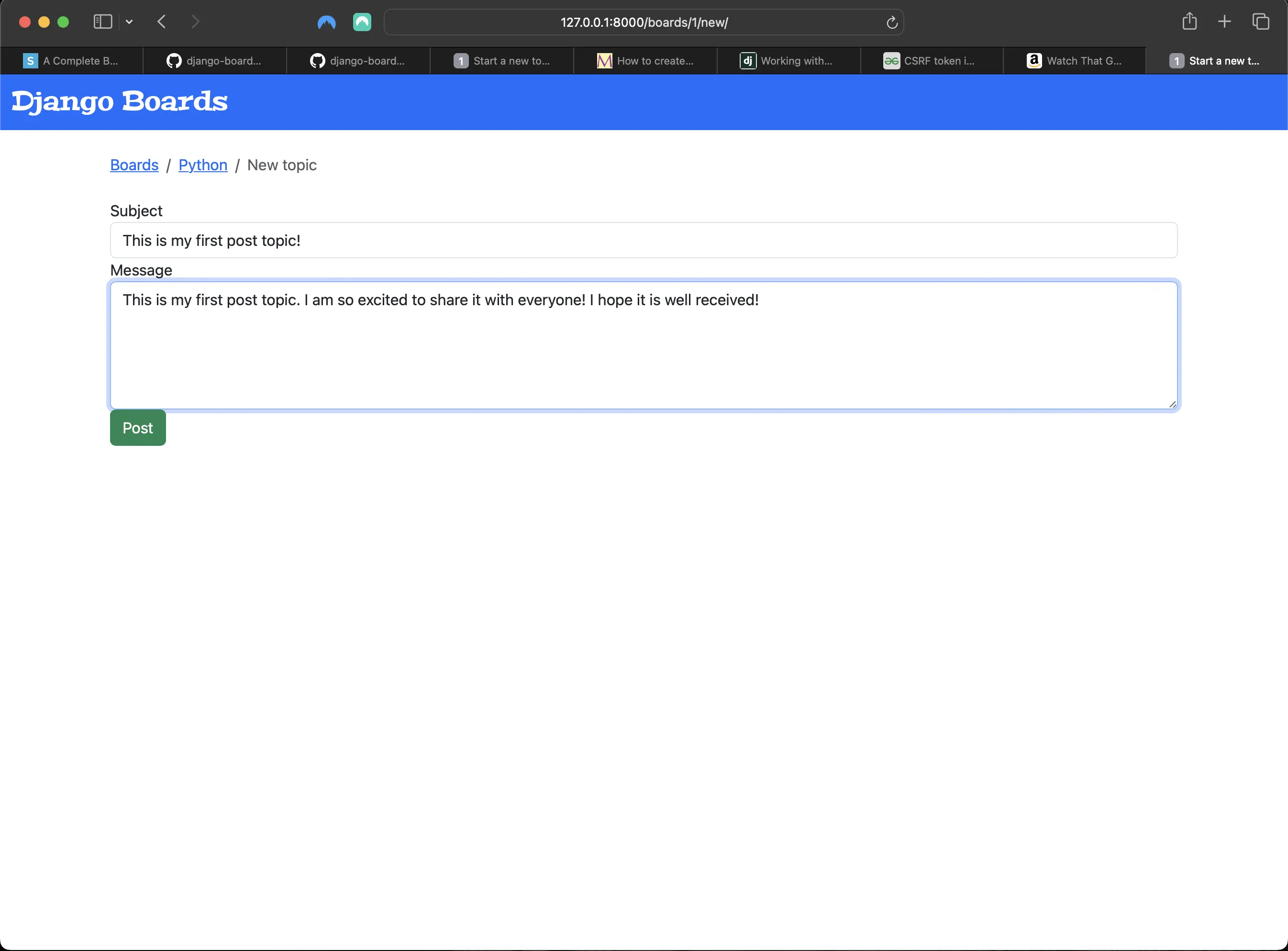
Creating a new post topic on the new topic page
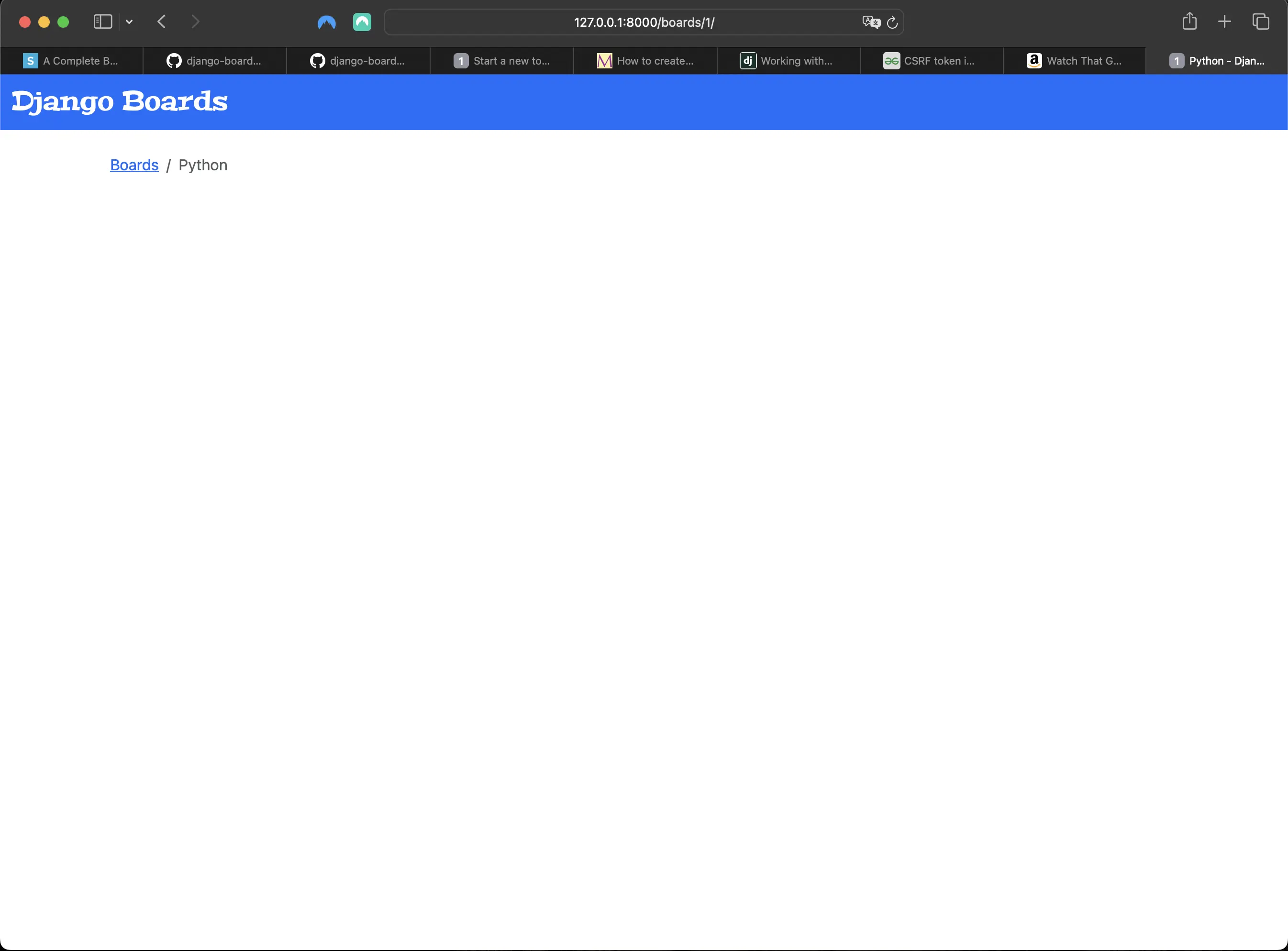
Result of new topic submission
The submission seemed to work. I even received a success response status code of 200 in Terminal. However, the submission didn't seem to go anywhere because I still don't have the topics listing yet! Let's do that now.
Updating templates/topics.html to include a listing of all topics
<!-- templates/topics.html -->
{% extends 'base.html' %}
{% block title %}
  {{ board.name }} - {{ block.super }}
{% endblock title %}
{% block breadcrumb %}
  <li class="breadcrumb-item"><a href="{% url 'index' %}">Boards</a></li>
  <li class="breadcrumb-item active">{{ board.name }}</li>
{% endblock breadcrumb %}
{% block content %}
<table class="table">
	<thead class="thead-inverse">
		<tr>
			<th>Topic</th>
			<th>Starter</th>
			<th>Replies</th>
			<th>Views</th>
			<th>Last Update</th>
		</tr>
	</thead>
	<tbody>
		{% for topic in board.topics.all %}
		<tr>
			<td>{{ topic.subject }}</td>
			<td>{{ topic.starter.username }}</td>
			<td>0</td>
			<td>0</td>
			<td>{{ topic.last_updated }}</td>
		</tr>
		{% endfor %}
	</tbody>
</table>
{% endblock content %}
With these changes, http://127.0.0.1:8000/boards/1/, which is the listing of all (post) topics for a given board, looks something like the following:
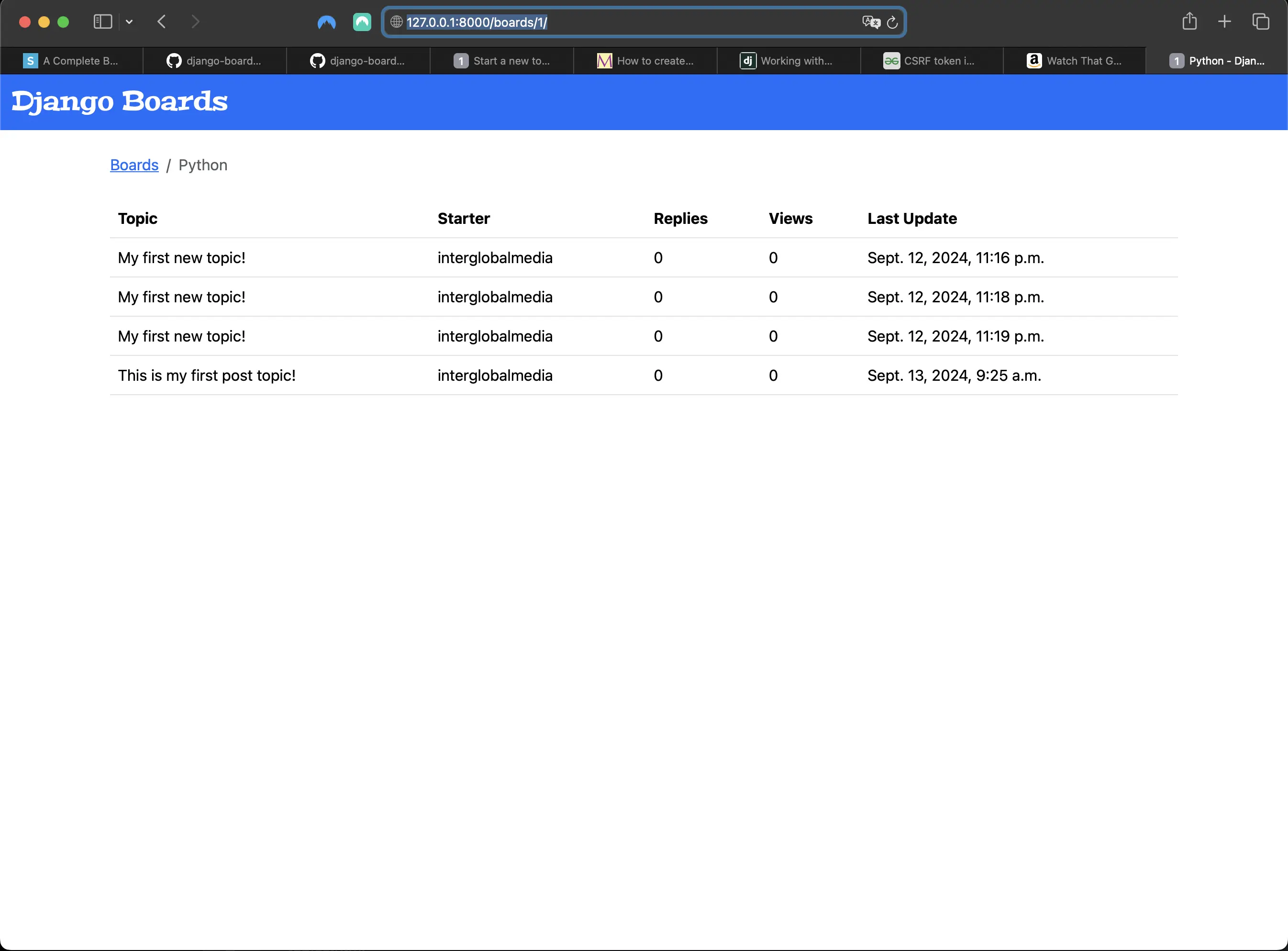
Including a listing of all (post) topics for a given board
The above includes submissions I made before the submitted data had anywhere to go!
Two new concepts introduced in the new_topic view
Two new concepts are introduced in the new_topic view in boards/views.py.
- I am using the topics property for the first time in the Board model. The
topics property is created automatically by Django using a reverse
relationship (related_name='topics' in models.py).
- In the line board=board in Topic.objects.create() inside new_topic in boards/views.py, I set the board field in the Topic model, which is a models.ForeignKey(Board). Now my Board instance is aware that it has a Topic instance associated with it.
- In the Python code, I have to use board.topics.all(), because .all() using parentheses indicates a method, which is what I need. I am not literally using board.topics.all(). I am using board = Board.objects.all() inside def index(request), which makes board.topics available. To be able to return all topics associated with a given board, I have to run board.topics.all() (via Board.objects.all()) in boards/views.py. But in templates/topics.html, I exclude the parentheses: {% for topic in board.topics.all %}. Here, it is considered a property and not a method. board.topics is a Related Manager, similar to Model Manager, and available on the board.objects property.
- I am making use of a ForeignKey in my topics.html template: <td>{{ topic.starter.username }}</td>. I am able to access any property of the User model. If I wanted to access the user's email, I would use topic.starter.email.
Creating the button that goes to the new_topic view in templates/topics.html
<!-- templates/topics.html -->
{% block content %}
<div class="mb-4">
	<a href="{% url 'new_topic' board.id %}" class="btn btn-primary"
		>New Topic</a
	>
</div>
<table class="table"></table>
{% endblock content %}
Which results in the following rendering to the new_topic view page:
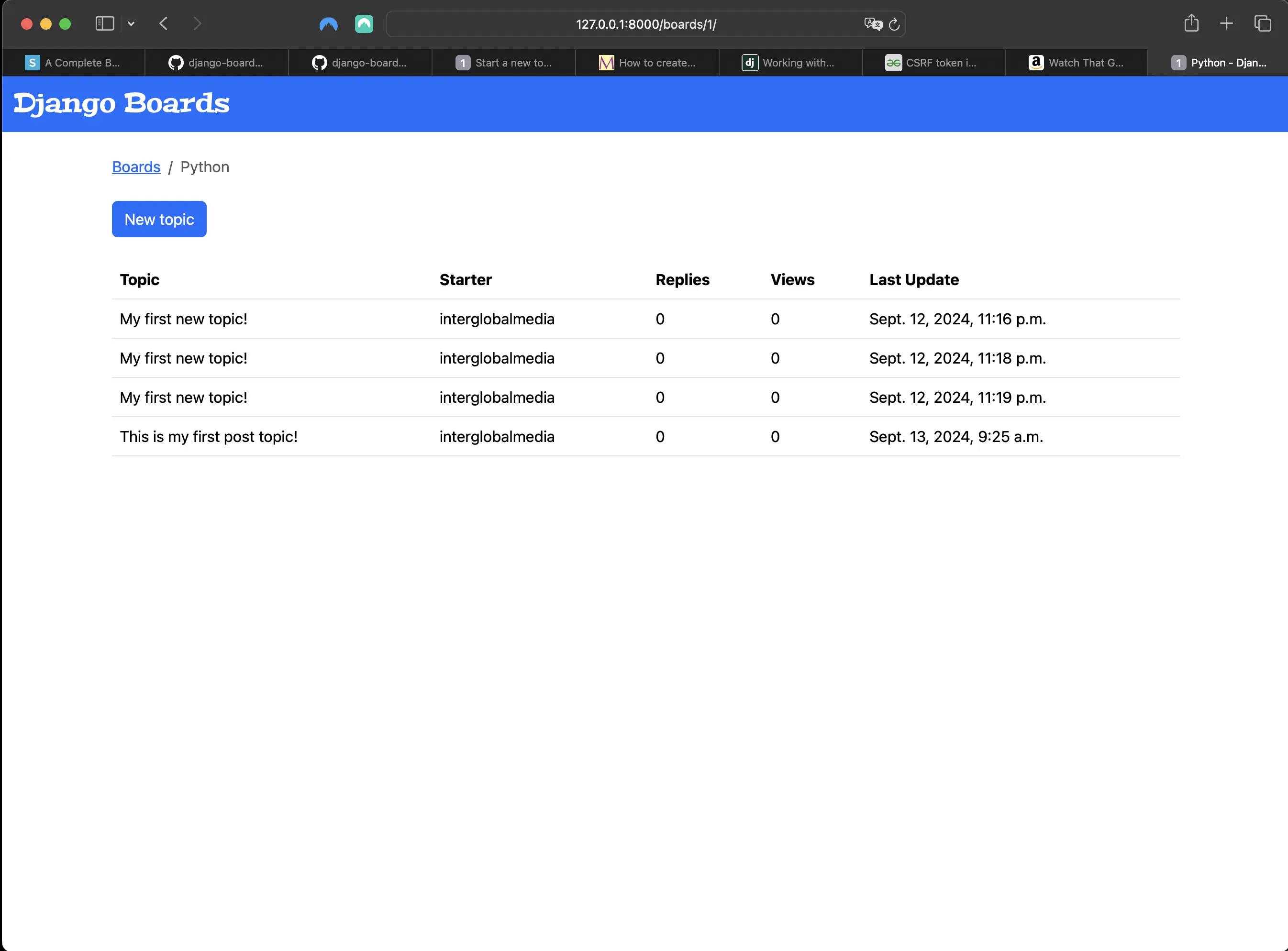
Adding button going to new_topic view in templates/topics.html
Clicking on the "New Topic" button takes me to the new_topic view:
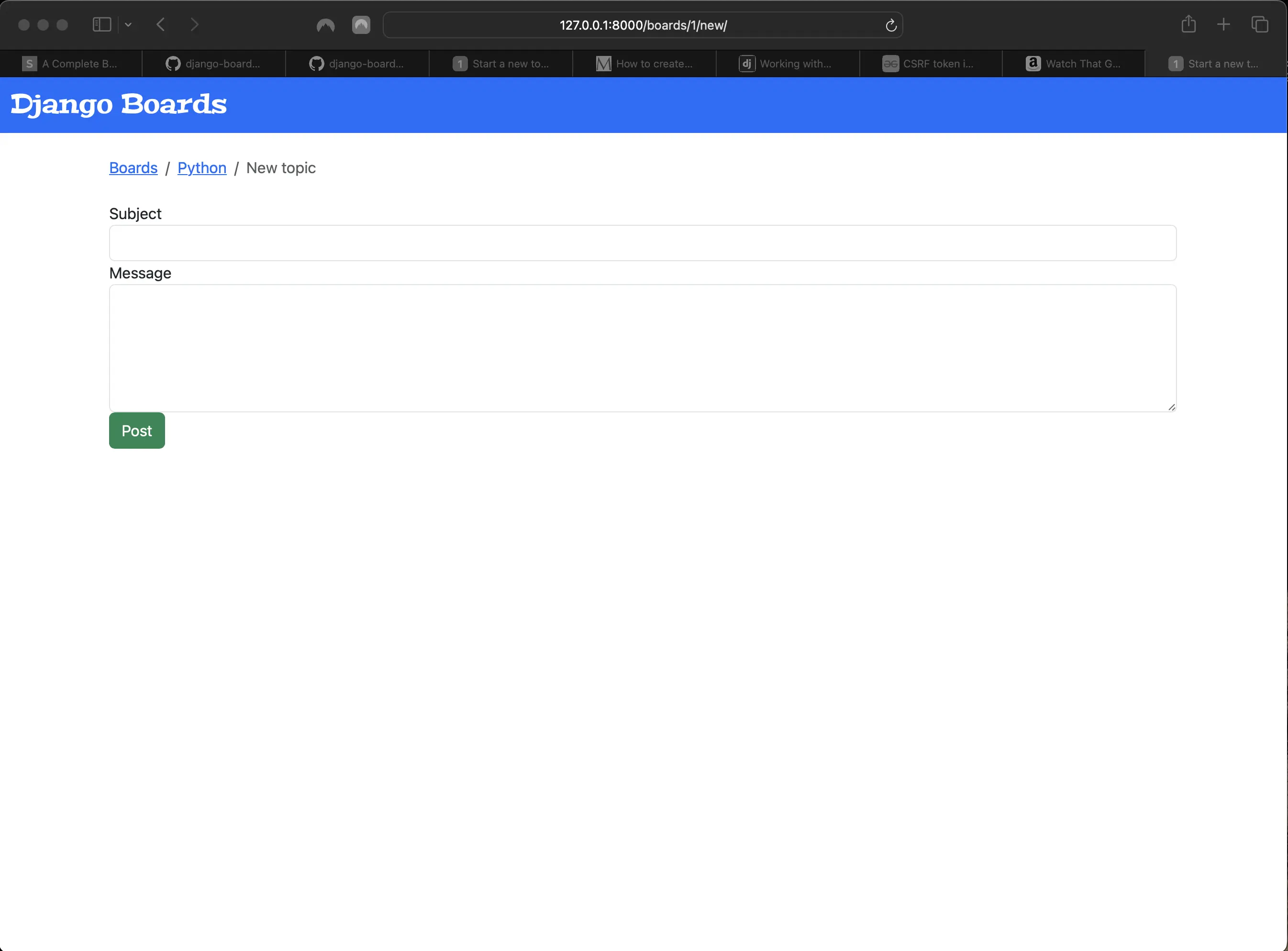
Clicking on the "New Topic" button (new_topic view)
Testing whether the user can reach the new_topic view from templates/topics.html
# in boards/tests.py
class BoardTopicsTests(TestCase):
    ...
    def test_board_topics_view_contains_navigation_links(self):
        board_topics_url = reverse('board_topics', kwargs={'id': 1})
        homepage_url = reverse('index')
        new_topic_url = reverse('new_topic', kwargs={'id': 1})

        response = self.client.get(board_topics_url)

        self.assertContains(response, 'href="{0}"'.format(homepage_url))
        self.assertContains(response, 'href="{0}"'.format(new_topic_url))
This test makes sure my view contains the required navigation links.
When I run python3 manage.py test in Terminal, the following should be returned:
Found 12 test(s).
Creating test database for alias 'default'...
System check identified no issues (0 silenced).
............
----------------------------------------------------------------------
Ran 12 tests in 0.026s

OK
Destroying test database for alias 'default'...
Testing the form view
I'll create some tests on the processing of my form before actually updating my form template:
# boards/tests.py
# updated boards/tests.py
from django.urls import reverse
from django.test import TestCase
from django.urls import resolve
from django.contrib.auth.models import User
from .views import index, board_topics, new_topic
from .models import Board, Topic, Post

class NewTopicTests(TestCase):

    def setUp(self):
        Board.objects.create(name="Python", description="Everything related to Python")
        User.objects.create_user(username='jane', email='jane@doe.com', password='123')

    def test_csrf(self):
        url = reverse('new_topic', kwargs={'id': 1})
        response = self.client.get(url)
        self.assertContains(response, 'csrfmiddlewaretoken')

    def test_new_topic_valid_post_data(self):
        url = reverse('new_topic', kwargs={'id': 1})
        data = {
            'subject': 'Test title',
            'message': 'Lorem ipsum dolor sit amet'
        }
        response = self.client.post(url, data)
        self.assertTrue(Topic.objects.exists())
        self.assertTrue(Post.objects.exists())

    def test_new_topic_invalid_post_data(self):
        '''
        Invalid post data should not redirect
        The expected behavior is to show the form again with validation errors
        '''
        url = reverse('new_topic', kwargs={'id': 1})
        response = self.client.get(url, {})
        self.assertEqual(response.status_code, 200)

    def test_new_topic_invalid_post_data_empty_fields(self):
        '''
        Invalid post data should not redirect
        The expected behavior is to show the form again with validation errors
        '''
        url= reverse('new_topic', kwargs={'id': 1})
        data = {
            'subject': '',
            'message': ''
        }
        response = self.client.post(url, data)
        self.assertEqual(response.status_code, 200)
        self.assertFalse(Topic.objects.exists())
        self.assertFalse(Post.objects.exists())

    def test_new_topic_view_success_status_code(self):
        url = reverse("new_topic", kwargs={"id": 1})
        response = self.client.get(url)
        self.assertEqual(response.status_code, 200)

    def test_new_topic_view_not_found_status_code(self):
        url = reverse("new_topic", kwargs={"id": 99})
        response = self.client.get(url)
        self.assertEqual(response.status_code, 404)

    def test_new_topic_url_resolves_new_topic_view(self):
        view = resolve("/boards/1/new/")
        self.assertEqual(view.func, new_topic)

    def test_new_topic_view_contains_link_back_to_board_topics_view(self):
        new_topic_url = reverse("new_topic", kwargs={"id": 1})
        board_topics_url = reverse("board_topics", kwargs={"id": 1})
        response = self.client.get(new_topic_url)
        self.assertContains(response, 'href="{0}'.format(board_topics_url))
Running python3 manage.py test including updated NewTopicTests
When I run python3 manage.py test including the updated NewTopicTests, it returns the following:
Found 16 test(s).
Creating test database for alias 'default'...
System check identified no issues (0 silenced).
..........F.....
======================================================================
FAIL: test_new_topic_invalid_post_data_empty_fields (boards.tests.NewTopicTests.test_new_topic_invalid_post_data_empty_fields)
Invalid post data should not redirect
----------------------------------------------------------------------
Traceback (most recent call last):
  File "/Users/mariacam/Python-Development/django-boards/django_boards/boards/tests.py", line 109, in test_new_topic_invalid_post_data_empty_fields
    self.assertEqual(response.status_code, 200)
AssertionError: 302 != 200

----------------------------------------------------------------------
Ran 16 tests in 1.723s

FAILED (failures=1)
Destroying test database for alias 'default'...
I have one failed test and one AssertionError. Instead of refactoring the tests, I'll make those tests pass using the Django Forms API.
Creating forms correctly
Now I am going to use the Forms API to create my form.
The Forms API is accessible through the django.forms module.
Django works with two types of forms: forms.Form and forms.ModelForm.
| Forms API type | Description |
|---|---|
| Form class | General purpose form implementation. I can use it to process data that isn't directly associated with a model in my application. |
| ModelForm | Is a subclass of Form, and it’s associated with a model class. |
Creating a boards/forms.py file
# boards/forms.py
from django import forms
from .models import Topic


class NewTopicForm(forms.ModelForm):
    message = forms.CharField(widget=forms.Textarea(), max_length=4000)

    class Meta:
        model = Topic
        fields = ["subject", "message"]
The form I have created here is a ModelForm which is associated with a Topic model.
The subject field inside the fields list in the Meta class refers to the subject field in the Topic class.
The message field inside the fields list in the Meta class refers to the message field in the Post class. "message" refers to the Post I want to save.
Meta class in Models
Meta is special class within a model. Class Meta is used to change the behavior of my model fields, and it is optional. In order to use Meta, I have to add it to the Model I want to use it in (as above).
Refactoring boards/views.py to include form validation
# boards/view.py
# before:
from django.shortcuts import render, redirect, get_object_or_404
from django.contrib.auth.models import User
from .models import Board, Topic, Post

def new_topic(request, id):
    board = get_object_or_404(Board, id=id)

    if request.method == "POST":
        subject = request.POST["subject"]
        message = request.POST["message"]

        user = User.objects.first()  # TODO: get the currently logged in user

        topic = Topic.objects.create(subject=subject, board=board, starter=user)

        post = Post.objects.create(message=message, topic=topic, created_by=user)

        return redirect(
            "board_topics", id=board.id
        )  # TODO: redirect to the created topic page

    return render(request, "new_topic.html", {"board": board})
# refactor;
from django.shortcuts import render, redirect, get_object_or_404
from django.contrib.auth.models import User
from .forms import NewTopicForm
from .models import Board, Topic, Post

def new_topic(request, id):
    board = get_object_or_404(Board, id=id)
    user = User.objects.first()  # TODO: get the currently logged in user
    if request.method == 'POST':
        form = NewTopicForm(request.POST)
        if form.is_valid():
            topic = form.save(commit=False)
            topic.board = board
            topic.starter = user
            topic.save()
            post = Post.objects.create(
                message=form.cleaned_data.get('message'),
                topic=topic,
                created_by=user
            )
            return redirect('board_topics', id=board.id)  # TODO: redirect to the created topic page
    else:
        form = NewTopicForm()
    return render(request, 'new_topic.html', {'board': board, 'form': form})
The above is how I use a form in a view.
Breaking down the refactored new_topic view
First I check if the form method is a POST request. If it is a POST request, it means the user is submitting some data via the form to the server. It also means that I should instantiate a form instance (NewTopicForm(request.POST)) passing the POST data to the form (NewTopicForm(request.POST).
Then, if the form is valid (form.is_valid()), I can save the data to the database (topic = form.save(commit=False)). This first instance of "saving" the form doesn't actually save it to the database. It allows me to create a model instance of the topic form without immediately saving it to the database so that I can make further modifications to it. In this case, I add the topic.board = board and the topic.starter = user modifications before saving the form. Model.save(), which is what topic.save() is, returns "None". What topic.save() does is persist the Topic instance to the database.
Then the user is redirected to the board_topics view (templates/topics.html) so that the user can't re-submit the same form data and to complete the form submission process.
If, on the other hand, the form is NOT valid, Django adds a list of errors to the form. After that, the view doesn't do anything, just returns the last statement: return render(request, 'new_topic.html', {'board': board, 'form': form}). This now means that I have to update templates/new_topic.html to reflect my refactored new_topic view to display errors properly.
But meanwhile, let's re-run python3 manage.py test in Terminal. It should return the following:
Found 16 test(s).
Creating test database for alias 'default'...
System check identified no issues (0 silenced).
................
----------------------------------------------------------------------
Ran 16 tests in 1.736s

OK
Destroying test database for alias 'default'...
I fixed the two tests which previously failed with the refactoring of my new_topic view.
Updating templates/new_topic.html to fully use Django Forms API
<!-- templates/new_topic.html -->
{% extends "base.html" %}

{% block title %}Start a New Topic{% endblock title %}

{% block breadcrumb %}
  <li class="breadcrumb-item"><a href="{% url 'index' %}">Boards</a></li>
  <li class="breadcrumb-item"><a href="{% url 'board_topics' board.id %}">{{ board.name }}</a></li>
  <li class="breadcrumb-item active">New Topic</li>
{% endblock breadcrumb %}

{% block content %}
  <form method="post">
    {% csrf_token %}
    {{ form.as_p }}
    <button type="submit" class="btn btn-success">Post</button>
  </form>
{% endblock content %}
Now the new_topic view (templates/new_topic.html) looks like the following in the browser:
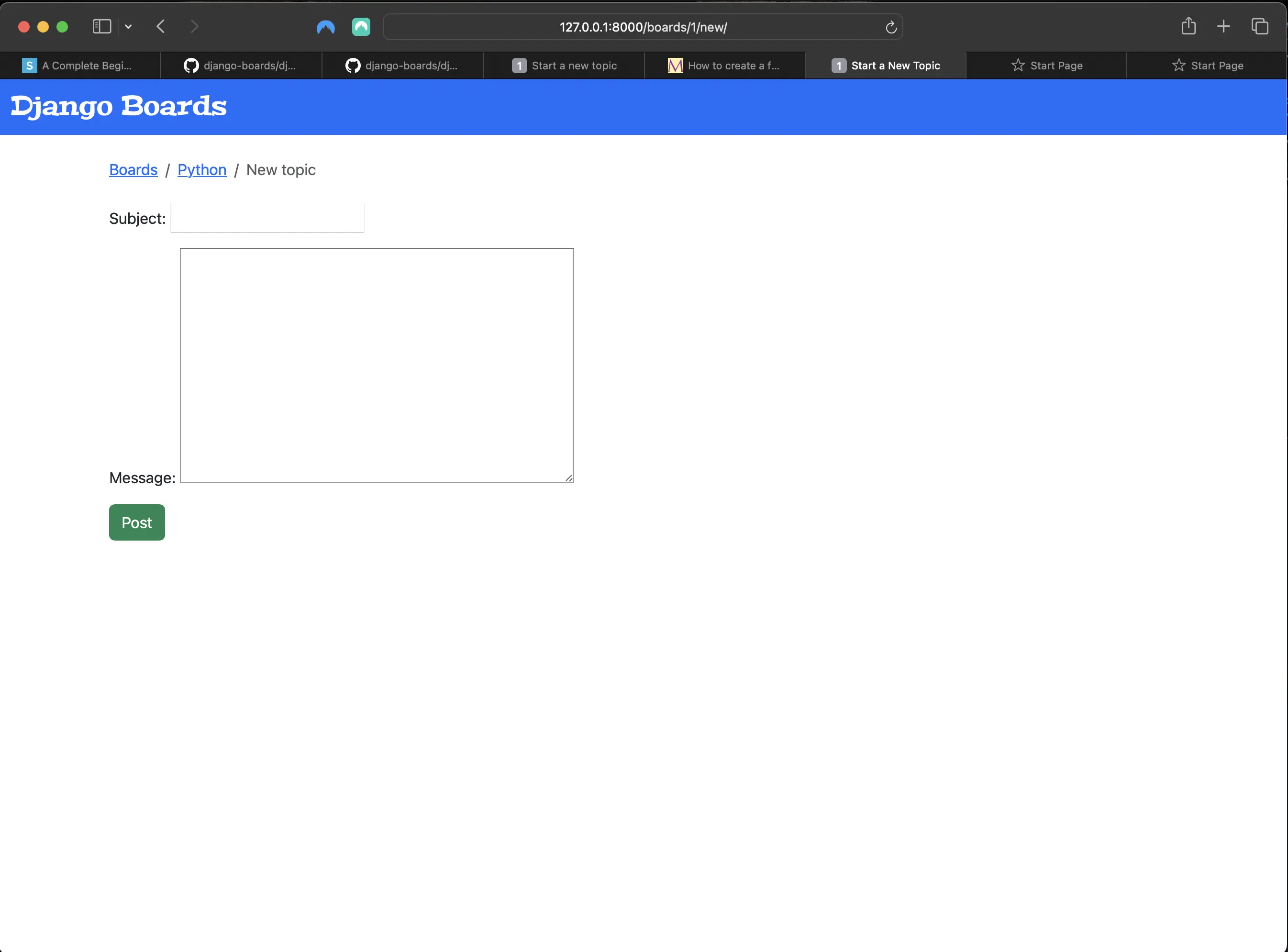
Updated new_topic view (templates/new_topic.html)
The form has three rendering options: form.as_table, form.as_ul, and form.as_p. They are a quick way to render all the fields of a form.
What I have implemented by using {{ form.as_p }} is very powerful. If, for example, my form contained 50 fields, I could render all the fields just by using {{ form.as_p }}.
By using the Forms API, Django will natively validate the form data and error messages for each field.
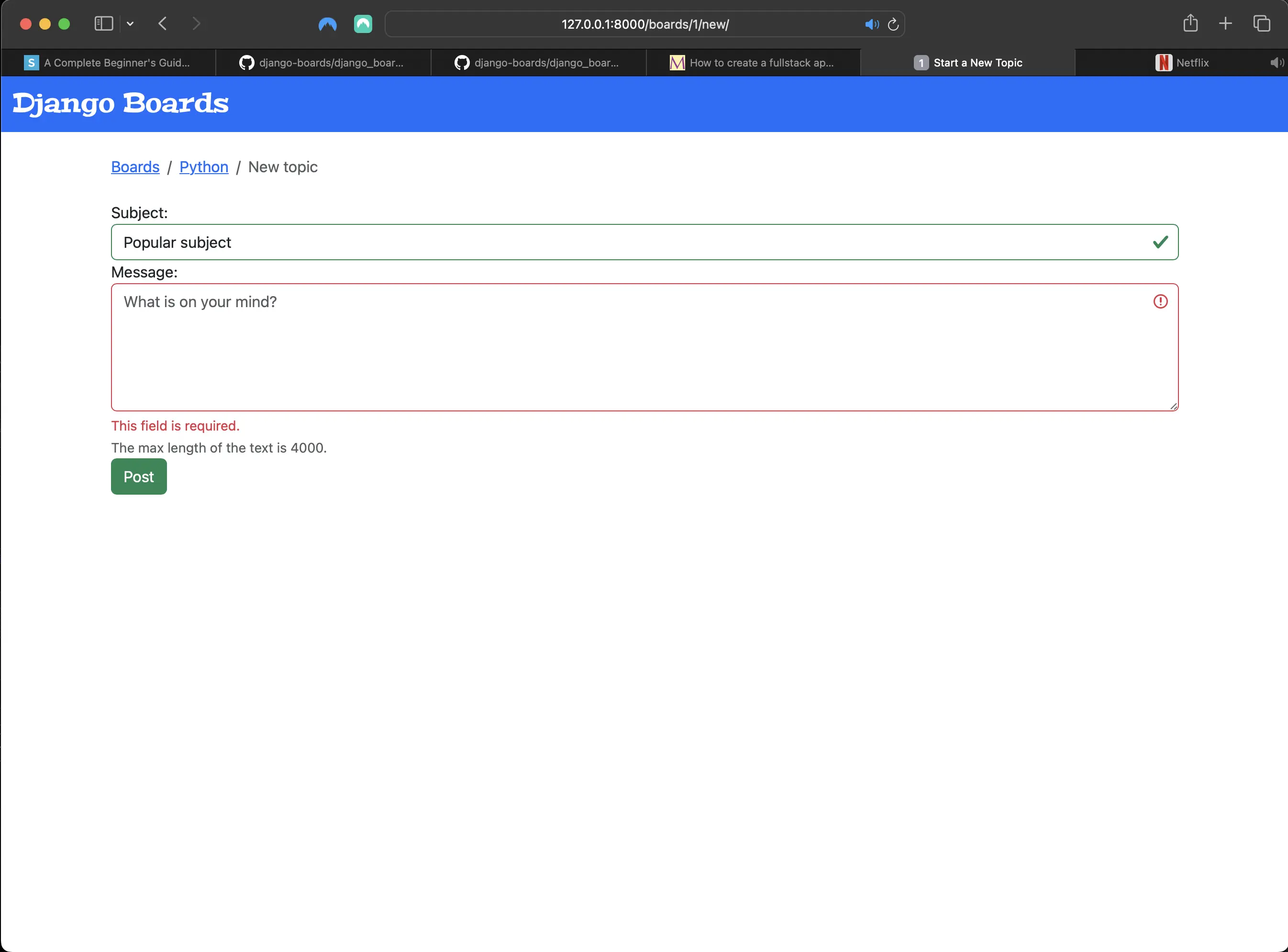
If I try to submit an empty new_topic form the following happens:
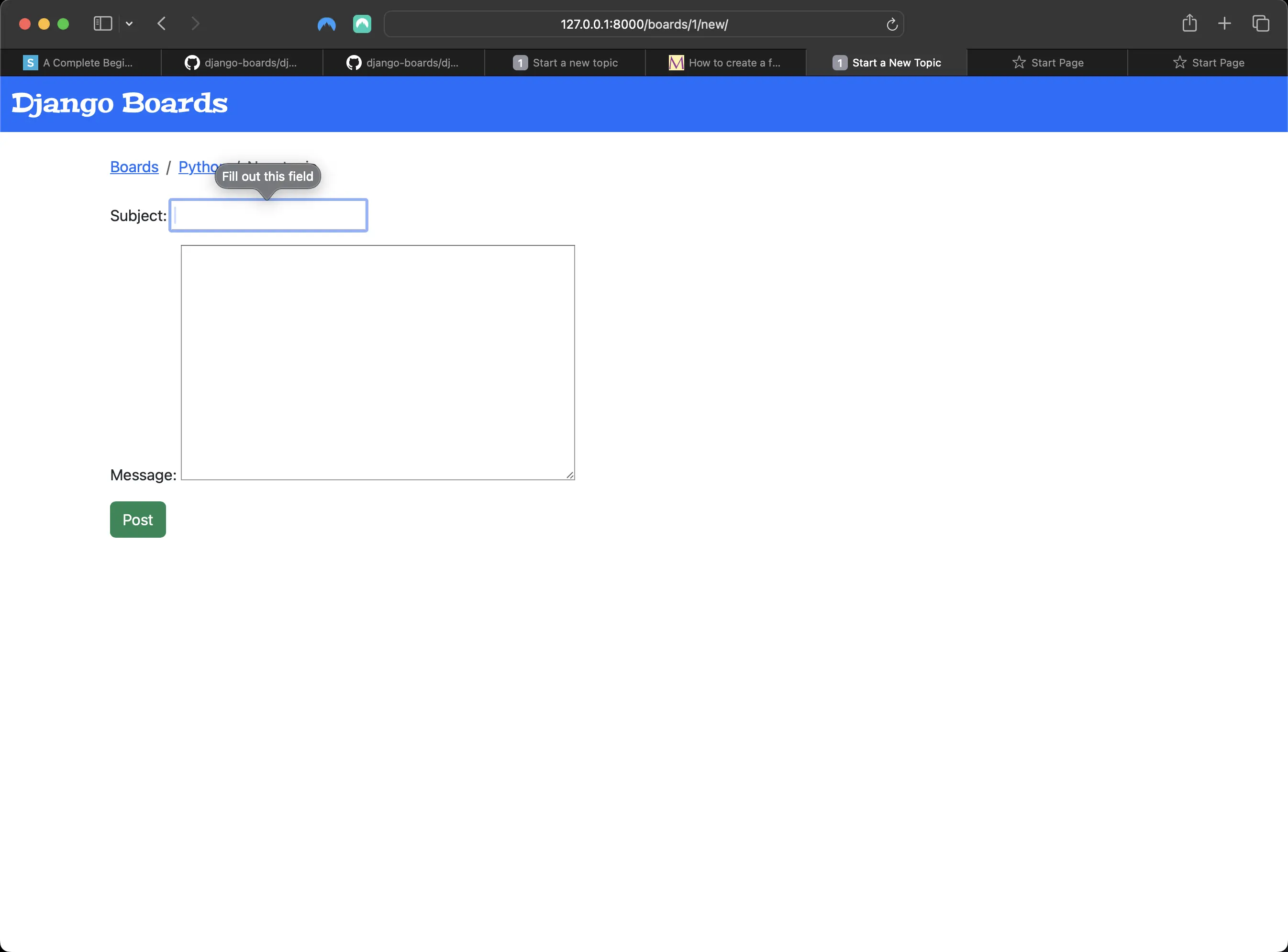
Result of trying to submit an empty form
When I only fill in the subject field and then try to submit the new_topic form:
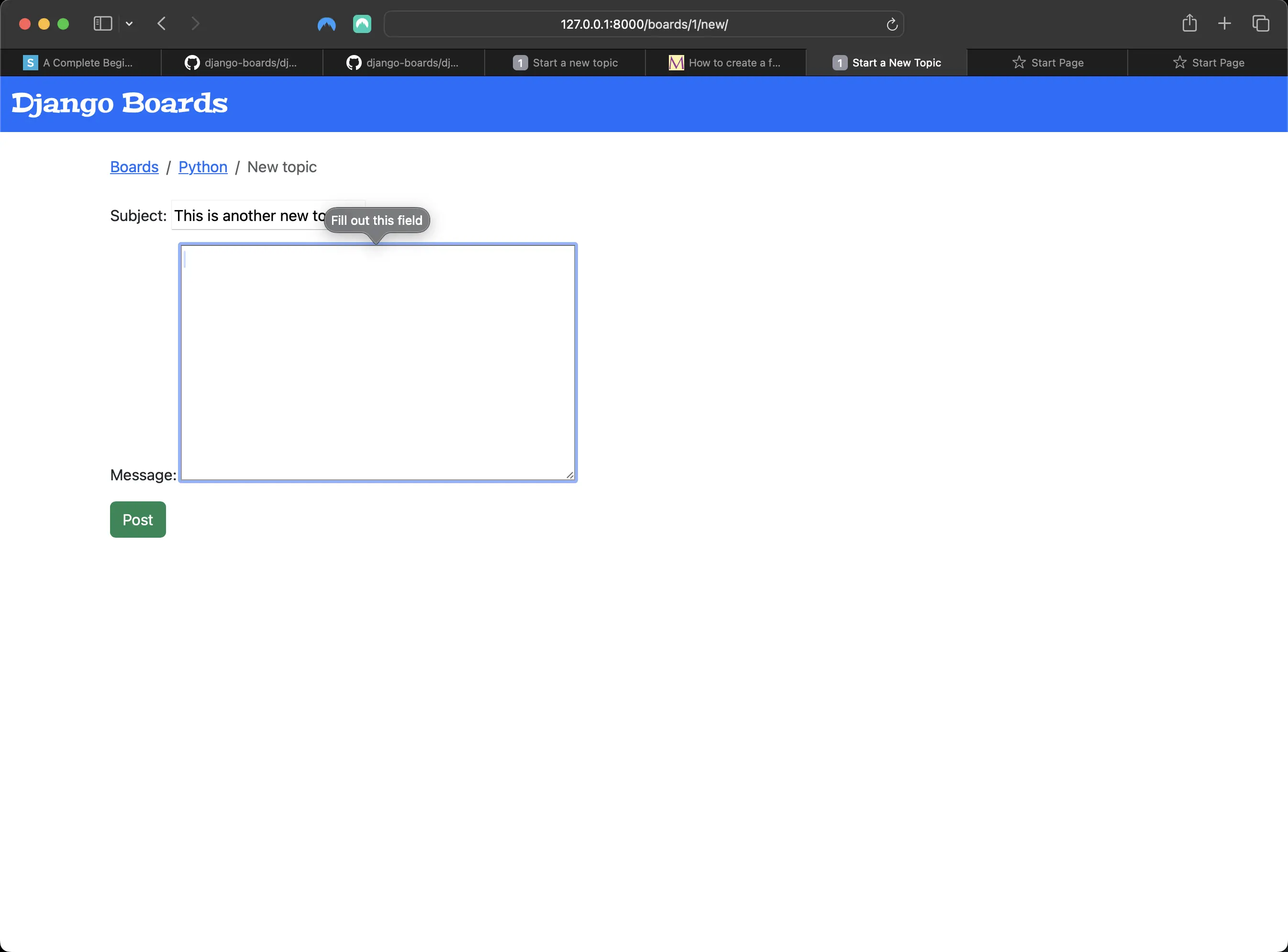
Result of only filling in the subject field and then submitting the new_topic form
If, however, I add the novalidate boolean attribute to the opening form tag:
{% block content %}
<form method="post" novalidate>
	{% csrf_token %} {{ form.as_p }}
	<button type="submit" class="btn btn-success">Post</button>
</form>
{% endblock content %}
It will prevent my browser from implementing its own built-in browser form validation:
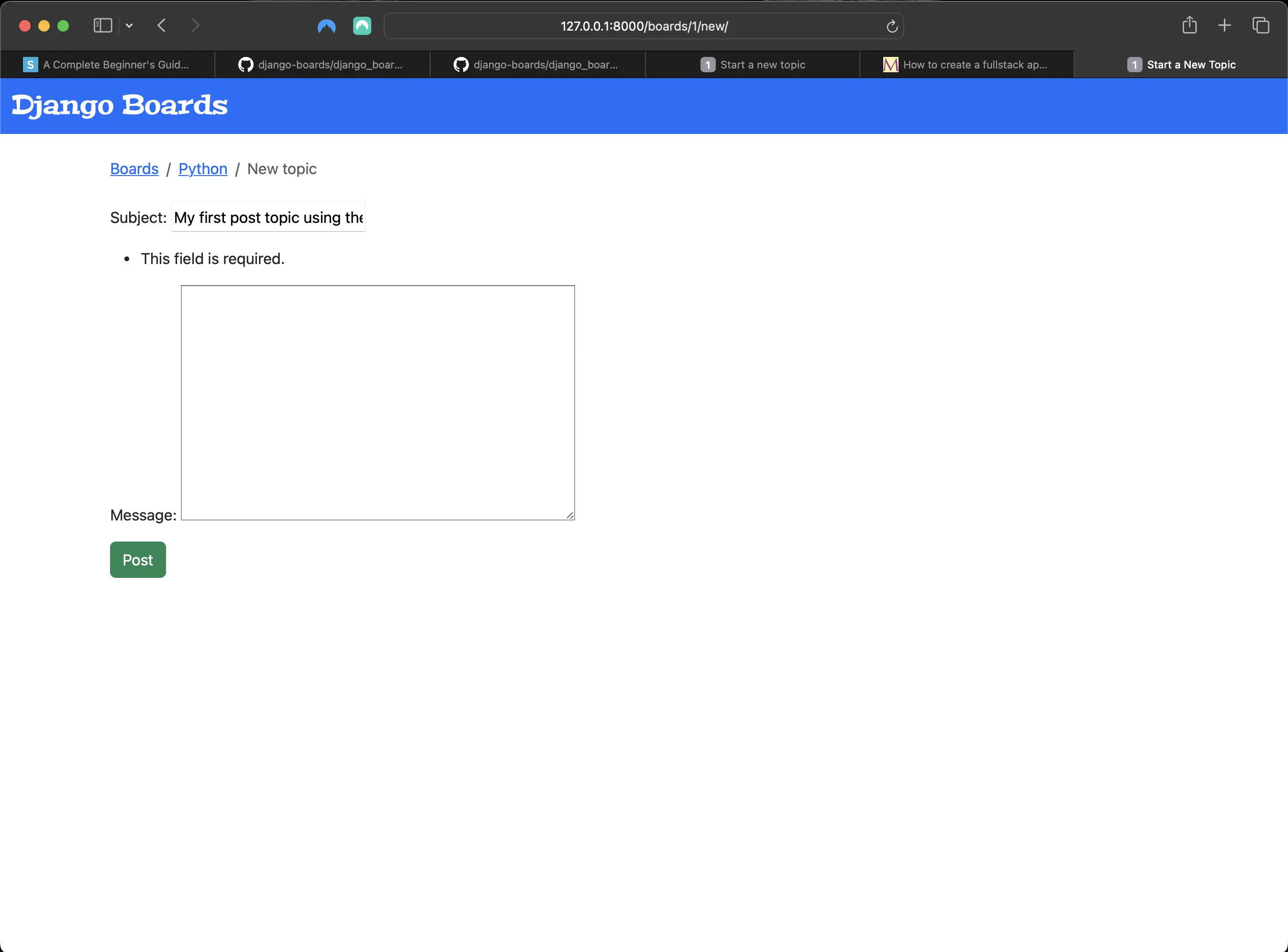
Result of adding novalidate boolean attribute to the opening form tag
Forms API help_text
The Forms API also handles help_text.
What is help_text? The help_text attribute is used to display "help text" along with the form field in the admin interface or ModelForm. It's useful for documentation even if the field is not part of a form. For example, I could define the date pattern received as input in the DateField help_text, for example.
Adding the help_text attribute to the Textarea widget in forms.py
# forms.py before:
from django import forms
from .models import Topic

class NewTopicForm(forms.ModelForm):
    message = forms.CharField(widget=forms.Textarea(), max_length=4000)

    class Meta:
        model = Topic
        fields = ["subject", "message"]
# forms.py after:
from django import forms
from .models import Topic

class NewTopicForm(forms.ModelForm):
    message = forms.CharField(
        widget=forms.Textarea(),
        max_length=4000,
        help_text='The max length of the text is 4000.'
    )

    class Meta:
        model = Topic
        fields = ["subject", "message"]
With these changes, the new_topic view looks like the following:
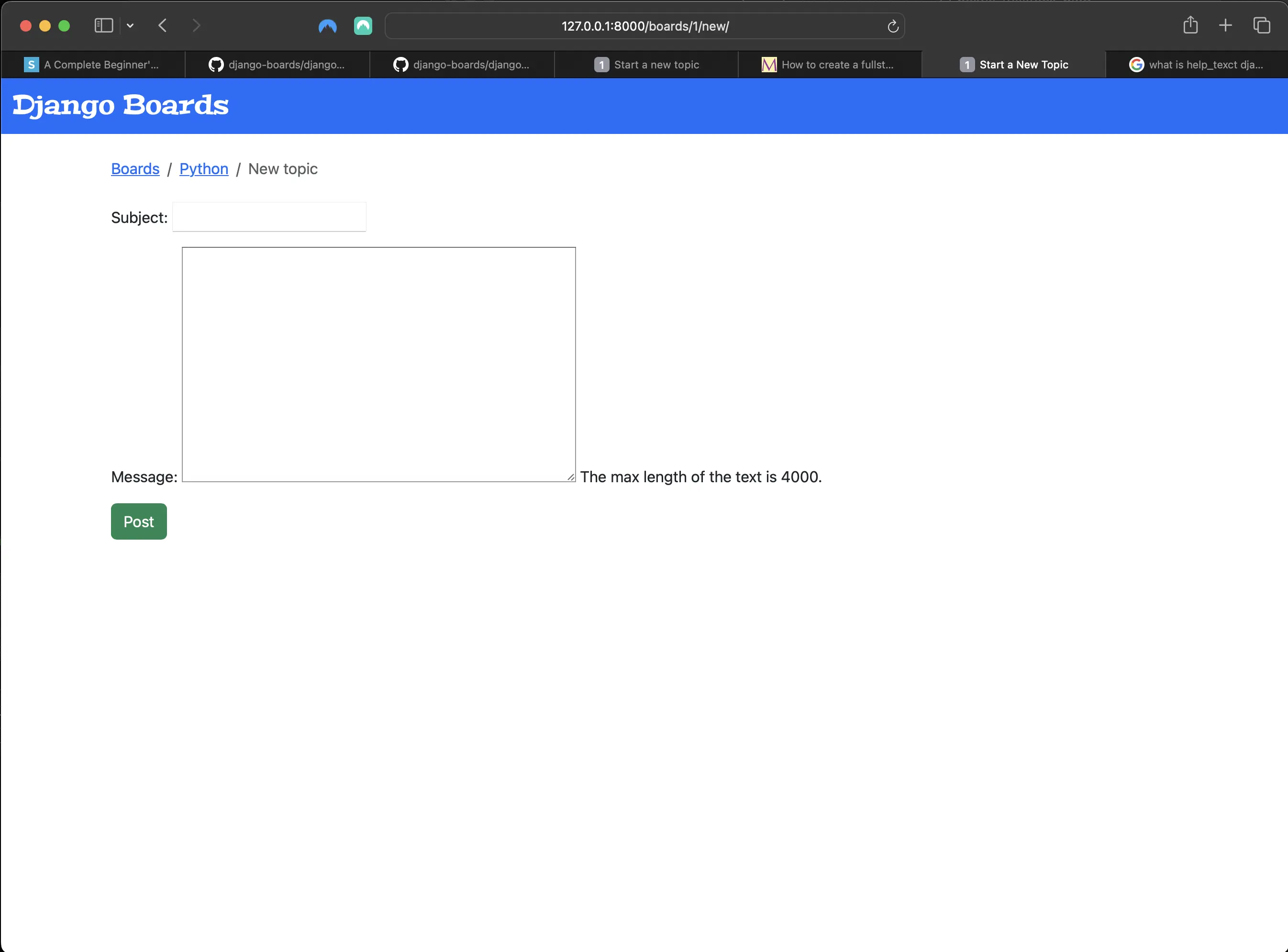
topic_view with Textarea widget help_text
I can also set extra attributes to a form field:
# in forms.py
from django import forms
from .models import Topic


class NewTopicForm(forms.ModelForm):
    message = forms.CharField(
        widget=forms.Textarea(
            # added
            attrs={"rows": 5, "placeholder": "What is on your mind?"}
        ),
        max_length=4000,
        help_text="The max length of the text is 4000.",
    )

    class Meta:
        model = Topic
        fields = ["subject", "message"]
With this addition, the NewTopicForm in the new_topic view looks like the following:
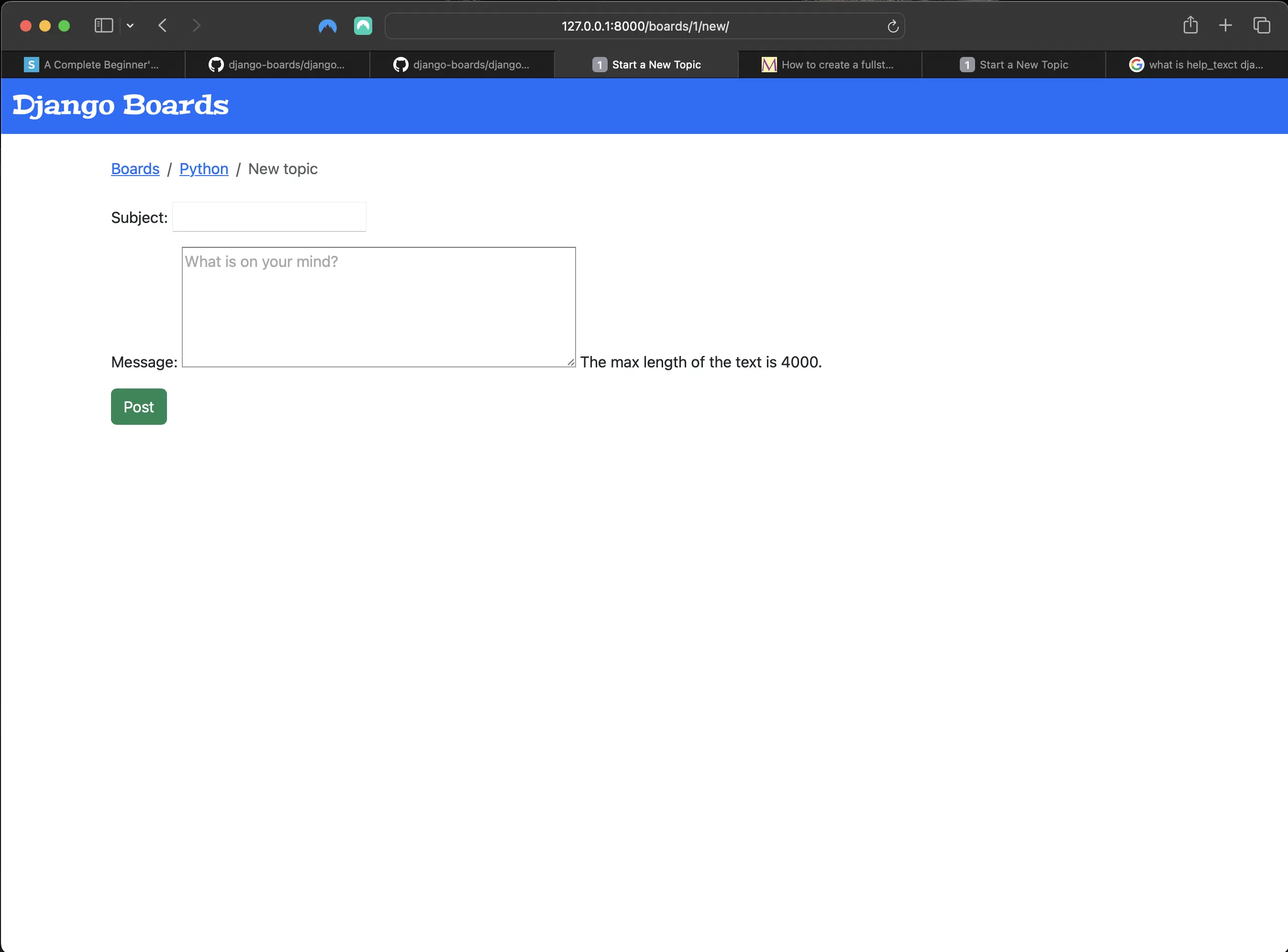
Adding placeholder attribute and value to Textarea widget
Rendering Bootstrap Form Styling
Installing and using django-widget-tweaks with Bootstrap
Next, I am going to install a Django package called django-widget-tweaks. It gives me more control over the rendering process, keeps the form defaults and adds extra customizations on top of it:
# install django-widget-tweaks in Terminal with the following command:
python3 -m pip install django-widget-tweaks
Then I have to make sure to add django-widget-tweaks to INSTALLED_APPS in settings.py:
# in django_boards/settings.py
INSTALLED_APPS = [
    'django.contrib.admin',
    'django.contrib.auth',
    'django.contrib.contenttypes',
    'django.contrib.sessions',
    'django.contrib.messages',
    'django.contrib.staticfiles',
    'boards.apps.BoardsConfig',
    'dotenv',
    'pylint',
    'graphviz',
    'djlint',
    'coverage',
    'widget_tweaks',
]
Now let's use django-widget-tweaks in templates/new_topic.html:
<!-- templates/new_topic.html -->
{% extends "base.html" %}

{% block title %}Start a New Topic{% endblock title %}

{% block breadcrumb %}
  <li class="breadcrumb-item"><a href="{% url 'index' %}">Boards</a></li>
  <li class="breadcrumb-item"><a href="{% url 'board_topics' board.id %}">{{ board.name }}</a></li>
  <li class="breadcrumb-item active">New Topic</li>
{% endblock breadcrumb %}

{% block content %}
{% load widget_tweaks %}
  <form method="post" novalidate>
    {% csrf_token %}

    {% for field in form %}
      <div class="form-group">
        {{ field.label_tag }}

        {% render_field field class="form-control" %}

        {% if field.help_text %}
          <small class="form-text text-muted">
            {{ field.help_text }}
          </small>
        {% endif %}
      </div>
    {% endfor %}

    <button type="submit" class="btn btn-success">Post</button>
  </form>
{% endblock %}
Let's go to the browser and see what my new_topic view looks like:
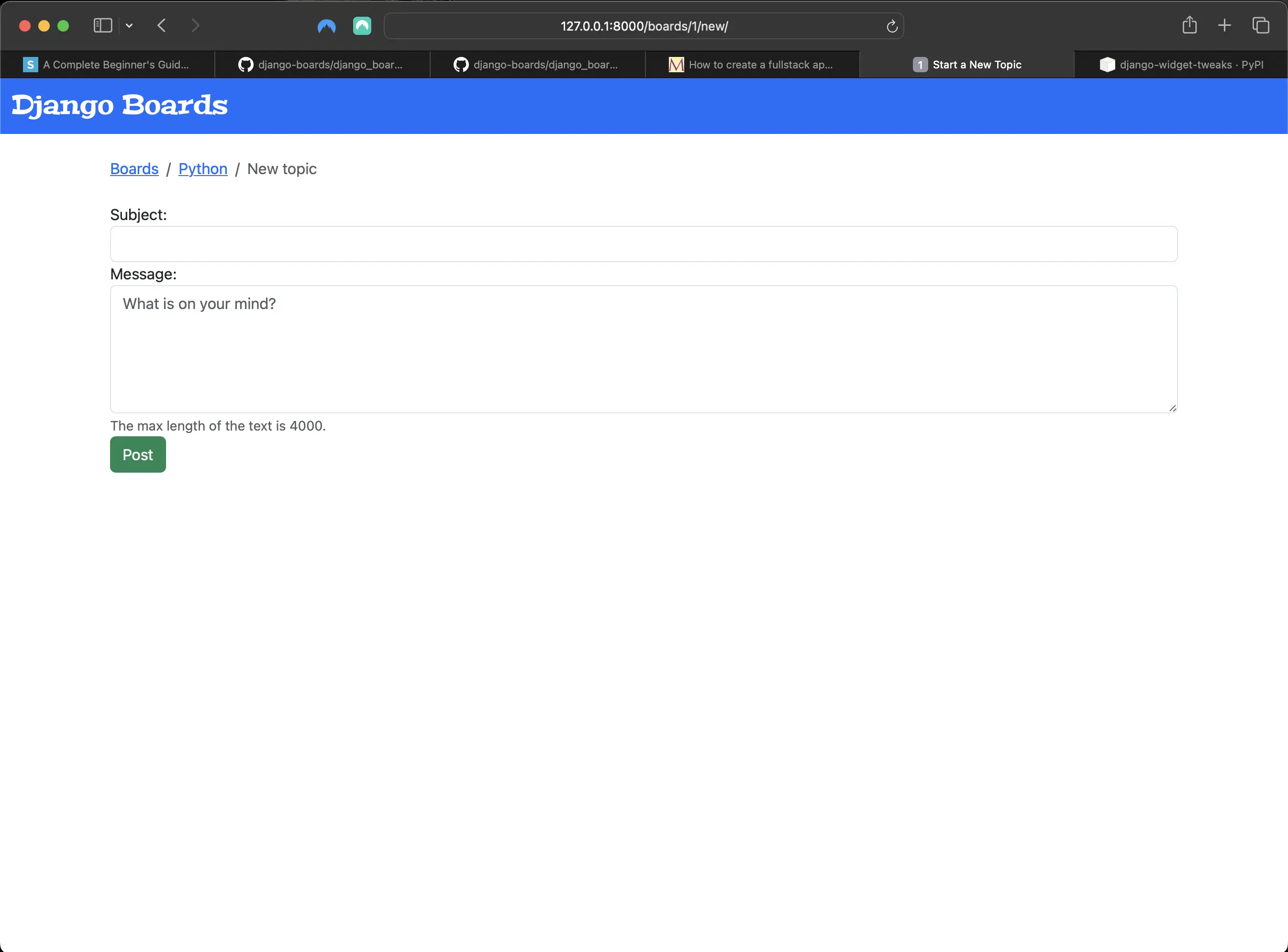
Result of using django-widget-tweaks on the NewTopicForm
Breaking down the addition of django-widget-tweaks in templates/new_topic.html
- First I load django-widget-tweaks with the {% load widget_tweaks %} tag, located right above the opening form tag.
- Then I render the form fields inside the for in loop with the {% render_field field class="form-control" %} tag.
The render_field is not part of Django. It lives inside django-widget-tweaks. To use it, I have to pass a form field instance as a first parameter, followed by arbitrary HTML attributes. Then I can assign classes based on certain conditions.
Implementing Bootstrap validation tags in templates/new_topic.html
<!-- templates/new_topic.html -->
{% extends "base.html" %}

{% block title %}Start a New Topic{% endblock title %}

{% block breadcrumb %}
  <li class="breadcrumb-item"><a href="{% url 'index' %}">Boards</a></li>
  <li class="breadcrumb-item"><a href="{% url 'board_topics' board.id %}">{{ board.name }}</a></li>
  <li class="breadcrumb-item active">New Topic</li>
{% endblock breadcrumb %}

{% block content %}
{% load widget_tweaks %}
  <form method="post" novalidate>
    {% csrf_token %}

    {% for field in form %}
      <div class="form-group">
        {{ field.label_tag }}
        {% if form.is_bound %}
          {% if field.errors %}

            {% render_field field class="form-control is-invalid" %}
            {% for error in field.errors %}
            <div class="invalid-feedback">
              {{ error }}
            </div>
            {% endfor %}

          {% else %}
            {% render_field field class="form-control is-valid" %}
          {% endif %}
        {% else %}
          {% render_field field class="form-control" %}
        {% endif %}

        {% if field.help_text %}
          <small class="form-text text-muted">
            {{ field.help_text }}
          </small>
        {% endif %}
      </div>
    {% endfor %}

    <button type="submit" class="btn btn-success">Post</button>
  </form>
{% endblock content %}
These changes result in the following when I try and submit an empty form:
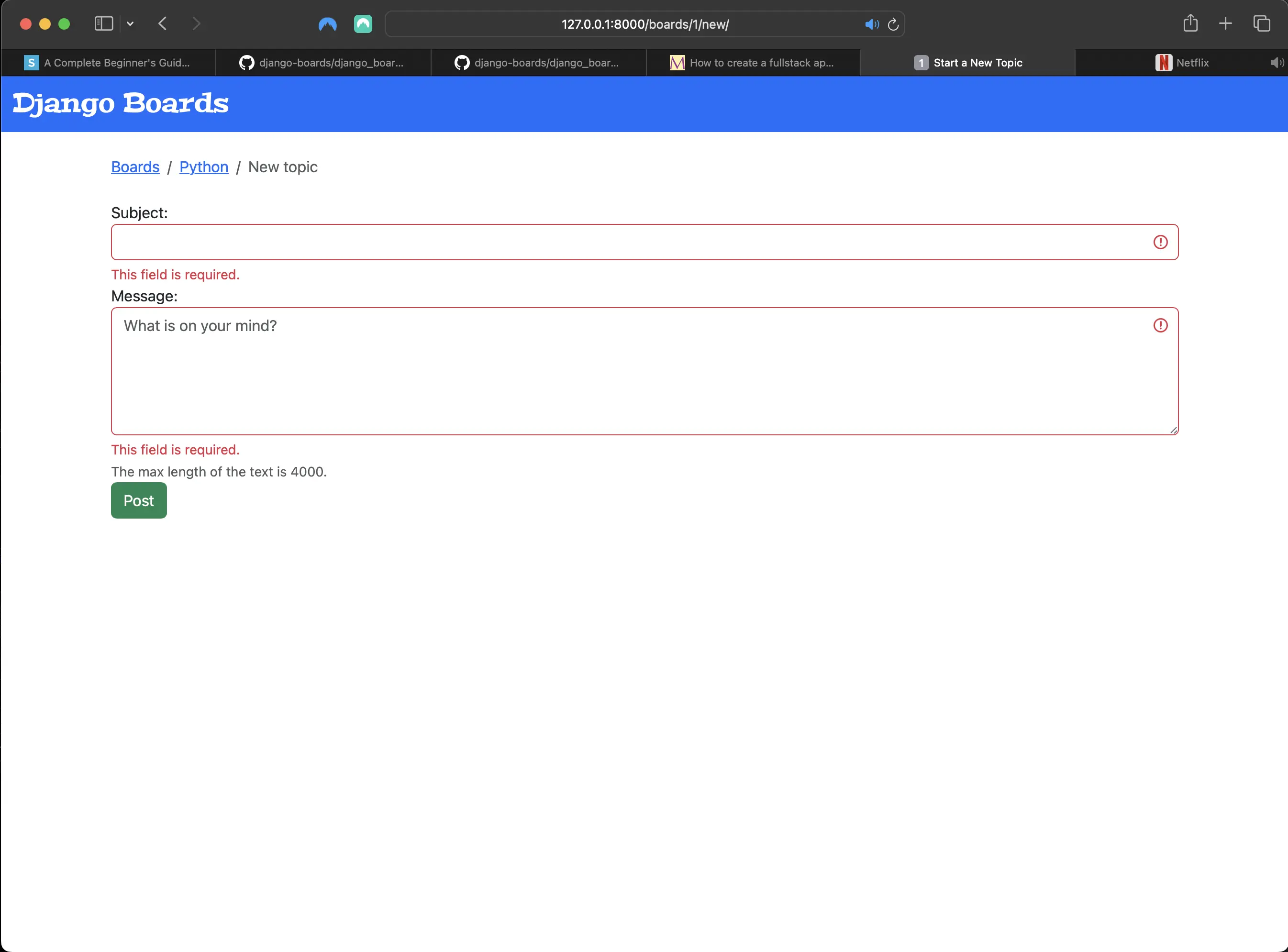
Result when trying to submit an empty form
Result when trying to submit an empty message
Now I have three different rendering states:
- initial state: the form has no data (not bound)
- invalid: I add the .is-invalid CSS class and add error messages in a div element with the .invalid-feedback class. The form field and messages are in red.
- valid: I add the .is-valid CSS class so as to color the form field in green, giving feedback to the user that the field is good to go.
Re-usable forms templates
Next, inside the templates directory, I create a new directory called "includes".
Inside the includes directory, I create a file called form.html:
<!-- templates/includes/form.html -->
{% load widget_tweaks %}

{% for field in form %}
  <div class="form-group">
    {{ field.label_tag }}

    {% if form.is_bound %}
      {% if field.errors %}
        {% render_field field class="form-control is-invalid" %}
        {% for error in field.errors %}
          <div class="invalid-feedback">
            {{ error }}
          </div>
        {% endfor %}
      {% else %}
        {% render_field field class="form-control is-valid" %}
      {% endif %}
    {% else %}
      {% render_field field class="form-control" %}
    {% endif %}

    {% if field.help_text %}
      <small class="form-text text-muted">
        {{ field.help_text }}
      </small>
    {% endif %}
  </div>
{% endfor %}
Updating templates/new_topic.html
<!-- templates/new_topic.html -->
{% extends "base.html" %}

{% block title %}Start a New Topic{% endblock title %}

{% block breadcrumb %}
  <li class="breadcrumb-item"><a href="{% url 'index' %}">Boards</a></li>
  <li class="breadcrumb-item"><a href="{% url 'board_topics' board.id %}">{{ board.name }}</a></li>
  <li class="breadcrumb-item active">New Topic</li>
{% endblock breadcrumb %}

{% block content %}
  <form method="post" novalidate>
    {% csrf_token %}
    {% include "includes/form.html" %}
    <button type="submit" class="btn btn-success">Post</button>
  </form>
{% endblock content %}
The {% include %} tag is used to include HTML templates in other templates. It's a good way to reuse HTML components in a project.
In the next form I implement, I can just use {% include 'includes/form.html' %} to render it.
Adding more tests to NewTopicTests
# boards/tests.py
from .forms import NewTopicForm # added

class NewTopicTests(TestCase):
...
    def test_contains_form(self):
        url = reverse('new_topic', kwargs={'id': 1})
        response = self.client.get(url)
        form = response.context.get('form')
        self.assertIsInstance(form, NewTopicForm)

    def test_new_topic_invalid_post_data(self):
        '''
        Invalid post data should not redirect
        The expected behavior is to show the form again with validatiron errors
        '''
        url = reverse('new_topic', kwargs={'id': 1})
        response = self.client.post(url, {})
        form = response.context.get('form')
        self.assertEqual(response.status_code, 200)
        self.assertTrue(form.errors)
Above, I use .assertIsInstance() method. I am grabbing the form instance in the context data, and checking if it is a NewTopicForm.
In the last test, I add self.assertTrue(form.errors) to make sure the form is showing errors when the data is invalid.
The response context attribute
The response in test_contains_form() and test_new_topic_invalid_post_data() has a context attribute that contains the context used to render the form.html template.
The last two tests check whether a given request is rendered by a given Django template, with a template context that contains certain values (form = response.context.get('form')).
Code associated with this post
To view the code associated with this post, please visit 0b48bdd and 2f168df.
Conclusion
In this section, I talk about how to save user input to the database, build a NewTopicForm, create a new route called new_topic, a new_topic view, a new_topic form template, NewTopicTests, implement the CSRF csrf_token in the form, update topics.html template to include a listing of all topics, create a button going to the new_topic view in topics.html, add Model Meta to NewTopicForm, refactor boards/views.py to include form validation, use the Forms API in new_topic.html, add the help_text attribute to the Textarea widget in forms.py, use django-widget-tweaks with Bootstrap, implement Bootstrap validation tags in new_topic.html, and create a re-usable form template.
Related Resources
- Django Boards repository on GitHub
- How to use Django’s CSRF protection: Official Django Documentation
- Model Meta options: Official Django Documentation
- Form and field validation: Official Django Documentation
- Form fields: Official Django Documentation
- Settings: Official Django documentation
- TIL: Django has a field limit: abenezer.ca