How to create a fullstack application using Django and Python Part 19
Social Share:
Friday, September 20, 2024 at 9:56 AM | 17 min read
Last modified on Thursday, July 16, 2026 at 12:11 PM
#fullstack development, #macOS, #django, #annotate, #login redirect, #protecting views, #python3, #queryset, #series, #tests, #unittest

_Photo by Chittima Stanmore on unsplash.com_
Important Note: Before committing anything to Git or pushing anything to remote, please visit How to create a fullstack application using Django and Python Part 4 where I discuss how to add the python-dotenv package to the Django site and why it is crucial to do it. This article assumes you have a working knowledge of Git.
Table of Contents
- How to protect views
- Configuring the login next redirect
- @login_required tests
- Accessing the authenticated user
- The topic posts view
- The reply post view
- Update the return redirect of the new_topic view function
- First version of templates/reply_topic.html (without likes or links)
- Making the starter post more prominent on the page
- boards/tests/test_reply_topic_test_case.py
- boards/tests/test_login_required_reply_topic_tests.py
- boards/tests/test_reply_topic_tests.py
- boards/tests/test_successful_reply_topic_tests.py
- boards/tests/test_invalid_reply_topic_tests.py
- QuerySets
- Experimenting with the Python shell
- boards/models.py
- Adding the posts count, topics count, and latest post to the index/home view
- Running the tests to include the new ReplyTopic related tests
- Improving the topics view
- Updating the board_topics in boards/views.py
- Updating templates/topics.html
- Adding a new field to the Topic model
- Running makemigrations and migrate
- app.css
- Code associated with this post
- Conclusion
- Related Resources
- Related Posts
Update (July 2026): This walkthrough was written against Django 5.1, which reached full end-of-life in December 2025 and is no longer receiving security patches. Run python -m django --version to check which version you have.
I wrote this series as a live process, so sometimes it might seem confusing, but it all works out in the end.
How to protect views
I have to start protecting my views from non-authorized users. For example, I have the new_topic view for starting a new topic post:
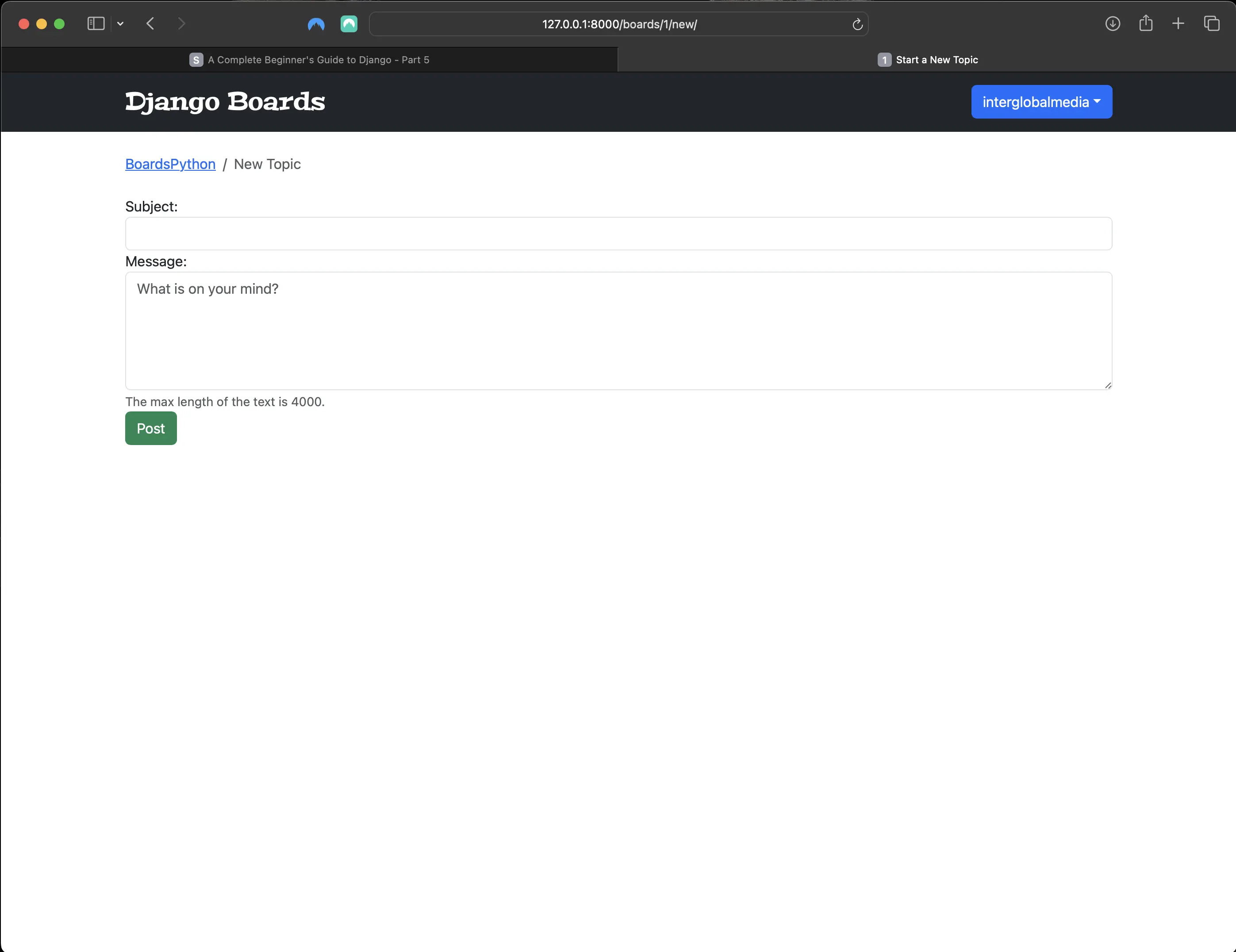
The unprotected new_topic view
Django has a built-in decorator to prevent unauthorized users from being able to access views only meant for logged in users:
# boards/views.py
from django.shortcuts import render, redirect, get_object_or_404
from django.contrib.auth.models import User
from django.contrib.auth.decorators import login_required
from .forms import NewTopicForm
from .models import Board, Topic, Post


# Create your views here.
def index(request):
    boards = Board.objects.all()
    return render(request, "index.html", {"boards": boards})


def board_topics(request, id):
    board = get_object_or_404(Board, id=id)
    return render(request, "topics.html", {"board": board})

@login_required
def new_topic(request, id):
    board = get_object_or_404(Board, id=id)
    user = User.objects.first()  # TODO: get the currently logged in user
    if request.method == 'POST':
        form = NewTopicForm(request.POST)
        if form.is_valid():
            topic = form.save(commit=False)
            topic.board = board
            topic.starter = user
            topic.save()
            post = Post.objects.create(
                message=form.cleaned_data.get('message'),
                topic=topic,
                created_by=user
            )
            return redirect('board_topics', id=board.id)  # TODO: redirect to the created topic page
    else:
        form = NewTopicForm()
    return render(request, 'new_topic.html', {'board': board, 'form': form})
From now on, if the user is not authenticated, they will be redirected to the login page.
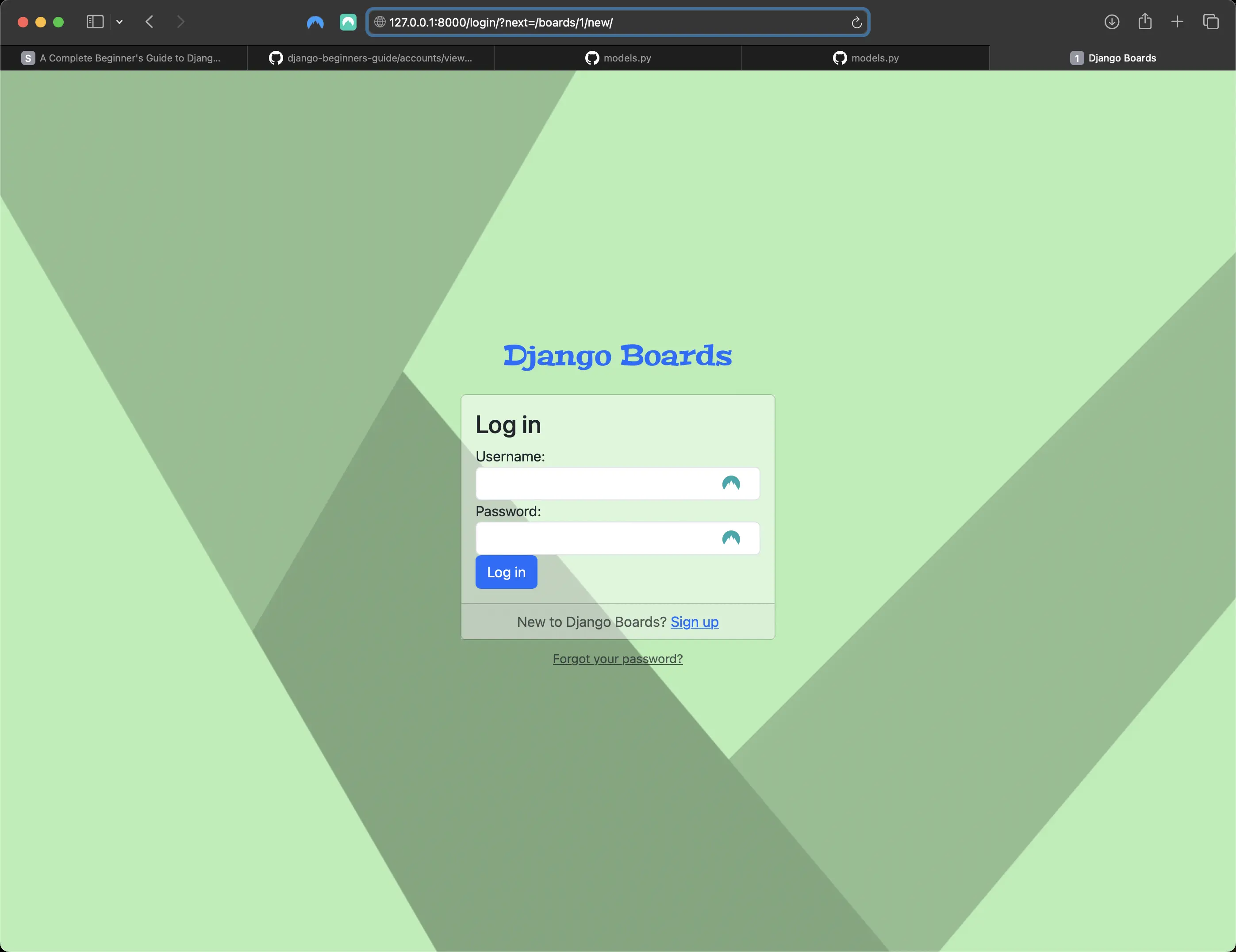
Unauthorized user redirect to login page
Notice the http://127.0.0.1:8000/login/?next=/boards/1/new/ URL in the browser? I am going to improve upon the user experience by taking advantage of the Django next redirect variable and improving upon the login template as well.
Configuring the login next redirect
templates/login.html
<!-- templates/login.html -->
{% extends "base_accounts.html" %}

{% load static %}

{% block stylesheet %}
  <link rel="stylesheet" href="{% static 'css/accounts.css' %}">
{% endblock stylesheet %}

{% block body %}
  <div class="container">
    <h1 class="text-center logo my-4">
      <a href="{% url 'index' %}">Django Boards</a>
    </h1>
    <div class="row justify-content-center">
      <div class="col-lg-4 col-md-6 col-sm-8">
        <div class="card">
          <div class="card-body">
            <h3 class="card-title">Log in</h3>
            <form method="post" novalidate>
              {% csrf_token %}
              <input type="hidden" name="next" value="{{ next }}">
              {% include "includes/form.html" %}
              <button type="submit" class="btn btn-primary btn-block">Log in</button>
            </form>
          </div>
          <div class="card-footer text-muted text-center">
            New to Django Boards? <a href="{% url 'signup' %}">Sign up</a>
          </div>
        </div>
        <div class="text-center py-2">
          <small>
            <a href="#" class="text-muted">Forgot your password?</a>
          </small>
        </div>
      </div>
    </div>
  </div>
{% endblock body %}
if I try to login now after being redirected to the login page, I will be taken back (in this case) to the protected new_topic view:
Taken back to the new_topic view after logging in
@login_required tests
boards/tests/test_login_required_new_topic_tests.py
# boards/tests/test_login_required_new_topic_tests.py
from django.test import TestCase
from django.urls import reverse
from ..models import Board

class LoginRequiredNewTopicTests(TestCase):
    def setUp(self):
        Board.objects.create(name='Django', description='Django board.')
        self.url = reverse('new_topic', kwargs={'id': 1})
        self.response = self.client.get(self.url)

    def test_redirection(self):
        login_url = reverse('login')
        self.assertRedirects(self.response, '{login_url}?next={url}'.format(login_url=login_url, url=self.url))
In the test(s) above, I am trying to make a request to the new_topic view without being authenticated. The expected result is for the request to be redirected to the login view.
Accessing the authenticated user
# boards/views.py
from django.shortcuts import render, redirect, get_object_or_404
from django.contrib.auth.models import User
from django.contrib.auth.decorators import login_required
from .forms import NewTopicForm
from .models import Board, Topic, Post


# Create your views here.
def index(request):
    boards = Board.objects.all()
    return render(request, "index.html", {"boards": boards})


def board_topics(request, id):
    board = get_object_or_404(Board, id=id)
    return render(request, "topics.html", {"board": board})

@login_required
def new_topic(request, id):
    board = get_object_or_404(Board, id=id)
    if request.method == 'POST':
        form = NewTopicForm(request.POST)
        if form.is_valid():
            topic = form.save(commit=False)
            topic.board = board
            topic.starter = request.user  # <- here
            topic.save()
            Post.objects.create(
                message=form.cleaned_data.get('message'),
                topic=topic,
                created_by=request.user  # <- and here
            )
            return redirect('board_topics', id=board.id)  # TODO: redirect to the created topic page
    else:
        form = NewTopicForm()
    return render(request, 'new_topic.html', {'board': board, 'form': form})
I can test this by creating a new topic:
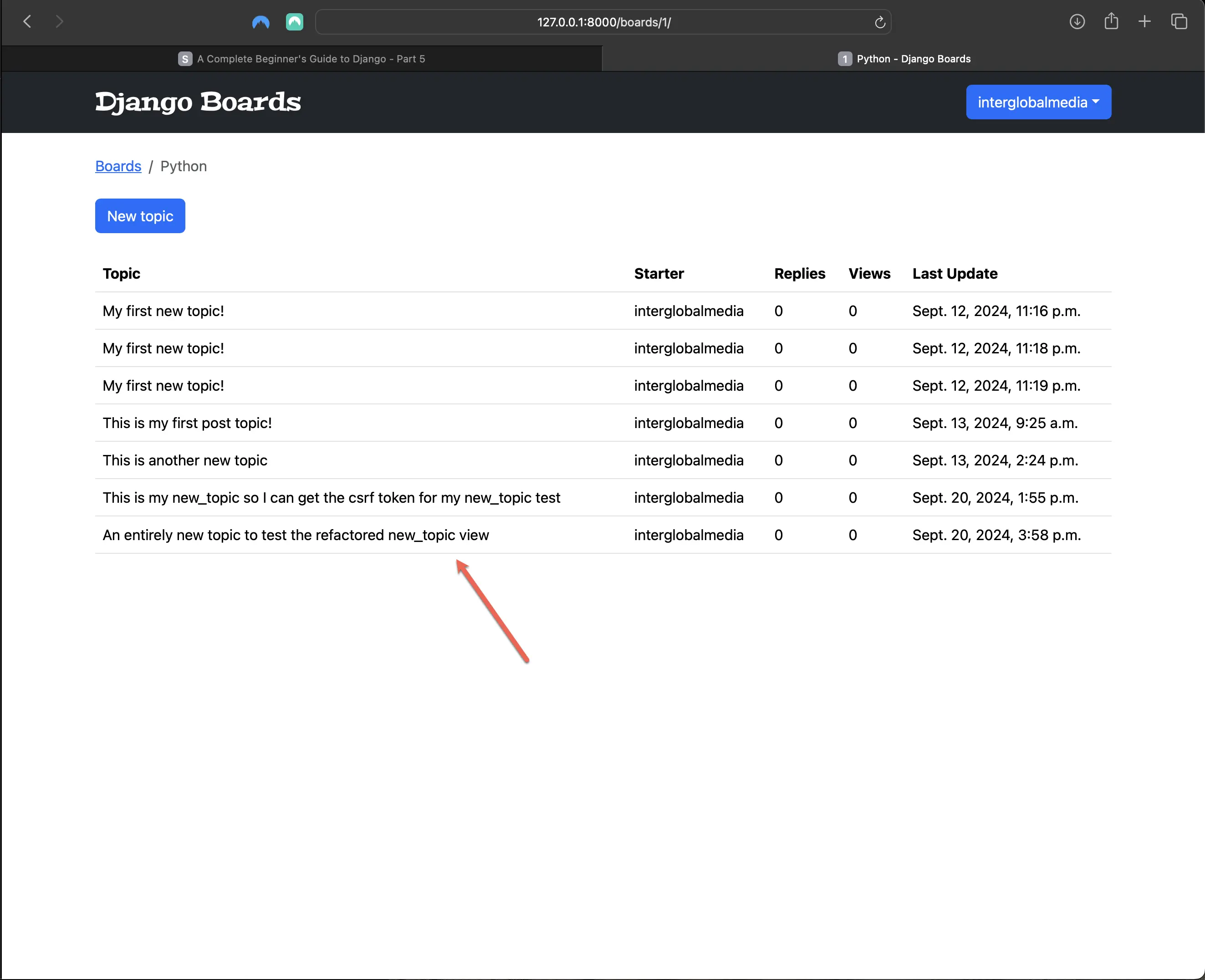
Creating a new topic using refactored new_topic view
The topic posts view
Let’s implement the posts listing page, according to the wireframe below:
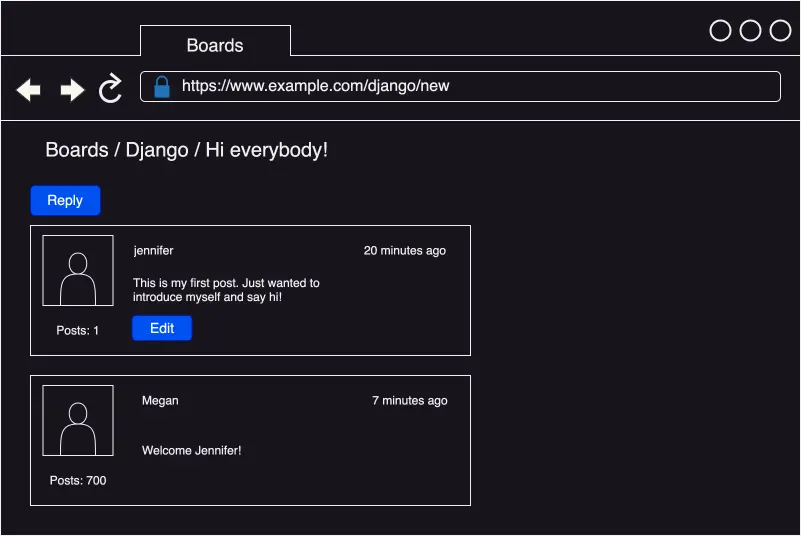
Boards app wireframe new topic posts and replies
- First, I need a route:
# django_boards/urls.py
path('boards/<id>/topics/<topic_id>/', views.topic_posts, name='topic_posts'),
I am now dealing with two keyword args. id is used to identify the Board, and topic_id is used to identify which topic to get from the database.
The matching view inside boards/views.py is the following:
# boards/views.py
def topic_posts(request, id, topic_id):
    topic = get_object_or_404(Topic, board__id=id, id=topic_id)
    return render(request, 'topic_posts.html', {'topic': topic})
I am indirectly getting the current board. The topic model is related to the board model, so I can access the current board.
Creating the templates/topic_posts.html
<!-- templates/topic_posts.html -->
{% extends "base.html" %}
{% block title %}
  {{ topic.subject }}
{% endblock title %}
{% block breadcrumb %}
  <li class="breadcrumb-item">
    <a href="{% url 'index' %}">Boards</a>
  </li>
  <li class="breadcrumb-item">
    <a href="{% url 'board_topics' topic.board.id %}">{{ topic.board.name }}</a>
  </li>
  <li class="breadcrumb-item active">{{ topic.subject }}</li>
{% endblock breadcrumb %}
{% block content %}
{% endblock content %}
Now I am using topic.board.name instead of board.name.
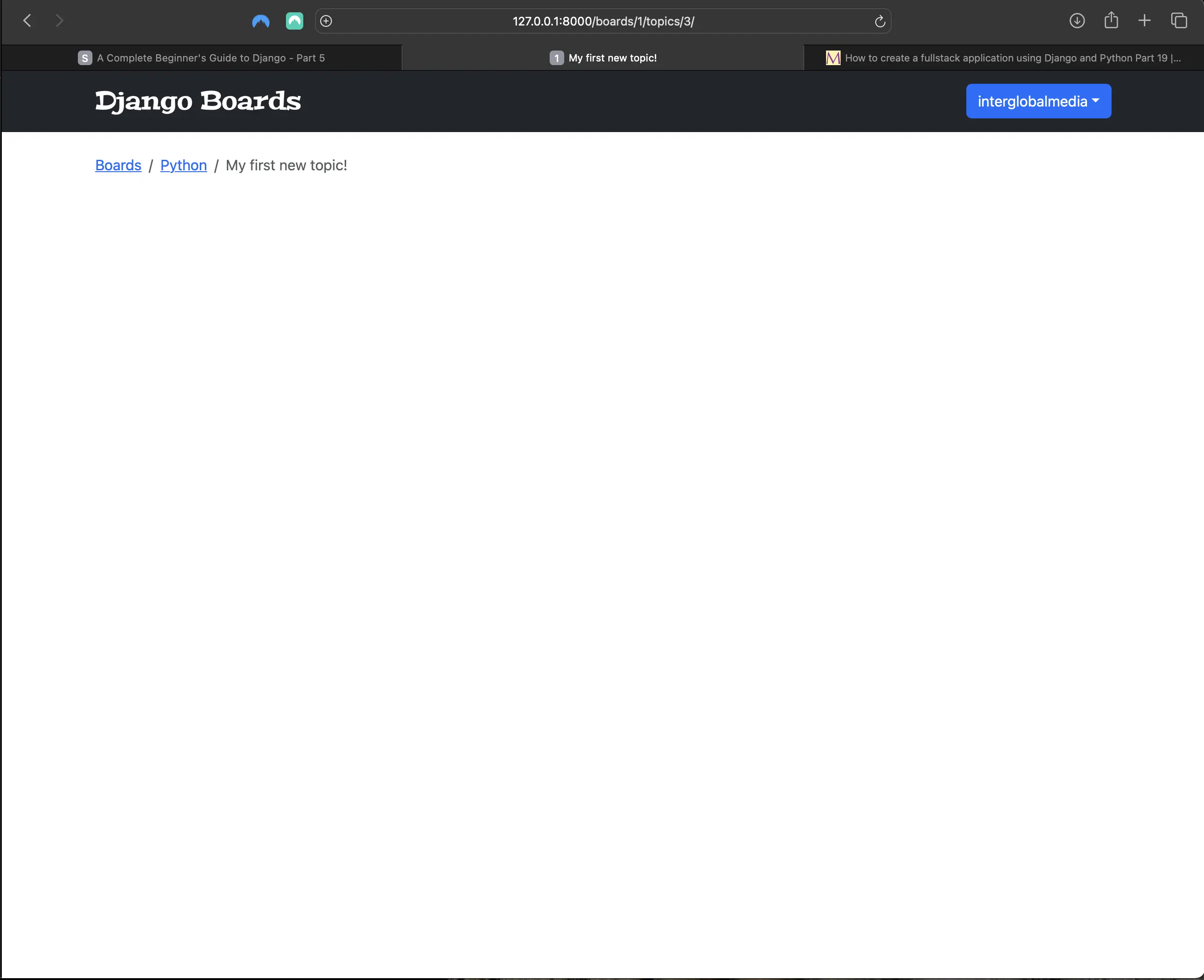
Empty topic_posts view
boards/tests/test_topic_posts_tests.py
# boards/tests/test_topic_posts_tests.py
from django.contrib.auth.models import User
from django.test import TestCase
from django.urls import resolve, reverse

from ..models import Board, Post, Topic
from ..views import topic_posts

class TopicPostsTests(TestCase):
    def setUp(self):
        board = Board.objects.create(name='Django', description='Django board.')
        user = User.objects.create_user(username='john', email='john@doe.com', password='123')
        topic = Topic.objects.create(subject='Hello, world', board=board, starter=user)
        Post.objects.create(message='Lorem ipsum dolor sit amet', topic=topic, created_by=user)
        url = reverse('topic_posts', kwargs={'id': board.id, 'topic_id': topic.id})
        self.response = self.client.get(url)

    def test_status_code(self):
        self.assertEqual(self.response.status_code, 200)

    def test_view_function(self):
        view = resolve('/boards/1/topics/1/')
        self.assertEqual(view.func, topic_posts)
Creating a for loop to iterate over topic posts in topic_posts.html
<!-- templates/topic_posts.html -->
{% extends "base.html" %}
{% load static %}
{% block title %}
  {{ topic.subject }}
{% endblock title %}
{% block breadcrumb %}
  <li class="breadcrumb-item">
    <a href="{% url 'index' %}">Boards</a>
  </li>
  <li class="breadcrumb-item">
    <a href="{% url 'board_topics' topic.board.id %}">{{ topic.board.name }}</a>
  </li>
  <li class="breadcrumb-item active">{{ topic.subject }}</li>
{% endblock breadcrumb %}
{% block content %}
  <div class="mb-4">
    <a href="#" class="btn btn-primary" role="button">Reply</a>
  </div>
  {% for post in topic.posts.all %}
    <div class="card mb-2">
      <div class="card-body p-3">
        <div class="row">
          <div class="col-2">
            <img src="{% static 'img/avatar.svg' %}"
                 alt="{{ post.created_by.username }}"
                 height="100"
                 width="100"
                 class="w-100">
            <small>Posts: {{ post.created_by.posts.count }}</small>
          </div>
          <div class="col-10">
            <div class="row mb-3">
              <div class="col-6">
                <strong class="text-muted">{{ post.created_by.username }}</strong>
              </div>
              <div class="col-6 text-right">
                <small class="text-muted">{{ post.created_at }}</small>
              </div>
            </div>
            {{ post.message }}
            {% if post.created_by == user %}
              <div class="mt-3">
                <a href="#" class="btn btn-primary btn-sm" role="button">Edit</a>
              </div>
            {% endif %}
          </div>
        </div>
      </div>
    </div>
  {% endfor %}
{% endblock content %}
This is how the topic_posts.html looks like in the browser:
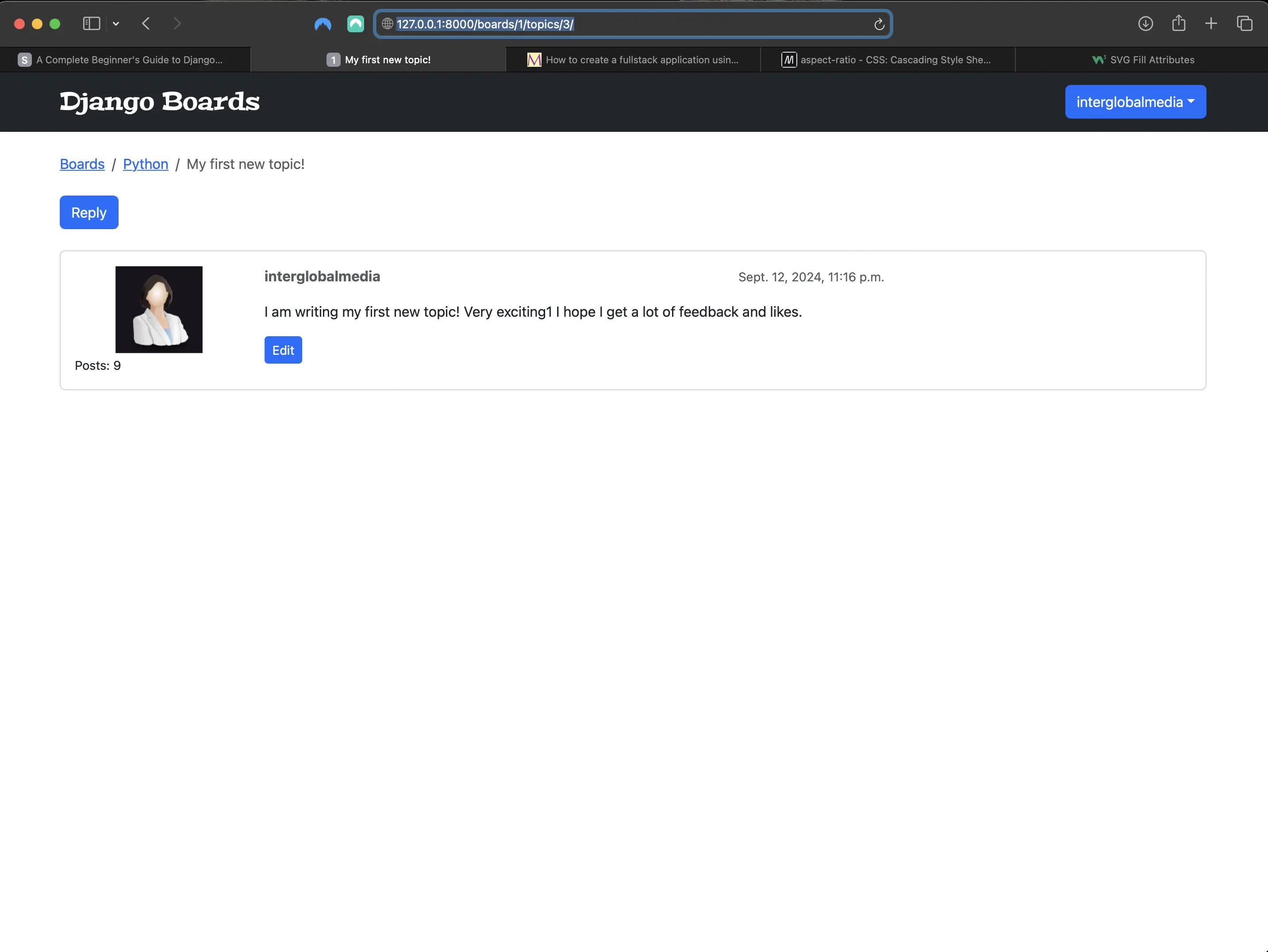
topic_posts view with a user response
Since I don't have a way of uploading images yet, I manually added an image to the static/img/ directory. I created it using draw.io and saved it as an svg.
The code {{ post.created_by.posts.count }} is executing a select count in the database (Posts: 9).
I am also testing if the current post belongs to the authenticated user: {% if post.created_by == user %}, and only the author of the post is able to see the edit button.
This is also where I would add the post likes and links: alongside the reply button. I will get back to this later.
Updating the topics.html template with URL to the topic posts listing
<!-- templates/topics.html -->
{% extends "base.html" %}
{% block title %}
  {{ board.name }} - {{ block.super }}
{% endblock title %}
{% block breadcrumb %}
  <li class="breadcrumb-item">
    <a href="{% url 'index' %}">Boards</a>
  </li>
  <li class="breadcrumb-item active">{{ board.name }}</li>
{% endblock breadcrumb %}
{% block content %}
  <div class="mb-4">
    <a href="{% url 'new_topic' board.id %}" class="btn btn-primary">New topic</a>
  </div>
  <table class="table">
    <thead class="thead-inverse">
      <tr>
        <th>Topic</th>
        <th>Starter</th>
        <th>Replies</th>
        <th>Views</th>
        <th>Last Update</th>
      </tr>
    </thead>
    <tbody>
      {% for topic in board.topics.all %}
        <tr>
          <td>
            <a href="{% url 'topic_posts' board.id topic.id %}">{{ topic.subject }}</a>
          </td>
          <td>{{ topic.starter.username }}</td>
          <td>0</td>
          <td>0</td>
          <td>{{ topic.last_updated }}</td>
        </tr>
      {% endfor %}
    </tbody>
  </table>
{% endblock content %}
The reply post view
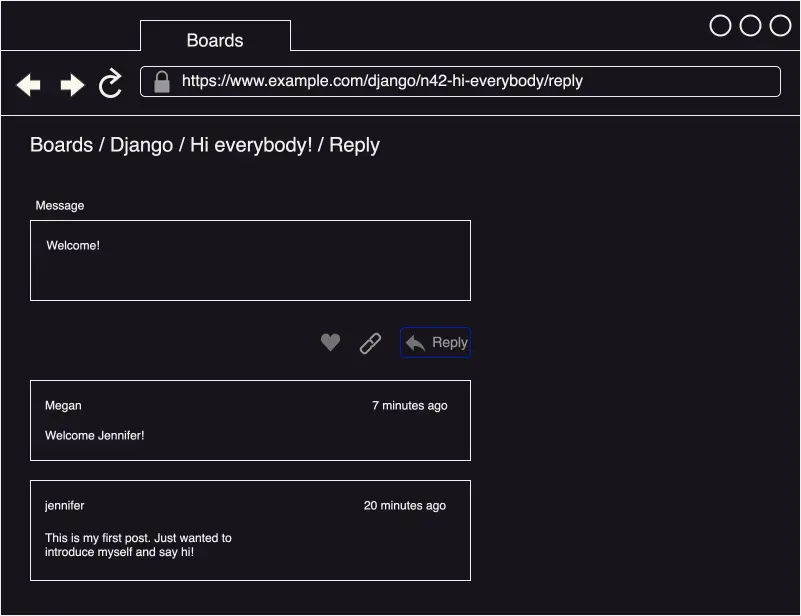
The reply post view
Adding the post reply URL to django_boards/urls.py
# django_boards/urls.py
# place this url right above the admin/ route
path('boards/<id>/topics/<topic_id>/reply/', views.reply_topic, name='reply_topic')
Creating a form for the post reply in boards/forms.py
# boards/forms.py
from django import forms
from .models import Topic
from .models import Post # added

class NewTopicForm(forms.ModelForm):
    message = forms.CharField(
        widget=forms.Textarea(
            attrs={"rows": 5, "placeholder": "What is on your mind?"}
        ),
        max_length=4000,
        help_text="The max length of the text is 4000.",
    )

    class Meta:
        model = Topic
        fields = ["subject", "message"]

class PostForm(forms.ModelForm): # added
    class Meta:
        model = Post
        fields = ['message', ]
And now I protect the reply_topic view in boards/views.py:
# boards/views.py
@login_required
def reply_topic(request, id, topic_id):
    topic = get_object_or_404(Topic, board__id=id, id=topic_id)
    if request.method == 'POST':
        form = PostForm(request.POST)
        if form.is_valid():
            post = form.save(commit=False)
            post.topic = topic
            post.created_by = request.user
            post.save()
            return redirect('topic_posts', id=id, topic_id=topic_id)
    else:
        form = PostForm()
    return render(request, 'reply_topic.html', {'topic': topic, 'form': form})
Update the return redirect of the new_topic view function
Next, I have to update the return redirect of the new_topic view function (marked with the comment # TODO):
@login_required
def new_topic(request, id):
    board = get_object_or_404(Board, id=id)
    if request.method == 'POST':
        form = NewTopicForm(request.POST)
        if form.is_valid():
            topic = form.save(commit=False)
            topic.board = board
            topic.starter = request.user  # <- here
            topic.save()
            Post.objects.create(
                message=form.cleaned_data.get('message'),
                topic=topic,
                created_by=request.user,  # <- and here
                post_liked_by = request.user # added
            )
            return redirect('topic_posts', id=id, topic_id=topic.id)  # redirect to the created topic (topic_posts) page
    else:
        form = NewTopicForm()
    return render(request, 'new_topic.html', {'board': board, 'form': form})
It's important to note that in the reply_topic view, I am using topic_id, because I am referring to the keyword argument of the function. In the new_topic view, I am using topic.id, because topic is an object (a Topic model instance), and with .id I am accessing the id property of the Topic model instance.
First version of templates/reply_topic.html (without likes or links)
<!-- templates/reply_topic.html -->
{% extends "base.html" %}
{% load static %}
{% block title %}
  Post a reply
{% endblock title %}
{% block breadcrumb %}
  <li class="breadcrumb-item">
    <a href="{% url 'index' %}">Boards</a>
  </li>
  <li class="breadcrumb-item">
    <a href="{% url 'board_topics' topic.board.id %}">{{ topic.board.name }}</a>
  </li>
  <li class="breadcrumb-item">
    <a href="{% url 'topic_posts' topic.board.id topic.id %}">{{ topic.subject }}</a>
  </li>
  <li class="breadcrumb-item active">Post a reply</li>
{% endblock breadcrumb %}
{% block content %}
  <form method="post" class="mb-4">
    {% csrf_token %}
    {% include "includes/form.html" %}
    <button type="submit" class="btn btn-success">Post a reply</button>
  </form>
  {% for post in topic.posts.all %}
    <div class="card mb-2">
      <div class="card-body p-3">
        <div class="row mb-3">
          <div class="col-6">
            <strong class="text-muted">{{ post.created_by.username }}</strong>
          </div>
          <div class="col-6 text-right">
            <small class="text-muted">{{ post.created_at }}</small>
          </div>
        </div>
        {{ post.message }}
      </div>
    </div>
  {% endfor %}
{% endblock content %}
Which looks like the following in the browser:
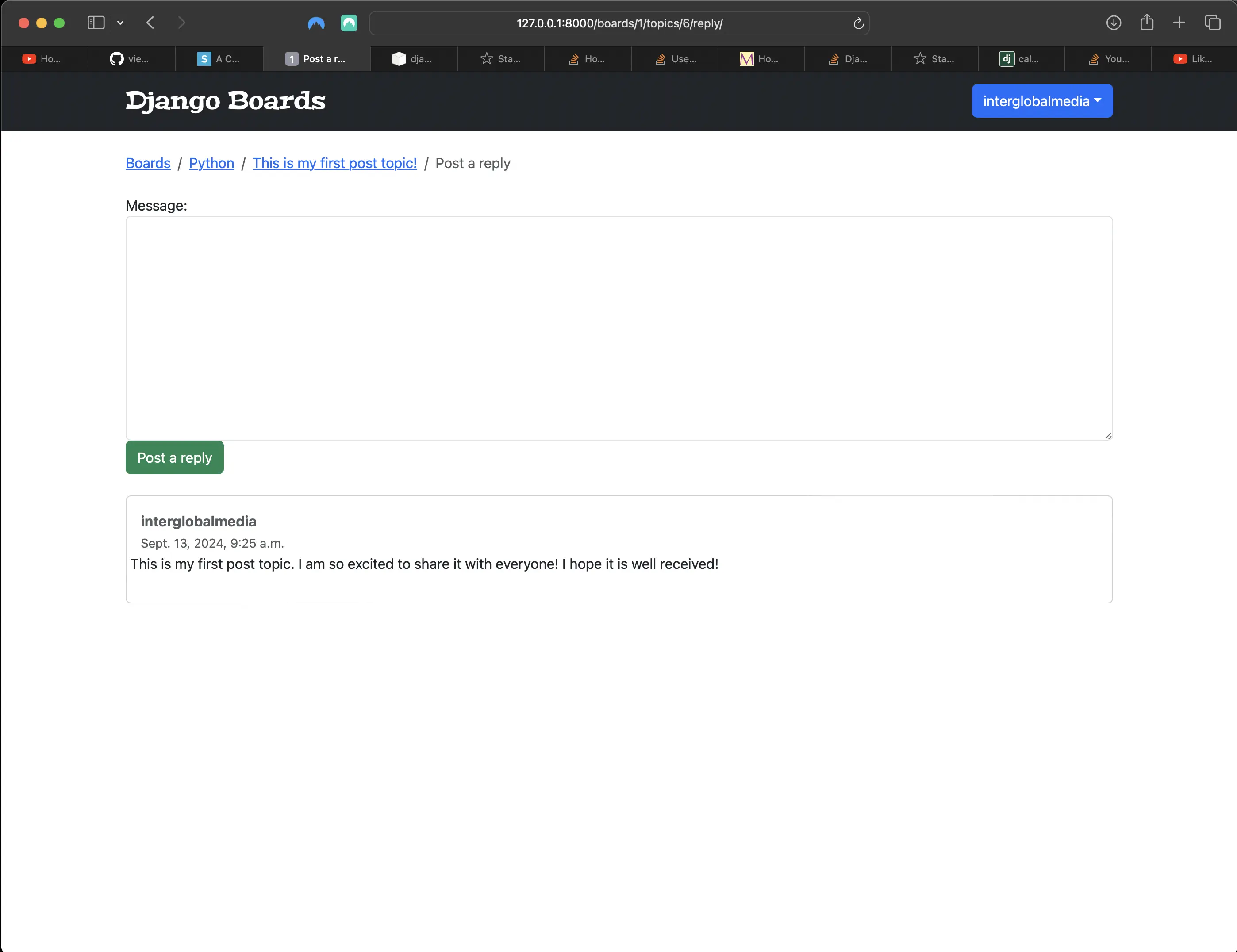
Topic reply view first version
After posting a reply, the user is redirected to the topic_posts view (topic_posts.html).
Making the starter post more prominent on the page
<!-- templates/topic_posts.html -->
{% extends "base.html" %}
{% load static %}
{% block title %}
  {{ topic.subject }}
{% endblock title %}
{% block breadcrumb %}
  <li class="breadcrumb-item">
    <a href="{% url 'index' %}">Boards</a>
  </li>
  <li class="breadcrumb-item">
    <a href="{% url 'board_topics' topic.board.pk %}">{{ topic.board.name }}</a>
  </li>
  <li class="breadcrumb-item active">{{ topic.subject }}</li>
{% endblock breadcrumb %}
{% block content %}
  <div class="mb-4">
    <a href="#" class="btn btn-primary" role="button">Reply</a>
  </div>
  {% for post in topic.posts.all %}
  <!-- Change starts here -->
    <div class="card mb-3 {% if forloop.first %}border-light{% endif %}">
      {% if forloop.first %}
        <div class="card-header bg-info text-white align-items-center py-2 px-3">
          <h5>{{ topic.subject }}</h5>
        </div>
      {% endif %}
      <!-- Change ends here -->
      <div class="row no-gutters">
        <div class="col-md-8">
          <div class="card-body col-md-8">
            <div class="col">
              <h5 class="card-title text-muted">{{ post.created_by.username }}</h5>
              <p class="card-text">
                <small class="text-muted">{{ post.created_at }}</small>
              </p>
            </div>
            <p class="mt-4">
              <small>Posts: {{ post.created_by.posts.count }}</small>
            </p>
            <div class="post-message">{{ post.message }}</div>
            {% if post.created_by == user %}
              <div class="mt-3">
                <a href="#" class="btn btn-primary btn-sm" role="button">Edit</a>
              </div>
            {% endif %}
            <div class="mb-3 like-count">Post Likes: {{ post.post_liked_by.count }}</div>
          </div>
        </div>
      </div>
    </div>
  {% endfor %}
{% endblock content %}
Which looks like the following in the browser:
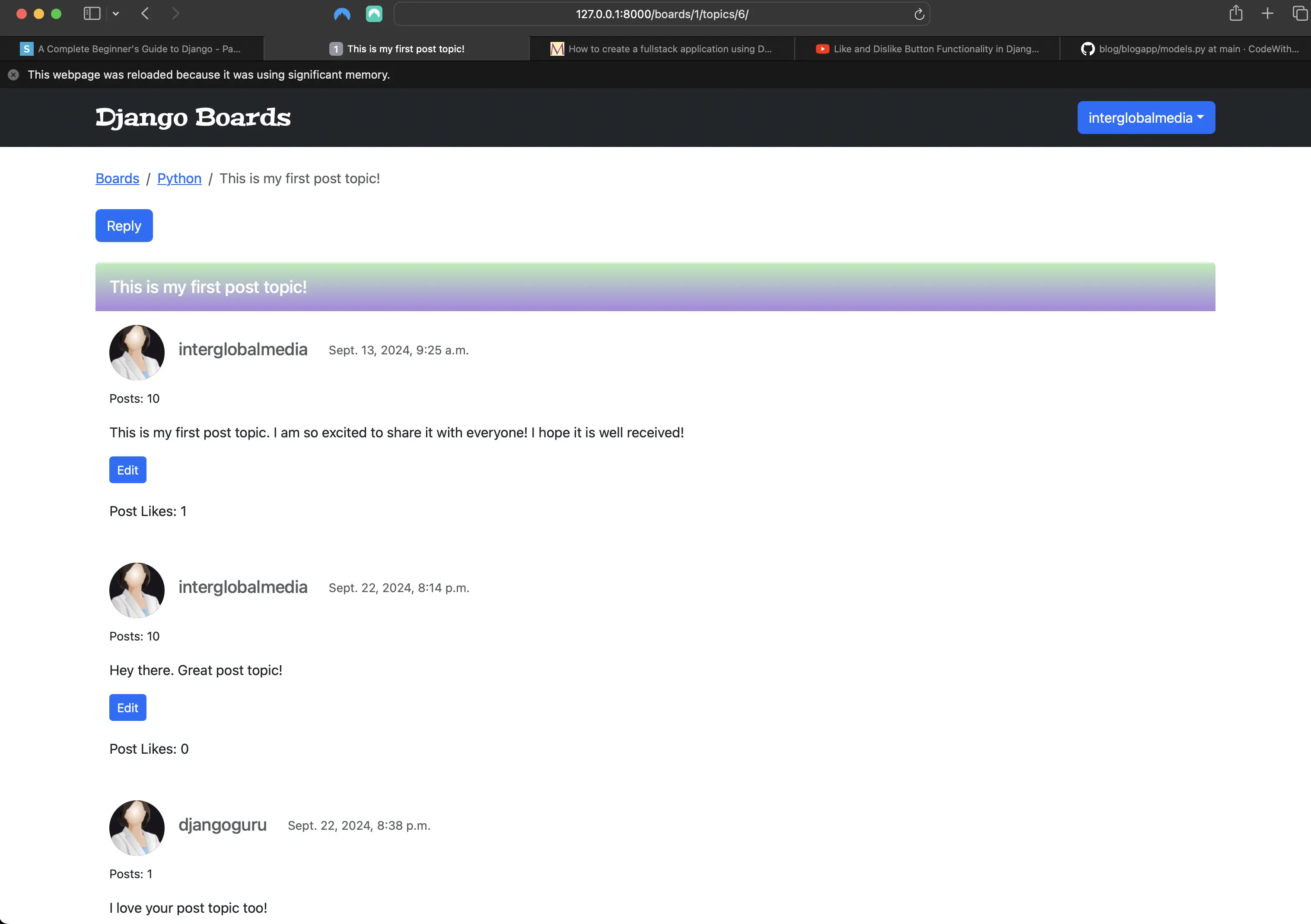
topic_posts view design revamp
I will share my CSS code at the end of this section!
boards/tests/test_reply_topic_test_case.py
# test_reply_topic_test_case.py
from django.contrib.auth.models import User
from django.test import TestCase
from django.urls import reverse
from ..models import Board, Post, Topic
from ..views import reply_topic

# this is just a setup. "No tests run" when this is run alone.
class ReplyTopicTestCase(TestCase):
    """
    Base test case to be used in all `reply_topic` view tests
    """
    def setUp(self):
        self.board = Board.objects.create(name='Django', description='Django board.')
        self.username = 'john'
        self.password = '123'
        user = User.objects.create_user(username=self.username, email='john@doe.com', password=self.password)
        self.topic = Topic.objects.create(subject='Hello, world', board=self.board, starter=user)
        Post.objects.create(message='Lorem ipsum dolor sit amet', topic=self.topic, created_by=user)
        self.url = reverse('reply_topic', kwargs={'id': self.board.id, 'topic_id': self.topic.id})
boards/tests/test_login_required_reply_topic_tests.py
# boards/tests/test_login_required_reply_topic_tests.py
from django.contrib.auth.models import User
from django.test import TestCase
from django.urls import reverse
from ..models import Board, Post, Topic
from ..views import reply_topic
from .test_reply_topic_test_case import ReplyTopicTestCase


class LoginRequiredReplyTopicTests(ReplyTopicTestCase):
    def test_redirection(self):
        login_url = reverse("login")
        response = self.client.get(self.url)
        self.assertRedirects(
            response, "{login_url}?next={url}".format(login_url=login_url, url=self.url)
        )
boards/tests/test_reply_topic_tests.py
# boards/tests/test_reply_topic_tests.py
from django.contrib.auth.models import User
from django.test import TestCase
from django.urls import reverse, resolve
from ..models import Board, Post, Topic
from ..views import reply_topic
from .test_reply_topic_test_case import ReplyTopicTestCase
from ..forms import PostForm

class ReplyTopicTests(ReplyTopicTestCase):
    def setUp(self):
        super().setUp()
        self.client.login(username=self.username, password=self.password)
        self.response = self.client.get(self.url)

    def test_status_code(self):
        self.assertEqual(self.response.status_code, 200)

    def test_view_function(self):
        view = resolve('/boards/1/topics/1/reply/')
        self.assertEqual(view.func, reply_topic)

    def test_csrf(self):
        self.assertContains(self.response, 'csrfmiddlewaretoken')

    def test_contains_form(self):
        form = self.response.context.get('form')
        self.assertIsInstance(form, PostForm)

    def test_form_inputs(self):
        '''
        The view must contain two inputs: csrf, message textarea
        '''
        self.assertContains(self.response, '<input', 1)
        self.assertContains(self.response, '<textarea', 1)
boards/tests/test_successful_reply_topic_tests.py
# boards/tests/test_successful_reply_topic_tests.py
from django.contrib.auth.models import User
from django.test import TestCase
from django.urls import reverse
from ..models import Board, Post, Topic
from ..views import reply_topic
from .test_reply_topic_test_case import ReplyTopicTestCase

class SuccessfulReplyTopicTests(ReplyTopicTestCase):
    def setUp(self):
        super().setUp()
        self.client.login(username=self.username, password=self.password)
        self.response = self.client.post(self.url, {'message': 'hello, world!'})

    def test_redirection(self):
        '''
        A valid form submission should redirect the user
        '''
        topic_posts_url = reverse('topic_posts', kwargs={'id': self.board.id, 'topic_id': self.topic.id})
        self.assertRedirects(self.response, topic_posts_url)

    def test_reply_created(self):
        '''
        The total post count should be 2
        The one created in the `ReplyTopicTestCase` setUp
        and another created by the post data in this class
        '''
        self.assertEqual(Post.objects.count(), 2)
boards/tests/test_invalid_reply_topic_tests.py
# boards/tests/test_invalid_reply_topic_tests.py
from django.contrib.auth.models import User
from django.test import TestCase
from django.urls import reverse
from ..models import Board, Post, Topic
from ..views import reply_topic
from .test_reply_topic_test_case import ReplyTopicTestCase

class InvalidReplyTopicTests(ReplyTopicTestCase):
    def setUp(self):
        '''
        Submit an empty dictionary to the `reply_topic` view
        '''
        super().setUp()
        self.client.login(username=self.username, password=self.password)
        self.response = self.client.post(self.url, {})

    def test_status_code(self):
        '''
        An invalid form submission should return to the same page
        '''
        self.assertEqual(self.response.status_code, 200)

    def test_form_errors(self):
        form = self.response.context.get('form')
        self.assertTrue(form.errors)
The crux here is the ReplyTopicTestCase class. The other four test cases extend the ReplyTopicTestCase class.
First, I check if the view is protected with the @login_required decorator, and then check the HTML inputs, status code. Finally, I test a valid and an invalid form submission.
QuerySets
A QuerySet represents a collection of objects from my database. It can have zero, one, or many filters. QuerySets reduce the number of query results based on given parameters. In SQL terms, a QuerySet equates to a SELECT statement, and a filter is a limiting clause such as WHERE or LIMIT.
I get a QuerySet by using my model’s Manager. Each model has at least one Manager, and it’s called objects by default. I can access it directly via the model class. For example:
Blog.objects
django.db.models.manager.Manager object at ...>
b = Blog(name="Foo", tagline="Bar")
b.objects
Traceback:
    ...
AttributeError: "Manager isn't accessible via Blog instances."
To learn more about QuerySets, please visit Making queries in the official Django documentation.
Improving the index/home view
I have three things to add to the index/home view:
- Display the posts count of the board.
- Display the topics count of the board.
- Display the last user who posted something and the date and time it was posted.
But let's first experiment with the Python shell for a bit before refactoring the index/home view.
Experimenting with the Python shell
Before I start experimenting with the Python shell, let's add the following to the Post model (at the end):
from django.utils.text import Truncator # new

def __str__(self):
    truncated_message = Truncator(self.message)  # new
    return truncated_message.chars(30) # new
    # return self.message
Above, I am using the Truncator utility class. It truncates long strings into an arbitrary string size. Here it is 30 characters.
To start the Python shell, I run the following command in Terminal:
python3 manage.py shell
And for me, the following is returned:
Python 3.12.5 (main, Aug 26 2024, 07:35:37) [Clang 15.0.0 (clang-1500.3.9.4)] on darwin
Type "help", "copyright", "credits" or "license" for more information.
(InteractiveConsole)
Then, let's run the following:
# first import Board model
from boards.models import Board
# then get a board instance from the database
board = Board.objects.get(name='Django')
# then get the board topics QuerySet:
board.topics.all()
# which returns:
<QuerySet [<Topic: Explain the Django directory structure>, <Topic: A new Django topic>]>
# then get the board topics count:
board.topics.count()
# which returns:
2
Next, let's get the number of posts within a board:
# first import the Post model:
from boards.models import Post
# then get the board posts QuerySet:
Post.objects.all()
# which returns:
<QuerySet [<Post: I'm so glad someone started a…>, <Post: I am really excited about sta…>, <Post: I am writing my first new top…>, <Post: I am writing my first new top…>, <Post: I am writing my first new top…>, <Post: This is my first post topic. …>, <Post: My other new topic.>, <Post: This is my new_topic so I can…>, <Post: This is an entirely new topic…>, <Post: Hey there. Great post topic!>, <Post: I love your post topic too!>]>
# then get the total number of posts:
Post.objects.count()
# which returns:
11
I have a total of 11 posts, but they don't necessarily all belong to the Django board. However, I can filter the posts:
Post.objects.filter(topic__board=board)
# which returns:
<QuerySet [<Post: I'm so glad someone started a…>, <Post: I am really excited about sta…>]>
# filter out the Django topic posts:
Post.objects.filter(topic__board=board).count()
# which returns:
2
In my case, Django returned the same two posts in the QuerySet as well as the count(). That is because I had previously defined the board, which was Django, and I only have two Django topics.
I use double underscores in topic__board to navigate through the models’ relationships. Under the hood, Django builds a connection between Board -> Topic -> Post, and builds an SQL query to retrieve just the posts that belong to a specific board.
Lastly, I want to identify the latest post:
# order by the `created_at` field, getting the most recent post first:
Post.objects.filter(topic__board=board).order_by('-created_at')
# which returns:
<QuerySet [<Post: I am really excited about sta…>, <Post: I'm so glad someone started a…>]>
# then we can use the `first()` method to just grab the result that interests us:
Post.objects.filter(topic__board=board).order_by('-created_at').first()
# which returns:
<Post: I am really excited about sta…>
Now I can implement what I just did in the Python shell in my actual code.
boards/models.py
# boards/models.py
class Board(models.Model):
    name = models.CharField(max_length=30, unique=True)
    description = models.CharField(max_length=100)

    def __str__(self):
        return self.name

    def get_posts_count(self): # new
        return Post.objects.filter(topic__board=self).count()

    def get_latest_post(self): # new
        return Post.objects.filter(topic__board=self).order_by('-created_at').first()
I am using self, because the methods are used by a Board instance. I am using the Board instance to filter the QuerySet.
Adding the posts count, topics count, and latest post to the index/home view
<!-- templates/index.html -->
{% extends "base.html" %}
{% block breadcrumb %}
  <li class="breadcrumb-item active">Boards</li>
{% endblock breadcrumb %}
{% block content %}
  <table class="table">
    <thead class="thead-inverse">
      <tr>
        <th>Board</th>
        <th>Posts</th>
        <th>Topics</th>
        <!-- new wording (instead of Last Post) -->
        <th>Latest Post</th>
      </tr>
    </thead>
    <tbody>
      {% for board in boards %}
        <tr>
          <td>
            <a href="{% url 'board_topics' board.id %}">{{ board.name }}</a>
            <small class="text-muted d-block">{{ board.description }}</small>
          </td>
          <td class="align-middle">{{ board.get_posts_count }}</td>
          <td class="align-middle">{{ board.topics.count }}</td>
          <td class="align-middle">
            {% if board.get_posts_count > 0 %}
              {% with post=board.get_latest_post %}
                <small>
                  <a href="{% url 'topic_posts' board.id post.topic.id %}">By {{ post.created_by.username }} at {{ post.created_at }}</a>
                </small>
              {% endwith %}
            </td>
          {% else %}
            <small>0</small>
          </tr>
        {% endif %}
      {% endfor %}
    </tbody>
  </table>
{% endblock content %}
I also included an if statement regarding getting the latest post, because it could be the case that a board has no topics and no posts. So the if statement checks if there indeed is at least one board topic post, and if so, render a link to that latest post. Otherwise, just render 0 to indicate that there is no latest post to link to.
I could also do something a bit more verbose:
<!-- templates/index.html -->
{% extends "base.html" %}
{% block breadcrumb %}
  <li class="breadcrumb-item active">Boards</li>
{% endblock breadcrumb %}
{% block content %}
  <table class="table">
    <thead class="thead-inverse">
      <tr>
        <th>Board</th>
        <th>Posts</th>
        <th>Topics</th>
        <th>Latest Post</th>
      </tr>
    </thead>
    <tbody>
      {% for board in boards %}
        <tr>
          <td>
            <a href="{% url 'board_topics' board.id %}">{{ board.name }}</a>
            <small class="text-muted d-block">{{ board.description }}</small>
          </td>
          <td class="align-middle">{{ board.get_posts_count }}</td>
          <td class="align-middle">{{ board.topics.count }}</td>
          <td class="align-middle">
            {% with post=board.get_latest_post %}
              {% if post %}
                <small>
                  <a href="{% url 'topic_posts' board.id post.topic.id %}">By {{ post.created_by.username }} at {{ post.created_at }}</a>
                </small>
              {% else %}
                <small class="text-muted"><em>No posts yet.</em></small>
              {% endif %}
            {% endwith %}
          </td>
        </tr>
      {% endfor %}
    </tbody>
  </table>
{% endblock content %}
Either works just fine. It's a matter of personal preference. The second approach looks like the following in the browser:
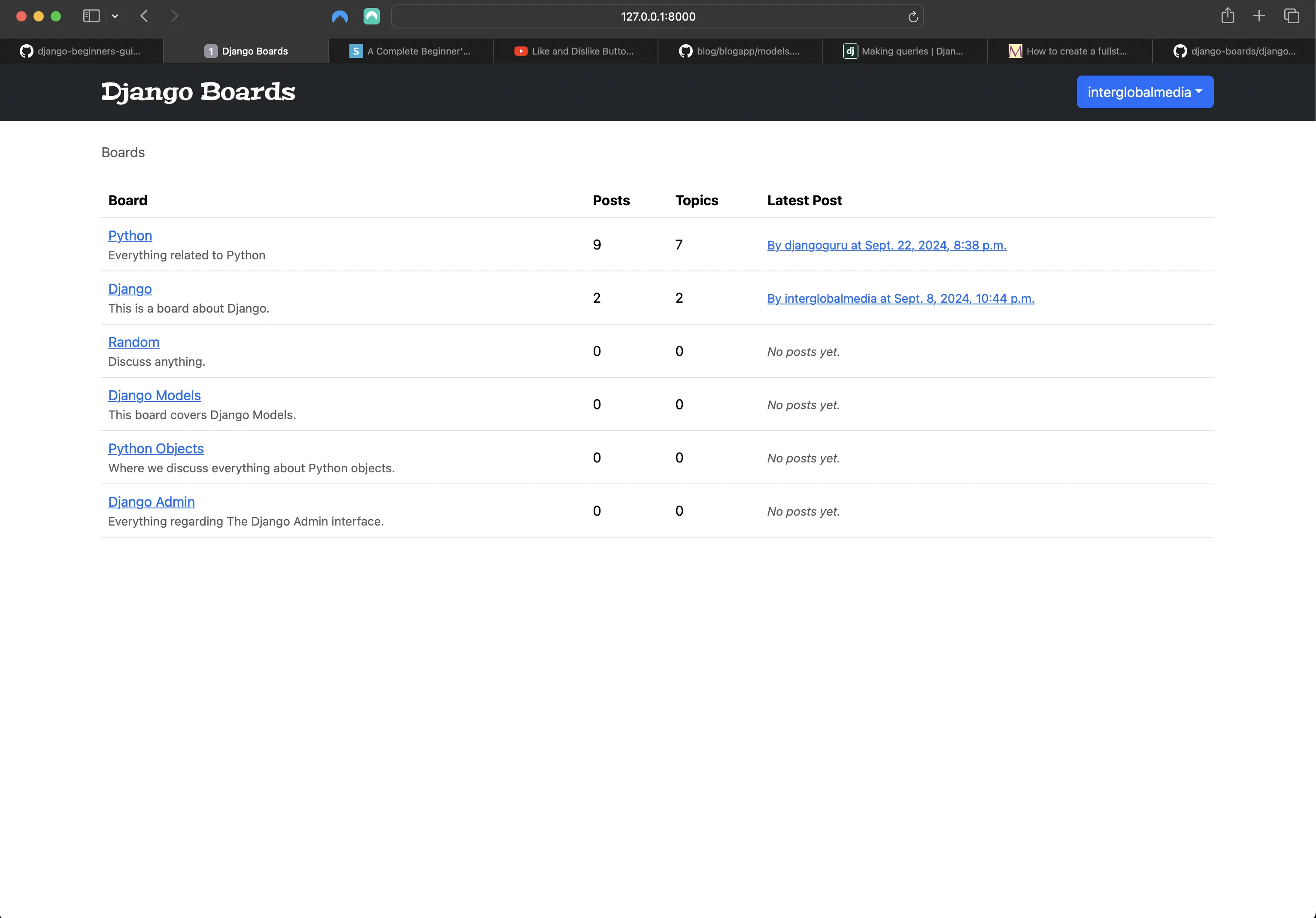
Adding posts count, topics count, last post to index/home view approach 2
I am going to go with the first approach, and am going to create a new Random Board topic:
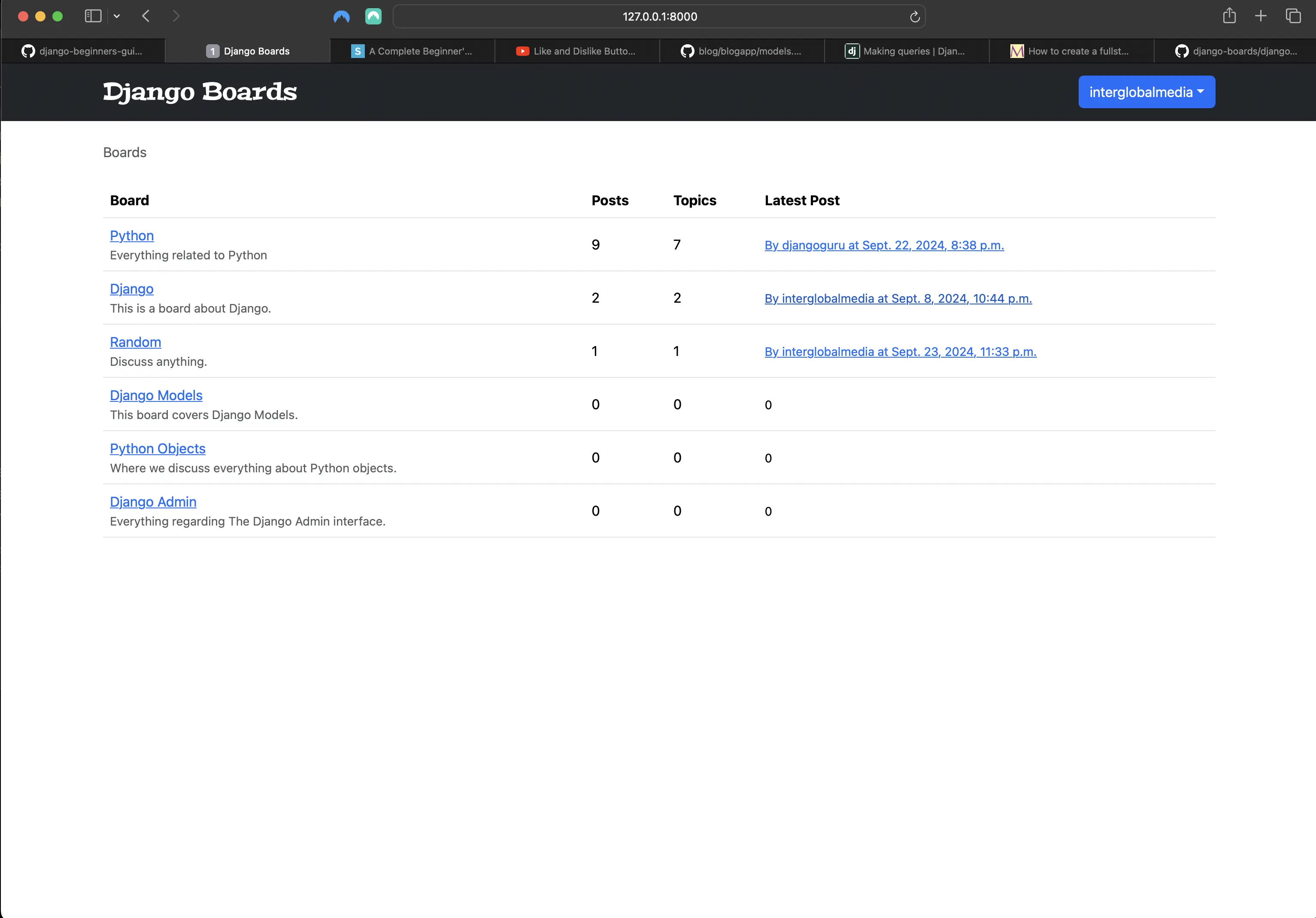
Adding a new Random board topic
The new Random board topic link takes me to the following:
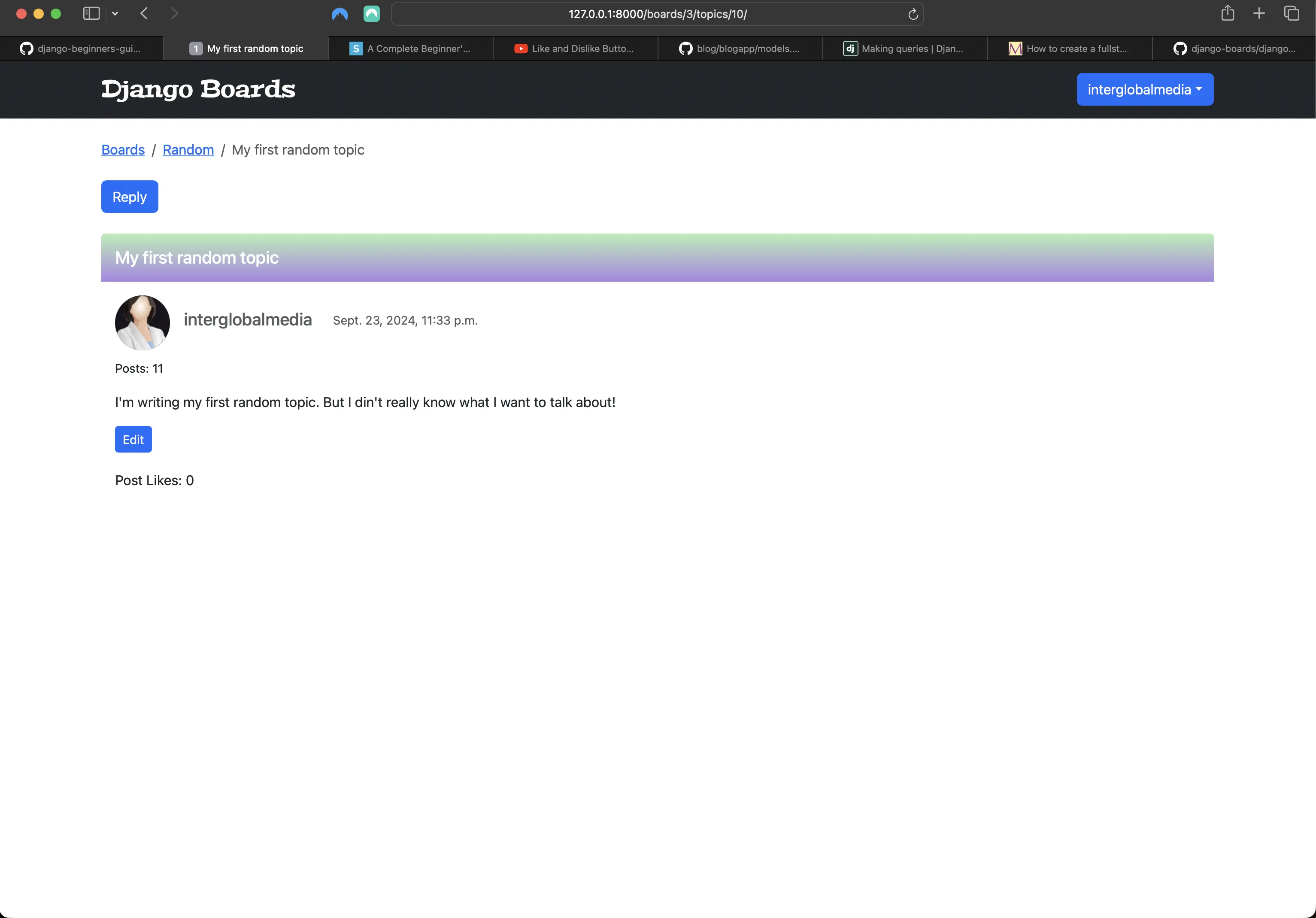
New Random board topic
Running the tests to include the new ReplyTopic related tests
python3 manage.py test results in the following:
Found 65 test(s).
Creating test database for alias 'default'...
System check identified no issues (0 silenced).
EEEEE..............F...................................FF.F......
======================================================================
FAIL: test_csrf (accounts.tests.test_password_reset_confirm_tests.PasswordResetConfirmTests.test_csrf)
----------------------------------------------------------------------
Traceback (most recent call last):
  File "/Users/mariacam/Python-Development/django-boards/django_boards/accounts/tests/test_password_reset_confirm_tests.py", line 36, in test_csrf
    self.assertContains(self.response, 'csrfmiddlewaretoken')
  File "/Users/mariacam/.pyenv/versions/3.12.5/lib/python3.12/site-packages/django/test/testcases.py", line 623, in assertContains
    self.assertTrue(
AssertionError: False is not true : Couldn't find 'csrfmiddlewaretoken' in the following response
b'\n<!DOCTYPE html>\n<html lang="en">\n  <head>\n    <meta charset="utf-8">\n    <meta name="description" content="A forum dedicated to all things Django" />\n    <meta name="keywords" content="django, python3" />\n    <title>\n      \n  \n    Reset your password\n  \n\n    </title>\n    <link rel="stylesheet" href="/static/css/bootstrap.min.css">\n    <link rel="stylesheet" href="/static/css/app.css">\n    \n  <link rel="stylesheet" href="/static/css/accounts.css">\n\n  </head>\n  <body>\n    \n  <div class="container">\n    <h1 class="text-center logo my-4">\n      <a href="/">Django Boards</a>\n    </h1>\n    \n  <div class="row justify-content-center">\n    <div class="col-lg-6 col-md-8 col-sm-10">\n      <div class="card">\n        <div class="card-body">\n          \n            <h3 class="card-title">Reset your password</h3>\n            <div class="alert alert-danger" role="alert">\n              It looks like you clicked on an invalid password reset link. Please try again.\n            </div>\n            <a href="/password-reset/" class="btn btn-secondary btn-block">Request a new password reset link</a>\n          \n        </div>\n      </div>\n    </div>\n  </div>\n\n  </div>\n\n    <script src="https://cdnjs.cloudflare.com/ajax/libs/popper.js/2.9.2/umd/popper.min.js"\n            integrity="sha512-2rNj2KJ+D8s1ceNasTIex6z4HWyOnEYLVC3FigGOmyQCZc2eBXKgOxQmo3oKLHyfcj53uz4QMsRCWNbLd32Q1g=="\n            crossorigin="anonymous"\n            referrerpolicy="no-referrer"></script>\n    <script src="https://code.jquery.com/jquery-3.7.1.min.js"\n            integrity="sha256-/JqT3SQfawRcv/BIHPThkBvs0OEvtFFmqPF/lYI/Cxo="\n            crossorigin="anonymous"></script>\n    <script src="https://cdnjs.cloudflare.com/ajax/libs/bootstrap/5.3.3/js/bootstrap.min.js"\n            integrity="512-ykZ1QQr0Jy/4ZkvKuqWn4iF3lqPZyij9iRv6sGqLRdTPkY69YX6+7wvVGmsdBbiIfN/8OdsI7HABjvEok6ZopQ=="\n            crossorigin="anonymous"\n            referrerpolicy="no-referrer"></script>\n  </body>\n</html>\n'

======================================================================
FAIL: test_csrf (boards.tests.test_new_topic_tests.NewTopicTests.test_csrf)
----------------------------------------------------------------------
Traceback (most recent call last):
  File "/Users/mariacam/Python-Development/django-boards/django_boards/boards/tests/test_new_topic_tests.py", line 18, in test_csrf
    self.assertContains(response, 'csrfmiddlewaretoken')
  File "/Users/mariacam/.pyenv/versions/3.12.5/lib/python3.12/site-packages/django/test/testcases.py", line 609, in assertContains
    text_repr, real_count, msg_prefix, content_repr = self._assert_contains(
                                                      ^^^^^^^^^^^^^^^^^^^^^^
  File "/Users/mariacam/.pyenv/versions/3.12.5/lib/python3.12/site-packages/django/test/testcases.py", line 571, in _assert_contains
    self.assertEqual(
AssertionError: 302 != 200 : Couldn't retrieve content: Response code was 302 (expected 200)

======================================================================
FAIL: test_new_topic_invalid_post_data (boards.tests.test_new_topic_tests.NewTopicTests.test_new_topic_invalid_post_data)
Invalid post data should not redirect
----------------------------------------------------------------------
Traceback (most recent call last):
  File "/Users/mariacam/Python-Development/django-boards/django_boards/boards/tests/test_new_topic_tests.py", line 37, in test_new_topic_invalid_post_data
    self.assertEqual(response.status_code, 200)
AssertionError: 302 != 200

======================================================================
FAIL: test_new_topic_valid_post_data (boards.tests.test_new_topic_tests.NewTopicTests.test_new_topic_valid_post_data)
----------------------------------------------------------------------
Traceback (most recent call last):
  File "/Users/mariacam/Python-Development/django-boards/django_boards/boards/tests/test_new_topic_tests.py", line 27, in test_new_topic_valid_post_data
    self.assertTrue(Topic.objects.exists())
AssertionError: False is not true

----------------------------------------------------------------------
Ran 65 tests in 9.403s

FAILED (failures=4)
Destroying test database for alias 'default'...
However, if I want to know how my latest tests in particular pass, I can run them individually. Let's do that!
Running test_login_required_reply_topic_tests.py:
python3 manage.py test boards.tests.test_login_required_reply_topic_tests
Returns the following:
Found 1 test(s).
Creating test database for alias 'default'...
System check identified no issues (0 silenced).
.
----------------------------------------------------------------------
Ran 1 test in 0.231s

OK
Destroying test database for alias 'default'...
Running test_reply_topic_tests.py:
python3 manage.py test boards.tests.test_reply_topic_tests
Returns the following:
Found 5 test(s).
Creating test database for alias 'default'...
System check identified no issues (0 silenced).
..F..
======================================================================
FAIL: test_form_inputs (boards.tests.test_reply_topic_tests.ReplyTopicTests.test_form_inputs)
The view must contain two inputs: csrf, message textarea
----------------------------------------------------------------------
Traceback (most recent call last):
  File "/Users/mariacam/Python-Development/django-boards/django_boards/boards/tests/test_reply_topic_tests.py", line 33, in test_form_inputs
    self.assertContains(self.response, '<input', 1)
  File "/Users/mariacam/.pyenv/versions/3.12.5/lib/python3.12/site-packages/django/test/testcases.py", line 614, in assertContains
    self.assertEqual(
AssertionError: 2 != 1 : Found 2 instances of '<input' (expected 1) in the following response
b'\n<!DOCTYPE html>\n<html lang="en">\n  <head>\n    <meta charset="utf-8">\n    <meta name="description" content="A forum dedicated to all things Django" />\n    <meta name="keywords" content="django, python3" />\n    <title>\n      \n  Post a reply\n\n    </title>\n    <link rel="stylesheet" href="/static/css/bootstrap.min.css">\n    <link rel="stylesheet" href="/static/css/app.css">\n    \n    \n  </head>\n  <body>\n    \n      <nav class="navbar navbar-expand-sm navbar-dark bg-dark">\n        <div class="container">\n          <a class="navbar-brand" href="/">Django Boards</a>\n          \n            <div class="dropdown">\n              <a class="btn btn-primary dropdown-toggle"\n                 href="#"\n                 role="button"\n                 data-bs-toggle="dropdown"\n                 aria-expanded="false">john</a>\n              <ul class="dropdown-menu">\n                <li>\n                  <a class="dropdown-item" href="#">My account</a>\n                </li>\n                <li>\n                  <a class="dropdown-item" href="#">change password</a>\n                </li>\n                <li>\n                  <form method="post" action="/logout/">\n                    <input type="hidden" name="csrfmiddlewaretoken" value="tLFxq0CcwZaJPWoOyXSo4rQVOT0YL67JqvergYZB28iqJYiMAFb4UUhAFolRVjxW">\n                    <button type="submit">Logout</button>\n                  </form>\n                </li>\n              </ul>\n            </div>\n            <button class="navbar-toggler"\n                    type="button"\n                    data-toggle="collapse"\n                    data-target="#mainMenu"\n                    aria-controls="mainMenu"\n                    aria-expanded="false"\n                    aria-label="Toggle navigation">\n              <span class="navbar-toggler-icon"></span>\n            </button>\n          \n        </div>\n      </nav>\n      <div class="container">\n        <ol class="breadcrumb my-4">\n          \n  <li class="breadcrumb-item">\n    <a href="/">Boards</a>\n  </li>\n  <li class="breadcrumb-item">\n    <a href="/boards/1/">Django</a>\n  </li>\n  <li class="breadcrumb-item">\n    <a href="/boards/1/topics/1/">Hello, world</a>\n  </li>\n  <li class="breadcrumb-item active">Post a reply</li>\n\n        </ol>\n        \n  <form method="post" class="mb-4">\n    <input type="hidden" name="csrfmiddlewaretoken" value="tLFxq0CcwZaJPWoOyXSo4rQVOT0YL67JqvergYZB28iqJYiMAFb4UUhAFolRVjxW">\n    \n\n\n\n\n  <div class="form-group">\n    <label for="id_message">Message:</label>\n    <textarea name="message" cols="40" rows="10" maxlength="4000" class="form-control " required id="id_message">\n</textarea>\n    \n    \n  </div>\n\n    <button type="submit" class="btn btn-success">Post a reply</button>\n  </form>\n  \n    <div class="card mb-2">\n      <div class="card-body p-3">\n        <div class="row mb-3">\n          <div class="col-6">\n            <div class="col-6">\n              <strong class="text-muted">john</strong>\n            </div>\n            <div class="col-6 text-right">\n              <small class="text-muted">Sept. 24, 2024, 12:42 a.m.</small>\n            </div>\n          </div>\n          <div class="mb-2 mt-3">Lorem ipsum dolor sit amet</div>\n        </div>\n        <div class="col-6 text-right">\n          <small>0 Likes</small>\n        </div>\n      </div>\n    </div>\n  \n\n      </div>\n    \n    <script src="https://cdnjs.cloudflare.com/ajax/libs/popper.js/2.9.2/umd/popper.min.js"\n            integrity="sha512-2rNj2KJ+D8s1ceNasTIex6z4HWyOnEYLVC3FigGOmyQCZc2eBXKgOxQmo3oKLHyfcj53uz4QMsRCWNbLd32Q1g=="\n            crossorigin="anonymous"\n            referrerpolicy="no-referrer"></script>\n    <script src="https://code.jquery.com/jquery-3.7.1.min.js"\n            integrity="sha256-/JqT3SQfawRcv/BIHPThkBvs0OEvtFFmqPF/lYI/Cxo="\n            crossorigin="anonymous"></script>\n    <script src="https://cdnjs.cloudflare.com/ajax/libs/bootstrap/5.3.3/js/bootstrap.min.js"\n            integrity="512-ykZ1QQr0Jy/4ZkvKuqWn4iF3lqPZyij9iRv6sGqLRdTPkY69YX6+7wvVGmsdBbiIfN/8OdsI7HABjvEok6ZopQ=="\n            crossorigin="anonymous"\n            referrerpolicy="no-referrer"></script>\n  </body>\n</html>\n'

----------------------------------------------------------------------
Ran 5 tests in 2.140s

FAILED (failures=1)
Destroying test database for alias 'default'...
Remember these errors from other instances of the test_form_inputs function and status code 302 != 200 fails? I will implement Beautiful Soup 4 and Soup Sieve again to ensure that these tests pass instead of hard coding the arguments passed to assertContains().
Running test_successful_reply_topic_tests.py:
python3 manage.py test boards.tests.test_successful_reply_topic_tests
Returns the following:
Found 2 test(s).
Creating test database for alias 'default'...
System check identified no issues (0 silenced).
..
----------------------------------------------------------------------
Ran 2 tests in 0.865s

OK
Destroying test database for alias 'default'...
Running test_invalid_reply_topic_tests.py:
python3 manage.py test boards.tests.test_invalid_reply_topic_tests
Returns the following:
 python3 manage.py test boards.tests.test_invalid_reply_topic_tests
Found 2 test(s).
Creating test database for alias 'default'...
System check identified no issues (0 silenced).
..
----------------------------------------------------------------------
Ran 2 tests in 0.896s

OK
Destroying test database for alias 'default'...
I will go through debugging the (current) failed tests in Part 20. There are five failed tests, including the test_reply_topic_tests.py file. The test failures are all familiar.
Improving the topics view
I will include the topic replies (posts) count in a different way, and I'll test it out first in the Python shell:
from django.db.models import Count
from boards.models import Board

board = Board.objects.get(name='Django')
topics = board.topics.order_by('-last_updated').annotate(replies=Count('posts'))

for topic in topics:
    print(topic.replies)

# which, for me, returns:
1
1
1
3
1
1
1
I am running the annotate QuerySet method to generate a "new" column. This new column will be translated into a property, accessible via topic.replies, and will contain the post count of a given topic.
I, however, have to ignore the starter topic (which is also a Post instance) when counting the posts. I can do it in the following way:
topics = board.topics.order_by('-last_updated').annotate(replies=Count('posts') - 1)
for topic in topics:
...     print(topic.replies)
# which returns:
0
0
0
2
0
0
0
Updating the board_topics in boards/views.py
# boards/views.py
from django.db.models import Count

def board_topics(request, id):
    board = get_object_or_404(Board, id=id)
    topics = board.topics.order_by('-last_updated').annotate(replies=Count('posts') - 1)
    return render(request, "topics.html", {"board": board, 'topics': topics})
Updating templates/topics.html
<!-- templates/topics.html -->
{% for topic in topics %}
  <tr>
    <td>
      <a href="{% url 'topic_posts' board.id topic.id %}">{{ topic.subject }}</a>
    </td>
    <td>{{ topic.starter.username }}</td>
    <td>{{ topic.replies }}</td>
    <td>0</td>
    <td>{{ topic.last_updated }}</td>
  </tr>
{% endfor %}
Which results in:
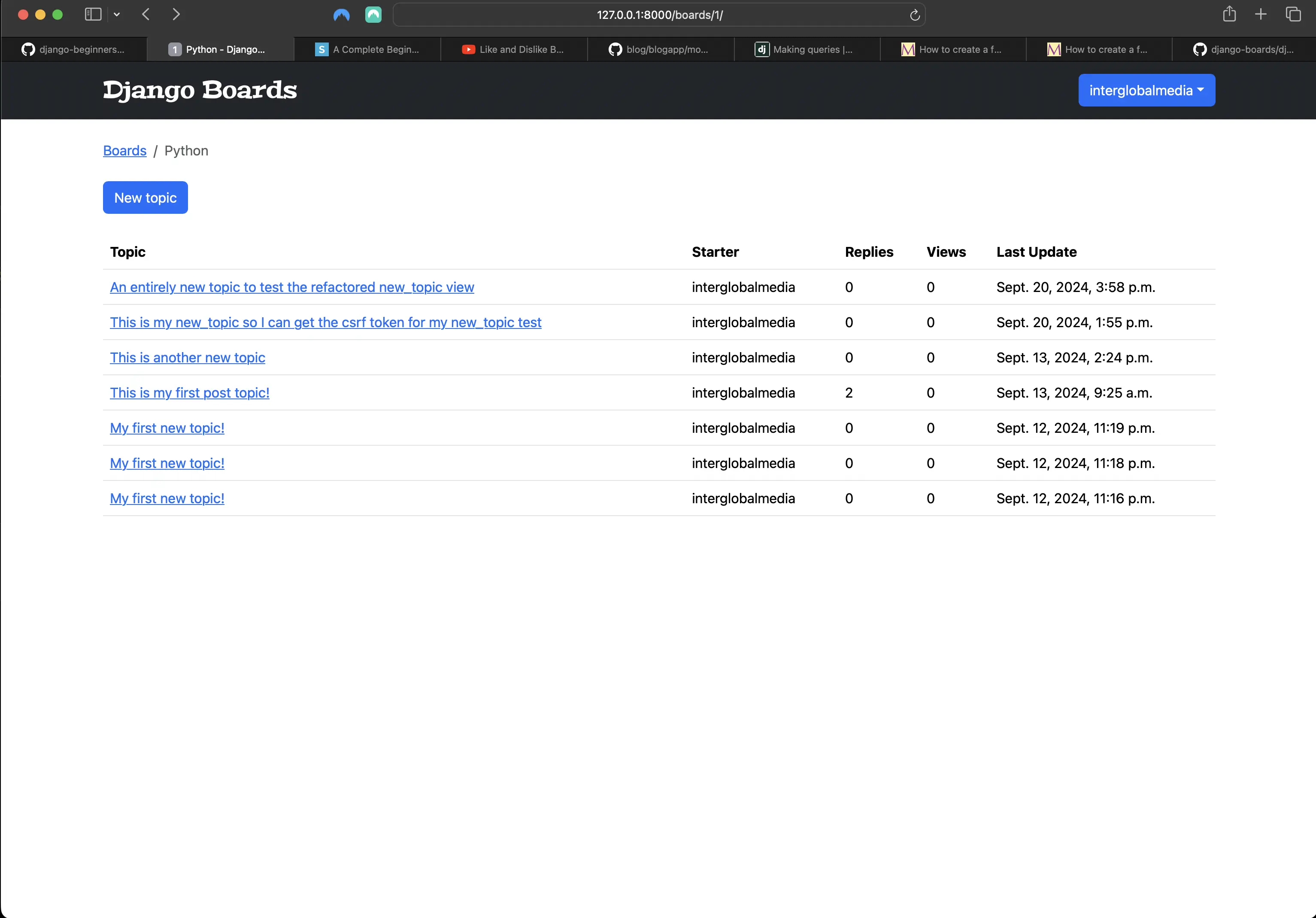
Including topic replies in topics view
Adding a new field to the Topic model
# boards/models.py
class Topic(models.Model):
    subject = models.CharField(max_length=255)
    last_updated = models.DateTimeField(auto_now_add=True)
    board = models.ForeignKey(Board, on_delete=models.CASCADE, related_name="topics")
    starter = models.ForeignKey(User, on_delete=models.CASCADE, related_name="topics")
    views = models.PositiveIntegerField(default=0) # new

    def __str__(self):
        return self.subject
I am using a PositiveIntegerField in the value of the views field. PositiveIntegerField is like an IntegerField but must be either positive or zero (0). It supports values from 0 to 2147483647, and is safe in all databases supported by Django.
I am using PositiveIntegerField because I want to store views (and increase them).
Running makemigrations and migrate
Before I can actually use PositiveIntegerField, I have to run makemigrations and migrate, because I made changes to my model(s).
python3 manage.py makemigrations
python3 manage.py migrate
Now I can use PositiveIntegerField to keep track of the number of views a given topic has:
# boards/views.py
def topic_posts(request, id, topic_id):
    topic = get_object_or_404(Topic, board__id=id, id=topic_id)
    topic.views += 1
    topic.save()
    return render(request, 'topic_posts.html', {'topic': topic})
And then in topics.html:
<!-- topics.html -->
{% for topic in topics %}
  <tr>
    <td>
      <a href="{% url 'topic_posts' board.id topic.id %}">{{ topic.subject }}</a>
    </td>
    <td>{{ topic.starter.username }}</td>
    <td>{{ topic.replies }}</td>
    <!-- here -->
    <td>{{ topic.views }}</td>
    <td>{{ topic.last_updated }}</td>
  </tr>
{% endfor %}
If I go to the topics view for a topic__board and refresh the page a few times, I should see if it’s counting the page views:
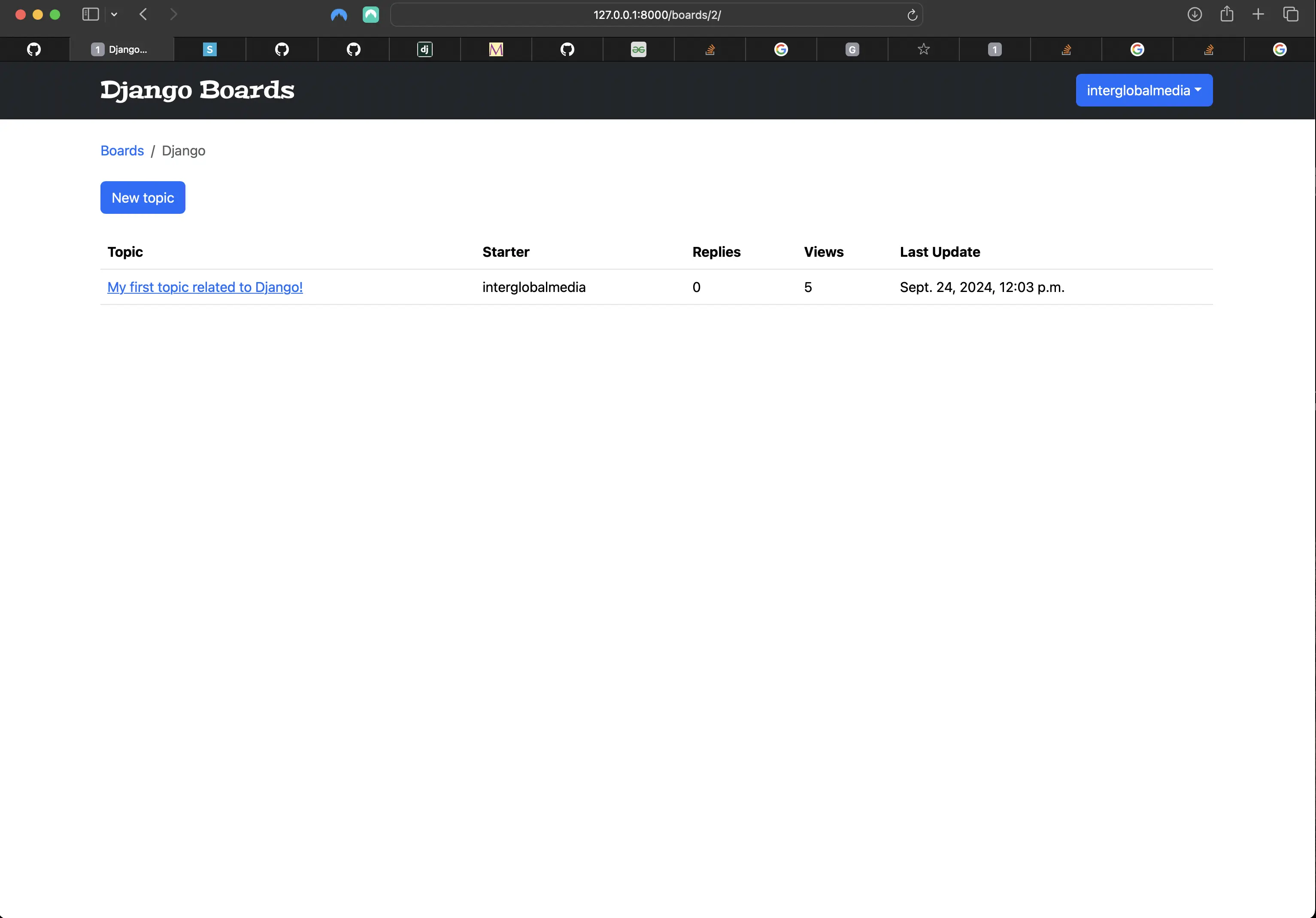
Tracking the topics view views
app.css
Below is the current app.css contents:
@import url('https://fonts.googleapis.com/css2?family=Peralta&display=swap');

.navbar-brand {
	font-family: 'Peralta', serif;
	font-size: 1.75rem;
	font-style: normal;
	font-weight: 400;
}

.nav-item .dropdown {
	color: #666;
	display: flex;
	font-weight: 300;
	justify-content: flex-end;
	margin-top: 1.5rem;
	text-decoration: none;
}

.breadcrumb-item a {
	text-decoration: none !important;
}

.card-header {
	margin-bottom: 1rem;
	border: 0;
	background-image: linear-gradient(to bottom, #b4eeb4, #aa85e5);
}

.card-header > h5 {
	margin-bottom: 0.5rem;
	margin-top: 0.5rem;
}

.card {
	border: 0;
	display: flex;
	flex-direction: column;
	justify-content: flex-start;
}

.row.no-gutters:before {
	background: url('/static/img/user_avatar.svg') center center;
	border-radius: 50%;
	content: '';
	height: 4rem;
	left: 1rem;
	object-fit: cover;
	position: absolute;
	width: 4rem;
}

.card-body {
	width: 100%;
}

.col {
	display: flex;
}

.card-title {
	margin-left: 5rem;
	margin-right: 1.5rem;
}

.post-message {
	text-align: left;
}

.like-count {
	margin-top: 1.25rem;
}
Code associated with this post
To view the code associated with this post, please visit 14e8a99.
Conclusion
In this section, I implement protecting views, I configure the login next redirect, and I create @login_required tests. I update the topic posts view, create the topic_posts.html template and related tests. I update the reply post (reply_topic) view and create related tests, discuss QuerySets and use them to improve the index/home view. I improve the topics view, update the board_topics view, update the topics.html template, and add a new field to the Topic model. In section 20, I will debug the five tests that are currently failing.
In section 20, I will debug the five tests that are currently failing.
Related Resources
- Django Boards repository on GitHub
- Model field reference: Official Django documentation