How to create a fullstack application using Django and Python Part 24
Social Share:
Tuesday, October 8, 2024 at 11:25 AM | 10 min read
Last modified on Thursday, July 16, 2026 at 12:19 PM
#fullstack development, #macOS, #django, #code refactoring, #es6 modules, #javascript, #markdown, #series

Photo by Desola Lanre-Ologun on unsplash.com
Important Note: Before committing anything to Git or pushing anything to remote, please visit How to create a fullstack application using Django and Python Part 4 where I discuss how to add the python-dotenv package to the Django site and why it is crucial to do it. This article assumes you have a working knowledge of Git.
Table of Contents
- Adding Markdown
- Implementing ES6 modules to the JavaScript code
- Adding the clipboard.js script tag to templates/base.html
- The associated HTML markup in templates/post_detail.html
- The associated CSS in static/css/app.css
- Refactoring the scroll top and bottom buttons
- Modularizing the pagination behavior JavaScript code
- Importing ES6 modules into a new file called app.js
- Adding the finishing touch to ES6 modularization in templates/base.html
- Screenshots of refactored features (except pagination)
- Screenshot of the copy link button clicked/on hover
- Screenshot of scroll buttons when scrollbar is at bottom of the page
- Screenshot of the effect of pressing down on a scroll button
- Screenshot of what happens to scroll buttons when scrollbar is positioned at top of page
- Screenshot of what happens to scroll buttons when scrollbar is positioned a bit below the top of the page
- Code associated with this post
- Conclusion
- Related Resources
- Related Posts
Update (July 2026): This walkthrough was written against Django 5.1, which reached full end-of-life in December 2025 and is no longer receiving security patches. Run python -m django --version to check which version you have.
I wrote this series as a live process, so sometimes it might seem confusing, but it all works out in the end.
Adding Markdown
Now I am going to add Markdown to the reply_topic and edit_post views and templates.
Installing the markdown app
I have to install the markdown app in my Django Boards application:
# run the following from within the directory which contains the venv folder, and make sure that the virtual environment is activated:
pip install markdown
Which, for me, returned the following:
Downloading Markdown-3.7-py3-none-any.whl.metadata (7.0 kB)
Downloading Markdown-3.7-py3-none-any.whl (106 kB)
Installing collected packages: markdown
Successfully installed markdown-3.7
Then I added the following to django_boards/settings.py:
# Application definition

INSTALLED_APPS = [
    'django.contrib.admin',
    'django.contrib.auth',
    'django.contrib.contenttypes',
    'django.contrib.sessions',
    'django.contrib.messages',
    'django.contrib.staticfiles',
    'boards',
    'accounts',
    'dotenv',
    'pylint',
    'graphviz',
    'djlint',
    'coverage',
    'widget_tweaks',
    'soupsieve',
    'bs4',
    'html5lib',
    'markdown', # added
]
Adding a new method to the Post model
# boards/models.py
...
from django.utils.html import mark_safe
from markdown import markdown
class Post(models.Model):
  ...
  def get_message_as_markdown(self):
        return mark_safe(markdown(self.message, safe_mode='escape'))
I am dealing with user input here, so I have to be careful. When using the markdown function, I am telling it to escape special characters first and THEN parse the markdown. After that, I mark the output string as safe to be used in the template. However, mark_safe marks the output of the Markdown rendering as safe for HTML display, so that does not mean that the Markdown input is actually safe. Here, I am following what Vitor Freitas did in his Django Boards tutorial. My approach to Markdown changes later. I add sanitization.
Updating templates/topic_posts.html to use markdown
<!-- change {{ post.message }} to: -->
<!-- {{ post.get_message_as_markdown }} -->
Now I can already use markdown in the topic replies (topic_posts.html).
I added a topic post using markdown syntax, and it resulted in the following:
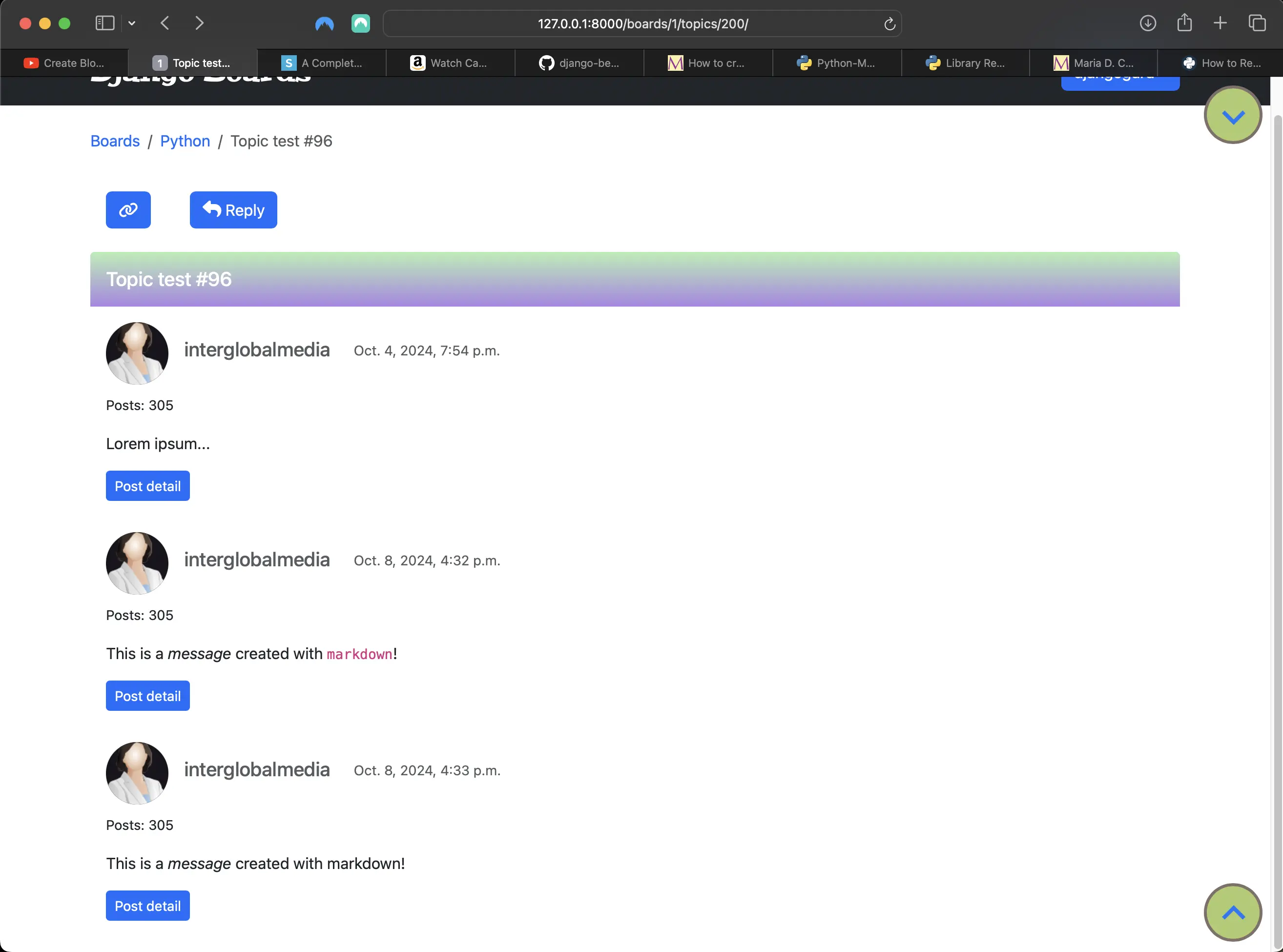
Implementing markdown in topic posts
As you can see in the screenshot, one of the topic posts contains an italicized word and a word wrapped in inline code syntax (magenta color).
templates/edit_post.html containing markdown
The following is what the edit post view looks like with the implementation of markdown:
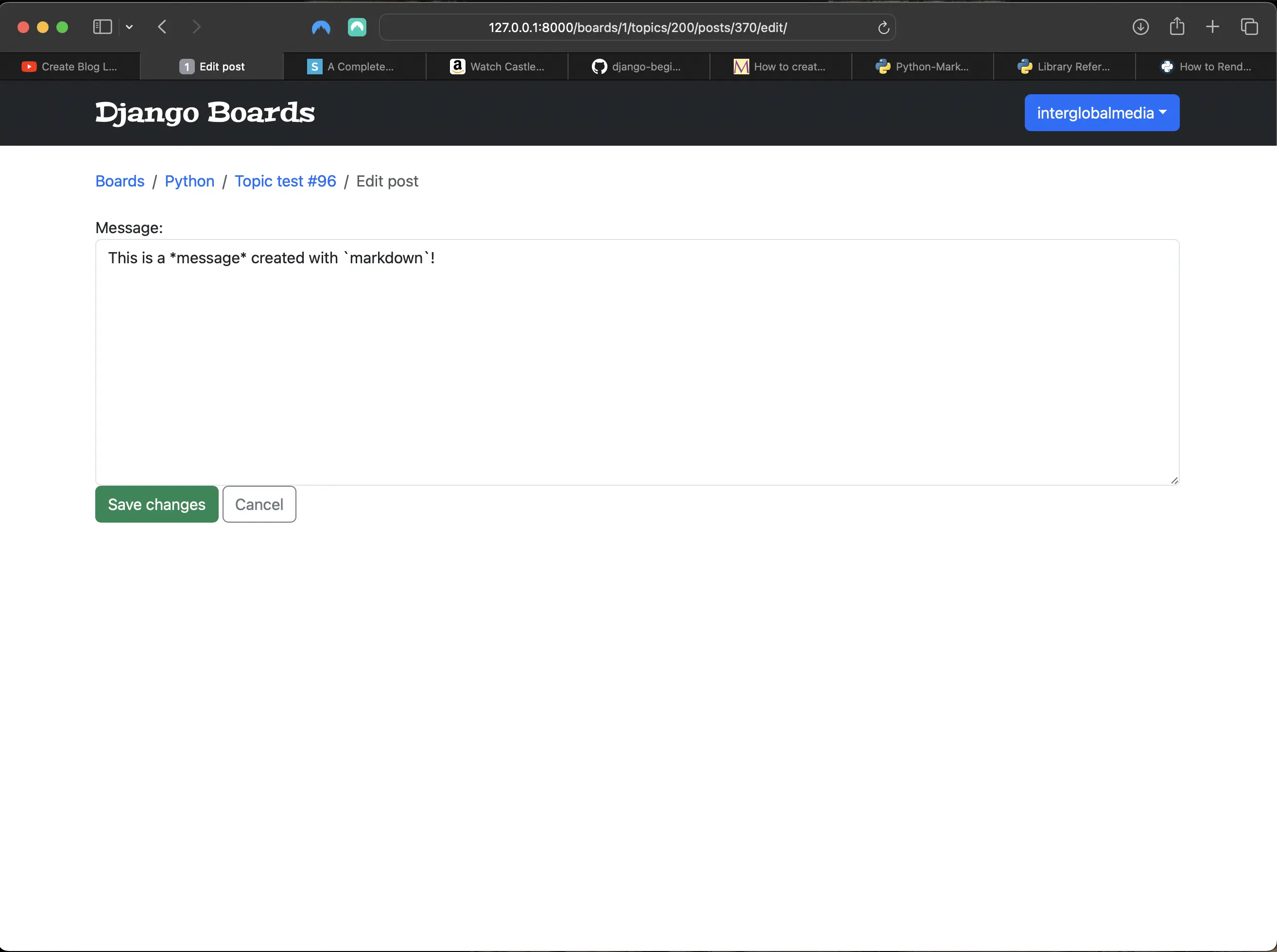
Post edit view using markdown syntax
I tried to implement the SimpleMDE text editor to the reply_topic.html and edit_post.html templates, but it broke everything on the page. After some investigation, I found out that it does not work with Django 5. No problem! I write markdown here directly into files without a "markdown editor", so I have no problem with that. If I do come across one that does work with Django 5, I will share it in a post.
Implementing ES6 modules to the JavaScript code
As a JavaScript developer, one of my pet peeves is to modularize my JavaScript code to avoid all sorts of collisions, especially global naming and code collisions. I was already starting to feel oncoming issues because of all the JavaScript I had already added to the project. And I am also using two third-party JavaScript libraries from Bootstrap that could cause conflicts. There is much to refactor, but in the end, the code will be slimmer and easy to modify if needed or desired.
Refactoring the copy button
The copy button code contains the following:
// static/js/copy-button.js
Element.prototype.getLink = function () {
	let link = document.createElement('a')
	link.href = this.getUrl()
	link.innerText = this.innerText
	return link
}

Element.prototype.getUrl = function () {
	return new URL(
		window.location.origin + window.location.pathname + '#' + this.id,
	)
}

Clipboard.prototype.writeHTML = function (html, text) {
	let textContent = text || html.innerText
	let htmlContent = ''
	if (typeof html == 'string') htmlContent = html
	else if (html instanceof Element) htmlContent = html.outerHTML
	else htmlContent = html.toString()

	if (ClipboardItem) {
		//bug in firefox : https://developer.mozilla.org/en-US/docs/Web/API/ClipboardItem
		let content = [
			new ClipboardItem({
				'text/html': new Blob([htmlContent], { type: 'text/html' }), //this can be interpreted by applications like teams or office word
				'text/plain': new Blob([textContent], { type: 'text/plain' }), //while this is required for other apps, like plain text editors
			}),
		]
		return this.write(content)
	} else {
		return this.writeText(textContent)
	}
}

let header = document.getElementById('copy-header')
let button = document.getElementById('copy-button')
let feedback = document.getElementById('feedback')
button.addEventListener('click', function () {
	navigator.clipboard
		.writeHTML(header.getLink(), header.getUrl())
		.then(function () {
			feedback.innerText = 'copied!'
			setTimeout(function () {
				document.getElementById('feedback').innerHTML = ''
			}, 1000)
		})
		.catch((error) => {
			feedback.innerText = `Oops... that shouldn't have happened. ${error}`
		})
})
This code is a hybrid of ES5 and ES6 JavaScript. I would have to do some major refactoring to make it completely ES6 module friendly, but the work and time that would go into it is not worth it.
I found a much slimmer and easier solution. Clipboard.js! I added the following code to copy-button.js:
// static/js/copy-button.js
const url = document.location.href

export const copyButton = new Clipboard('.copy-button', {
	text: function () {
		return url
	},
})
The associated html markup in templates/topic_posts.html consists of:
<!-- templates/topic_posts.html -->
<div class="d-inline-flex flex-row w-50">
  <div class=" mb-4 mt-4" id="copy-header">
    <a href="#"
        id="copy-button"
        class="copy-button btn btn-primary"
        role="button"
        title="Copy link to post to Clipboard"><i class="fa fa-link" aria-hidden="true"></i></a>
    <div id="feedback"></div>
  </div>
  <div class="reply-button mt-4">
    <a href="{% url 'reply_topic' topic.board.pk topic.pk %}"
        class="btn btn-primary"
        role="button"><i class="reply-icon fa-solid fa-reply"></i> Reply</a>
  </div>
</div>
The only thing I don't need is the div element with the id of "feedback", so the associated markup should look like the following instead:
<!-- templates/topic_posts.html -->
<div class="d-inline-flex flex-row w-50">
  <div class=" mb-4 mt-4" id="copy-header">
    <a href="#"
        id="copy-button"
        class="copy-button btn btn-primary"
        role="button"
        title="Copy link to post to Clipboard"><i class="fa fa-link" aria-hidden="true"></i></a>
  </div>
  <div class="reply-button mt-4">
    <a href="{% url 'reply_topic' topic.board.pk topic.pk %}"
        class="btn btn-primary"
        role="button"><i class="reply-icon fa-solid fa-reply"></i> Reply</a>
  </div>
</div>
Adding the clipboard.js script tag to templates/base.html
<!-- templates/base.html -->
<script
	src="https://cdnjs.cloudflare.com/ajax/libs/clipboard.js/1.4.0/clipboard.min.js"
	integrity="sha512-iJh0F10blr9SC3d0Ow1ZKHi9kt12NYa+ISlmCdlCdNZzFwjH1JppRTeAnypvUez01HroZhAmP4ro4AvZ/rG0UQ=="
	crossorigin="anonymous"
	referrerpolicy="no-referrer"
></script>
Note October 10, 2024: I inadvertently removed the Popper script tag from the script tags in templates/base.html, but will be adding it back and pushing the change to GitHub momentarily. All the script tags are included at the end of this post when I add the app.js file. Sorry for this inconvenience!
The associated HTML markup in templates/post_detail.html
<!-- templates/post_detail.html -->
<div class=" mb-4 mt-3" id="copy-header">
  <a id="copy-button"
      class="btn btn-primary"
      role="button"
      title="Copy link to this topic to Clipboard">
    <i class="fa fa-link" aria-hidden="true"></i>
  </a>
  <div id="feedback"></div>
</div>
Again, I don't need the div element with the id of "feedback", so the associated HTML markup should look like the following instead:
<!-- templates/post_detail.html -->
<div class=" mb-4 mt-3" id="copy-header">
  <a id="copy-button"
      class="btn btn-primary"
      role="button"
      title="Copy link to this topic to Clipboard">
    <i class="fa fa-link" aria-hidden="true"></i>
  </a>
</div>
The associated CSS in static/css/app.css
/* static/css/app.css */
/* Make copy text appear and disappear using CSS transitions */

#copy-header {
	position: relative;
	margin-left: 1rem;
}

#copy-header #feedback {
	position: absolute;
	top: -1.5rem;
	left: 0;
}

#copy-header .link-icon,
#copy-header #feedback::after {
	display: none;
	transition: 0.2s;
}

#copy-header:hover .link-icon {
	opacity: 1;
}

#copy-header #feedback::after {
	content: 'copied';
	opacity: 1;
}

#copy-header:hover #feedback:after {
	opacity: 1;
}

/* End make copy text appear and disappear using CSS transitions */

/* link icon styling */
.link-icon {
	font-size: 1.5rem;
	width: 2.25rem;
}
When I made the changes to the JavaScript and the HTML markup, the associated CSS became the following:
/* Make copy text appear and disappear using CSS transitions */

#copy-header {
	position: relative;
}

#copy-header .copy-button::before {
	content: '';
	border-radius: 3px;
	display: flex;
	padding: 0.25rem;
	position: absolute;
	top: -2rem;
	left: 0;
	width: 6.255rem;
	line-height: 1;
	transition:
		color 0.5s,
		transform 0.2s,
		background-color 0.2s;
}

#copy-header .copy-button:hover::before {
	content: 'Link copied!';
	color: #2c7a7b;
	border: 1px solid #2c7a7b;
	background: #b4eeb4;
}

/* End make copy text appear and disappear using CSS transitions */

/* link icon styling */
.link-icon {
	font-size: 1.5rem;
	width: 2.25rem;
}
Refactoring the scroll top and bottom buttons
There is not much to do with these buttons, except that they have to be placed in their own JavaScript file. At present, the code for both resides in a file called scroll-top-bottom.js, and it consists of:
// static/js/scroll-top-bottom.js
// For scroll to top functionality
const scrollTopButton = document.querySelector('.scroll.top')

function scrollTop() {
	window.scrollTo(0, 0)
}

scrollTopButton.addEventListener('click', scrollTop)

// Scroll to bottom functionality
const scrollDownButton = document.querySelector('.scroll')

function scrollStep() {
	window.scroll(0, window.scrollY + 200)
	console.log(window.scrollY + 200)
}

scrollDownButton.addEventListener('pointerdown', scrollStep)

// scroll top button disappears after click when scrollY == 0, but it reappears when scrollY is greater than 0 on scroll down.
document.addEventListener('scroll', function () {
	const scrollButton = document.querySelector('.scroll.top')
	if (window.scrollY > 0) {
		scrollButton.style.opacity = 1
		scrollButton.style.transition = 'opacity 1s ease'
	} else {
		scrollButton.style.opacity = 0
		scrollButton.style.transition = 'opacity 1s ease'
	}
})

// scroll bottom button disappears after click of the scroll top button when scrollY == 0, but it reappears when scrollY is greater than 0 on scroll down.
document.addEventListener('scroll', function () {
	const scrollButton = document.querySelector('.scroll.bottom')
	if (window.scrollY > 0) {
		scrollButton.style.opacity = 1
		scrollButton.style.transition = 'opacity 1s ease'
	} else {
		scrollButton.style.opacity = 0
		scrollButton.style.transition = 'opacity 1s ease'
	}
})
Code for showing and hiding the buttons on scroll also shares the scroll-top-bottom.js file. What I ended up having to do is take out the eventListeners for showing and hiding the scroll buttons and place them in separate files. For the scroll top button:
// static/js/visibility-top.js
// scroll top button disappears after click when scrollY == 0, but it reappears when scrollY is greater than 0 on scroll down.
function toggleVisibilityScrollTop() {
	document.addEventListener('scroll', function () {
		const scrollButton = document.querySelector('.scroll.top')
		if (window.scrollY > 0) {
			// CSS in JS to change opacity from 0 (app.css) to 1
			scrollButton.style.opacity = 1
			scrollButton.style.transition = 'opacity 1s ease'
		} else {
			// CSS in JS to change opacity from 1 to 0
			scrollButton.style.opacity = 0
			scrollButton.style.transition = 'opacity 1s ease'
		}
	})
}

export default toggleVisibilityScrollTop
For the scroll bottom button:
// static/js/visibility-bottom.js
// scroll bottom button disappears after click of the scroll top button when scrollY == 0, but it reappears when scrollY is greater than 0 on scroll down.
function toggleVisibilityScrollBottom() {
	document.addEventListener('scroll', function () {
		const scrollButton = document.querySelector('.scroll.bottom')
		if (window.scrollY > 0) {
			// CSS in JS to change opacity from 0 (app.css) to 1
			scrollButton.style.opacity = 1
			scrollButton.style.transition = 'opacity 1s ease'
		} else {
			// CSS in JS to change opacity from 1 to 0
			scrollButton.style.opacity = 0
			scrollButton.style.transition = 'opacity 1s ease'
		}
	})
}

export default toggleVisibilityScrollBottom
For the scroll top and bottom button functionalities:
// static/js/scroll-top-bottom.js
// For scroll to top functionality
export const scrollTopButton = document.querySelector('.scroll.top')

export function scrollTop() {
	window.scrollTo(0, 0)
}

scrollTopButton.addEventListener('pointerdown', scrollTop)

// Scroll to bottom functionality
export const scrollDownButton = document.querySelector('.scroll')

export function scrollStep() {
	window.scroll(0, window.scrollY + 200)
	console.log(window.scrollY + 200)
}

scrollDownButton.addEventListener('pointerdown', scrollStep)
Since I added JavaScript for showing and hiding the scroll top and bottom buttons depending on the scrollY position, I had to make sure that the CSS did its part. Presently, it looks like the following:
/* static/css/app.css */
/*  scroll */
button.top {
	border: none;
	border: 3px solid transparent;
	border-radius: 0.5rem;
	display: flex;
	font-size: 1.5rem;
	justify-content: space-around;
	outline: none;
	position: fixed;
	transition:
		color 0.5s,
		transform 0.2s,
		background-color 0.2s;
}

button.top:active {
	transform: translateY(3px);
}

button.top::after,
button.top::before {
	border-radius: 3px;
}

button.top,
button.bottom {
	display: flex;
	align-items: center;
	justify-content: space-between;
	margin: 0 0.5rem 0 0;
	opacity: 0;
	padding: 20px 9.5px 20px 18px;
	text-align: center;
}

button.bottom {
	padding: 18px 9.5px 20px 18px;
}

button.scroll {
	cursor: pointer;
	font-size: 3.5rem;
	position: fixed;
	text-align: center;
	text-decoration: none;
	z-index: 1000;
}

button.scroll.top {
	bottom: -0.25rem;
	right: 0;
}

button.scroll.bottom {
	right: 0;
	top: 0;
}

button.scroll.bottom,
button.scroll.top {
	border: none;
	cursor: pointer;
	outline: none;
}

.material-icons {
	font-size: 3rem;
	display: flex;
	align-items: center;
	justify-content: center;
	margin-right: -0.25rem;
}

button.scroll.top i {
	margin-top: -0.25rem;
}

button.scroll.bottom i {
	`margin-bottom: -1rem;
}

.shrink-border {
	background-color: transparent;
	color: #0978f6;
}

.shrink-border:hover {
	background-color: transparent;
	box-shadow: none;
	color: #000;
}

button.shrink-border::before {
	background: #aecb6e;
	border: 3px solid #806f67;
	border-radius: 50%;
	content: '';
	height: 100%;
	max-height: 60px;
	max-width: 60px;
	position: absolute;
	right: 0;
	top: 0.6rem;
	transition:
		opacity 0.3s,
		border 0.3s;
	width: 100%;
	z-index: -1;
}

button.shrink-border:hover::before {
	opacity: 0;
}

button.shrink-border::after {
	background-color: #e4ddd3;
	border: 3px solid #806f67;
	color: blue;
	content: '';
	height: 100%;
	max-height: 60px;
	max-width: 60px;
	opacity: 0;
	position: absolute;
	right: 0;
	top: 0.6rem;
	transform: scaleX(1.1) scaleY(1.3);
	transition: transform 0.3s;
	width: 100%;
	z-index: -1;
}

button.shrink-border:hover::after {
	opacity: 1;
	transform: scaleX(1) scaleY(1);
}
After modifications which made showing and hiding the buttons possible, the associated CSS looks like the following:
/* static/css/app.css */
/*  scroll */
button.top {
	border: none;
	border: 3px solid transparent;
	border-radius: 0.5rem;
	font-size: 1.5rem;
	outline: none;
	position: fixed;
	transition:
		color 0.5s,
		transform 0.2s,
		background-color 0.2s;
}

button.top:active {
	transform: translateY(3px);
}

button.top::after,
button.top::before {
	border-radius: 3px;
}

button.top,
button.bottom {
	display: flex;
	align-items: center;
	justify-content: space-between;
	margin: 0 0.5rem 0 0;
	/* Initially hide the buttons via opacity property */
	opacity: 0;
	padding: 20px 9.5px 20px 18px;
	text-align: center;
}

button.bottom {
	padding: 18px 9.5px 20px 18px;
}

button.scroll {
	cursor: pointer;
	font-size: 3.5rem;
	position: fixed;
	text-align: center;
	text-decoration: none;
	z-index: 1000;
}

button.scroll.top {
	bottom: -0.25rem;
	right: 0;
}

button.scroll.bottom {
	right: 0;
	top: 0;
}

button.scroll.bottom,
button.scroll.top {
	border: none;
	cursor: pointer;
	outline: none;
}

.material-icons {
	font-size: 3rem;
	display: flex;
	align-items: center;
	justify-content: center;
	margin-right: -0.25rem;
}

button.scroll.top i {
	margin-top: -0.25rem;
}

button.scroll.bottom i {
	`margin-bottom: -1rem;
}

.shrink-border {
	background-color: transparent;
	color: #0978f6;
}

.shrink-border:hover {
	background-color: transparent;
	box-shadow: none;
	color: #000;
}

button.shrink-border::before {
	background: #aecb6e;
	border: 3px solid #806f67;
	border-radius: 50%;
	content: '';
	height: 100%;
	max-height: 60px;
	max-width: 60px;
	position: absolute;
	right: 0;
	top: 0.6rem;
	transition:
		opacity 0.3s,
		border 0.3s;
	width: 100%;
	z-index: -1;
}

button.shrink-border:hover::before {
	opacity: 0;
}

button.shrink-border::after {
	background-color: #e4ddd3;
	border: 3px solid #806f67;
	color: blue;
	content: '';
	height: 100%;
	max-height: 60px;
	max-width: 60px;
	opacity: 0;
	position: absolute;
	right: 0;
	top: 0.6rem;
	transform: scaleX(1.1) scaleY(1.3);
	transition: transform 0.3s;
	width: 100%;
	z-index: -1;
}

button.shrink-border:hover::after {
	opacity: 1;
	transform: scaleX(1) scaleY(1);
}
Update July 10, 2026: The static/js/scroll-top-bottom.js file's name and contents changed in Part 27, where I remove the scrolldown button and refactor the scrolltop button.
Modularizing the pagination behavior JavaScript code
// static/js/django-boards-pagination.js
function paginationScrollBehavior() {
	document
		.querySelector('.page-link', function (e) {
			e.preventDefault()
		})
		.scrollIntoView({
			behavior: 'smooth',
			block: 'end',
			inline: 'nearest',
		})
}

// paginationScrollBehavior()

export default paginationScrollBehavior
Now the structure and contents of the static/js directory look like the following:
- static/
  - js/
    - copy-button.js
    - django-boards-pagination.js
    - scroll-top-bottom.js
    - visibility-bottom.js
    - visibility-top.js
Importing ES6 modules into a new file called app.js
//  static/js/app.js
import paginationScrollBehavior from './django-boards-pagination.js'
import {
	scrollTop,
	scrollStep,
	scrollTopButton,
	scrollDownButton,
} from './scroll-top-bottom.js'
import toggleVisibilityScrollTop from './visibility-top.js'
import toggleVisibilityScrollBottom from './visibility-bottom.js'
import { copyButton } from './copy-button.js'

// Initialize functions
const toggleVisibilityScrollTopInit = toggleVisibilityScrollTop()
const toggleVisibilityScrollBottomInit = toggleVisibilityScrollBottom()
const paginationScrollBehaviorInit = paginationScrollBehavior()
const copyButtonInit = copyButton()

// For scroll to top functionality

scrollTopButton.addEventListener('pointerdown', scrollTop)

// Scroll to bottom functionality

scrollDownButton.addEventListener('pointerdown', scrollStep)
export default does not have to be wrapped in curly braces ({}). Named exports (export) do. To initialize a function, I store the call to the function as the value of a variable. As for the scroll top and bottom buttons, they are triggered when clicked, so I set addEventListeners on them as indicated above.
Update July 11, 2026: const copyButtonInit = copyButton() is incorrect — new Clipboard(...) returns an object instance, not a function, so calling it throws a TypeError. In practice this doesn't break the page: copy-button.js and scroll-top-bottom.js both do their real setup (instantiating Clipboard, attaching the scroll-button listeners) as side effects when the modules are imported, before this line ever runs, so nothing visibly stops working — you'd just see the error in the console. I remove the pagination and visibility-toggle code from app.js in commit 3d9982a dated November 6, 2024, but copyButtonInit itself carries over unfixed — it's just moved to the bottom of the file.
querySelector('.page-link', function(e){...}) (django-boards-pagination.js) in ./django-boards-pagination.js ignores its second argument, so preventDefault() never fires, and the function auto-scrolls to the first .page-link on page load rather than on click. The 3d9982a commit resolves the pagination issue by removing the code entirely. I wrote this series as a live process, so sometimes it might seem confusing, but it all works out in the end.
Adding the finishing touch to ES6 modularization in templates/base.html
In order to make ES6 modules actually work in my Django Boards website, I have to do the following in templates/base.html:
<!-- templates/base.html -->
{% block javascript %}
 <script src="https://cdnjs.cloudflare.com/ajax/libs/popper.js/2.9.2/umd/popper.min.js"
              integrity="sha512-2rNj2KJ+D8s1ceNasTIex6z4HWyOnEYLVC3FigGOmyQCZc2eBXKgOxQmo3oKLHyfcj53uz4QMsRCWNbLd32Q1g=="
              crossorigin="anonymous"
              referrerpolicy="no-referrer"></script>
      <script src="https://code.jquery.com/jquery-3.7.1.min.js"
              integrity="sha256-/JqT3SQfawRcv/BIHPThkBvs0OEvtFFmqPF/lYI/Cxo="
              crossorigin="anonymous"></script>
      <script src="https://cdnjs.cloudflare.com/ajax/libs/bootstrap/5.3.3/js/bootstrap.min.js"
              integrity="512-ykZ1QQr0Jy/4ZkvKuqWn4iF3lqPZyij9iRv6sGqLRdTPkY69YX6+7wvVGmsdBbiIfN/8OdsI7HABjvEok6ZopQ=="
              crossorigin="anonymous"
              referrerpolicy="no-referrer"></script>
      <script src="https://cdnjs.cloudflare.com/ajax/libs/clipboard.js/1.4.0/clipboard.min.js"
              integrity="sha512-iJh0F10blr9SC3d0Ow1ZKHi9kt12NYa+ISlmCdlCdNZzFwjH1JppRTeAnypvUez01HroZhAmP4ro4AvZ/rG0UQ=="
              crossorigin="anonymous"
              referrerpolicy="no-referrer"></script> <!-- added this -->
      <script type="module" src="{% static 'js/app.js' %}"></script> <!-- added this and removed other native JavaScript files -->
{% endblock javascript %}
That is it as far as ES6 modularization goes of non-third-party JavaScript code. I have included a very good article entitled "A Practical guide to ES6 modules" under Related Resources if you want to learn more about ES6 modules and why they are so important.
Screenshots of refactored features (except pagination)
Screenshot of the copy link button clicked/on hover
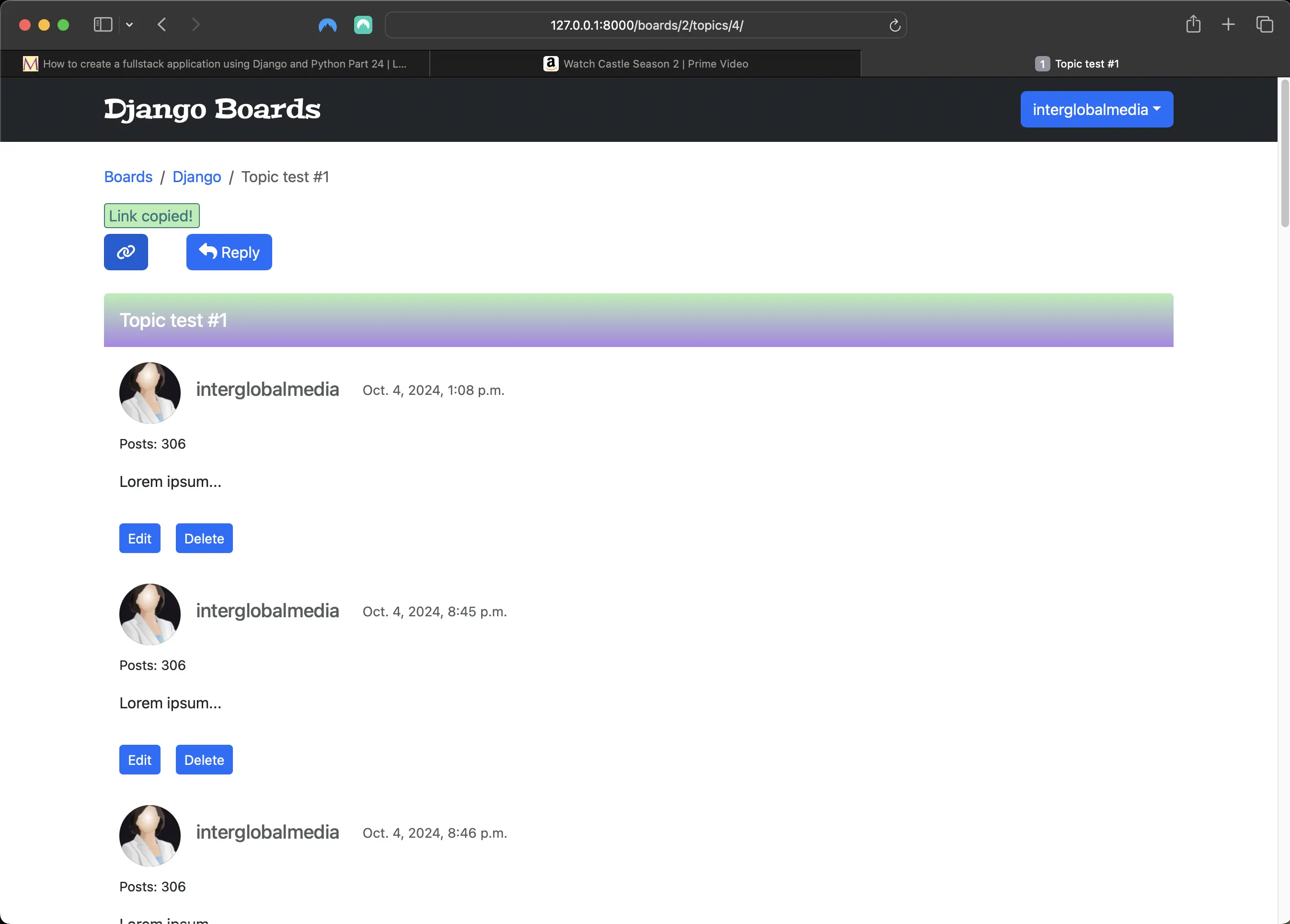
copy link button clicked/on hover
Screenshot of scroll buttons when scrollbar is at bottom of the page
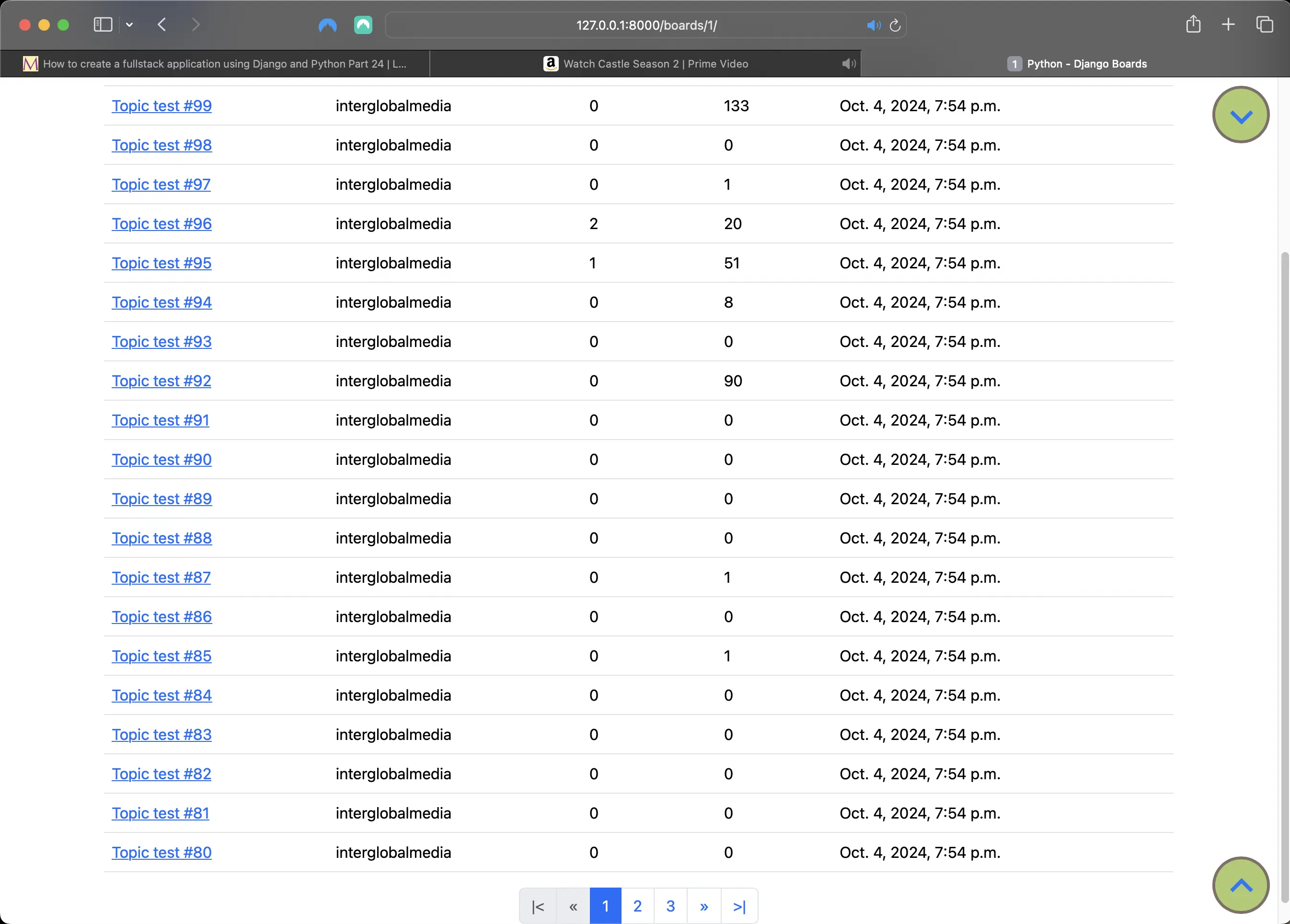
Scroll buttons when scrollbar is at bottom of the page
Take note of the position of the scrollbar.
Screenshot of the effect of pressing down on a scroll button
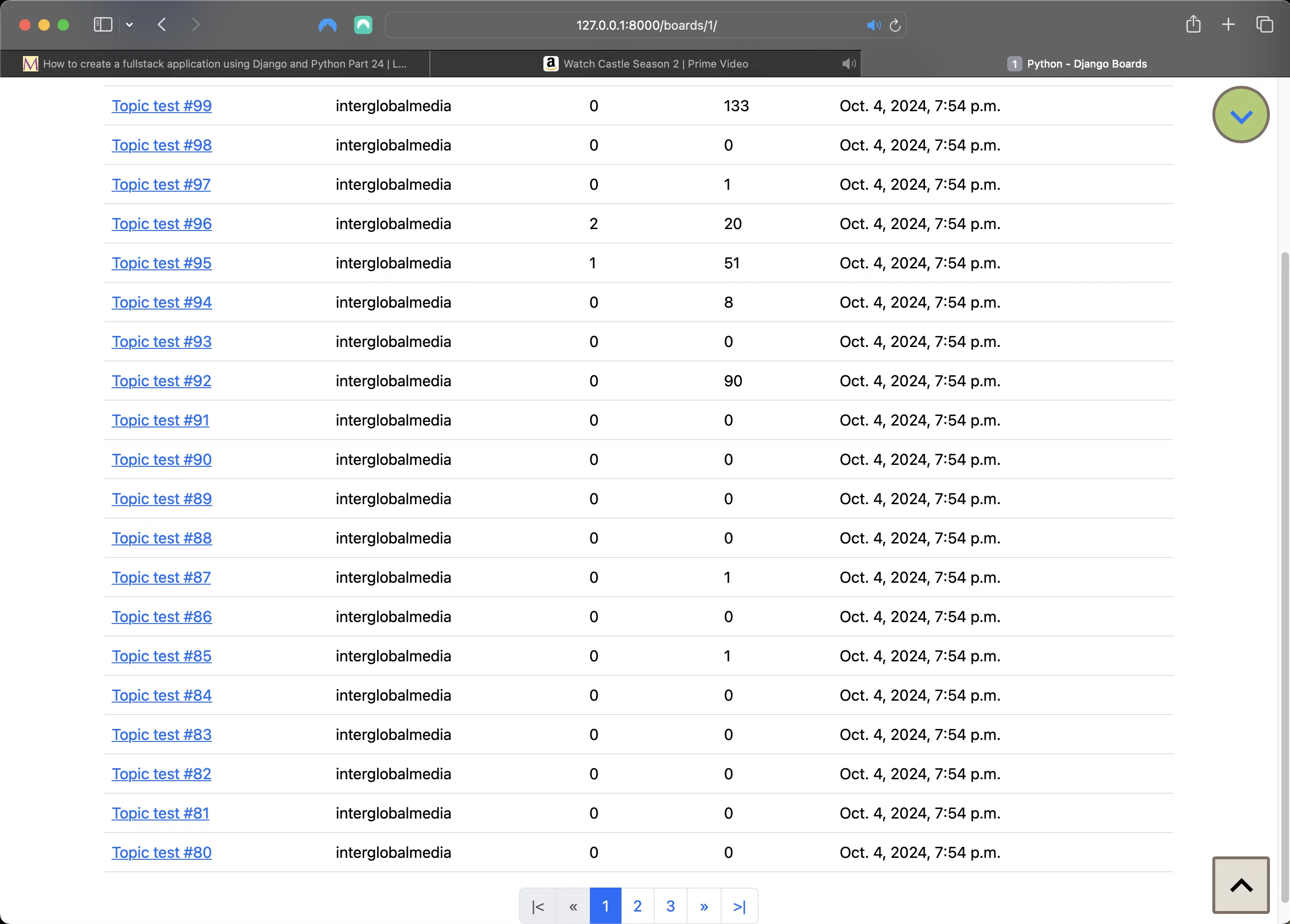
The effect of pressing down on a scroll button
Take note of the position of the scrollbar.
Screenshot of what happens to scroll buttons when scrollbar is positioned at top of page
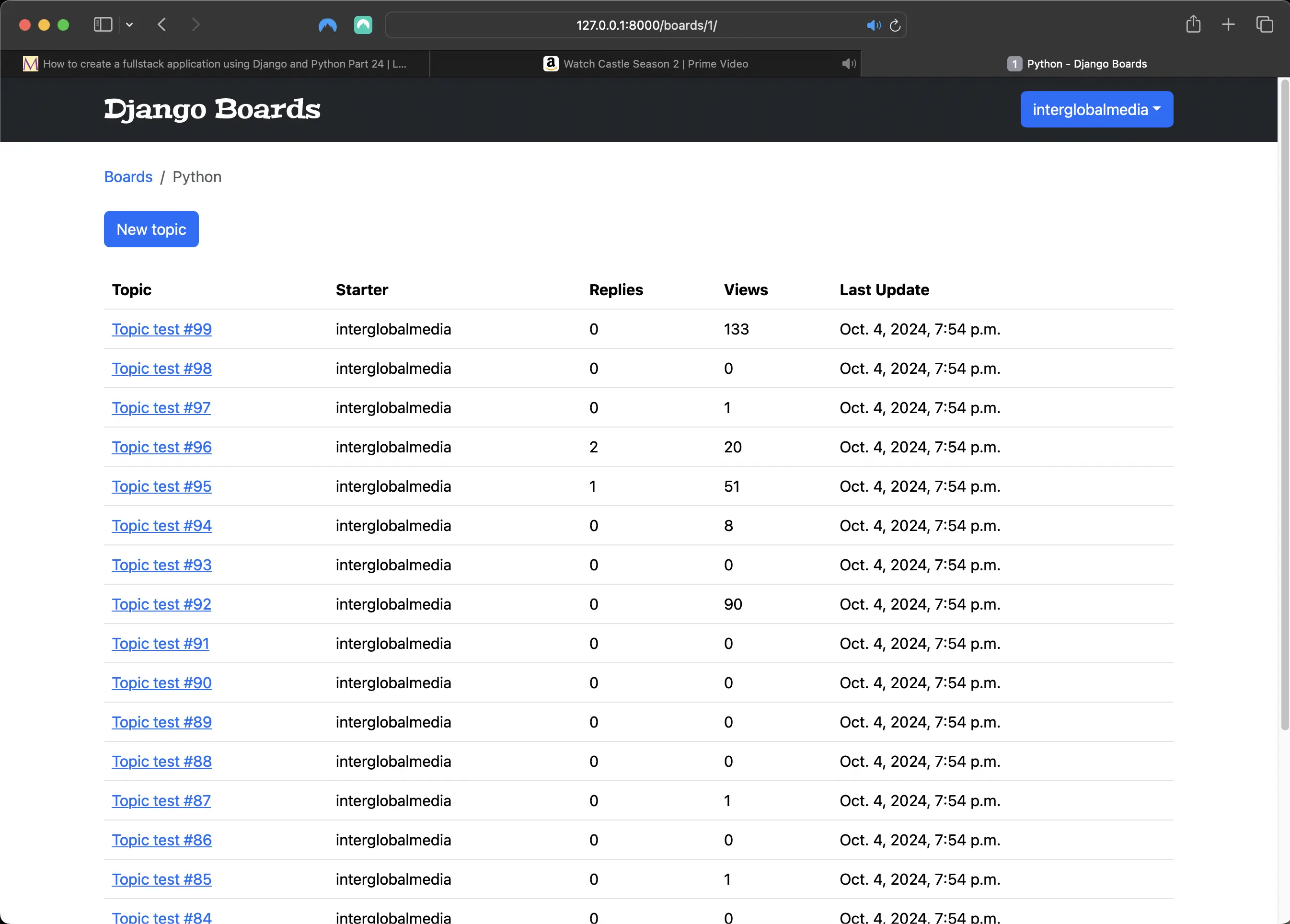
When scrollbar is positioned at top of page
Take note of the position of the scrollbar.
Screenshot of what happens to scroll buttons when scrollbar is positioned a bit below the top of the page
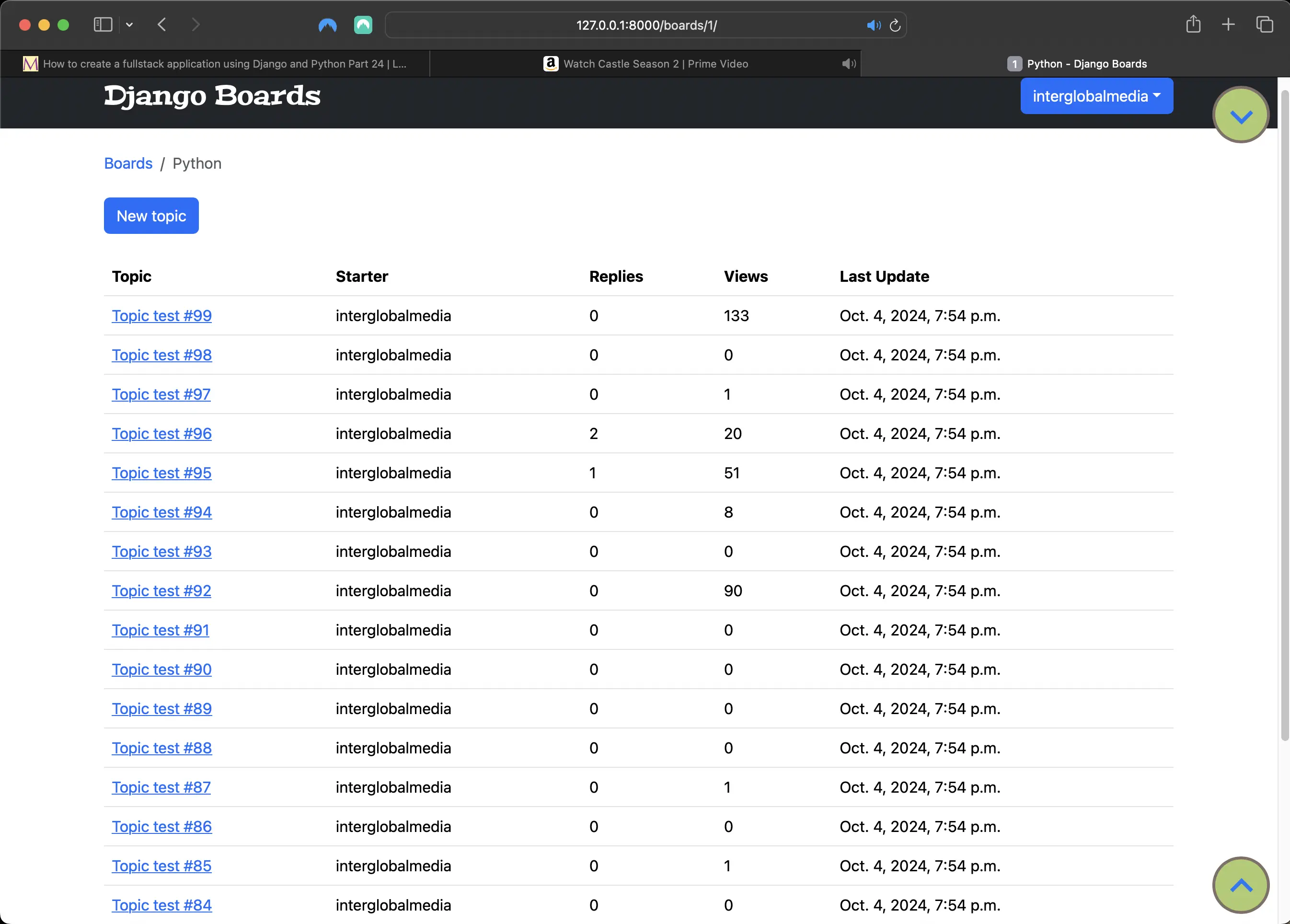
When scrollbar is positioned a bit below the top of the page
As for Bootstrap pagination, you can see it in action for yourself.
Code associated with this post
To view the code associated with this post, please visit 2dcc0f0.
Conclusion
In this section, I add markdown functionality to the Post model, the reply_topic.html and topic_posts.html templates, and I implement ES6 modules to my JavaScript code. This means refactoring the copy (link) button and associated HTML markup and CSS. I refactor and modularize the scroll top and bottom button JavaScript code and associated CSS, modularize the pagination behavior JavaScript code, import the ES6 modules into a new file called app.js, and add the type="module" attribute to the app.js script tag in templates/base.html.
Related Resources
- Django Boards repository on GitHub
- How to create a fullstack application using Django and Python Part 16: mariadcampbell.com
- Python-Markdown
- A Practical guide to ES6 modules: by Dler Ari, freecodecamp.org
- clipboard.js
- Security in Django