How to create a fullstack application using Django and Python Part 26
Social Share:
Thursday, October 10, 2024 at 11:31 AM | 17 min read
Last modified on Thursday, July 16, 2026 at 12:22 PM
#fullstack development, #macOS, #django, #extended built-in user, #imagefield, #one-to-one relationship, #pillow, #python3, #series

Photo by Peter Herrmann on unsplash.com
Important Note: Before committing anything to Git or pushing anything to remote, please visit How to create a fullstack application using Django and Python Part 4 where I discuss how to add the python-dotenv package to the Django site and why it is crucial to do it. This article assumes you have a working knowledge of Git.
Table of Contents
- Adding a user profile
- Creating the user profile view in accounts/views.py
- Adding a profile url to accounts/urls.py
- Creating the initial templates/profile.html template
- Extending User model using a one-to-one relationship
- Creating the profile model in accounts/models.py
- Installing the pillow package
- Running makemigrations and migrate
- Registering the Profile model
- Working with media files in Django
- Using signals in Django
- Creating an update profile form
- Resizing images in Django
- Why existing users pre the User Profile no longer work
- Adjusted styling for templates/topic_posts.html (top half view)
- Fixing the broken styling for templates/login.html
- Current directory structure of django_boards
- Code associated with this post
- Conclusion
- Related Resources
- Related Posts
- Footnotes
Update (July 2026): This walkthrough was written against Django 5.1, which reached full end-of-life in December 2025 and is no longer receiving security patches. Run python -m django --version to check which version you have.
I wrote this series as a live process, so sometimes it might seem confusing, but it all works out in the end.
Adding a user profile
I am now going to add a user profile primarily so that users can upload avatars/gravatars to add to their (newly created) profiles.
Creating the user profile view in accounts/views.py
# accounts/views.py
# add to the bottom of the file
@login_required
def profile(request):
    return render(request, 'profile.html')
Adding a profile url to accounts/urls.py
# this file has to be created
# accounts/urls.py
from django.urls import path
from .views import profile

urlpatterns = [
    # Add this
    path('profile/', profile, name='users-profile'),
]
I also moved my account url to accounts/urls.py:
# accounts/urls.py
from django.urls import path
from .views import profile, UserUpdateView

urlpatterns = [
    path('account/', UserUpdateView.as_view(), name='my_account'),
    path("profile/", profile, name="users-profile"),
]
This then meant that I had to add the following to boards/urls.py:
urlpatterns = [
    ...
    path("signup/", accounts_views.signup, name="signup"),
    path('', include('accounts.urls')),
    ...
]
path('', include('accounts.urls')) includes all the urls set in accounts/urls.py.
Creating the initial templates/profile.html template
<!-- templates/profile.html -->
{% extends "users/base.html" %}
{% block title %}
  Profile Page
{% endblock title %}
{% block content %}
  <div class="row my-3 p-3">
    <h1>This is the profile page for {{ user.username }}</h1>
  </div>
{% endblock content %}
Extending User model using a one-to-one relationship
The user profile will contain a user avatar field and bio field, and the profile model will have a one-to-one relationship with the built-in user.
Creating the profile model in accounts/models.py
from django.db import models
from django.contrib.auth.models import User


# Extending User Model Using a One-To-One Link
class Profile(models.Model):
    user = models.OneToOneField(User, on_delete=models.CASCADE)

    avatar = models.ImageField(default='default.jpg', upload_to='profile_images')
    bio = models.TextField()

    def __str__(self):
        return self.user.username
In this model, the first argument of the user OneToOnefield specifies which model the Profile model is related to: the User model. The second argument, on_delete=models.CASCADE, means that if a user is deleted, the user's profile should be deleted as well.
The avatar ImageField's first argument, default='default.jpg', is the default image to use if a user doesn't upload their own. The second argument, upload_to='profile_images', is the directory where the images are uploaded to.
The bio field is just a TextField where user information is stored.
The dunder (double underscore) __str__ method converts an object into its string representation. I have already used this method in the boards models. It enables the display of the username whenever I print out the user profile.
Installing the pillow package
Next, I have to install the Python package called pillow. Pillow adds image processing capabilities to Python interpreters. It provides extensive file format support, an efficient internal representation, and fairly powerful image processing capabilities.
Django requires me to install this library whenever working with ImageField.
To install pillow, I run the following command:
pip install pillow
Which, for me, returned the following:
Requirement already satisfied: pillow in /Users/mariacam/.pyenv/versions/3.12.5/lib/python3.12/site-packages (10.4.0)
I already had it installed.
Running makemigrations and migrate
Since I created a new model, I have to run makemigrations and migrate.
First:
python3 manage.py makemigrations
Which returns:
Migrations for 'accounts':
  accounts/migrations/0001_initial.py
    + Create model Profile
Followed by:
python3 manage.py migrate
Which returns:
Operations to perform:
  Apply all migrations: accounts, admin, auth, avatar, boards, contenttypes, sessions
Running migrations:
  Applying accounts.0001_initial... OK
Registering the Profile model
# accounts/admin.py
from .models import Profile
# Register your models here.

admin.site.register(Profile)
The above code imports the Profile model, and then calls admin.site.register to register it. I can login to the admin panel and see the model I created:
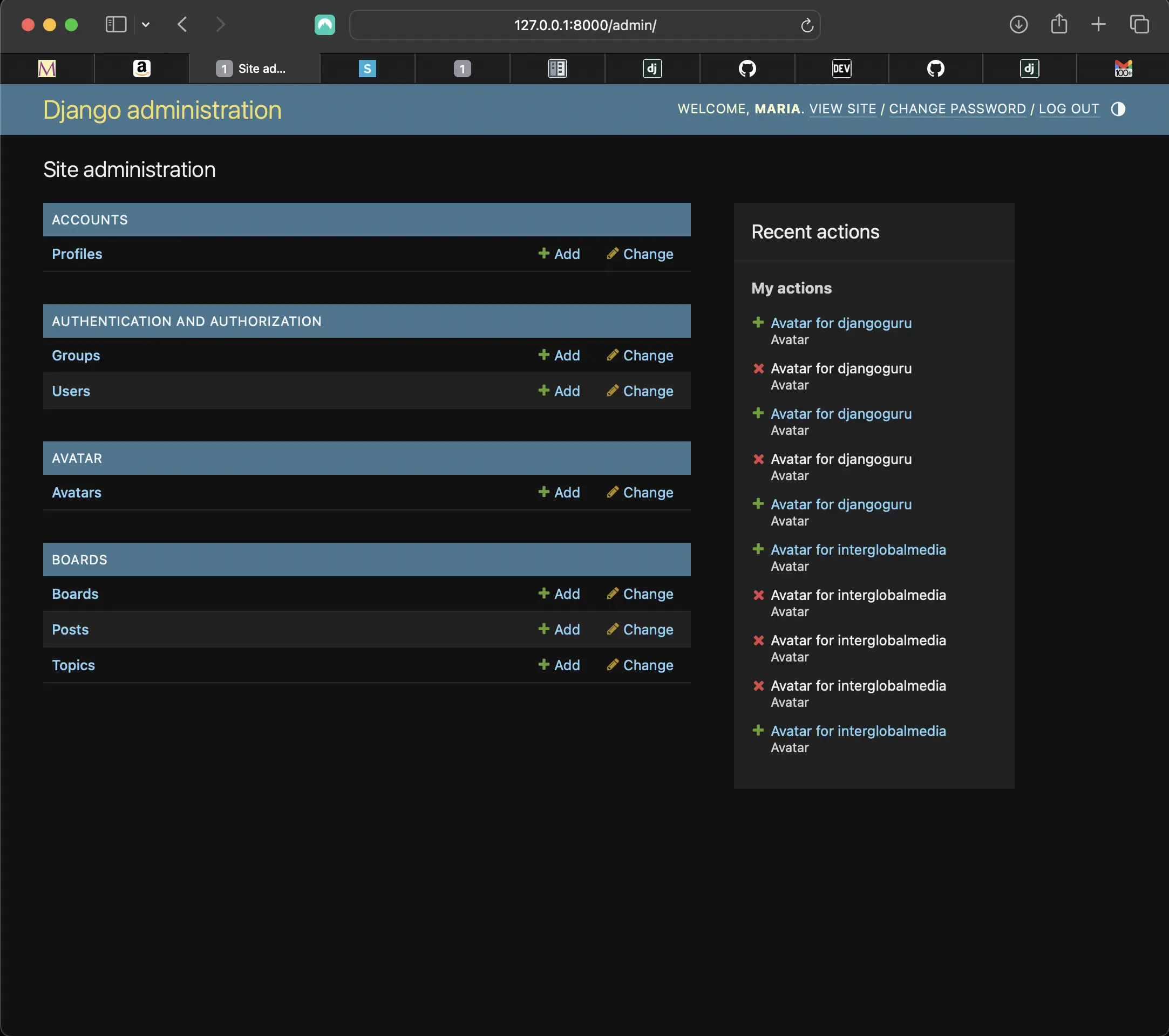
The Profile model in admin site
Avatar also appears there.
Working with media files in Django
When working with media files in Django, I have to change some settings to store files locally and serve them when needed.
Specifically, I need to set MEDIA_URL and MEDIA_ROOT in settings.py.
MEDIA_ROOT represents the full path to a directory where uploaded files are stored. Typically such files are stored in a directory inside the project's root directory.
MEDIA_URL represents the base URL which serves media files. This enables me to access media via my web browser.
MEDIA_ROOT = os.path.join(BASE_DIR, 'media')
MEDIA_URL = '/media/'
Configuring urls.py for user-uploaded media files during development
Now I have to configure the django_boards/urls.py to serve user-uploaded media files during development (when debug=True).
from django.conf import settings
from django.conf.urls.static import static

urlpatterns = [
...
] + static(settings.MEDIA_URL, document_root=settings.MEDIA_ROOT)
Now I can add files to the media root folder and Django will serve them from the media url.
Profile avatars that users upload will be stored in the /media/profile_images/your_image path.
Until I configure the frontend where users will upload their images, I can go to the admin panel and upload images for registered users to make sure everything is working properly.
For now, the only option I have on the backend is from django-avatar. When I upload an image for myself, it is populated for all other users, because they do not have any profile images yet. But the upload was successful, and ended up in the right directory:
- django_boards/
  ...
  - media/
    - avatars/
      - 1/
        - resized/
          - 80/
            - 10551051-copy.png
        - 10551051-copy.jpeg
    - default.jpg
The number 1 represents the id of the user. The above is what a user's avatar directory structure would look like.
Next, I add the following template tags to templates/topic_posts.html:
<!-- templates/topic_posts.html -->
...
<div class="card-body col-md-8">
	<div class="col">
		<h5 class="card-title text-muted">{{ post.created_by.username }}</h5>
		<p class="card-text">
			<small class="text-muted">{{ post.created_at }}</small>
		</p>
	</div>
	<div class="django-avatar">
		{% avatar post.created_by 80 class="img-circle img-responsive"
		id="user_avatar" %}
	</div>
</div>
<div class="mb-4">
	<small>Posts: {{ post.created_by.posts.count }}</small>
</div>
...
I changed the p tag which wrapped around the posts count to a div tag. In the avatar template tag, post.created_by targets the user who created the topic post.
"80" represents the size of the avatar. I already set the avatar size to "80", so this is more for demonstration purposes. But I'll keep it anyway.
class="img-circle img-responsive" id="user_avatar" is how I can customize the avatar styling. The default shape of the avatar is a square, but I wanted to change it to a circle, so I added the following to the bottom of static/css/app.css:
/* static/css/app.css */
/* django-avatar styling */
img#user_avatar.img-circle.img-responsive {
	border-radius: 50%;
	margin-left: -1rem;
}
Uploading an avatar for another user
Let's see what happens when I upload an image for another user.
When I upload an avatar for djangoguru via admin, it is uploaded successfully and saved to the media directory, and the new avatar for djangoguru is uploaded to the posts that she created. This is thanks to post.created_by in the avatar template tag.
django-beginner, however, does not have her own image, so django-avatar worked its magic and assigned a placeholder avatar. django-avatar is working as expected! No need for a fallback image called default.jpg in the media directory.
Using signals in Django
Signals are used to perform some action on a creation/modification of a particular entry in a database.
A signal consists of the following basic concepts:
There is the Sender, which is usually a model that notifies the receiver when an event occurs.
There is the Receiver, which is usually a function that works on the data once it is notified of some action that has taken place. For example, when a user instance is about to be saved to the database.
The connection between the two is done through 'signal dispatchers'.
So why am I using signals in my case? Using signals will enable me to create a profile instance when a new user instance is saved to the database.
Creating accounts/signals.py
# accounts/signals.py
from django.db.models.signals import post_save
from django.contrib.auth.models import User
from django.dispatch import receiver

from .models import Profile

@receiver(post_save, sender=User)
def create_profile(sender, instance, created, **kwargs):
    if created:
        Profile.objects.create(user=instance)


@receiver(post_save, sender=User)
def save_profile(sender, instance, **kwargs):
    instance.profile.save()
create_profile is the receiver function which is run every time a user is created.
User is the sender, and is responsible for making the notification.
post_save is the signal sent at the end of the save method.
In essence, after the user model's save() method has finished executing, it sends signal(post_save) to the receiver function (create_profile). Then create_profile will receive the signal to create and save a profile instance for that user.
Connecting the receivers to AppConfig's ready method
In order to configure an application, I create an apps.py file inside my accounts app. Then I define a subclass of AppConfig there.
In apps.py, I can include any application configuration for the accounts app.
# accounts/apps.py

from django.apps import AppConfig


class UserConfig(AppConfig):
    default_auto_field = 'django.db.models.BigAutoField'
    name = 'accounts'

    # add this
    def ready(self):
        import accounts.signals  # noqa
What I did above is to override the ready() method of the accounts app config to perform an initialization task to register signals.
Creating an update profile form
Now I am going to create and display a form where users can update their profile. It will look something like the following:
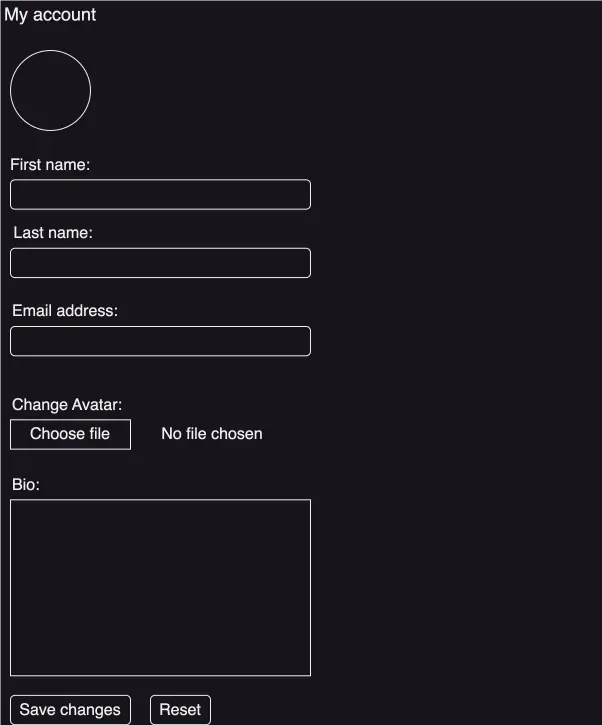
Account profile form
Creating update user and profile forms
from .models import Profile
...
class UpdateUserForm(forms.ModelForm):
    username = forms.CharField(max_length=100,
                               required=True,
                               widget=forms.TextInput(attrs={'class': 'form-control'}))
    email = forms.EmailField(required=True,
                             widget=forms.TextInput(attrs={'class': 'form-control'}))

    class Meta:
        model = User
        fields = ['username', 'email']


class UpdateProfileForm(forms.ModelForm):
    avatar = forms.ImageField(widget=forms.FileInput(attrs={'class': 'form-control-file'}))
    bio = forms.CharField(widget=forms.Textarea(attrs={'class': 'form-control', 'rows': 5}))

    class Meta:
        model = Profile
        fields = ['avatar', 'bio']
UpdateUserForm interacts with the User model to let users update their username, email, and update their password. I already have that set up.
UpdateProfileForm interacts with the profile model to let users update their profile.
Updating the profile view
# accounts/views.py
from django.contrib.auth.decorators import login_required
# SignUpForm was already there, but just adding it since it is part of the line
from .forms import SignUpForm, UpdateUserForm, UpdateProfileForm

@login_required
def profile(request):
    if request.method == 'POST':
        user_form = UpdateUserForm(request.POST, instance=request.user)
        profile_form = UpdateProfileForm(request.POST, request.FILES, instance=request.user.profile)

        if user_form.is_valid() and profile_form.is_valid():
            user_form.save()
            profile_form.save()
            messages.success(request, 'Your profile is updated successfully')
            return redirect(to='users-profile')
    else:
        user_form = UpdateUserForm(instance=request.user)
        profile_form = UpdateProfileForm(instance=request.user.profile)

    return render(request, 'users/profile.html', {'user_form': user_form, 'profile_form': profile_form})
The required forms are imported and instances of those forms are created depending on whether the request is a GET or POST.
If the form is submitted (request is POST), I need to pass in the post data to the forms. But for the profile form there is file/image data coming in with the request. This file data is placed in request.FILES, so I need to pass in that too.
Then it populates the form fields with the current information of the logged in user, for example. The user form expects an instance of a user since it's working with the User model, so I use instance=request.user. For the profile form, I pass in an instance of the profile model by using instance=request.user.profile.
Adding the templates/users/base.html
<!-- Needed to load static for static/css/accounts.css --> {% load static %} <!DOCTYPE html> <html lang="en"> <head> <!-- Required meta tags --> <meta charset="utf-8" /> <meta name="viewport" content="width=device-width, initial-scale=1, shrink-to-fit=no" /> <!--Font awesome icons --> <link rel="stylesheet" href="https://cdnjs.cloudflare.com/ajax/libs/font-awesome/6.6.0/css/all.min.css" /> <!-- Bootstrap 5 css --> <link rel="stylesheet" href="{% static 'css/bootstrap.min.css' %}" /> <!-- Google material Icons --> <link href="https://fonts.googleapis.com/icon?family=Material+Icons" rel="stylesheet" /> <!-- Added static/css/accounts.css for styling --> <link rel="stylesheet" href="{% static 'css/accounts.css' %}" /> <title>{% block title %}{% endblock %}</title> </head> <body> <div class="container p-3 my-3"> <div class="row"> <div class="col-md-12"> <nav class="navbar rounded navbar-expand-md navbar-light" style="background-color: #f0f5f5" > <a href="/" class="navbar-brand">Home</a> <button type="button" class="navbar-toggler" data-toggle="collapse" data-target="#navbarCollapse" > <span class="navbar-toggler-icon"></span> </button> <div class="collapse navbar-collapse" id="navbarCollapse" > <div class="navbar-nav ml-auto"> {% if user.is_authenticated %} <a href="{% url 'users-profile' %}" class="nav-item nav-link" >Profile</a > <a href="{% url 'logout' %}" class="nav-item nav-link" >Logout</a > {% else %} <a href="{% url 'login' %}" class="nav-item nav-link" >Sign in</a > {% endif %} </div> </div> </nav> <!--Any flash messages pop up in any page because this is the base template--> {% if messages %} <div class="alert alert-dismissible" role="alert"> {% for message in messages %} <div class="alert alert-{{ message.tags }}"> {{ message }} </div> {% endfor %} <button type="button" class="close" data-dismiss="alert" aria-label="Close" > <span aria-hidden="true">×</span> </button> </div> {% endif %} {% block content %}{% endblock %} </div> </div> </div> <!-- jQuery first, then Popper.js, then Bootstrap JS --> <script src="https://code.jquery.com/jquery-3.7.1.min.js" integrity="sha256-/JqT3SQfawRcv/BIHPThkBvs0OEvtFFmqPF/lYI/Cxo=" crossorigin="anonymous" ></script> <script src="https://cdnjs.cloudflare.com/ajax/libs/popper.js/2.9.2/umd/popper.min.js" integrity="sha512-2rNj2KJ+D8s1ceNasTIex6z4HWyOnEYLVC3FigGOmyQCZc2eBXKgOxQmo3oKLHyfcj53uz4QMsRCWNbLd32Q1g==" crossorigin="anonymous" referrerpolicy="no-referrer" ></script> <script src="https://cdnjs.cloudflare.com/ajax/libs/bootstrap/5.3.3/js/bootstrap.min.js" integrity="512-ykZ1QQr0Jy/4ZkvKuqWn4iF3lqPZyij9iRv6sGqLRdTPkY69YX6+7wvVGmsdBbiIfN/8OdsI7HABjvEok6ZopQ==" crossorigin="anonymous" referrerpolicy="no-referrer" ></script> <!-- A plugin for password show/hide --> <script src="https://unpkg.com/bootstrap-show-password@1.2.1/dist/bootstrap-show-password.min.js"></script> </body> </html>
Updating templates/users/profile.html
<!-- templates/users/profile.html --> {% extends "users/base.html" %} <!-- needed to load static for css styling from templates/users/base.html --> {% load static %} {% block title %} Profile Page {% endblock title %} {% block content %} <div class="profile-avatar"> <img class="rounded-circle account-img" src="{{ user.profile.avatar.url }} " style="cursor: pointer" width="80" height="80" alt="{{ user.profile }}" /> </div> {% if user_form.errors %} <div class="alert alert-danger alert-dismissible" role="alert"> <div id="form_errors"> {% for key, value in user_form.errors.items %}<strong>{{ value }}</strong>{% endfor %} </div> <button type="button" class="close" data-dismiss="alert" aria-label="Close"> <span aria-hidden="true">×</span> </button> </div> {% endif %} <div class="form-content"> <form method="post" enctype="multipart/form-data"> {% csrf_token %} <div class="form-row"> <div class="col-md-5"> <div class="form-group"> <label class="mb-1">Username:</label> {{ user_form.username }} <label class="mb-1">Email:</label> {{ user_form.email }} </div> <div class="form-group change-password"> <a href="{% url 'password_change' %}">Change Password</a> <hr> </div> <div class="form-group"> <label class="mb-1">Change Avatar:</label> <p>{{ profile_form.avatar }}</p> </div> <label class="mb-1">Bio:</label> {{ profile_form.bio }} </div> </div> <br> <br> <button type="submit" class="btn btn-dark btn-lg">Save Changes</button> <button type="reset" class="btn btn-dark btn-lg">Reset</button> </form> </div> {% endblock content %}
This template includes the profile-avatar div which contains the profile avatar. It extends the templates/users/base.html template.
The link for "Change Password" is all set up. I don't need to make any changes there. However, I do have to remove the Change Password link in the logged in user dropdown menu in templates/base.html:
{% load static %} <!DOCTYPE html> <html lang="en"> <head> <meta charset="utf-8" /> <meta name="description" content="A forum dedicated to all things Django" /> <meta name="keywords" content="django, python3" /> <title>{% block title %} Django Boards {% endblock title %}</title> {% block stylesheet %} <link rel="stylesheet" href="https://cdnjs.cloudflare.com/ajax/libs/font-awesome/6.6.0/css/all.min.css" /> <link rel="stylesheet" href="{% static 'css/bootstrap.min.css' %}" /> <link href="https://fonts.googleapis.com/icon?family=Material+Icons" rel="stylesheet" /> <link rel="stylesheet" href="{% static 'css/app.css' %}" /> {% endblock stylesheet %} </head> <body class="site"> {% block body %} <div class="site-content"> <div class="buttons-container"> <button class="scroll bottom shrink-border"> <i class="material-icons"> keyboard_arrow_down </i> </button> <button class="scroll top shrink-border"> <i class="material-icons">keyboard_arrow_up</i> </button> </div> <nav class="navbar navbar-expand-sm navbar-dark bg-dark"> <div class="container"> <a class="navbar-brand" href="{% url 'index' %}" >Django Boards</a > {% if user.is_authenticated %} <div class="dropdown"> <a class="btn btn-primary dropdown-toggle" href="#" role="button" data-bs-toggle="dropdown" aria-expanded="false" >{{ user.username }}</a > <ul class="dropdown-menu"> <li> <a class="dropdown-item" href="{% url 'my_account' %}" >My account</a > </li> <li> <a class="dropdown-item" href="{% url 'users-profile' %}" >My profile</a > </li> <li> <form method="post" action="{% url 'logout' %}"> {% csrf_token %} <button class="btn btn-secondary logout" type="submit" > Logout </button> </form> </li> </ul> </div> <button class="navbar-toggler" type="button" data-toggle="collapse" data-target="#mainMenu" aria-controls="mainMenu" aria-expanded="false" aria-label="Toggle navigation" > <span class="navbar-toggler-icon"></span> </button> {% else %} <form class="form-inline ml-auto"> <a href="{% url 'login' %}" class="btn btn-outline-secondary" >Log in</a > <a href="{% url 'signup' %}" class="btn btn-primary ml-2" >Sign up</a > </form> {% endif %} </div> </nav> <div class="container"> <ol class="breadcrumb my-4"> {% block breadcrumb %} {% endblock breadcrumb %} </ol> {% block content %} {% endblock content %} </div> </div> <footer class="site-footer text-center"> <script> const theDate = new Date() const footer = document.querySelector('.site-footer') footer.style.fontWeight = '400' footer.style.letterSpacing = '0.07rem' footer.style.fontFamily = "'Quicksand', sans-serif;" footer.style.fontSize = `1.2rem` footer.innerHTML = `` const anchor = document.createElement('a') anchor.setAttribute('href', '/') footer.appendChild(anchor) anchor.innerHTML = `` </script> </footer> {% endblock body %} {% block javascript %} <script src="https://cdnjs.cloudflare.com/ajax/libs/popper.js/2.9.2/umd/popper.min.js" integrity="sha512-2rNj2KJ+D8s1ceNasTIex6z4HWyOnEYLVC3FigGOmyQCZc2eBXKgOxQmo3oKLHyfcj53uz4QMsRCWNbLd32Q1g==" crossorigin="anonymous" referrerpolicy="no-referrer" ></script> <script src="https://code.jquery.com/jquery-3.7.1.min.js" integrity="sha256-/JqT3SQfawRcv/BIHPThkBvs0OEvtFFmqPF/lYI/Cxo=" crossorigin="anonymous" ></script> <script src="https://cdnjs.cloudflare.com/ajax/libs/bootstrap/5.3.3/js/bootstrap.min.js" integrity="512-ykZ1QQr0Jy/4ZkvKuqWn4iF3lqPZyij9iRv6sGqLRdTPkY69YX6+7wvVGmsdBbiIfN/8OdsI7HABjvEok6ZopQ==" crossorigin="anonymous" referrerpolicy="no-referrer" ></script> <script src="https://cdnjs.cloudflare.com/ajax/libs/clipboard.js/1.4.0/clipboard.min.js" integrity="sha512-iJh0F10blr9SC3d0Ow1ZKHi9kt12NYa+ISlmCdlCdNZzFwjH1JppRTeAnypvUez01HroZhAmP4ro4AvZ/rG0UQ==" crossorigin="anonymous" referrerpolicy="no-referrer" ></script> <script type="module" src="{% static 'js/app.js' %}"></script> {% endblock javascript %} </body> </html>
I also have added a site footer in which I use JavaScript to create a dynamic date which updates to the current year every year. I will discuss how I created a sticky footer at the end of this section.
As for the Change Password link, the only glitch is that the user has to go through updating the password twice. That's because of the way I have validation errors set up. Either way is not perfect, but I opted for the way I have it set up now. The other way was too misleading for the user trying to change the password! This is a glitch which already existed before I added the extended User Profile.
Resizing images in Django
Saving large images and then showing a scaled/smaller version of it on the profile page might cause slow app performance. I can mitigate this problem by using pillow to resize larger images and override it with the resized/smaller image.
In order to save the resized image, I need to override the save() method. The save() method is accessible to all models, and is used to save an instance of the User model.
I need to override the save() method because I want customized save behavior.
I need to add the following to accounts/models.py:
...
from PIL import Image

# Extending User Model Using a One-To-One Link
class Profile(models.Model):
    ...
    # resizing images
    def save(self, *args, **kwargs):
        super().save()

        img = Image.open(self.avatar.path)

        if img.height > 80 or img.width > 80:
            new_img = (80, 80)
            img.thumbnail(new_img)
            img.save(self.avatar.path)
The above code does the following:
- It saves the uploaded image.
- It resizes large images to 80 x 80.
Why existing users pre the User Profile no longer work
Now, if I tried to use an existing user such as django-beginner, djangoguru, or even interglobalmedia to create topic posts, change passwords, login, logout, etc., Django would throw an error. Why? Because they don't contain the extra fields that the Profile model provides. This means that I have to delete all of the existing users and recreate new users. And deleting existing users means deleting all associated topic posts. The only things that would remain are the boards themselves.
Deleting existing users and creating new ones
When I delete djangoguru, django-beginner, and interglobalmedia, all associated topic posts are also deleted. The only things that remain are the boards themselves. That is due to the on_delete=models.CASCADE argument passed to the Post created_by field which links to a model instance of Post to User. When the user is deleted, all associated topic posts are deleted as well.
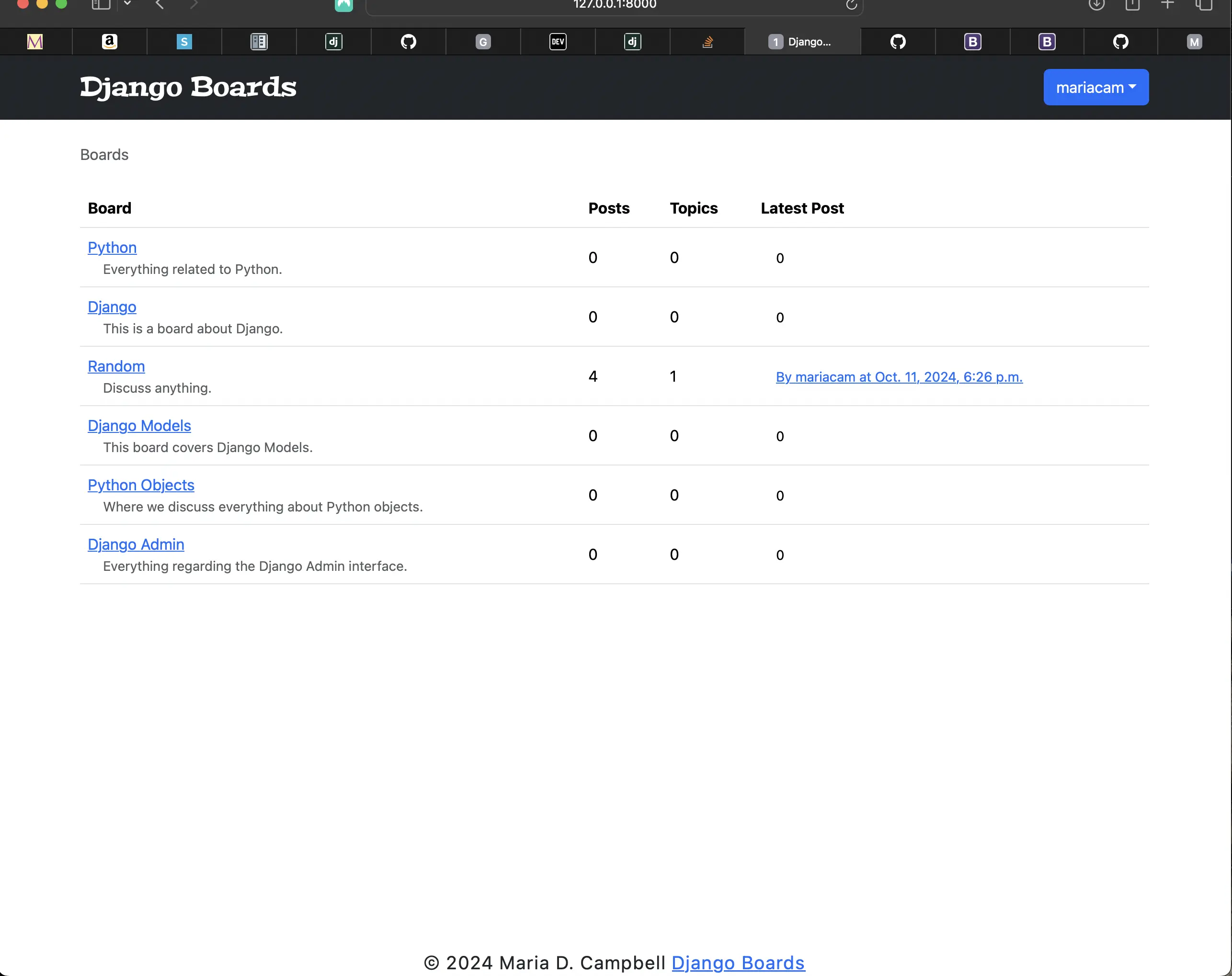
Boards remain after existing users are deleted
There is a topic post created by a new superuser called mariacam under the Latest Post column.
topics.html after deleting existing users
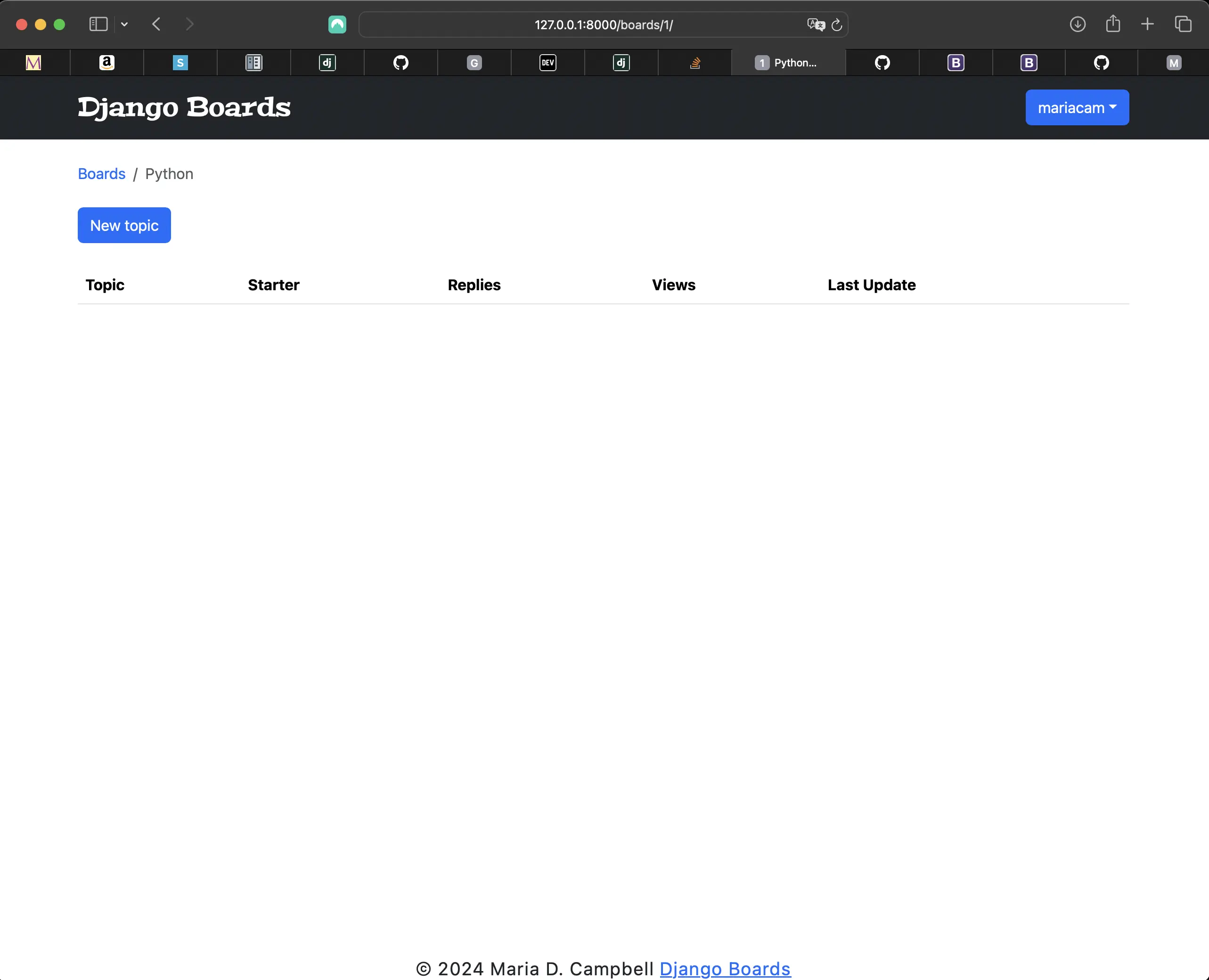
topics.html after deleting existing users
Adjusting pagination to make sure it still works
I created a new topic along with a few topic posts to make sure that pagination still worked. However, I first had to reduce the number of posts per page so that pagination kicks in:
# boards/views.py
...
class BoardListView(ListView):
    model = Board
    context_object_name = 'boards'
    template_name = 'index.html'

class TopicListView(ListView):
    model = Topic
    context_object_name = 'topics'
    template_name = 'topics.html'
    paginate_by = 2 # changed from 20 to 2

    def get_context_data(self, **kwargs):
        kwargs['board'] = self.board
        return super().get_context_data(**kwargs)

    def get_queryset(self):
        self.board = get_object_or_404(Board, pk=self.kwargs.get('pk'))
        queryset = self.board.topics.order_by('-last_updated').annotate(replies=Count('posts') - 1)
        return queryset
...
class PostListView(ListView):
    model = Post
    context_object_name = 'posts'
    template_name = 'topic_posts.html'
    paginate_by = 3 # changed from 20 to 3

    def get_context_data(self, **kwargs):
        self.topic.views += 1
        self.topic.save()
        kwargs['topic'] = self.topic
        return super().get_context_data(**kwargs)

    def get_queryset(self):
        self.topic = get_object_or_404(Topic, board__pk=self.kwargs.get('pk'), pk=self.kwargs.get('topic_pk'))
        queryset = self.topic.posts.order_by('created_at')
        return queryset
...
Screenshot of adjusted pagination
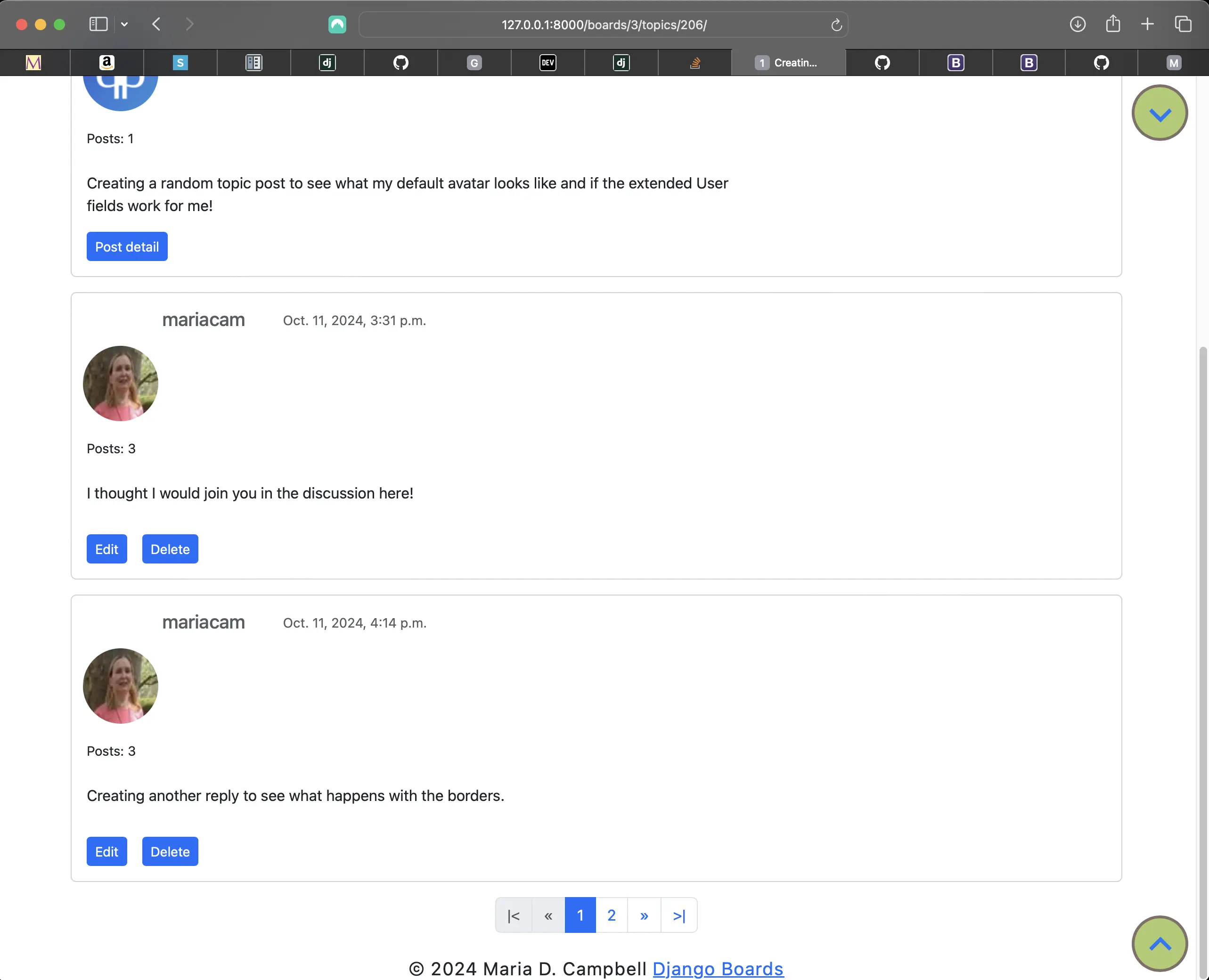
Adjusted pagination
Adjusted styling for templates/topic_posts.html (top half view)
I made some styling changes to templates/topic_posts.html. Now it looks like the following:
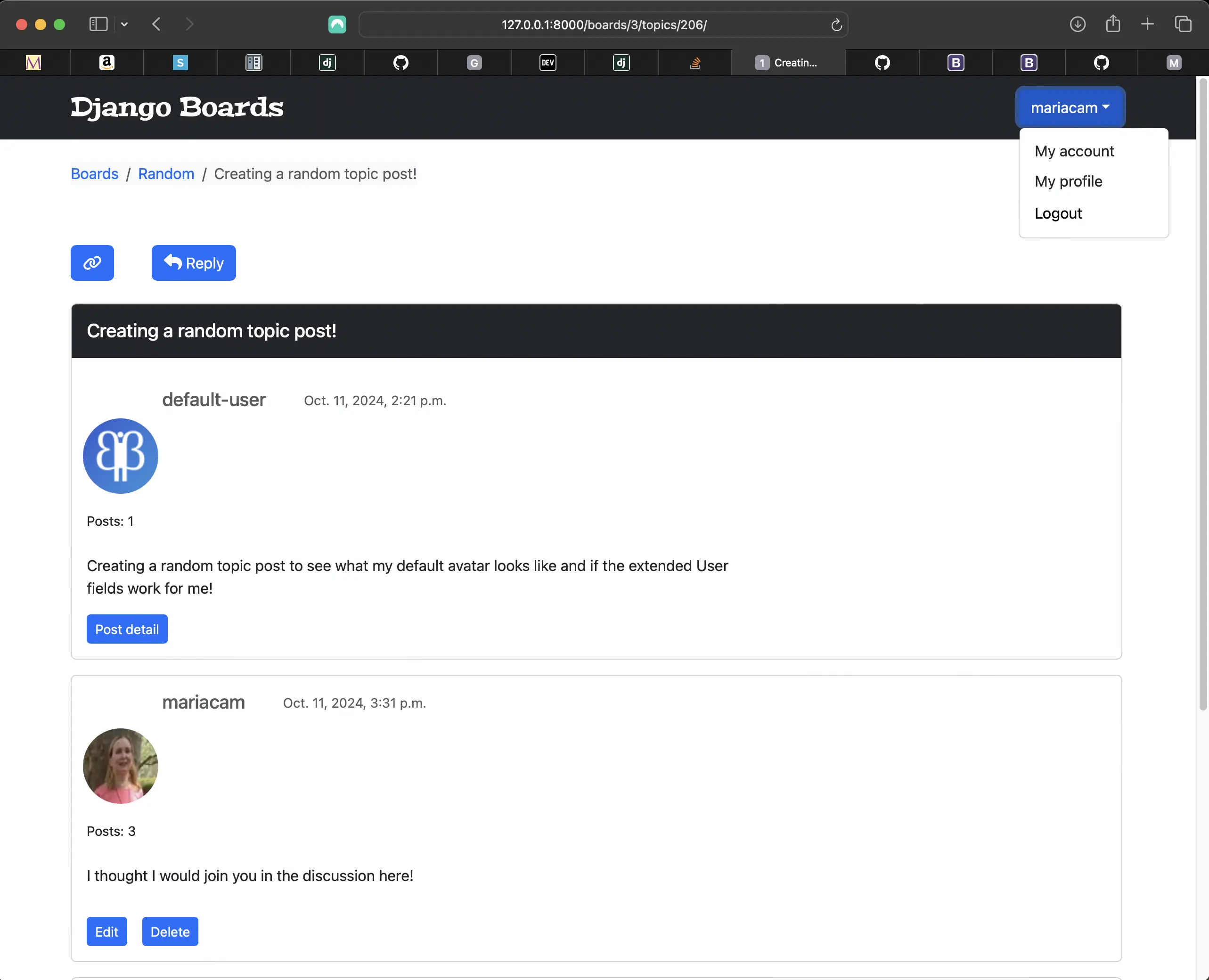
Styling changes to topic_posts.html (top half view)
Below is the associated CSS in static/css/app.css:
/* static/css/app.css */
/*  user profile avatar styling */
.django-avatar {
	margin-left: 0.75rem;
	padding-left: 1rem;
}

.profile-avatar {
	margin-left: -0.25rem;
	width: 80px;
	height: 80px;
	margin-top: 0.5rem;
}

/* django-avatar and profile avatar styling */
img#user_avatar.img-circle.img-responsive {
	border-radius: 50%;
	margin-left: -2rem;
}

small {
	padding-left: 1rem;
}

.post-message p {
	padding-left: 1rem;
}

.user-post-buttons {
	margin-left: 1rem;
	margin-bottom: 1rem;
}
Adjusted styling for templates/topic_posts.html (bottom half view)
Styling for topic_posts.html (bottom half view)
Below is the associated HTML markup for the sticky footer in templates/base.html:
<!-- templates/base.html --> ... <html lang="en"> <!-- new class related to sticky footer --> <body class="site"> {% block body %} <!-- new class related to sticky footer --> <div class="site-content"> </div> <!-- new footer classes --> <footer class="site-footer text-center"> <script> const theDate = new Date(); const footer = document.querySelector(".site-footer"); footer.style.fontWeight = "400"; footer.style.letterSpacing = "0.07rem"; footer.style.fontFamily = "'Quicksand', sans-serif;"; footer.style.fontSize = `1.2rem`; footer.innerHTML = ``; const anchor = document.createElement('a') anchor.setAttribute('href', '/') footer.appendChild(anchor) anchor.innerHTML = `` </script> </footer> </body> </html>
Associated sticky footer css in static/css/app.css:
/* static/css/app.css */
body {
	display: flex;
	flex-direction: column;
	min-height: 100vh;
}

.site-content {
	flex: 1;
	width: 100%;
}
First topic post adjusted HTML markup in topic_posts.html
<!-- topic_posts.html -->
... {% for post in posts %}
<div class="card mb-3 {% if forloop.first %}{% endif %}">
	{% if forloop.first %}
	<div class="card-header bg-dark text-white align-items-center py-2 px-3">
		<h5>{{ topic.subject }}</h5>
	</div>
	{% endif %} ...
</div>
{% endfor %}
...
Adding light colored borders to the topic post cards in templates/topic_posts.html
/* static/css/app.css */
/* from: */
.card-header {
	margin-bottom: 1rem;
	border: 0;
	background-image: linear-gradient(to bottom, #b4eeb4, #aa85e5);
}
.card {
	border: 0;
	display: flex;
	flex-direction: column;
	justify-content: flex-start;
}
/* to: */
.card-header {
	margin-bottom: 1rem;
	/* background-image: linear-gradient(to bottom, #b4eeb4, #aa85e5); */
}
.card {
	display: flex;
	flex-direction: column;
	justify-content: flex-start;
}
Adding conditional avatar in topic_posts.html
I had to add an if/else statement to topic_posts.html to render the correct user profile now that I have an extended built-in User profile in place:
<!-- topic_posts.html -->
{% if user == post.created_by %}
<div class="profile-avatar">
	<img
		class="rounded-circle account-img"
		alt="{{ user.username }}"
		src="{{ user.profile.avatar.url }}"
		style="cursor: pointer"
		width="80"
		height="80"
	/>
</div>
{% else %}
<div class="django-avatar">
	{% avatar post.created_by class="img-circle img-responsive" id="user_avatar"
	%}
</div>
{% endif %}
I also had to move style="cursor: pointer" into static/css/app.css:
/* django-avatar and profile avatar styling */
img#user_avatar.img-circle.img-responsive {
	border-radius: 50%;
	/* moved from topic_posts.html */
	cursor: pointer;
	margin-left: -2rem;
}
Fixing the broken styling for templates/login.html
Because of various changes and additions that I made to the accounts app, the styling for templates/login.html broke a bit. Right now it looks like the following:
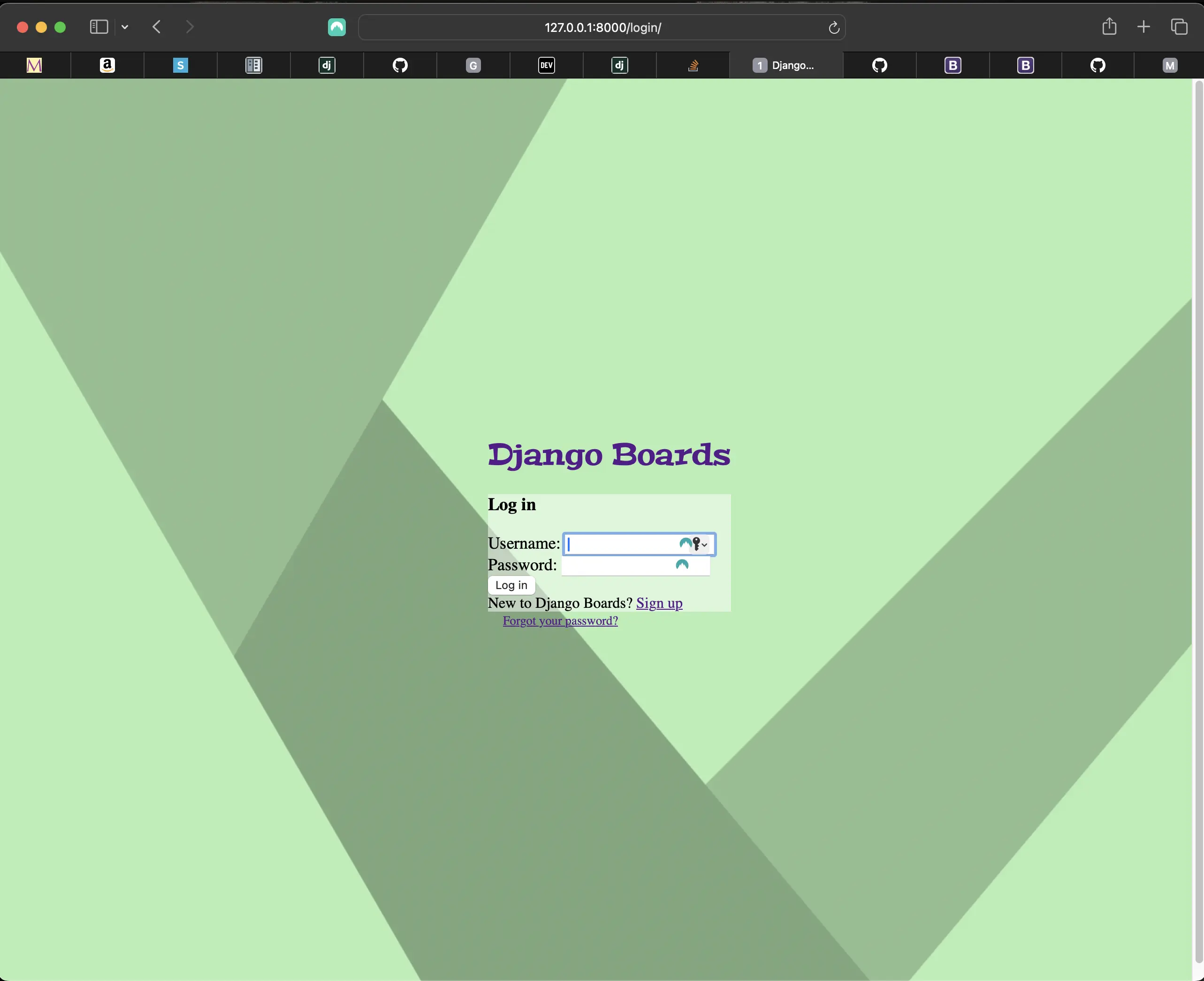
Broken login page styling
First, I have to rename templates/users/base.html. I can't have two base.html. So I rename it to base_profile.html.
Next, I have to add meta description and keywords elements to base_profile.html. I know this is not only because I know it, but djLint1 also warns me that base_profile.html does not contain them. So I add the following:
<!-- templates/users/base_profile.html -->
<head>
	<!-- Required meta tags -->
	<meta charset="utf-8" />
	<meta
		name="viewport"
		content="width=device-width, initial-scale=1, shrink-to-fit=no"
	/>
	<!-- newly added -->
	<meta
		name="description"
		content="A Django Boards application where users respond to topics related to Django created by a superuser"
	/>
	<!-- newly added -->
	<meta
		name="keywords"
		content="django, python3, boards, topics, topic posts, user authentication, extended built-in user profile, user avatars, csrf tokens, django signals, generic class based views, function based views, bootstrap, pagination"
	/>
	<!--Font awesome icons -->
	<link
		rel="stylesheet"
		href="https://cdnjs.cloudflare.com/ajax/libs/font-awesome/6.6.0/css/all.min.css"
	/>
	<!-- Bootstrap 5 css -->
	<link rel="stylesheet" href="{% static 'css/bootstrap.min.css' %}" />
	<!-- Google material Icons -->
	<link
		href="https://fonts.googleapis.com/icon?family=Material+Icons"
		rel="stylesheet"
	/>
	<link rel="stylesheet" href="{% static 'css/accounts.css' %}" />
	<title>{% block title %}{% endblock %}</title>
</head>
Changing the extends template tag in templates/users/profile.html
<!-- templates/users/profile.html -->
<!-- from: -->
{% extends "users/base.html" %}
<!-- to: -->
{% extends "users/base_profile.html" %}
Refactoring templates/login.html markup
<!-- from: -->
{% extends "base_accounts.html" %}
{% load static %}
{% comment %} {% block stylesheet %}
  <!-- Bootstrap 5 css -->
  <link rel="stylesheet" href="{% static 'css/bootstrap.min.css' %}">
  <link rel="stylesheet" href="{% static 'css/accounts.css' %}">
{% endblock stylesheet %} {% endcomment %}
{% block body %}
  <div class="container">
    <h1 class="text-center logo my-4">
      <a href="{% url 'index' %}">Django Boards</a>
    </h1>
    <div class="row justify-content-center">
      <div class="col-lg-4 col-md-6 col-sm-8">
        <div class="card rounded">
          <div class="card-body">
            <h3 class="card-title">Log in</h3>
            <form method="post" novalidate>
              {% csrf_token %}
              <input type="hidden" name="next" value="{{ next }}">
              {% include "includes/form.html" %}
              <button type="submit" class="btn btn-primary mt-2">Log in</button>
            </form>
          </div>
          <div class="card-footer login-card-footer text-muted text-center">
            New to Django Boards? <a href="{% url 'signup' %}">Sign up</a>
          </div>
        </div>
        <div class="text-center login-text-center py-2">
          <small>
            <a href="{% url 'password_reset' %}"" class="text-muted">Forgot your password?</a>
          </small>
        </div>
      </div>
    </div>
  </div>
{% endblock body %}
I removed the above commented out HTML markup. Now templates/login.html should look like the following:
<!-- to: -->
{% extends "base_accounts.html" %}
{% load static %}
{% comment %} {% block stylesheet %}
{% block body %}
  <div class="container">
    <h1 class="text-center logo my-4">
      <a href="{% url 'index' %}">Django Boards</a>
    </h1>
    <div class="row justify-content-center">
      <div class="col-lg-4 col-md-6 col-sm-8">
        <div class="card rounded">
          <div class="card-body">
            <h3 class="card-title">Log in</h3>
            <form method="post" novalidate>
              {% csrf_token %}
              <input type="hidden" name="next" value="{{ next }}">
              {% include "includes/form.html" %}
              <button type="submit" class="btn btn-primary mt-2">Log in</button>
            </form>
          </div>
          <div class="card-footer login-card-footer text-muted text-center">
            New to Django Boards? <a href="{% url 'signup' %}">Sign up</a>
          </div>
        </div>
        <div class="text-center login-text-center py-2">
          <small>
            <a href="{% url 'password_reset' %}"" class="text-muted">Forgot your password?</a>
          </small>
        </div>
      </div>
    </div>
  </div>
{% endblock body %}
Refactoring templates/signup.html markup
<!-- templates/signup.html -->
<!-- from: -->
{% extends "base_accounts.html" %}
{% load static %}
{% comment %} {% block stylesheet %}
  <link rel="stylesheet" href="{% static 'css/accounts.css' %}">
{% endblock stylesheet %} {% endcomment %}
{% block body %}
  <div class="container">
    <h1 class="text-center logo my-4">
      <a href="{% url 'index' %}">Django Boards</a>
    </h1>
    <div class="row justify-content-center">
      <div class="col-lg-8 col-md-10 col-sm-12">
        <div class="card">
          <div class="card-body">
            <h3 class="card-title">Sign up</h3>
            <form method="post" novalidate class="signup-form">
              {% csrf_token %}
              {% include "includes/form.html" %}
              <button type="submit" class="btn btn-primary btn-block">Create an account</button>
            </form>
          </div>
          <div class="card-footer text-muted text-center">
            Already have an account? <a href="{% url 'login' %}">Log in</a>
          </div>
        </div>
      </div>
    </div>
  </div>
{% endblock body %}
I removed the commented out HTML markup. Now templates/signup.html should look like the following:
<!-- templates/signup.html -->
<!-- to; -->
{% extends "base_accounts.html" %}
{% load static %}
{% block body %}
  <div class="container">
    <h1 class="text-center logo my-4">
      <a href="{% url 'index' %}">Django Boards</a>
    </h1>
    <div class="row justify-content-center">
      <div class="col-lg-8 col-md-10 col-sm-12">
        <div class="card">
          <div class="card-body">
            <h3 class="card-title">Sign up</h3>
            <form method="post" novalidate class="signup-form">
              {% csrf_token %}
              {% include "includes/form.html" %}
              <button type="submit" class="btn btn-primary btn-block">Create an account</button>
            </form>
          </div>
          <div class="card-footer text-muted text-center">
            Already have an account? <a href="{% url 'login' %}">Log in</a>
          </div>
        </div>
      </div>
    </div>
  </div>
{% endblock body %}
Refactoring templates/base_accounts.html
<!-- templates/base_accounts.html -->
{% extends "base.html" %}
{% load static %}
{% block stylesheet %}
  <link rel="stylesheet" href="{% static 'css/bootstrap.min.css' %}">
  <link rel="stylesheet" href="{% static 'css/accounts.css' %}">
{% endblock stylesheet %}
{% block body %}
  <div class="container">
    <h1 class="text-center logo my-4">
      <a href="{% url 'index' %}">Django Boards</a>
    </h1>
    {% block content %}
    {% endblock content %}
  </div>
{% endblock body %}
I had to add <link rel="stylesheet" href="{% static 'css/bootstrap.min.css' %}">.
Tweaking the styling of templates/password_reset.html
<!-- templates/password_reset.html -->
{% extends "base_accounts.html" %}
{% block title %}
  Reset your password
{% endblock title %}
{% block content %}
  <div class="row justify-content-center">
    <div class="col-lg-4 col-md-6 col-sm-8">
      <div class="card">
        <div class="card-body">
          <h3 class="card-title">Reset your password</h3>
          <p>Enter your email address and we will send you a link to reset your password.</p>
          <form method="post" novalidate class="password-reset">
            {% csrf_token %}
            {% include "includes/form.html" %}
            <!-- I added mt-2 to the submit button classes -->
            <button type="submit" class="btn btn-primary btn-block mt-2">Send password reset email</button>
          </form>
        </div>
      </div>
    </div>
  </div>
{% endblock content %}
Current directory structure of django_boards
.git/ # gitignored
.venv/ # gitignored
.vscode/ # gitignored
- django_boards/
  - accounts/
    - `__pycache__/`
    - migrations/
    - tests/
      - `__pycache__/`
      - `__init__.py`
      - test_form_signup_test.py
      - test_mail_password_reset_tests.py
      - test_view_my_account_tests.py
      - test_view_password_change_tests.py
      - test_view_password_reset_tests.py
      - test_view_signup_tests.py
    - `__init__.py`
    - admin.py
    - apps.py
    - forms.py
    - models.py
    - signals.py
    - urls.py
    - views.py
  - avatars/
  - boards/
    - `__pycache__/`
    - migrations/
    - templatetags/
    - `__pycache__/`
      - form_tags.py
      - gravatar.py
    - tests/
      - `__pycache__/`
      - `__init__.py`
      - test_templatetags.py
      - test_view_board_topics_tests.py
      - test_view_delete_post_tests.py
      - test_view_edit_post_tests.py
      - test_view_index_tests.py
      - test_view_new_topic_tests.py
      - test_view_post_detail_tests.py
      - test_view_reply_topic_tests.py
      - test_view_topic_posts_tests.py
    - `__init__.py`
    - admin.py
    - apps.py
    - forms.py
    - models.py
    - views.py
  - django_boards/
    - `__pycache__/`
    - `__init__.py`
    - asgi.py
    - wsgi.py
  - htmlcov/ # gitignored
  - media/
    - avatars/
    - profile_images/
    - default.jpg
  - static/
    - css/
      - accounts.css
      - app.css
      - bootstrap.min.css
    - img/
      - user_avatar.svg
    - js/
      - app.js
      - copy-button.js
      - django-boards-pagination.js
      - scroll-top-button.js
      - visibility-bottom.js
      - visibility-top.js
  - templates/
    - includes/
      - form.html
      - pagination.html
    - users/
      - base_profile.html
      - profile.html
    - base_accounts.html
    - base.html
    - edit_post.html
    - index.html
    - login.html
    - my_account.html
    - new_topic.html
    - password_change_done.html
    - password_change.html
    - password_reset_complete.html
    - password_reset_confirm.html
    - password_reset_done.html
    - password_reset_email.html
    - password_reset_subject.txt
    - password_reset.html
    - post_confirm_delete.html
    - post_detail.html
    - reply_topic.html
    - signup.html
    - topic_posts.html
    - topics.html
    - .coverage # gitignored
    - db.sqlite3 # gitignored
    - manage.py
- venv/
- .env # gitignored
- .gitignore
You can also check out the GitHub repository for django-boards. Each section is associated with a different branch, so you can go back in history on GitHub to follow the development of this project from the beginning. The link to the repository is also included under Related Resources in each section of this series.
If you have any questions, you can also reach out to me in Giscus comments at the end of any given posts. Simply click on "Load comments" at the bottom of a post. I will be initiating discussions so that you can do so. Please note that you do have to have an account on GitHub to be able to post comments.
Code associated with this post
To view the code associated with this post, please visit 394109d and f5b6b51.
Conclusion
In this section, I extend the built-in Django User with a Profile model containing extra fields, create the Profile model in accounts/models.py, and extend the User model using a one-to-one relationship with the built-in User. I add a profile URL to accounts.urls.py, move the account URL in boards/urls.py to accounts/urls.py, and install the pillow package to enable use of the ImageField in the Profile model. I configure urls.py for user-uploaded media files during development, implement signals in the accounts app, and create an update profile form. I create a profile.html template, delete existing users pre User profile and create new ones, and make styling adjustments to various templates.
I couldn't have added image functionality to Django Boards without Hana Belay's tutorial series on dev.to. I have included links to her Django profile-related posts under Related Resources. I also have to give credit to Renne Rocha, who wrote another article regarding extending the built-in Django User with a Profile model. Renne did not get into extensive detail about the whole process, but the explanation regarding extending the built-in Django User and signals was super!
Related Resources
- Django Boards repository on GitHub
- How to create a fullstack application using Django and Python Part 16: mariadcampbell.com
- Django - User Profile: by Hana Belay, dev.to
- Django - Update User Profile: by Hana Belay, dev.to
- Applications: Django documentation
- Extending built-in Django User with a Profile Model: by Renne Rocha
- One-to-One vs. Foreign Key in Django Models: by Gajanan Rajput, medium.com