How to create a fullstack application using Django and Python Part 27
Social Share:
Thursday, October 10, 2024 at 6:05 PM | 26 min read
Last modified on Thursday, July 16, 2026 at 12:23 PM
#fullstack development, #macOS, #bootstrap, #django, #python3, #code refactoring, #markdown, #nh3, #sanitization, #fenced code, #code highlighting, #pygments, #series, #tests, #unittest
Photo by Kevin Grieve on unsplash.com
Important Note: Before committing anything to Git or pushing anything to remote, please visit How to create a fullstack application using Django and Python Part 4 where I discuss how to add the python-dotenv package to the Django site and why it is crucial to do it. This article assumes you have a working knowledge of Git.
Table of Contents
- Some further adjustments
- Better controlling the view count in templates/index.html
- Reversing the created_by default behavior in templates/topic_posts.html
- Limiting replies to last 10 posts on templates/reply_topic.html
- Updating boards/tests/test_view_reply_topic_tests.py
- Creating a test for the extended user profile
- Creating tests for the profile signals
- Creating the ProfileListView
- Creating the profile_detail view
- Customizing the profiles.html and profile.html navigation
- Replacing the original navigation in base.html with profile-navigation-main.html include
- Removing the scrolldown button and refactoring the scrolltop button
- Moving the footer HTML markup into a footer.html include
- Sanitizing my Markdown
- Adding code formatting and highlighting to my Markdown
- Creating tests for the ProfileListView
- Creating tests for the protected function based profile view
- Creating tests for the profile_detail view
- Updating accounts/tests/test_form_signup_test.py
- Fixing the topic posts avatar issue
- The extended profile functionality
- Code associated with this post
- Conclusion
- Footnotes
- Related Resources
- Related Posts
Update (July 2026): This walkthrough was written against Django 5.1, which reached full end-of-life in December 2025 and is no longer receiving security patches. Run python -m django --version to check which version you have.
I wrote this series as a live process, so sometimes it might seem confusing, but it all works out in the end.
Some further adjustments
Adding timezone.now() to templates/reply_topic view
# boards/views.py

@login_required
def reply_topic(request, pk, topic_pk):
    topic = get_object_or_404(Topic, board__pk=pk, pk=topic_pk)
    if request.method == 'POST':
        form = PostForm(request.POST)
        if form.is_valid():
            post = form.save(commit=False)
            post.topic = topic
            post.created_by = request.user
            post.save()

            topic.last_updated = timezone.now()  # <- add
            topic.save() # <- add

        return redirect('topic_posts', pk=pk, topic_pk=topic_pk)
    else:
        form = PostForm()
    return render(request, 'reply_topic.html', {'topic': topic, 'form': form})
With these changes, the Latest Update is actually updated in topics.html:
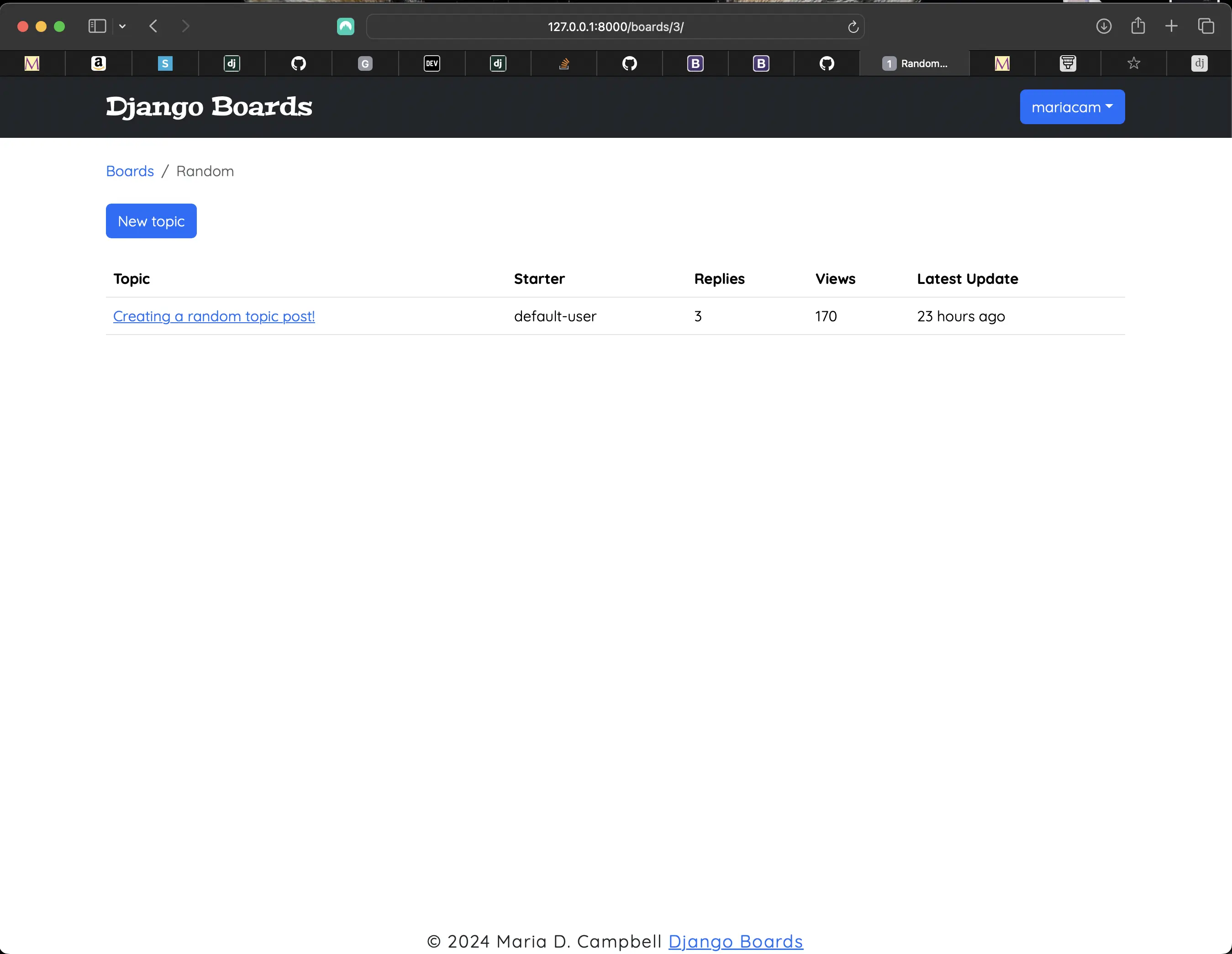
Latest Update in topics.html fixed
Better controlling the view count in templates/index.html
# boards/views.py
class PostListView(ListView):
    model = Post
    context_object_name = 'posts'
    template_name = 'topic_posts.html'
    paginate_by = 3

    def get_context_data(self, **kwargs):
        # change starts here
        session_key = 'viewed_topic_{}'.format(self.topic.pk)
        if not self.request.session.get(session_key, False):
            self.topic.views += 1
            self.topic.save()
            self.request.session[session_key] = True
            # change ends here
        kwargs['topic'] = self.topic
        return super().get_context_data(**kwargs)

    def get_queryset(self):
        self.topic = get_object_or_404(Topic, board__pk=self.kwargs.get('pk'), pk=self.kwargs.get('topic_pk'))
        queryset = self.topic.posts.order_by('created_at')
        return queryset
These changes will provide better navigation in templates/topics.html. Right now the user can only click on the topic title and go to the first page of its topic posts. I can do the following to better the user experience:
# boards/models.py
import math

class Topic(models.Model):
  ...
  def get_page_count(self):
      count = self.posts.count()
      pages = count / 10
      return math.ceil(pages)

  def has_many_pages(self, count=None):
      if count is None:
          count = self.get_page_count()
      return count > 6

  def get_page_range(self):
      count = self.get_page_count()
      if self.has_many_pages(count):
          return range(1, 5)
      return range(1, count + 1)
For me, only pages = count / 10 works, because I have the following set to 10 in boards/views.py:
# boards/views.py
class TopicListView(ListView):
    model = Topic
    context_object_name = 'topics'
    template_name = 'topics.html'
    paginate_by = 10 # here

    def get_context_data(self, **kwargs):
        kwargs['board'] = self.board
        return super().get_context_data(**kwargs)

    def get_queryset(self):
        self.board = get_object_or_404(Board, pk=self.kwargs.get('pk'))
        queryset = self.board.topics.order_by('-last_updated').annotate(replies=Count('posts') - 1)
        return queryset

class PostListView(ListView):
    model = Post
    context_object_name = 'posts'
    template_name = 'topic_posts.html'
    paginate_by = 10 # here

    def get_context_data(self, **kwargs):

        session_key = 'viewed_topic_{}'.format(self.topic.pk)
        if not self.request.session.get(session_key, False):
            self.topic.views += 1
            self.topic.save()
            self.request.session[session_key] = True
        kwargs['topic'] = self.topic
        return super().get_context_data(**kwargs)

    def get_queryset(self):
        self.topic = get_object_or_404(Topic, board__pk=self.kwargs.get('pk'), pk=self.kwargs.get('topic_pk'))
        queryset = list(reversed(self.topic.posts.order_by('created_at')))
        return queryset
The page numbers have to match.
Refactoring templates/topics.html to match changes in boards/views.py
<!-- templates/topics.html --> <table class="table table-striped mb-4"> <thead class="thead-inverse"> <tr> <th>Topic</th> <th>Starter</th> <th>Replies</th> <th>Views</th> <th>Last Update</th> </tr> </thead> <tbody> {% for topic in topics %} {% url 'topic_posts' board.pk topic.pk as topic_url %} <tr> <td> <p class="mb-0"> <a href="{{ topic_url }}">{{ topic.subject }}</a> </p> <small class="text-muted"> Pages: {% for i in topic.get_page_range %} <a href="{{ topic_url }}?page={{ i }}">{{ i }}</a>{% endfor %} {% if topic.has_many_pages %}... <a href="{{ topic_url }}?page={{ topic.get_page_count }}">Last Page</a>{% endif %} </small> </td> <td class="align-middle">{{ topic.starter.username }}</td> <td class="align-middle">{{ topic.replies }}</td> <td class="align-middle">{{ topic.views }}</td> <td class="align-middle">{{ topic.last_updated|naturaltime }}</td> </tr> {% endfor %} </tbody> </table>
Here, I added a table-striped class to the table element, which looks really nice, and I added "mini pagination" to the topic's topic posts. This way, the user can go to other topic posts pages other than just the first. Now templates/topics.html looks like the following:
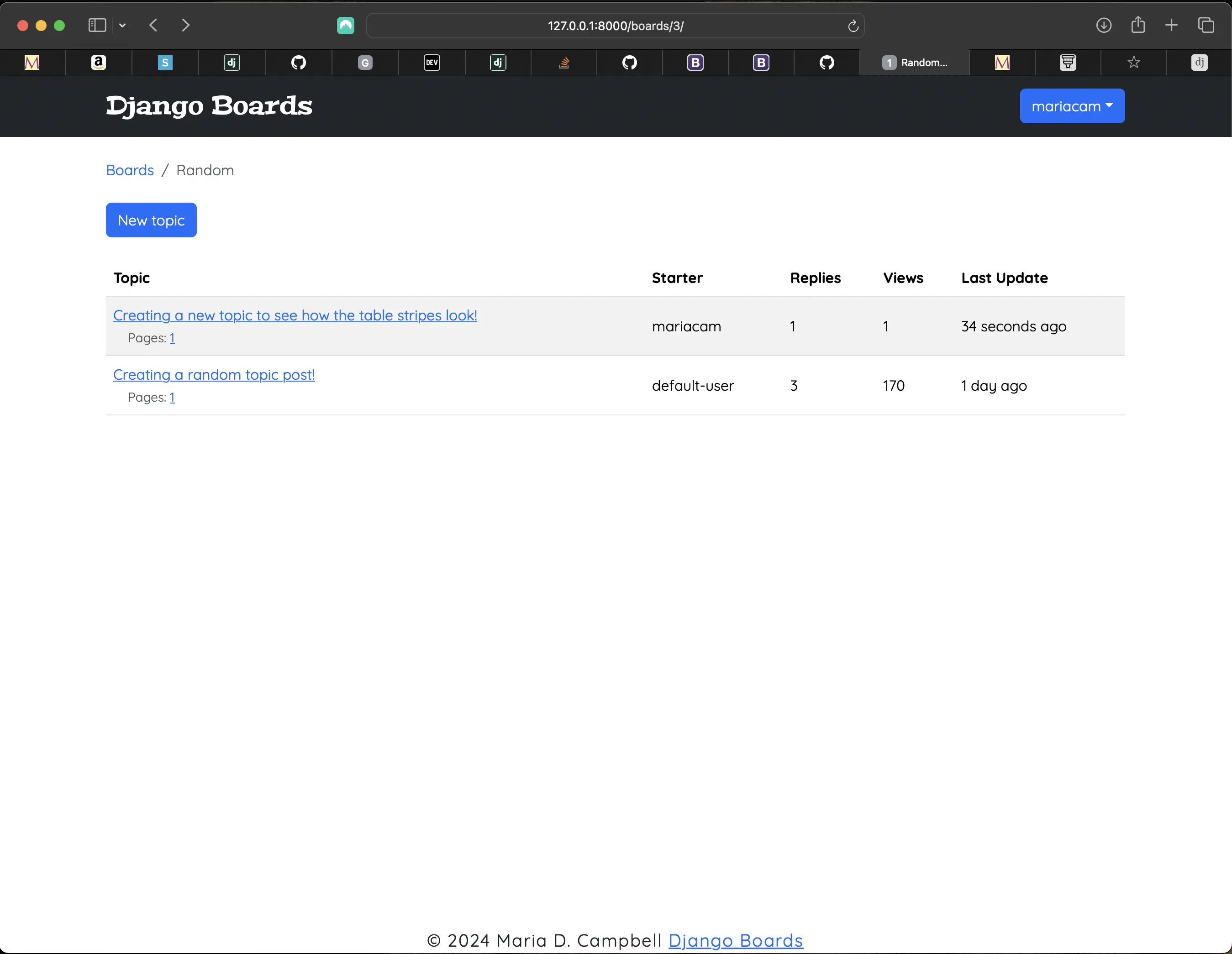
Updated templates/topics.html
Adding the table-striped class to templates/index.html
<!-- templates/index.html -->
...
<table class="table table-striped">
  <thead class="thead-inverse">
    <tr>
      <th>Board</th>
      <th>Posts</th>
      <th>Topics</th>
      <!-- new wording (instead of Last Post) -->
      <th>Latest Post</th>
    </tr>
  </thead>
  <tbody>
    {% for board in boards %}
      <tr>
        <td>
          <a href="{% url 'board_topics' board.pk %}">{{ board.name }}</a>
          <small class="text-muted d-block">{{ board.description }}</small>
        </td>
        <td class="align-middle">{{ board.get_posts_count }}</td>
        <td class="align-middle">{{ board.topics.count }}</td>
        <td class="align-middle">
          {% if board.get_posts_count > 0 %}
            {% with post=board.get_latest_post %}
              <small>
                <a href="{% url 'topic_posts' board.pk post.topic.pk %}">By {{ post.created_by.username }} at {{ post.created_at }}</a>
              </small>
            {% endwith %}
          </td>
        {% else %}
          <small>0</small>
        </tr>
      {% endif %}
    {% endfor %}
  </tbody>
</table>
...
Reversing the created_by default behavior in templates/topic_posts.html
# boards/views.py
class PostListView(ListView):
    model = Post
    context_object_name = 'posts'
    template_name = 'topic_posts.html'
    paginate_by = 10

    def get_context_data(self, **kwargs):

        session_key = 'viewed_topic_{}'.format(self.topic.pk)
        if not self.request.session.get(session_key, False):
            self.topic.views += 1
            self.topic.save()
            self.request.session[session_key] = True
        kwargs['topic'] = self.topic
        return super().get_context_data(**kwargs)

    def get_queryset(self):
        self.topic = get_object_or_404(Topic, board__pk=self.kwargs.get('pk'), pk=self.kwargs.get('topic_pk'))
        queryset = list(reversed(self.topic.posts.order_by('created_at'))) # here
        return queryset
list(reversed(self.topic.posts.order_by('created_at'))) reverses the default ascending behavior. But I wanted the opposite: descending behavior: the most recently created post first, and the first created post last.
Now templates/topic_posts.html looks like the following:
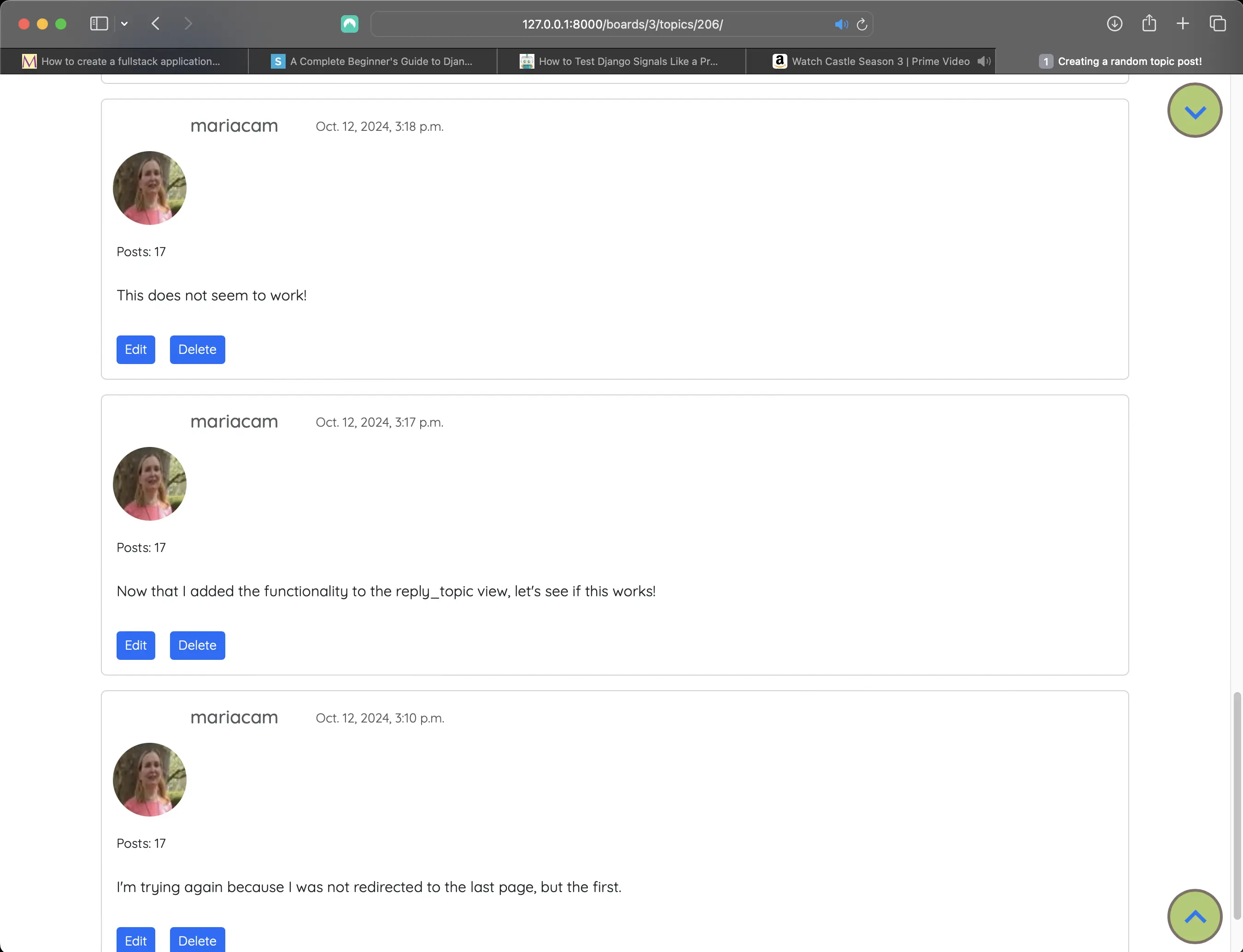
Topic posts in descending order
Limiting replies to last 10 posts on templates/reply_topic.html
Right now all topic replies are listed on the reply_topic.html page:
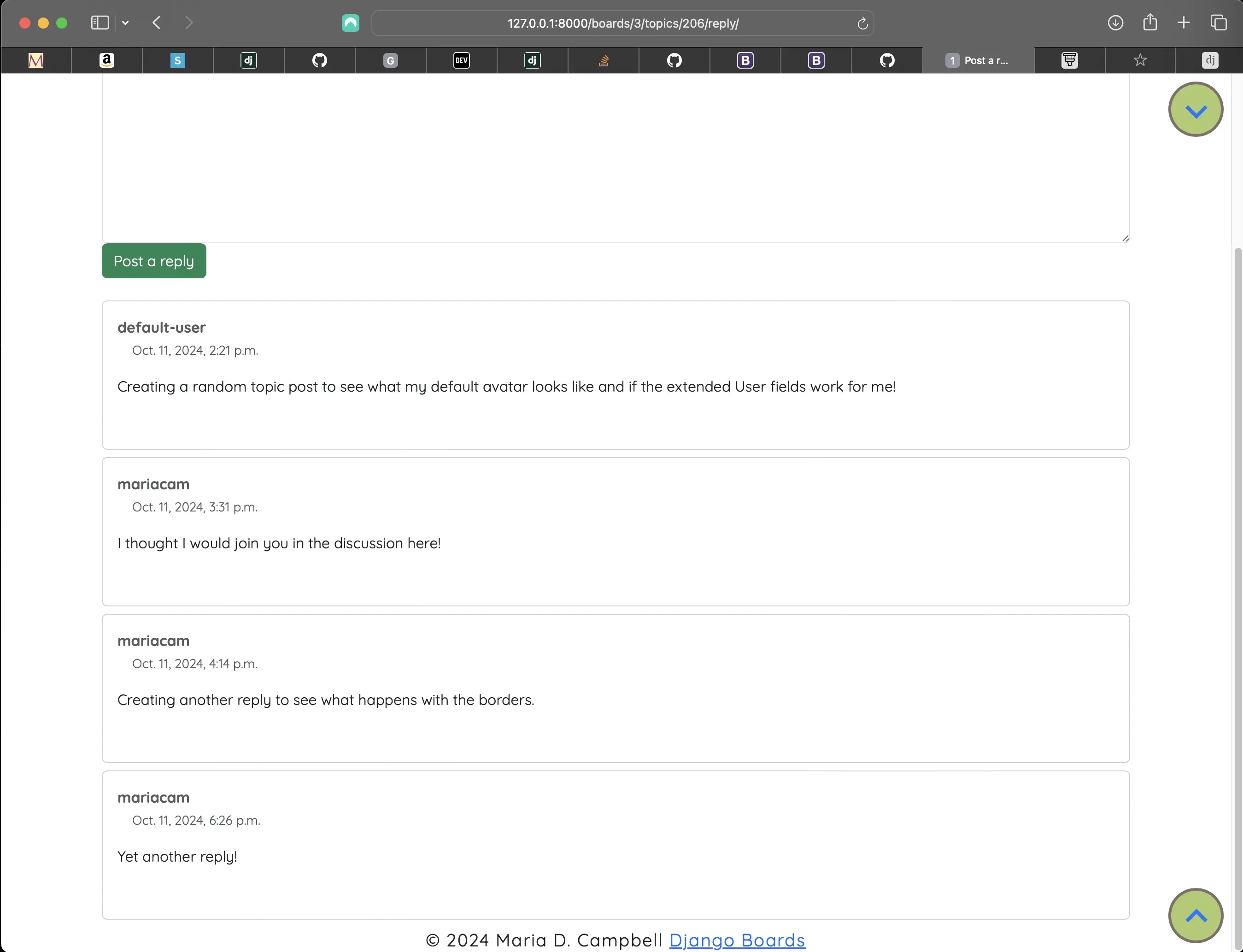
Current reply_topic.html containing all replies to a viewed_topic
Now I am going to limit the replies to the last 10:
# boards/models.py
class Topic(models.Model):
  ...
  def get_last_ten_posts(self):
        return self.posts.order_by('-created_at')[:10]
Updating templates/reply_topic.html to limit the number of replies to 10
<!-- templates/reply_topic.html -->
<!-- Modified line right below -->
{% for post in topic.get_last_ten_posts %}
  <div class="card mb-2">
    <div class="card-body p-3">
      <div class="row mb-3">
        <div class="col-6">
          <div class="col-6">
            <strong class="text-muted">{{ post.created_by.username }}</strong>
          </div>
          <div class="col-6 text-right">
            <small class="text-muted">{{ post.created_at }}</small>
          </div>
        </div>
        <div class="mb-2 mt-3">{{ post.get_message_as_markdown }}</div>
      </div>
    </div>
  </div>
{% endfor %}
Redirecting the user to the last topic posts page instead of the first
To enable user redirection to the last topic posts page instead of the first after they submit their reply, I could add an id to the post card:
<!-- templates/topic_posts.html -->
{% for post in posts %}
  <div id="{{ post.pk }}"
        class="card mb-3 {% if forloop.last %} mb-4 {% else %} mb-2 {% endif %} ">
    {% if forloop.first %}
      <div class="card-header bg-dark text-white align-items-center py-2 px-3">
        <h5>{{ topic.subject }}</h5>
      </div>
    {% endif %}
    <div class="row no-gutters">
      <div class="col-md-8">
        <div class="card-body col-md-8">
          <div class="col">
            <h5 class="card-title text-muted">{{ post.created_by.username }}</h5>
            <p class="card-text">
              <small class="text-muted">{{ post.created_at }}</small>
            </p>
          </div>
          {% if user == post.created_by %}
            <div class="profile-avatar">
              <img class="rounded-circle account-img"
                    alt="{{ user.username }}"
                    src="{{ user.profile.avatar.url }}"
                    width="80"
                    height="80" />
            </div>
          {% else %}
            <div class="django-avatar">{% avatar post.created_by class="img-circle img-responsive" id="user_avatar" %}</div>
          {% endif %}
        </div>
        <div class="mb-4">
          <small>Posts: {{ post.created_by.posts.count }}</small>
        </div>
        <div class="post-message">{{ post.get_message_as_markdown }}</div>
        {% if post.created_by == user %}
          <div class="d-inline-flex flex-row user-post-buttons">
            <div class="topic-posts-btn-edit mt-3">
              <a href="{% url 'edit_post' post.topic.board.pk post.topic.pk post.pk %}"
                  class="btn btn-primary btn-sm"
                  role="button">Edit</a>
            </div>
            <div class="topic-posts-btn-delete mt-3">
              <a href="{% url 'delete_post' post.topic.board.pk post.topic.pk post.pk %}"
                  class="btn btn-primary btn-sm"
                  role="button">Delete</a>
            </div>
          </div>
        {% else %}
          <div class="mt-3 user-post-buttons">
            <a href="{% url 'post_detail' post.topic.board.pk post.topic.pk post.pk %}"
                class="btn btn-primary btn-sm"
                role="button">Post detail</a>
          </div>
        {% endif %}
      </div>
    </div>
  </div>
{% endfor %}
Updating the reply_topic view to add the redirection to last page functionality
# boards/views.py
@login_required
def reply_topic(request, pk, topic_pk):
    topic = get_object_or_404(Topic, board__pk=pk, pk=topic_pk)
    if request.method == 'POST':
        form = PostForm(request.POST)
        if form.is_valid():
            post = form.save(commit=False)
            post.topic = topic
            post.created_by = request.user
            post.save()

            topic.last_updated = timezone.now()
            topic.save()
            # addition starts here
            topic_url = reverse('topic_posts', kwargs={'pk': pk, 'topic_pk': topic_pk})
            topic_post_url = '{url}?page={page}#{id}'.format(
                url=topic_url,
                id=post.pk,
                page=topic.get_page_count()
            )

            return redirect(topic_post_url)
    else:
    # addition ends here
        form = PostForm()
    return render(request, 'reply_topic.html', {'topic': topic, 'form': form})
Updating boards/tests/test_view_reply_topic_tests.py
# boards/tests/test_view_reply_topic_tests.py
class SuccessfulReplyTopicTests(ReplyTopicTestCase):
  ...
  def test_redirection(self):
        '''
        A valid form submission should redirect the user
        '''
        url = reverse('topic_posts', kwargs={'pk': self.board.pk, 'topic_pk': self.topic.pk})
        topic_posts_url = '{url}?page=1#2'.format(url=url)
        self.assertRedirects(self.response, topic_posts_url)
When I run python3 manage.py test boards.tests.test_view_reply_topic_tests, the following is returned:
Found 10 test(s).
Creating test database for alias 'default'...
System check identified no issues (0 silenced).
......<HttpResponse status_code=200, "text/html; charset=utf-8"> location
....
----------------------------------------------------------------------
Ran 10 tests in 4.127s

OK
Destroying test database for alias 'default'...
This new test checks for my redirect to the last topic post page after the user submits their reply. Since the test passed, it means that my redirection took the user to the expected (last) topic post page. I also checked it by creating a new reply, and it worked as expected!
Creating a test for the extended user profile
Creating a test for the UpdateProfileForm
# test_form_profile_test.py
from django.test import TestCase
from ..forms import UpdateProfileForm

class UpdateProfileFormTest(TestCase):
    def test_form_has_fields(self):
        form = UpdateProfileForm()
        expected = ['avatar', 'bio', ]
        actual = list(form.fields)
        self.assertSequenceEqual(expected, actual)
When I run python3 manage.py test accounts.tests.test_form_profile_test, the following is returned:
Found 1 test(s).
Creating test database for alias 'default'...
System check identified no issues (0 silenced).
.
----------------------------------------------------------------------
Ran 1 test in 0.000s

OK
Destroying test database for alias 'default'...
The test passes!
Creating tests for the profile view
# accounts/tests/test_view_profile_tests.py
from django.forms import ModelForm
from django.contrib.auth.models import User
from django.test import TestCase
from django.urls import resolve, reverse

from ..forms import UpdateUserForm, UpdateProfileForm

from ..views import profile

class MyProfileTestCase(TestCase):
    def setUp(self):
        self.username = 'john'
        self.password = 'secret123'
        self.user = User.objects.create_user(username=self.username, email='johndoe@example.com', password=self.password)
        self.url = reverse('users-profile')

class MyProfileTests(MyProfileTestCase):

    def setUp(self):
        super().setUp()
        self.client.login(username=self.username, password=self.password)
        self.response = self.client.get(self.url)

    def test_status_code(self):
        self.assertEqual(self.response.status_code, 200)

    def test_url_resolves_correct_view(self):
        view = resolve('/profile/')
        self.assertEqual(view.func, profile)

    def test_csrf(self):
        self.assertContains(self.response, 'csrfmiddlewaretoken')

    def test_contains_user_form(self):
        # add condition to test whether form is "None" or not. Add condition because there is no form. We’re not doing anything with the form to test at this line, we’re just making it available to your code. - thanks to @KenWhitesell, Django Forum
        form = None
        if form is not None:
            form = self.response.context['form']
            self.assertIsInstance(form, UpdateUserForm)

    def test_contains_profile_form(self):
        # add condition to test whether form is "None" or not. Add condition because there is no form. We’re not doing anything with the form to test at this line, we’re just making it available to your code. - thanks to @KenWhitesell, Django Forum
        form = None
        if form is not None:
            form = self.response.context['form']
            self.assertIsInstance(form, UpdateProfileForm)

    def test_form(self):
        '''
        Make sure that form has enctype attribute and 'multipart/form-data' value
        '''
        self.assertContains(self.response, '<form', 1)
        self.assertContains(self.response, 'enctype="multipart/form-data"', 1)

    def test_form_inputs(self):
        '''
        The view must contain four inputs: csrf, username, email, avatar upload. It also contains one textarea for bio.
        '''
        self.assertContains(self.response, '<input', 4)
        self.assertContains(self.response, 'type="file"', 1)
        self.assertContains(self.response, 'type="text"', 2)
        self.assertContains(self.response, '<textarea', 1)

class LoginRequiredMyProfileTests(TestCase):
    def test_redirection(self):
        url = reverse('users-profile')
        login_url = reverse('login')
        response = self.client.get(url)
        self.assertRedirects(response, '{login_url}?next={url}'.format(login_url=login_url, url=url))

class SuccessfulMyProfileTests(MyProfileTestCase):
    def setUp(self):
        super().setUp()
        self.client.login(username=self.username, password=self.password)
        self.response = self.client.post(self.url, {
            'first_name': 'John',
            'last_name': 'Doe',
            'email': 'johndoe@example.com',
        })

    def test_data_changed(self):
        '''
        refresh the user instance from database to get the updated data.
        '''
        self.user.refresh_from_db()
        self.assertEqual('john', self.user.username)
        self.assertEqual('johndoe@example.com', self.user.email)

class InvalidMyAccountTests(MyProfileTestCase):
    def setUp(self):
        super().setUp()
        self.client.login(username=self.username, password=self.password)
        self.response = self.client.post(self.url, {
            'first_name': 'longstring' * 100
        })

    def test_status_code(self):
        '''
        An invalid form submission should return to the same page
        '''
        self.assertEqual(self.response.status_code, 200)

    def test_form_errors(self):
        form = None
        if form is not None:
            form = self.response.context['form']
            self.assertTrue(form.errors)
When I run python3 manage.py test accounts.tests.test_view_profile_tests, the following is returned:
Found 11 test(s).
Creating test database for alias 'default'...
System check identified no issues (0 silenced).
...........
----------------------------------------------------------------------
Ran 11 tests in 4.279s

OK
Destroying test database for alias 'default'...
The tests pass!
Creating tests for the profile signals
# accounts/tests/test_signals_tests.py
from django.test import TestCase
from ..signals import create_profile, save_profile

class SignalTests(TestCase):
    def test_create_profile_handler_success(sender, **kwargs):
        sender.assertTrue(create_profile)

    def test_create_profile_handler_fail(sender, **kwargs):
        if not sender:
            sender.assertFalse(create_profile)

    def test_save_profile_handler_success(sender, **kwargs):
        sender.assertTrue(save_profile)

    def test_save_profile_handler_fail(sender, **kwargs):
        if not sender:
            assertFalse(save_profile)
These tests are straightforward and relatively simple. My actual create_profile and save_profile signals are called when I save the model they are attached to, which is the built-in User model. So calling save() on an instance of User will cause the signal to be called.
I don't have to activate my signals. They are already set up and ready to go. My Profile tests are extensive enough and affirm that the create_profile and save_profile signals work. I just wanted to affirm that the signals themselves were working independent of the Profile itself.
When I run python3 manage.py test accounts.tests.test_signals_tests, the following is returned:
Found 4 test(s).
Creating test database for alias 'default'...
System check identified no issues (0 silenced).
....
----------------------------------------------------------------------
Ran 4 tests in 0.001s

OK
Destroying test database for alias 'default'...
The tests pass!
Creating the ProfileListView
# accounts/views.py
@method_decorator(login_required, name='dispatch')
class ProfileListView(ListView):
    model = Profile
    context_object_name = 'profiles'
    template_name = 'users/profiles.html'
    # paginates profiles.html
    paginate_by = 3
Currently I have paginate_by set to 3, because I don't have many users. But when I populate the site with more, I will set it to 10, just like with the topic posts.
Paginating a ListView
Since The ProfileListView is a django.views.generic.list.ListView, I was able to use paginate_by. django.views.generic.list.ListView provides a built-in way to display the list. I can do this by adding the paginate_by attribute to my view class, as demonstrated above. I did touch upon this previously, but I thought I would mention it again since the opportunity presented itself.
Creating templates/users/profiles.html
<!-- templates/users/profiles.html --> {% extends "users/base_profile.html" %} {% load static %} {% block title %} Profiles Page {% endblock title %} {% block content %} <div class="container"> <div class="row"> <div class="col"> <h1 class="mt-4 mb-4">User profiles</h1> {% for profile in profiles %} <div class="row"> <div class="card mb-3"> <div class="profile-avatar"> <img class="rounded-circle account-img" src="{{ profile.avatar.url }} " style="cursor: pointer" width="80" height="80" alt="{{ profile.user.username }}" id="{{ profile.user.pk }}" /> </div> <div class="row"> <div class="col-lg"> <div class="form-group"> <div class="col d-flex flex-row"> <label class="fw-bold">First name: </label> <label>{{ profile.user.first_name }}</label> </div> <div class="col d-flex flex-row"> <label class="fw-bold">Last name: </label> {{ profile.user.last_name }} </div> <div class="col d-flex flex-row"> <label class="mb-1 fw-bold">Username: </label> <label>{{ profile.user.username }}</label> </div> <div class="col d-flex flex-row"> <label class="mb-1 fw-bold">Email: </label> <label>{{ profile.user.email }}</label> </div> <div class="col d-flex flex-column"> <label class="mb-1 fw-bold">Bio: </label> <div class="w-100">{{ profile.bio|truncatewords:15 }}</div> <a href="{% url 'profile' profile.pk %}">Learn more</a> </div> </div> </div> </div> </div> </div> {% endfor %} </div> </div> </div> {% include "includes/pagination.html" %} {% endblock content %}
For fields that are part of the built-in default user, I access them by implementing profile.user.username, profile.user.first_name, profile.user.last_name, and profile.user.email.
For fields that are part of the extended user Profile, I access them by implementing profile.avatar and profile.bio.
As for the url, I use the following in the profile-navigation-main.html and profile-navigation-profile.html includes:
<!-- templates/includes/profile-navigation-main.html -->
<li class="nav-item">
	<a href="{% url 'users-profile-list' %}" class="nav-item nav-link"
		>All Profiles</a
	>
</li>
users-profile-list is the name of the profiles path. I give the url a name so that I don't have to include the actual url in the anchor element's href attribute. This is also helpful when I want to change a url, for example. I just have to change the actual URL in urls.py and nowhere else. That means code uses the name instead of the hardcoded URL, and does not have to be updated.
Screenshots of templates/users/profiles.html
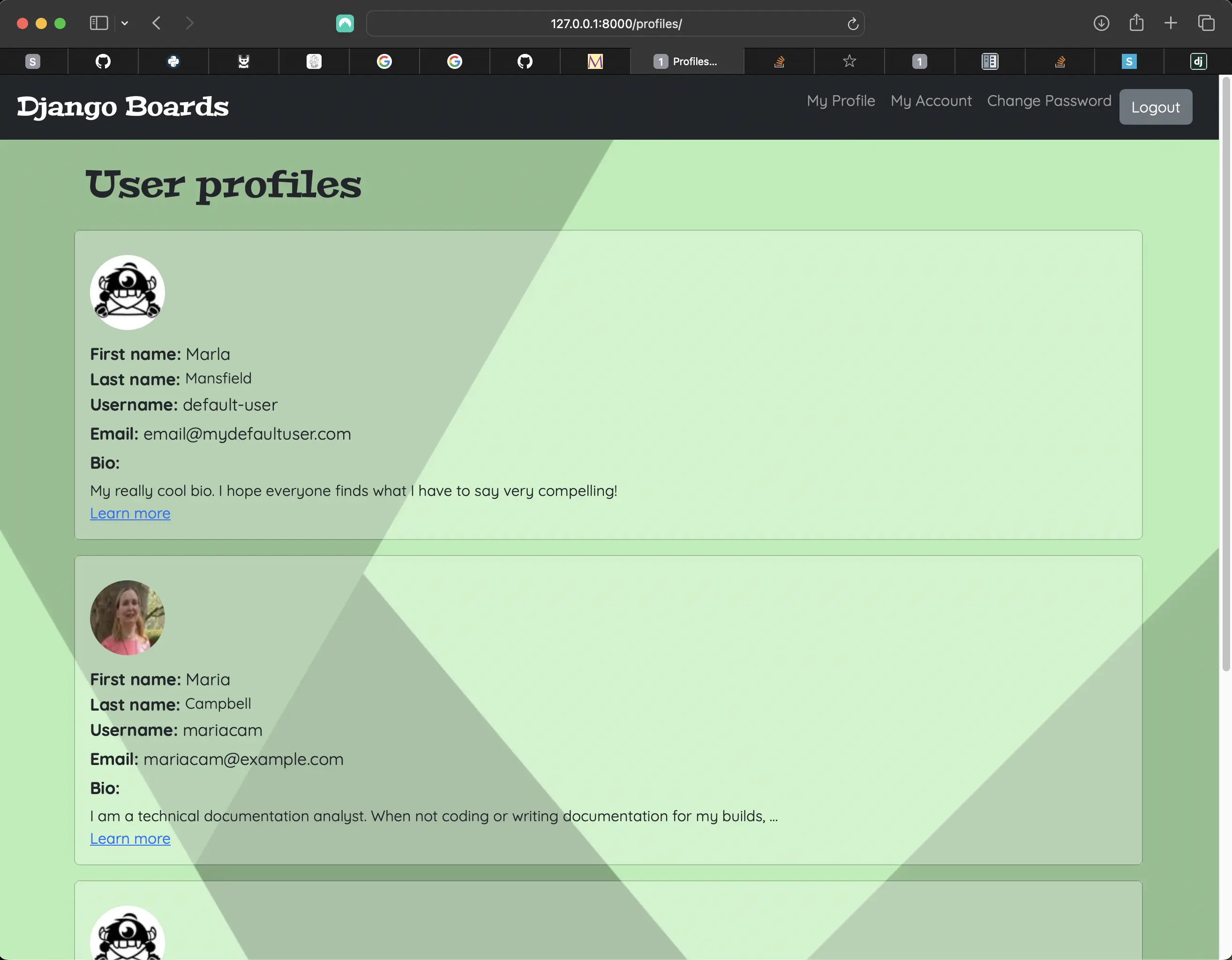
templates/users/profiles.html (top half)
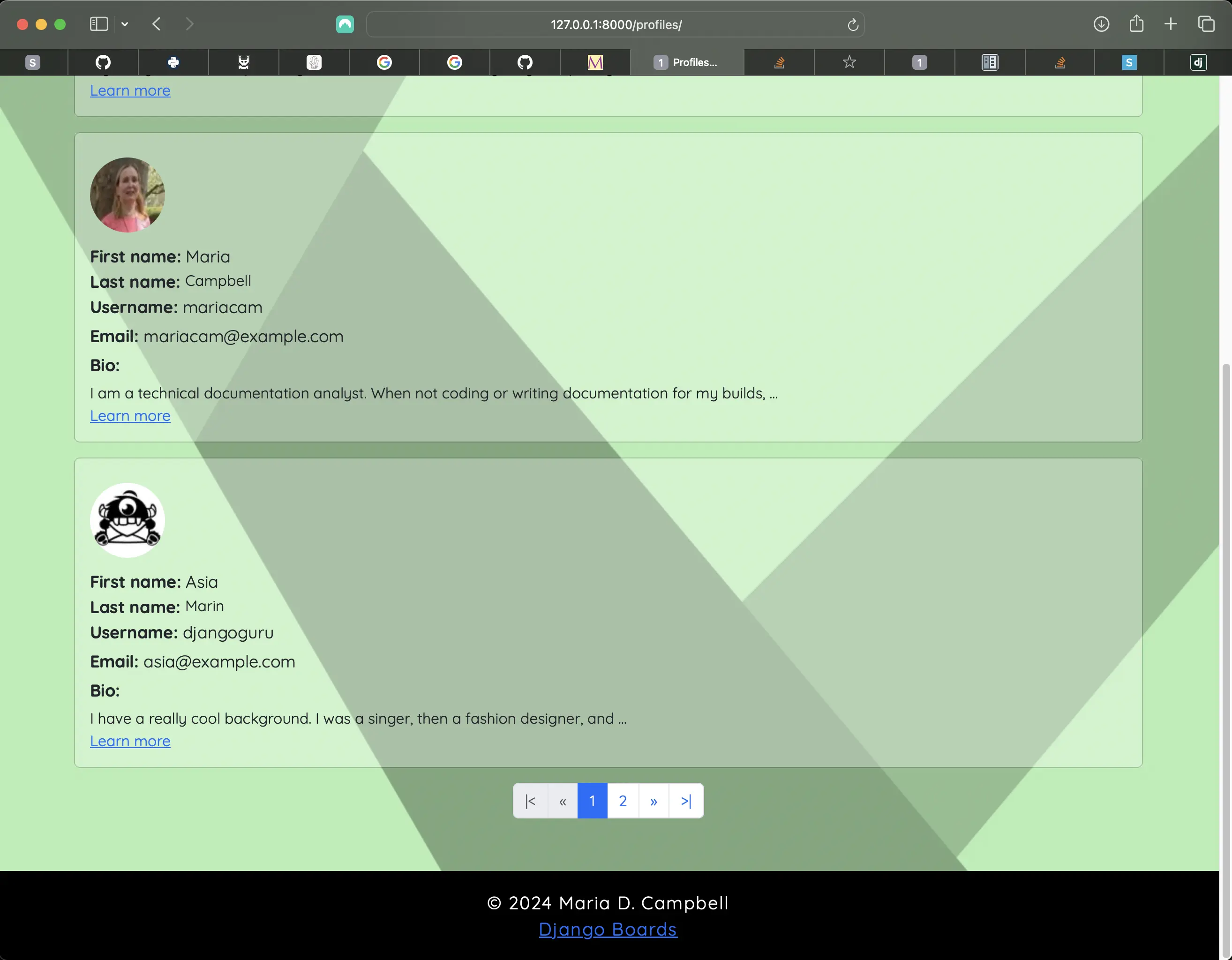
templates/users/profiles.html (bottom half)
Creating the profile_detail view
For the profile_detail view, I implemented a function based view:
def profile_detail(request, pk):
    profile = get_object_or_404(Profile, pk=pk)
    return render(request, 'users/profile_detail.html', {'profile': profile})
All the profile_detail view does is render what is stored in the profile user_form and profile_form, so it was an easier and more direct way of rendering the profile_detail view.
Why did I even bother to create a profile_detail view? Because I wanted users to feel free to write as much as they want about themselves in the bio field, but I didn't want the whole bio to appear in profiles.html. It would look ridiculous. I truncated the bio in the profiles.html template using truncatewords:
<!-- templates/users/profiles.html --> <div class="col d-flex flex-column"> <label class="mb-1 fw-bold">Bio: </label> <div class="w-100">{{ profile.bio|truncatewords:15 }}</div> <a href="{% url 'profile' profile.pk %}">Learn more</a> </div>
truncatewords is a template filter used to shorten a string to a specific number of words. If the string is longer than the specified number of words, it will be truncated and an ellipsis (...) will be added at the end. Above, I am truncating the bio to 15 words in profiles.html.
Breaking down the profile-detail URL
path('profile-detail/<int:pk>/', profile_detail, name='profile'),
I differentiate the profile-detail URL from the profile URL, even though I am pointing to the same data. However, one is an update form, and the other is simply a GET request to the profile_detail view. And since I name the URL profile, and the endpoint of the URL is the id of the user whose profile details are being requested, I add the following URL as the value of the anchor element's href attribute in profiles.html:
<!-- templates/users/profiles.html -->
<a href="{% url 'profile' profile.pk %}">Learn more</a>
profile is the path name, and profile.pk represents the /<int:pk>/ part of the profile-detail path. I use angle brackets to capture the profile id (technically primary key) from the URL.
Customizing the profiles.html and profile.html navigation
Originally, both the profiles.html and profile.html navigation contained the same navigation links. This meant that on the profiles.html page, the link to profiles.html was present, and on the profile.html page, the link to profile.html was present. So I ended up creating an include called profile-navigation-profile.html, which contains a conditional statement:
<!-- profile-navigation-profile.html -->
<nav class="navbar navbar-expand-lg navbar-fixed navbar-dark bg-dark ml-auto text-white">
  <div class="container-fluid">
  <!-- Here I have to use an absolute url because 'index' is only defined in boards/urls.py. -->
    <a href="/" class="navbar-brand text-white">Django Boards</a>
    <button class="navbar-toggler ms-auto"
            type="button"
            data-bs-toggle="collapse"
            data-bs-target="#n_bar"
            aria-controls="navbarNavAltMarkup"
            aria-label="Toggle navigation">
      <span class="navbar-toggler-icon"></span>
    </button>
    <div class="collapse navbar-collapse text-white" id="n_bar">
      <ul class="navbar-nav">
        {% if user.is_authenticated %}
        <!-- The condition states that if the current path contains /profiles/ then only show the profile/ url. Otherwise, show the profiles/ url. -->
          {% if request.get_full_path == "/profiles/" %}
            <li class="nav-item mb-0">
              <a class="nav-item nav-link" href="{% url 'users-profile' %}">My Profile</a>
            </li>
          {% else %}
            <li class="nav-item mb-0">
              <a href="{% url 'users-profile-list' %}" class="nav-item nav-link">All Profiles</a>
            </li>
          {% endif %}
          <li class="nav-item align-middle">
            <a href="{% url 'my_account' %}" class="nav-item nav-link">My Account</a>
          </li>
          <li class="nav-item">
            <a class="nav-item nav-link align-middle"
               href="{% url 'password_change' %}">Change Password</a>
          </li>
          <li class="nav-item">
            <form method="post" action="{% url 'logout' %}">
              {% csrf_token %}
              <button class="btn btn-secondary mb-2 mt-2 logout" type="submit">Logout</button>
            </form>
          </li>
        {% else %}
          <li class="nav-item">
            <a href="{% url 'login' %}" class="nav-item nav-link">Sign in</a>
          </li>
        </ul>
      </div>
    {% endif %}
  </div>
</nav>
If the current page contains /profiles/ in the path, then only show the profile/ URL. Otherwise, show the profiles/ URL. I replaced the navigation in base_profile.html with profile-navigation-profile.html:
<!-- base_profile.html --> {% block body %} <div class="site-content"> <!-- This include replaces the original full navigation. --> {% include "includes/profile-navigation-profile.html" %} <!--Any flash messages pop up in any page because this is the base template--> {% if messages %} <div class="alert alert-dismissible" role="alert"> {% for message in messages %}<div class="alert alert-{{ message.tags }}">{{ message }}</div>{% endfor %} <button type="button" class="close" data-dismiss="alert" aria-label="Close"> <span aria-hidden="true">×</span> </button> {% endif %} {% block content %} {% endblock content %} <!-- moved closing divs below block content. then sticky footer worked. matches base.html --> </div> </div> {% include "includes/footer.html" %} {% endblock body %}
Replacing the original navigation in base.html with profile-navigation-main.html include
I did some major refactoring to the navigation in base.html. First of all, I replaced the dropdown with a Bootstrap responsive navigation. Hamburger in screens smaller than 1007px, and then desktop navigation in screens 1007px or greater. The navigation for profile-navigation-profile.html is the same. But it was basically the same from the beginning. I just had to make sure that it contained the right markup to enable the Hamburger functionality. I will get to that soon.
<!-- base.html -->
<body class="site" id="site">
{% block body %}
  <div class="site-content">
  <!-- This include replaces the original full navigation. -->
    {% include "includes/profile-navigation-main.html" %}
    <div class="container">
      <ol class="breadcrumb my-4">
        {% block breadcrumb %}
        {% endblock breadcrumb %}
      </ol>
      {% block content %}
      {% endblock content %}
    </div>
  </div>
  {% include "includes/footer.html" %}
  {% include "includes/scroll-button.html" %}
{% endblock body %}
Styling for includes/profile-navigation-profile.html
/* static/css/accounts.css */
/* navbar custom styling. creates space to left of Django Boards logo. */

.navbar {
	padding-left: 0.5rem;
}

/* cross browser compatibility styling for the responsive navigation hamburger icon styling */

.navbar-toggler,
.navbar-toggler:focus,
.navbar-toggler:active,
.navbar-toggler-icon:focus {
	border: none;
	outline: none;
	/* for Firefox. Removed thick border on focus */
	box-shadow: none;
}

/* end cross browser compatibility styling for the responsive navigation hamburger icon styling */

/* hamburger styling */

.navbar-toggler {
	right: 0.5rem;
}

@media (min-width: 1007px) {
	.collapse.navbar-collapse {
		display: flex;
		justify-content: flex-end;
		margin-right: 1rem;
	}
}

/* end hamburger styling *

/* Website logo styling */

.navbar-brand {
	font-family: 'Peralta', serif;
	font-size: 1.75rem;
	font-style: normal;
	font-weight: 400;
}

/* end Website logo styling */
Styling for includes/profile-navigation-main.html
/* static/css/app.css */

/* navbar custom styling. creates space to left of Django Boards logo. */

.navbar {
	padding-left: 0.5rem;
}

/* cross browser compatibility styling for the responsive navigation hamburger icon styling */

.navbar-toggler,
.navbar-toggler:focus,
.navbar-toggler:active,
.navbar-toggler-icon:focus {
	border: none;
	outline: none;
	/* for Firefox. Removed thick border on focus */
	box-shadow: none;
}

/* end cross browser compatibility styling for the responsive navigation hamburger icon styling *

/* hamburger styling */

.navbar-toggler {
	right: 0.5rem;
}

/* make navigation flex end in larger viewports (> 1006px) */

@media (min-width: 1007px) {
	.collapse.navbar-collapse {
		display: flex;
		justify-content: flex-end;
		margin-right: 1rem;
	}
}

/* hamburger styling *

/* Website logo styling */

.navbar-brand {
	font-family: 'Peralta', serif;
	font-size: 1.75rem;
	font-style: normal;
	font-weight: 400;
}
Removing the scrolldown button and refactoring the scrolltop button
Next, I had to remove the scrolldown button, because it conflicted with the Hamburger icon. It both conflicted layout-wise and some functionality in Bootstrap conflicted with it as well. I originally created the up and down functionality on sites where I did NOT use Bootstrap. I created everything from scratch. Here, that was not the case. That is something I had to seriously consider when opting to work with CSS frameworks such as Bootstrap. There are many advantages to working with it, but there are also downsides.
Removing the scrolldown button and replacing the scrolltop button markup with Bootstrap markup
<!-- templates/includes/scroll-button.html -->
<!-- Back to top button -->
<button
	type="button"
	class="btn btn-danger btn-floating btn-lg"
	id="btn-back-to-top"
>
	<i class="fas fa-arrow-up"></i>
</button>
Above is all Bootstrap markup, so that is why it works with little need for JavaScript. I added my own styling, similar to what I had previously, but much less complicated. The original styling is a rounded square, red button (btn-danger) with a white up arrow. If you want to keep that styling, then don't add the custom CSS I added to app.css. If you really like my original styling, go ahead and try to make it fit to the current layout. It will take some time, because the styling was meant for both a scrolltop and scrolldown button. The original JavaScript also depended on the opacity of the buttons and not on whether they were set to display: block or display: none, so further CSS refactoring would be necessary to fit to the JavaScript functionality.
As indicated in the code comment, I made this into a reusable include. This then can even be reused in future projects using Bootstrap!
Replacing the original scroll buttons markup with the scroll-button.html include
<!-- templates/base.html -->
{% block body %}
  <div class="site-content">
    {% include "includes/profile-navigation-main.html" %}
    <div class="container">
      <ol class="breadcrumb my-4">
        {% block breadcrumb %}
        {% endblock breadcrumb %}
      </ol>
      {% block content %}
      {% endblock content %}
    </div>
  </div>
  {% include "includes/footer.html" %}
  {% include "includes/scroll-button.html" %}
{% endblock body %}
Refactored JavaScript for the scrolltop button
//Get the button
export const scrollTopButton = document.getElementById('btn-back-to-top')

export function scrollFunction() {
	if (
		document.body.scrollTop > 20 ||
		document.documentElement.scrollTop > 20
	) {
		scrollTopButton.style.display = 'block'
	} else {
		scrollTopButton.style.display = 'none'
	}
}

export function backToTop() {
	document.body.scrollTop = 0
	document.documentElement.scrollTop = 0
}
Customized CSS for the scrolltop button
/* static/css/app.css */
/* scrollTop button styling */

#btn-back-to-top {
	position: fixed;
	bottom: 20px;
	right: 20px;
	display: none;
	z-index: 1000;
}

.btn.btn-danger.btn-floating.btn-lg {
	border-radius: 50%;
	border: 2px solid #000;
	background: #aecb6e;
	color: #0978f6;
	transition:
		color 0.5s,
		transform 0.2s,
		background-color 0.2s;
}

.btn.btn-danger.btn-floating.btn-lg:hover {
	background: #e4ddd3;
	border-radius: 5px;
	color: #000;
}

/* end scrollTop button styling */
Moving the footer HTML markup into a footer.html include
Since I added a footer to the profiles.html, profile.html, and profile_detail.html pages as well, and the script for the footer was pretty lengthy, I thought it would be easier if I created a footer.html include. This would reduce the markup in the base templates, thereby making them easier to read. This would also mean that the footer include could easily be added to future Django projects!
<!-- templates/includes/footer.html --> <footer class="site-footer text-center"> <script> const theDate = new Date(); const footer = document.querySelector(".site-footer"); footer.style.fontWeight = "400"; footer.style.letterSpacing = "0.07rem"; footer.style.fontFamily = "'Quicksand', sans-serif;"; footer.style.fontSize = `1.2rem`; footer.style.height = `6rem`; footer.style.backgroundColor = `#000`; footer.style.color = `#fff`; footer.style.width = `100%`; footer.style.display = `flex`; footer.style.flexDirection = `column`; footer.style.justifyContent = `flex-end`; footer.style.paddingBottom = `1.25rem`; footer.innerHTML = ``; const anchor = document.createElement('a') anchor.setAttribute('href', '/') footer.appendChild(anchor) anchor.innerHTML = `` </script> </footer>
I just added a bit of css for the footer in accounts.css to take account of the background linear-gradient in the accounts pages:
/* footer styling */

footer {
	margin: 2rem auto 0;
}
I did not feel like adding anymore CSS in JS to the footer! Feel free to add it there if you like!
Replacing the original footer markup with the new footer.html include in base.html
<!-- templates/base.html -->
{% block body %}
<div class="site-content">
  {% include "includes/profile-navigation-main.html" %}
  <div class="container">
    <ol class="breadcrumb my-4">
      {% block breadcrumb %}
      {% endblock breadcrumb %}
    </ol>
    {% block content %}
    {% endblock content %}
  </div>
</div>
{% include "includes/footer.html" %}
{% include "includes/scroll-button.html" %}
{% endblock body %}
Replacing the original footer markup with the new footer.html include in base_profile.html
<!-- templates/users/base_profile.html --> {% block body %} <div class="site-content"> {% include "includes/profile-navigation-profile.html" %} <!--Any flash messages pop up in any page because this is the base template--> {% if messages %} <div class="alert alert-dismissible" role="alert"> {% for message in messages %}<div class="alert alert-{{ message.tags }}">{{ message }}</div>{% endfor %} <button type="button" class="close" data-dismiss="alert" aria-label="Close"> <span aria-hidden="true">×</span> </button> {% endif %} {% block content %} {% endblock content %} <!-- moved closing divs below block content. then sticky footer worked. matches base.html --> </div> </div> {% include "includes/footer.html" %} {% endblock body %}
Sanitizing my Markdown
For security purposes, it is very important to sanitize my Markdown.
I ended up using the nh3 library to clean my markdown. It replaces the now deprecated bleach library. To learn more about nh3, please visit their repository on GitHub: messense/nh3 repository on GitHub
♦︎ I installed nh3:
pip install nh3
♦︎ I added it to INSTALLED_APPS in settings.py:
INSTALLED_APPS = [
    'django.contrib.admin',
    'django.contrib.auth',
    'django.contrib.contenttypes',
    'django.contrib.sessions',
    'django.contrib.messages',
    'django.contrib.staticfiles',
    'django.contrib.humanize',
    'boards',
    'accounts',
    'dotenv',
    'pylint',
    'graphviz',
    'djlint',
    'coverage',
    'widget_tweaks',
    'soupsieve',
    'bs4',
    'html5lib',
    'markdown',
    'avatar',
    'mistune',
    'pygments',
    'nh3',
]
♦︎ I implemented nh3 in the PostForm class in boards/forms.py:
# boards/forms.py
import nh3

class HtmlSanitizedCharField(forms.CharField):
    def to_python(self, value):
        value = super().to_python(value)
        if value not in self.empty_values:
            value = nh3.clean(
                value,
                # Allow only tags and attributes from my rich text editor
                tags={
                    "a",
                    "abbr",
                    "acronym",
                    "b",
                    "blockquote",
                    "code",
                    "em",
                    "i",
                    "li",
                    "ol",
                    "strong",
                    "ul",
                    "s",
                    "sup",
                    "sub",
                },
                attributes={
                    "a": {"href"},
                    "abbr": {"title"},
                    "acronym": {"title"},
                },
                url_schemes={"https"},
                link_rel=None,)
        return value

class PostForm(forms.ModelForm):
    message = HtmlSanitizedCharField(widget=forms.Textarea)
    class Meta:
        model = Post
        fields = ['message', ]
Following Adam Johnson's article entitled Django: Sanitize incoming HTML fragments with nh3 as a start, and with some help from the article entitled Converting from bleach to nh3, I created a HtmlSanitizedCharField class to which I passed in forms.CharField to the class.
value = super().to_python(value) represents the actual value of the Post model's textarea field. reply_topic for a new topic post, and PostUpdateView (the edit_post.html template) when the topic post is updated.
But what does super().to_python(value) actually mean?
super().to_python(value)
super().to_python(value) is a method call that utilizes the super() function to access the to_python() method of the parent class.
The super() function allows me to access methods and properties of a parent or sibling class. In the context of Django model fields, it's used to call the to_python() method of the base Field class.
to_python(value)
The to_python(value) method is responsible for converting the raw data (usually a string) from a form or database into a Python object that is appropriate for the field type. For example, a DateField would convert a string representing a date into a Python date object. In my case, it is a form TextField (HTML textarea) which is converted into HTML, because I am converting markdown to HTML. I am also converting markdown fenced code into highlighted code in the form of an HTML object.
Why super().to_python(value)?
Why would I want to use super().to_python(value)? When I create custom model fields in Django by subclassing existing field classes (class Meta), I often want to extend or modify the behavior of the parent class's to_python() method.
Using super() ensures that I don't accidentally break the existing functionality of the parent class's method, while still allowing me to add my own custom logic.
♦︎ I implemented nh3.clean() in the Post model's get_message_as_markdown method:
# boards/models.py
import nh3

class Post(models.Model):
    message = models.TextField()
...
    def get_message_as_markdown(self):
        clean_content = nh3.clean(self.message, tags={
            "a",
            "abbr",
            "acronym",
            "b",
            "blockquote",
            "code",
            "em",
            "i",
            "li",
            "ol",
            "strong",
            "ul",
            "s",
            "sup",
            "sub",
        },
        attributes={
            "a": {"href"},
            "abbr": {"title"},
            "acronym": {"title"},
        },
        url_schemes={"http", "https", "mailto"},
        link_rel=None,)
        rendered_content = markdown(clean_content, extensions=['fenced_code', 'codehilite'])
        return mark_safe(rendered_content)
Update July 11, 2026: Later I changed url_schemes={"http", "https", "mailto"}, to match what is in boards/forms.py.
The nh3.clean() method removes offending tags altogether. For example, if I did the following inside my markdown, using fenced_code:
<script>
	console.log('This is a console.log message')
</script>
The script tags and their inner contents are completely removed from the rendered HTML. If I inspect the HTML code associated with that markdown in my browser, I would see that it was completely removed. It does still appear in the edit_post.html view, but is removed completely from the live HTML.
If I just stopped here, and did nothing in the PostUpdateView, the offending tags would initially not be saved to the edit_post.html textarea, but they would be if the topic post was updated with offending tags.
♦︎ Most importantly, I implemented nh3.clean() in the PostUpdateView:
@method_decorator(login_required, name='dispatch')
class PostUpdateView(UpdateView):
    model = Post
    fields = ('message', )
    template_name = 'edit_post.html'
    pk_url_kwarg = 'post_pk'
    context_object_name = 'post'
    success_url = "/" # new

    def get_queryset(self):
        queryset = super().get_queryset()
        return queryset.filter(created_by=self.request.user)

    def form_valid(self, form):
        if form: # new
            form.instance.message = nh3.clean(form.instance.message, # Allow only the following tags
                tags={
                    "a",
                    "abbr",
                    "acronym",
                    "b",
                    "blockquote",
                    "code",
                    "em",
                    "i",
                    "li",
                    "ol",
                    "strong",
                    "ul",
                    "s",
                    "sup",
                    "sub",
                },
                attributes={
                    "a": {"href"},
                    "abbr": {"title"},
                    "acronym": {"title"},
                },
                url_schemes={"https"},
                link_rel=None,)
            super().form_valid(form) # end new
        post = form.save(commit=False)
        post.updated_by = self.request.user
        post.updated_at = timezone.now()
        post.save()
        print(post.save, 'save the updated data')
        return redirect('topic_posts', pk=post.topic.board.pk, topic_pk=post.topic.pk)
In Django, a form instance is an object created from a form class (class Meta). It represents a single form that can be used to collect and process user input. Like my PostForm with the single message textarea field.
What a form instance does
♦︎ Data Handling:
♦︎ Unbound: When a form instance is created without any data, it's considered unbound. It can be used to render the form's HTML structure.
♦︎ Bound: When I pass data to a form instance (e.g., from a user submission), it becomes bound. The form instance then validates the data and provides access to the cleaned data.
As shown earlier, the contents of my PostForm message field submission is bound. The textarea field must contain (markdown) content. So if a form exits, each instance of form.message (form.instance.message) is "cleaned" by the nh3.clean() method. This is the code that removes the offending tags from the edit_post.html textarea field. Here, the super().form_valid(form) again refers to the PostForm with the single message field.
♦︎ Validation: Form instances provide validation mechanisms to ensure that the user input is correct and meets the required criteria. The is_valid() method checks if all the fields in the form contain valid data. If validation fails, the form instance stores the errors for each field.
♦︎ Rendering: Form instances can be rendered as HTML using Django's template engine. This allows me to easily display the form on my web pages. I can customize the rendering process using form widgets and template customizations.
♦︎ Saving Data: If I'm using a ModelForm, which is a form tied to a Django model, I can use the save() method to create or update a database record based on the form data.
♦︎ The other important thing is the addition of the success_url in the PostUpdateView. The success_url attribute determines the URL to redirect to after the object has been successfully updated. Here, the "/" represents going back to the topic_posts, which is the name for the PostListView URL.
Adding code formatting and highlighting to my Markdown
♦︎ I enabled fenced code and codehilite extensions in my Django Markdown. But in order to be able to make the code highlighting work, I also had to install the pygments library:
pip install pygments
♦︎ I added pygments to my INSTALLED_APPS in settings.py (see above).
♦︎ I created a pygments stylesheet using the following command:
pygmentize -S default -f html > styles.css
default refers to the pygments default stylesheet. However, I could have chosen another stylesheet from the pygments.css repository on GitHub.
♦︎ I added the styles.css link to my base.html template:
<!-- templates/base.html -->
{% block stylesheet %}
  <!-- fontawesome -->
  <link rel="stylesheet"
        href="https://cdnjs.cloudflare.com/ajax/libs/font-awesome/6.6.0/css/all.min.css">
  <!-- Material icons -->
  <link href="https://fonts.googleapis.com/icon?family=Material+Icons"
        rel="stylesheet">
  <!-- Bootstrap CSS -->
  <link rel="stylesheet"
        href="https://cdnjs.cloudflare.com/ajax/libs/bootstrap/5.3.3/css/bootstrap.min.css"
        integrity="sha512-jnSuA4Ss2PkkikSOLtYs8BlYIeeIK1h99ty4YfvRPAlzr377vr3CXDb7sb7eEEBYjDtcYj+AjBH3FLv5uSJuXg=="
        crossorigin="anonymous"
        referrerpolicy="no-referrer" />
  <!-- css/styles.css -->
  <link rel="stylesheet" href="{% static 'css/styles.css' %}">
  <!-- css/app.css -->
  <link rel="stylesheet" href="{% static 'css/app.css' %}">
{% endblock stylesheet %}
Now, a code block in my markdown looks something like the following:
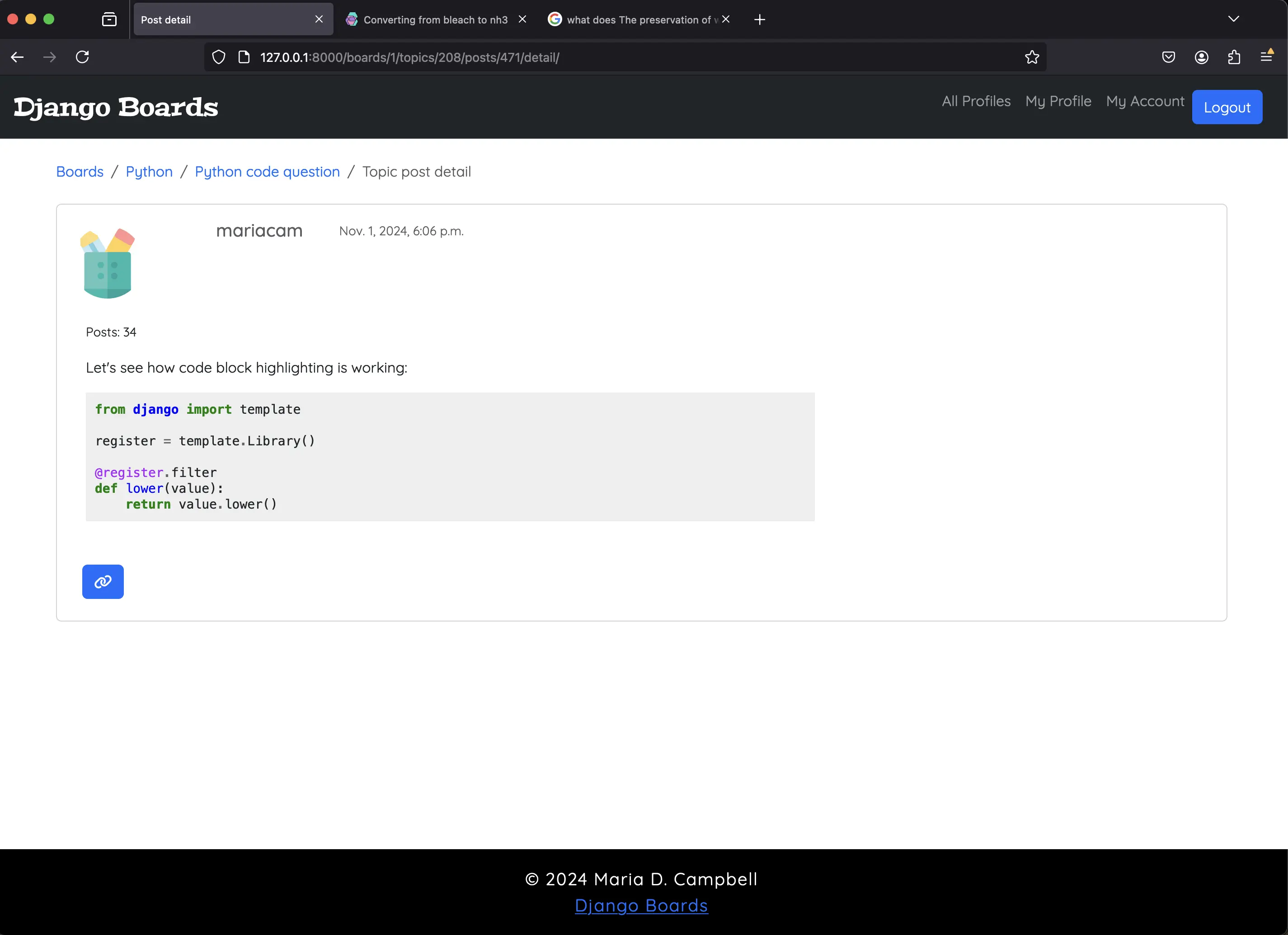
Code block highlighting with pygments
Creating tests for the ProfileListView
# accounts/tests/test_view_profile_list_tests.py
from django.test import TestCase
from django.urls import resolve, reverse
from django.contrib.auth.models import User

from ..views import ProfileListView

class ProfileListTestCase(TestCase):

    def setUp(self):
        self.username = 'john'
        self.password = 'secret123'
        self.user = User.objects.create_user(username=self.username, email='johndoe@example.com', password=self.password)
        self.url = reverse('users-profile-list')
        self.response = self.client.get(self.url)

class LoginRequiredProfileListTests(TestCase):

    def test_redirection(self):
        url = reverse('users-profile-list')
        login_url = reverse('login')
        response = self.client.get(url)
        self.assertRedirects(response, '{login_url}?next={url}'.format(login_url=login_url, url=url))

class ProfileListTests(ProfileListTestCase):

    def setUp(self):
        super().setUp()
        self.client.login(username=self.username, password=self.password)
        self.url = reverse('users-profile-list')
        self.response = self.client.get(self.url)

    def test_profiles_view_status_code(self):
        self.assertEqual(self.response.status_code, 200)

    def test_profiles_url_resolves_profiles_view(self):
        view = resolve('/profiles/')
        self.assertEqual(view.func.view_class, ProfileListView)
The ProfileListView is a protected view, so the user has to be logged in/authenticated in order to be able to view the list of registered users. Once the user is successfully logged in, and then visits the profiles.html page, the response status code for that request is 200. Lastly, the test_profiles_url_resolves_profiles_view test resolves that there indeed is an actual URL called /profiles/.
When I run python3 manage.py test accounts.tests.test_view_profile_list_tests, the following is returned:
Found 2 test(s).
Creating test database for alias 'default'...
System check identified no issues (0 silenced).
..
----------------------------------------------------------------------
Ran 2 tests in 0.878s

OK
Destroying test database for alias 'default'...
Creating tests for the protected function based profile view
# accounts/tests/test_view_profile_tests.py
from django.forms import ModelForm
from django.contrib.auth.models import User
from django.test import TestCase
from django.urls import resolve, reverse
from django.core.files.uploadedfile import SimpleUploadedFile

from ..forms import UpdateUserForm, UpdateProfileForm

from ..models import Profile

from ..views import profile

class MyProfileTestsCase(TestCase):
    def setUp(self):
        self.username = 'john'
        self.password = 'secret123'
        self.user = User.objects.create_user(username=self.username, email='johndoe@example.com', password=self.password)
        self.url = reverse('users-profile')

class MyProfileTests(MyProfileTestsCase):

    def setUp(self):
        super().setUp()
        self.client.login(username=self.username, password=self.password)
        self.url = reverse('users-profile')
        self.response = self.client.get(self.url)

    def test_status_code(self):
        self.assertEqual(self.response.status_code, 200)

    def test_url_resolves_correct_view(self):
        view = resolve('/profile/')
        self.assertEqual(view.func, profile)

    def test_csrf(self):
        self.assertContains(self.response, 'csrfmiddlewaretoken')

    def test_contains_user_form(self):
        # add condition to test whether form is "None" or not. Add condition because there is no form. We’re not doing anything with the form to test at this line, we’re just making it available to your code. - thanks to @KenWhitesell, Django Forum
        form = None
        if form is not None:
            form = self.response.context['form']
            self.assertIsInstance(form, UpdateUserForm)

    def test_contains_profile_form(self):
        # add condition to test whether form is "None" or not. Add condition because there is no form. We’re not doing anything with the form to test at this line, we’re just making it available to your code. - thanks to @KenWhitesell, Django Forum
        form = None
        if form is not None:
            form = self.response.context['form']
            self.assertIsInstance(form, UpdateProfileForm)

    def test_form(self):
        '''
        Make sure that form has enctype attribute and 'multipart/form-data' value
        '''
        # self.assertContains(self.response, '<form', 1)
        self.assertContains(self.response, 'enctype="multipart/form-data"', 1)

    def test_form_inputs(self):
        '''
        The view must contain five (not four) inputs: csrf, username, email, avatar upload, and textarea for bio.
        '''
        # self.assertContains(self.response, '<input', 4)
        self.assertContains(self.response, '<input', 5)
        self.assertContains(self.response, 'type="file"', 1)
        self.assertContains(self.response, 'type="text"', 2)
        self.assertContains(self.response, '<textarea', 1)

class LoginRequiredMyProfileTests(TestCase):
    def test_redirection(self):
        url = reverse('users-profile')
        login_url = reverse('login')
        response = self.client.get(url)
        self.assertRedirects(response, '{login_url}?next={url}'.format(login_url=login_url, url=url))

class SuccessfulMyProfileTests(MyProfileTestsCase):
    def setUp(self):
        super().setUp()
        self.client.login(username=self.username, password=self.password)
        self.response = self.client.post(self.url, {
            'first_name': 'John',
            'last_name': 'Doe',
            'email': 'johndoe@example.com',
        })

    def test_data_changed(self):
        '''
        refresh the user instance from database to get the updated data.
        '''
        self.user.refresh_from_db()
        self.assertEqual('john', self.user.username)
        self.assertEqual('johndoe@example.com', self.user.email)

class InvalidMyProfileTests(MyProfileTestsCase):
    def setUp(self):
        super().setUp()
        self.client.login(username=self.username, password=self.password)
        self.response = self.client.post(self.url, {
            'first_name': 'longstring' * 100
        })

    def test_status_code(self):
        '''
        An invalid form submission should return to the same page
        '''
        self.assertEqual(self.response.status_code, 200)

    def test_form_errors(self):
        form = None
        if form is not None:
            form = self.response.context['form']
            self.assertTrue(form.errors)

class MyProfileAvatarTest(MyProfileTestsCase):
    def setUp(self):
        super().setUp()

        # Create a test image file
        with open('test_image.jpg', 'rb') as img:
            avatar_file = SimpleUploadedFile('test_image.jpg', img.read(), content_type='image/jpeg')

        # Update the profile with the avatar
        profile.avatar = avatar_file
        profile.save()

        # Verify that the avatar was saved correctly
        self.assertTrue(profile.avatar)
        self.assertEqual(profile.avatar.name, 'avatars/test_image.jpg')
Again, since the profile view is a protected one, the user has to login and be authenticated before they can see their own profile. The profile view consists of updating a user and profile form due to the extended user profile.
The last test is important. It checks for a successful profile avatar upload. I use the SimpleUploadedFile class from Django's django.core.files.uploadedfile module to simulate file uploads. I can create an instance of SimpleUploadedFile with the file name, content, and content type, and then pass it to my Django views or forms as if it were a real uploaded file. Here, I am passing it to my profile view. Lastly, I assert that there is a profile avatar after successful upload, and that the profile.avatar.name is 'avatars/test_image.jpg', as it is in my test.
The 'rb' in with open('test_image.jpg', 'rb') as img: stands for read binary. In Python, when working with files, the rb mode stands for "read binary".
The file is opened for reading only. I cannot write to the file in this mode.
The file is opened in binary mode, which means the data is read as raw bytes, without any text encoding or decoding applied.
I should use rb mode when dealing with files that contain data other than plain text, such as images, audio files, video files, or serialized data (e.g., pickle files1).
Creating tests for the profile_detail view
# accounts/tests/test_view_profile_detail_tests.py
from django.forms import ModelForm
from django.contrib.auth.models import User
from django.test import TestCase
from django.urls import resolve, reverse

from ..models import Profile

from ..views import profile_detail

class MyProfileDetailTestsCase(TestCase):
    def setUp(self):
        self.username = 'john'
        self.password = 'secret123'
        self.user = User.objects.create_user(username=self.username, email='johndoe@example.com', password=self.password)
        self.url = reverse('users-profile')

class MyProfileDetailTests(MyProfileDetailTestsCase):

    def setUp(self):
        super().setUp()
        self.client.login(username=self.username, password=self.password)
        self.url = reverse('users-profile')
        self.response = self.client.get(self.url)

    def test_status_code(self):
        self.assertEqual(self.response.status_code, 200)

    def test_url_resolves_correct_view(self):
        view = resolve('/profile-detail/1/')
        self.assertEqual(view.func, profile_detail)

class LoginRequiredMyProfileDetailTests(TestCase):
    def test_redirection(self):
        url = reverse('users-profile')
        login_url = reverse('login')
        response = self.client.get(url)
        self.assertRedirects(response, '{login_url}?next={url}'.format(login_url=login_url, url=url))
The only test here that directly applies to the post_detail view is test_url_resolves_correct_view. Only users whose profile is NOT that of the profile-detail view can access a profile_detail view. But it is still a protected view and a user has to be logged in to be able to access it.
Updating accounts/tests/test_form_signup_test.py
I decided to update test_form_signup_test.py since I had made changes to the accounts app. Specifically, I extended the built-in User with the Profile model using signals. Originally the test (which failed initially because there were differences between the signup form in Django 5 and Django 1.11) contained the following:
# accounts/tests/test_form_signup_test.py
from django.test import TestCase
from ..forms import SignUpForm

class SignUpFormTest(TestCase):
    def test_form_has_fields(self):
        form = SignUpForm()
        expected = ['username', 'email', 'password1', 'password2', ]
        actual = list(form.fields)
        self.assertSequenceEqual(expected, actual)
When I ran this version of the test, the following was returned:
Found 1 test(s).
Creating test database for alias 'default'...
System check identified no issues (0 silenced).
F
======================================================================
FAIL: test_form_has_fields (accounts.tests.test_form_signup_test.SignUpFormTest.test_form_has_fields)
----------------------------------------------------------------------
Traceback (most recent call last):
  File "/Users/mariacam/Python-Development/django-boards/django_boards/accounts/tests/test_form_signup_test.py", line 9, in test_form_has_fields
    self.assertSequenceEqual(expected, actual)
AssertionError: Sequences differ: ['username', 'email', 'password1', 'password2'] != ['username', 'first_name', 'last_name', 'email', 'passw[33 chars]ord']

First differing element 1:
'email'
'first_name'

Second sequence contains 3 additional elements.
First extra element 4:
'password1'

- ['username', 'email', 'password1', 'password2']
+ ['username',
+  'first_name',
+  'last_name',
+  'email',
+  'password1',
+  'password2',
+  'usable_password']

----------------------------------------------------------------------
Ran 1 test in 0.001s

FAILED (failures=1)
Destroying test database for alias 'default'...
I made the following changes according to what was returned:
# accounts/tests/test_form_signup_test.py
from django.test import TestCase
from ..forms import SignUpForm

class SignUpFormTest(TestCase):
    def test_form_has_fields(self):
        form = SignUpForm()
        expected = ['username', 'first_name', 'last_name', 'email', 'password1', 'password2', 'usable_password']
        actual = list(form.fields)
        self.assertSequenceEqual(expected, actual)
Then I ran python3 manage.py test accounts.tests.test_form_signup_test again, and the following was returned:
Found 1 test(s).
Creating test database for alias 'default'...
System check identified no issues (0 silenced).
.
----------------------------------------------------------------------
Ran 1 test in 0.000s

OK
Destroying test database for alias 'default'...
Now the test passed. This test was meant to be informational. It would show what changes were made to the signup form.
Fixing the topic posts avatar issue
Originally I had added a hard coded user avatar to my topic posts. Then I added gravatar functionality, which did not really work. Then I extended the built-in user with a Profile model, and this changed everything.
The extended Profile model allows users to upload their own avatar, or if not, get a default, genderless one. However, this avatar does not extend to my topic posts.
I came up with a solution. Users can upload their own avatars to their profiles. These avatars appear both in the profiles list, and in the user profile_detail. But in the topic posts, I added a neat little svg consisting of writing utensils in a writing utensil holder. It looks like the following:
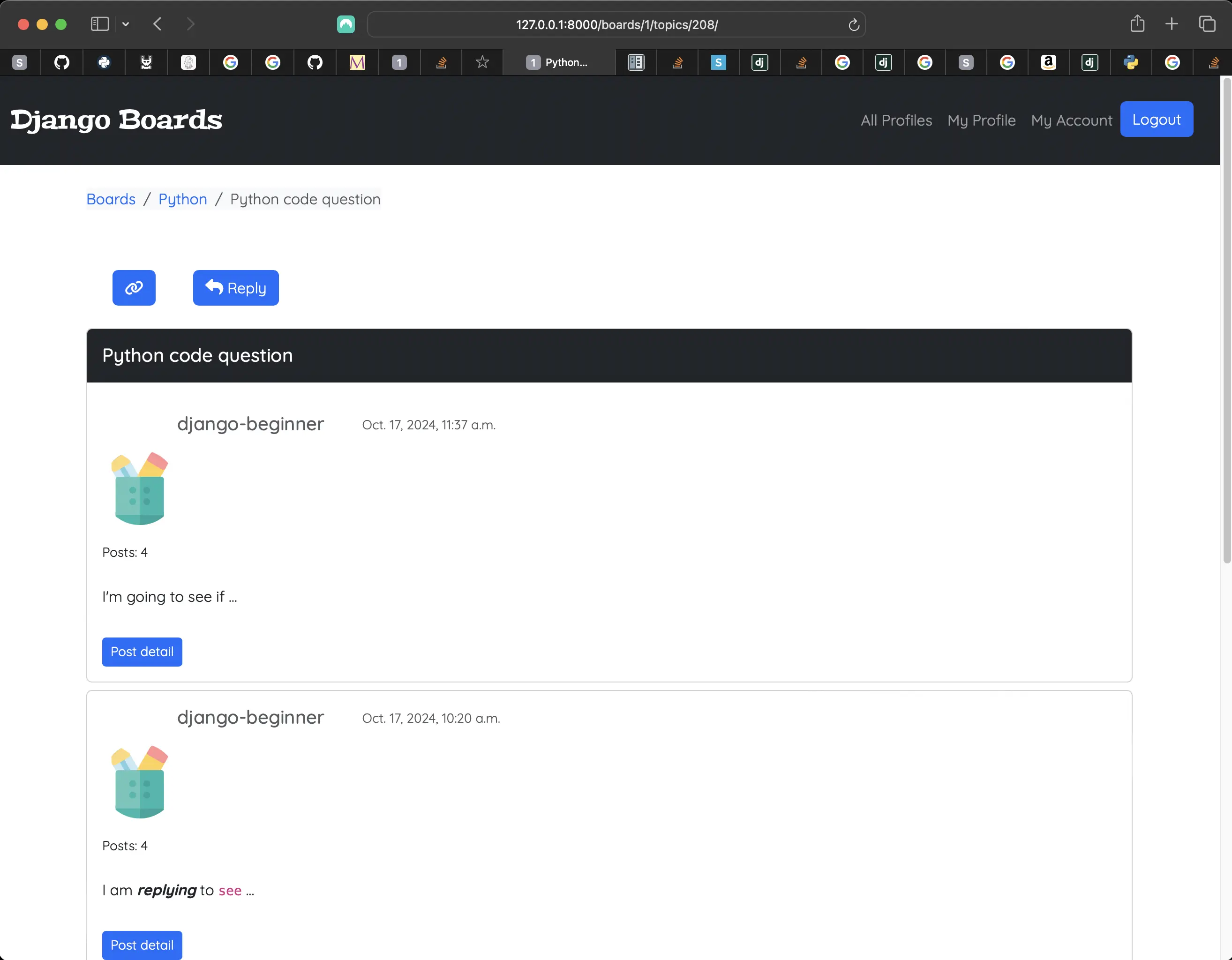
Default topic posts avatar
There, were, however, a few things I had to do in order to make this happen, because I did not want to remove the gravatar or avatar functionality. The avatar functionality works just fine, but the avatars are not too visually appealing!
First, I commented out {% load gravatar %} and {% load avatar_tags %} in topic_posts.html. But that was not enough.
Next, I had to modify the HTML for the avatar:
<!-- templates/topic_posts.html -->
<div class="profile-avatar">
    <img class="rounded-circle account-img"
          alt="{{ post.created_by.username }}"
          src="{% static 'img/pen-container.svg' %}"
          width="80"
          height="80" />
  </div>
</div>
But this too was not enough. Why? Because the rounded-circle account-img classes render the default avatar I was trying to get rid of. But no problem. I made the following changes in app.css:
/* static/css/app.css */

  content: "";
  height: 4rem;
  top: 1rem;
  left: 1rem;
  object-fit: cover;
  position: absolute;
  width: 4rem;
  /* Wanted to add my own "post avatar" so had to display this to none. */
  display: none;
}

/*  user profile avatar styling */

.django-avatar {
	margin-left: 0.75rem;
	padding-left: 1rem;
}

.profile-avatar {
	width: 80px;
	height: 80px;
	margin-top: 0.5rem;
}

/* django-avatar and profile avatar styling */

img#user_avatar.img-circle.img-responsive {
	border-radius: 50%;
	cursor: pointer;
	margin-left: -2rem;
  margin-top: 1rem;
  /* Wanted to add my own "post avatar" so had to display this to none. */
  display: none;
}
Yes. Everything had to be set to display: none in app.css, except for .django-avatar (which does nothing because it is not defined in topic_posts.html) and profile-avatar. When I placed pen-container.svg into the img folder inside the static directory, set a width and height to it in the img element, and made further styling changes using the .profile-avatar class, the result was a nice rendering of pen-container.svg!
The extended profile functionality
A user does not upload an avatar when they first sign up. They do it afterwards. However, as per the way things are set up in the profile form, I added an image called default.jpg to the root of the media directory. It was originally an svg called something else and was also in svg format. I converted it to jpg format and renamed it default.jpg. When a new user registers with the site, they are provided with this default.jpg avatar, and can upload their own afterwards.
I probably would do things a bit differently next time regarding the user avatar. There are ways of sharing the extended profile fields with other apps in a Django project. I would just have to have taken that into account from the beginning. But I am totally fine with the way things are set up now.
Code associated with this post
To view the code associated with this post, please visit 9bc16f6.
Conclusion
In this section, I add timezone.now() to templates/reply_topic.html, implement better control over the view count in templates/index.html, limit replies to the last 10 posts on templates/reply_topic.html, redirect the user to the last topic posts page instead of the first, update boards/tests/test_view_reply_topic_tests.py, create tests for the UpdateProfileForm and profile view, and profile signals, create a ProfileListView, paginate the ProfileListView, create a profile_detail view, customize the profiles.html and profile.html navigation and create associated includes, remove the scrolldown button and refactor the scrolltop button, move footer HTML markup into a footer.html include, sanitize my Markdown, add code formatting and highlighting to my Markdown, create tests for the ProfileListView, protect the function-based profile view, and profile_detail view, update accounts/tests/test_form_signup_test.py, fix the topic posts avatar issue, and explain the extended profile functionality.
Related Resources
- Django Boards repository on GitHub
- How to create a fullstack application using Django and Python Part 16: mariadcampbell.com
- How to create a fullstack application using Django and Python Table of Contents
- How To Test Django Signals Like A Pro: by bomber bot
- Bootstrap Scroll Back To Top button - examples & tutorial: mdbootstrap on GitHub
- Pagination: Django documentation
- URL dispatcher: Django documentation
- Source code for django.core.files.uploadedfile: Django documentation
- Input and Output: Python 3 documentation
- pickle — Python object serialization: Python 3 documentation
- Converting from bleach to nh3: Daniel Roy Greenfield
- Django: Sanitize incoming HTML fragments with nh3: Adam Johnson
Related Posts
Footnotes
-
In Python, pickle files are used to serialize and deserialize Python objects. This means that I can convert a complex Python object, such as a list, dictionary, or even a custom class instance, into a byte stream that can be stored in a file. Later, I can load this file and reconstruct the original object. Pickle files are useful when I want to save the state of a Python object for later use, or when I need to transfer objects between different Python processes or machines. Pickle files are not secure against malicious data. Unpickling untrusted data can lead to arbitrary code execution. Therefore, I should only unpickle data from trusted sources. ↩