How to create a fullstack application using Django and Python Part 6
Social Share:
Thursday, August 29, 2024 at 11:28 AM | 8 min read
Last modified on Thursday, July 16, 2026 at 12:37 PM
#macOS, #django, #site design, #use case diagram, #uml class diagram, #uml, #class diagram relationships, #standard user, #admin user, #multiplicity, #wireframe, #series
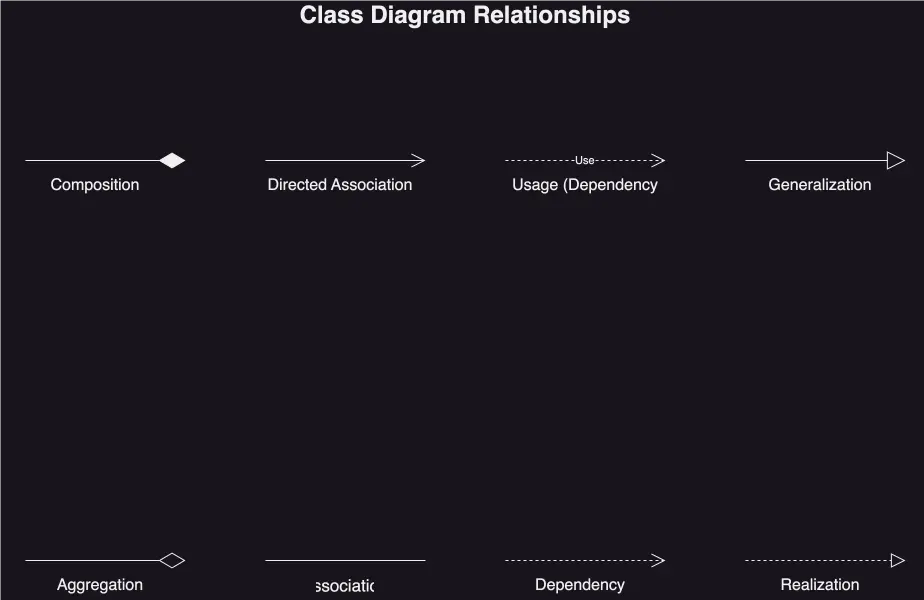
UML class diagram relationships
Important Note: Before committing anything to Git or pushing anything to remote, please visit How to create a fullstack application using Django and Python Part 4 where I discuss how to add the python-dotenv package to the Django site and why it is crucial to do it. This article assumes you have a working knowledge of Git.
Table of Contents
- Designing the Django Boards application
- What is the purpose of Django Boards?
- What are the basic functionalities and structure of Django Boards?
- Differentiating between a standard user and the admin user
- Use case diagram
- Basic class diagram
- Class diagram that visualizes how the classes (models) relate to each other
- UML class diagram (Unified Modeling Language)
- Analyzing the UML class diagram
- UML class diagram which visualizes fields (and not relationships)
- Creating wireframes to provide representations of what the Django Boards site will look like
- Conclusion
- Related Resources
- Related Posts
- Footnotes
Update (July 2026): This walkthrough was written against Django 5.1, which reached full end-of-life in December 2025 and is no longer receiving security patches. Run python -m django --version to check which version you have.
I wrote this series as a live process, so sometimes it might seem confusing, but it all works out in the end.
Designing the Django Boards application
What is the purpose of Django Boards?
Django Boards is a forum where people come to discuss everything Django. Its design and functionality is loosely based on the official Django Forum. However, the official Django Forum is NOT built with Django. It is built with a forum building tool called Discourse.
What are the basic functionalities and structure of Django Boards?
There will be a number of boards (the boards app), and they will be analogous to categories.
Inside the boards will be topics (topic), and they will be analogous to tags. Users start a (new) discussion by creating a new topic. Inside the topic, other users can take part in the discussion by posting replies (reply).
Differentiating between a standard user and the admin user
Only the admin user will be able to create boards, but both the standard user and the admin user will be able to create new topics and post replies.
Use case diagram
In software development, a use case is a concept used to describe how a system (or app, in this case) can be used to achieve specific goals or tasks. It outlines the interactions between users and the system (app) to achieve a specific outcome.
A use case diagram is a visualization of those goals or tasks. Below is a simple use case diagram of the boards app:
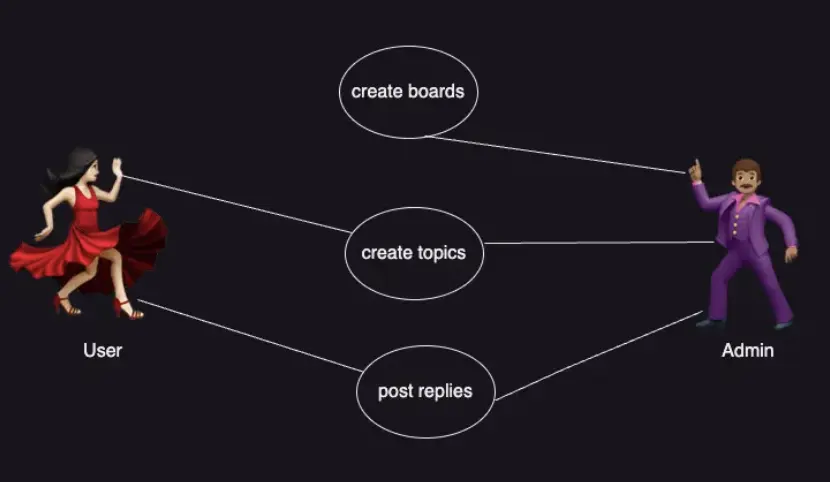
The boards use case diagram
Basic class diagram
Class diagrams are used in software development to visually represent the structure and relationships of classes in a system (boards app), i.e. construct and visualize object-oriented systems.
In class diagrams, classes are depicted as boxes, each containing three compartments for the class name, attributes, and methods. Lines connecting classes illustrate associations, showing relationships such as one-to-one or one-to-many.
In order to be able to implement the use cases described, I will have to at least create a Board, Topic, Post, and User model:
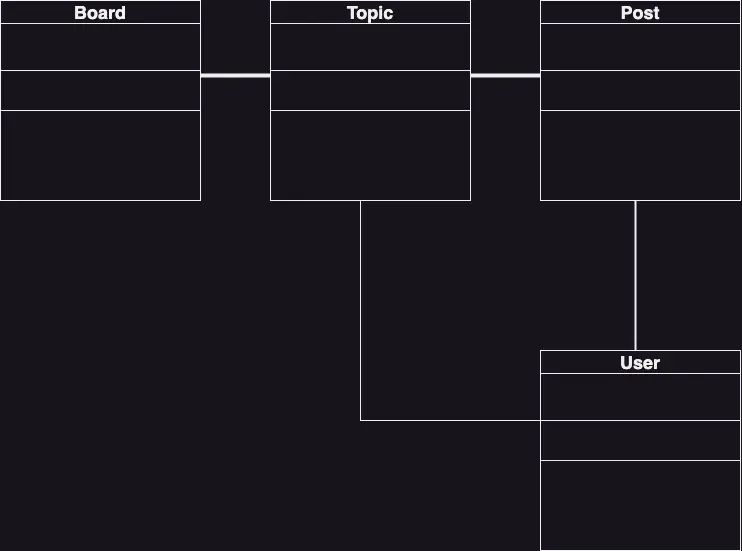
Basic class diagram
Class diagram that visualizes how the classes (models) relate to each other
Before going any further with developing the code base, I have to think about how I want the classes (models) to relate to each other.
- As indicated by the solid lines in the diagram, in Topic, I need to have a field which represents which Board the Topic belongs to.
- The Post needs to have a field to represent which Topic it belongs to. This is so that I could filter only Posts created within a specific Topic in discussions (replies).
- I need a field in Topic representing who started a discussion.
- I need a field in Post identifying who is posting a reply.
UML class diagram (Unified Modeling Language)
Now I am going to use a UML class diagram to visually represent the structure and relationships of my Django Board classes (models).
The UML class diagram provides a high-level overview of the Django Boards design, helping to communicate and document the structure of the software. It is a fundamental tool in object-oriented design and plays a crucial role in the software development lifecycle. Below is a UML class diagram of the Django Boards site:
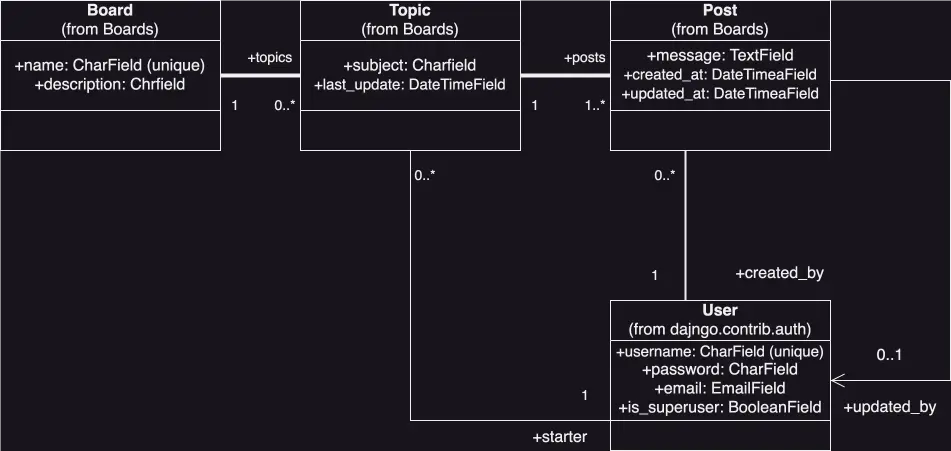
UML class diagram
The lines and arrows in the diagram will eventually be translated into fields a bit later on.
UML class notation
UML class notation is a graphical representation used to depict classes and their relationships in object-oriented modeling.
- The Class name is written in the top compartment of the Class box and is centered and bold.
- The Class attributes, or fields, are located in the second compartment of the Class box, and they represent the data members (data variables) of the Class. They include the visibility (public or private) and the data type of each attribute.
- Visibility notations indicate the access level of attributes and methods.
Common visibility notations include:
- + stands for public (visible to all classes)
- - stands for private (visible only within the class)
- # stands for protected (visible only within the class and its subclasses)
- ~ stands for default visibility (visible to classes in the same package)
Class diagram relationships
Class diagram relationships
- Association: An association represents a bi-directional relationship between two classes. It indicates that instances of one class are connected to instances of another class. Associations are typically depicted as a solid line connecting the classes, with optional arrows indicating the direction of the relationship. I have association lines in my UML class diagram. It is the solid line connecting Board with Topic, Topic with Post, Post with User, and Topic with User.
- Directed Association: A directed association represents a relationship
between two classes where the association has a direction, indicating that
one class is associated with another in a specific way. An arrowhead is added
to the association line to indicate the direction of the relationship. The
arrow points from the class that initiates the association to the class that
is being targeted or affected by the association.
- Directed associations are used when the association has a specific flow or directionality, such as indicating which class is responsible for initiating the association or which class has a dependency on another.
There are other relationships as indicated in the diagram, but these are the two that appear in my diagram.
Analyzing the UML class diagram
Multiplicity and what it means in the UML class diagram
In UML, multiplicity (represented by numbers, dots, and * (wildcards) in the UML class diagram) describes how many instances of one class can be connected to an instance of another class through a given association. This relation is often expressed as a string showing the lower and upper bounds at the endpoints of a connection.
As already mentioned, there is a bidirectional relationship between the Board class and the Topic class, the Topic class and the Post (Post reply) class, and the Post (Post reply) class and the User class. There is no relationship between the Board class and the User class, because it is the admin user and not the standard user that can create a Board.
-
A Board can have 0 or more Topics (0..*), meaning a Board can exist without a Topic, and each Topic must be associated with a specific Board (1), meaning it cannot be null.
-
A Topic must be associated with at least 1 (the starter Post (reply)) or more Posts (1..*), and a Post (reply) must be associated with a specific, only one Topic (1).
-
A Post (reply) is associated with a specific User (the creator of the Post reply) (1), and a User can create 0 or more Posts (0..*). That same Post (reply) can be updated by the same User who created the Post (reply) or not updated at all (0..1).
- There is not only a bidirectional association between a Post and a User. There is also a directed association between Post and User as indicated by the arrow pointing to the User and appended to the association line between the Post and User. A directed association is only interested in one side of a relationship, the one which it points to. In this case, it is the User who has edited a Post (updated_by).
-
A Topic must be started (created) by a specific User and therefore associated with only that one specific User. A User can create 0 or more Topics (0..*).
UML class diagram which visualizes fields (and not relationships)
I can also create a UML class diagram which puts an emphasis on Class fields (aka attributes) instead of relationships:
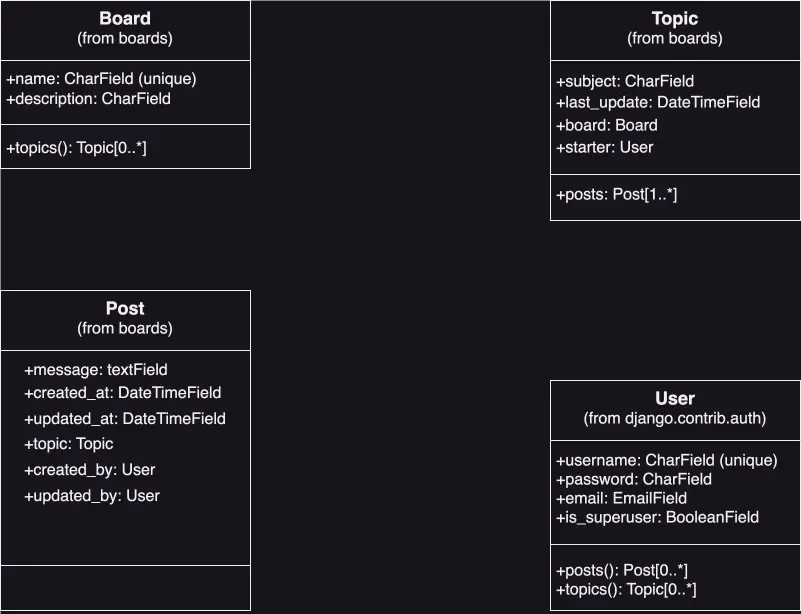
UML class diagram fields
This class diagram field representation is equivalent to the class diagram relationships representation. Both have their advantages, and I think using both diagrams is helpful in gaining a full understanding the classes' structure.
In this fields approach, it is clearer that the associations topic, created_by, and updated_by are actually model fields in Post.
In Topic, now there is a class method called posts(). posts() will implement a reverse relationship1, where Django will automatically execute a query in the database to return a list of all the Posts that belong to a specific Topic.
I used a tool called draw.io (free) to create my UML class diagrams. I like it a lot, and it is easy to use. I came across another tool for creating UML class diagrams called UML Board ($4.99 in macOS App Store). It is a lightweight graphical UML class designer which gives your diagrams a nice hand-drawn look. It provides a minimalistic and easy-to-use user interface with powerful inline-editing capabilities. UMLBoard is available for Windows, macOS, and Linux (via unlock.sh). I haven't checked this out yet, but I am looking forward to do so. It also has extensive documentation.
Creating wireframes to provide representations of what the Django Boards site will look like
A wireframe is a rough diagram created in the early stages of a site design to visualize and communicate the structure of a site.
According to balsamiq,
The purpose of a wireframe is to define a skeletal layout that is easy to understand, and encourages iteration and feedback. Getting to agreement on a good interface structure is a critical part of the software design process.
It is important to create wireframes early on, as they make it easy to visualize my ideas, but it is also important to create the UML class diagrams in conjunction. If designers create wireframes completely independent of the knowledge of the actual functionality (how the code works) of the site, problems can arise. Ideally, either designers also have a working knowledge of the programming language(s) being used, or the developers themselves create the wireframes. This is not necessarily a popular opinion or approach. It is simply mine.
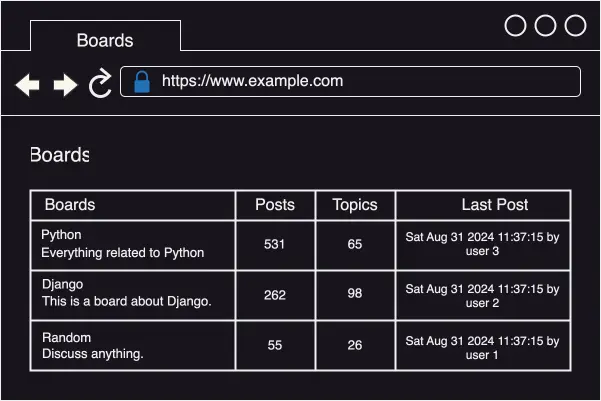
Boards project wireframe of the homepage listing all available boards
If a user clicks on the Django Board link, it should take the user to a list of all the topics:
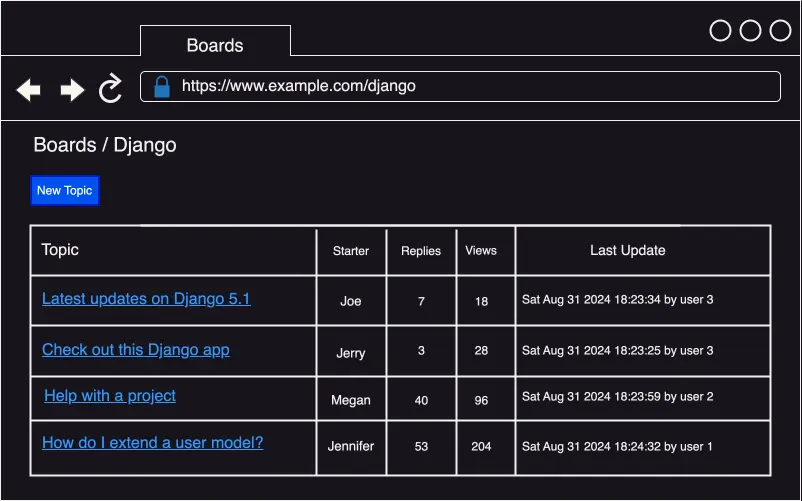
Boards project wireframe listing all topics in the Django board
The new topic view:
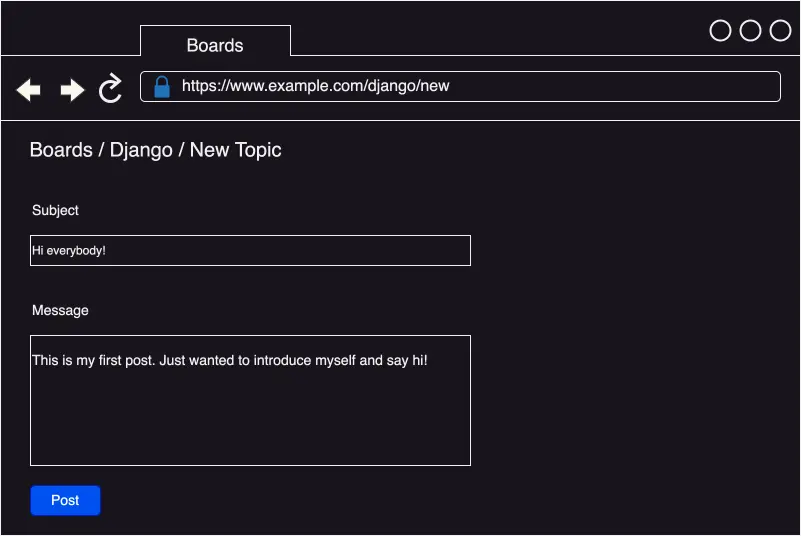
The new topic view
The topic view displaying posts and replies:
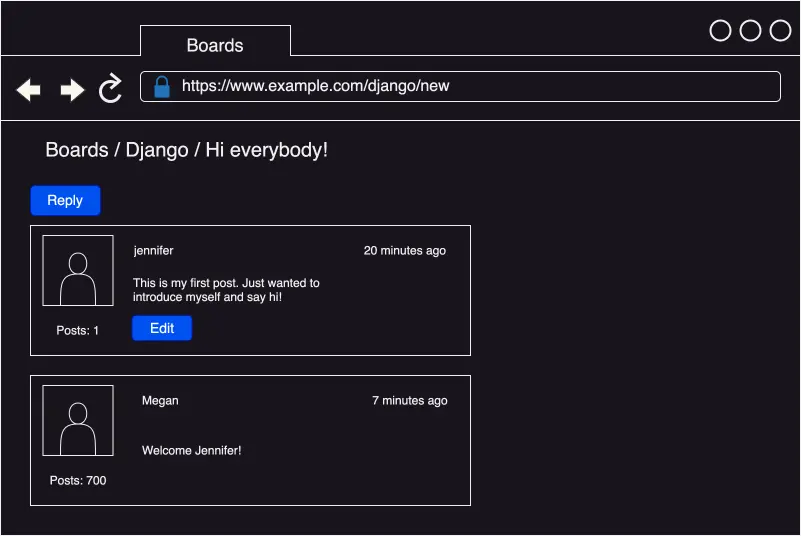
The topic view displaying posts and replies
The topic view displaying the posting of a new reply:
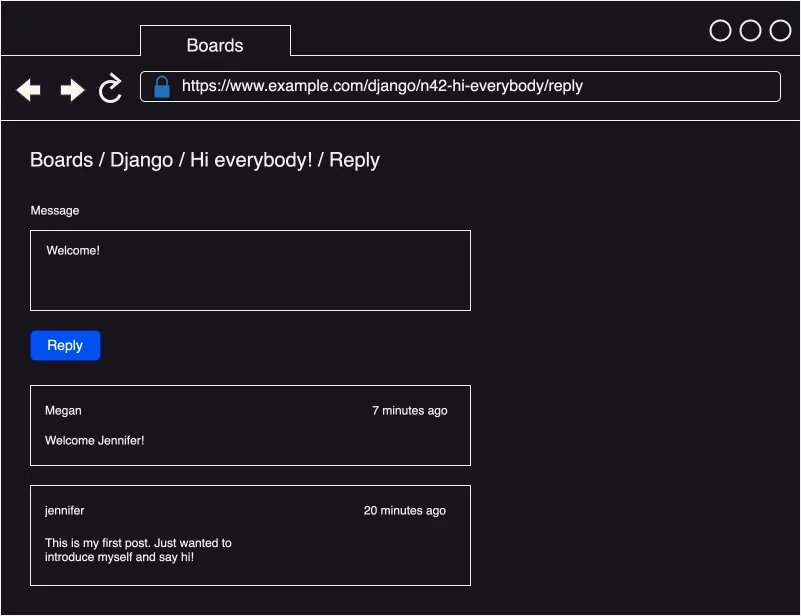
The topic reply view
I also used draw.io to create my wireframes. It's free and very easy to use!
Conclusion
In this section, I go over aspects of designing Django Boards. I discuss the basic functionalities and structure of Django Boards, the difference between a standard and admin user, use case diagrams, UML class diagrams, class diagram relationships, and wireframes.
Related Resources
- UMLBoard Multiplicity: UMLBoard
- What are wireframes and why are they used?: balsamiq
- Django What is reverse relationship?: stackoverflow
Related Posts
Footnotes
-
A reverse relationship in Django is when I add an extra field called related_name in the referenced model. In my boards app models.py file, I will have a Topic class and a Post class, and in order to reference Topic in the Post class, for example, I will add the related_name attribute (aka reverse relationship) in the Post class. ↩