How to create a fullstack application using Django and Python Part 8
Social Share:
Friday, September 6, 2024 at 5:13 PM | 8 min read
Last modified on Thursday, July 16, 2026 at 12:40 PM
#macOS, #django, #fullstack development, #python3, #python3 shell, #bootstrap, #static, #collectstatic, #series, #tests
Board app
Important Note: Before committing anything to Git or pushing anything to remote, please visit How to create a fullstack application using Django and Python Part 4 where I discuss how to add the python-dotenv package to the Django site and why it is crucial to do it. This article assumes you have a working knowledge of Git.
Table of Contents
- Views, Templates, and Static files
- Creating an index.html file inside the templates directory in the top django_boards directory
- Boards
- Testing the index (home) page
- Setting up the static files
- django.contrib.staticfiles
- Creating the static directory
- Creating the css directory
- Downloading Bootstrap
- Configuring the static directory in settings.py
- The collectstatic command
- Loading the static Bootstrap CSS file in the index.html template
- Editing the index.html template to include Bootstrap styling
- Conclusion
- Related Resources
- Related Posts
Update (July 2026): This walkthrough was written against Django 5.1, which reached full end-of-life in December 2025 and is no longer receiving security patches. Run python -m django --version to check which version you have.
I wrote this series as a live process, so sometimes it might seem confusing, but it all works out in the end.
Views, Templates, and Static files
Right now I already have a home page I call index (index.html inside the templates directory). Inside urls.py of inner django_boards project directory:
from django.contrib import admin
from django.urls import path

from boards import views

urlpatterns = [
    path('', views.index, name='index'),
    path('admin/', admin.site.urls),
]
And the corresponding view in the boards app views.py:
from django.shortcuts import render
from django.http import HttpResponse
from .models import Board

# Create your views here.
def index(request):
  boards = Board.objects.all() # returns all Boards
  return render(request, 'index.html', {'boards': boards}) # renders all boards to the page
This next thing to do is to render all the boards with a different approach as a comparison:
from django.shortcuts import render
from django.http import HttpResponse
from .models import Board

# Create your views here.
def index(request):
  boards = Board.objects.all()
  boards_names = list()

  for board in boards:
    boards_names.append(board.name)

    response_html = '<br/>'.join(boards_names)


  return HttpResponse(response_html)
And this results in the following in the browser:

I changed the code from using the render method to render the index.html page with the list of boards to returning an HttpResponse and passing the response_html object to it. This is okay, but it is the role of the templating engine to render the page(s).
Creating an index.html file inside the templates directory in the top django_boards directory
Next, I created an index.html file inside the templates directory inside the parent django_boards project directory:
- templates/
  - index.html
Inside the index.html file, I add the following markup:
<html lang="en">
	<head>
		<meta charset="UTF-8" />
		<meta name="viewport" content="width=device-width, initial-scale=1.0" />
		<title>Boards</title>
		<link rel="stylesheet" href="{% static 'css/bootstrap.min.css' %}" />
	</head>
	<body>
		<h1>Boards</h1>

		{% for board in boards %} {{ board.name }} <br />
		{% endfor %}
	</body>
</html>
The above contains html markup mixed with some special tags {% for board in boards %}{% endfor %} and a variable, {{ board.name }}. These tags and variable are part of the Django Templating Language.
The {% for board in boards %}{% endfor %} represents a for in loop, which iterates over each board in the queryset. {{ board.name }} renders the board name to the page, for example.
Before I can actually view my index.html page being rendered to the page, I have to tell Django where to find this template.
To do this, I have to go into settings.py located in the django_boards project subdirectory also called django_boards and add the following:
import os

TEMPLATES = [
    {
        'BACKEND': 'django.template.backends.django.DjangoTemplates',
        'DIRS': [ # what needs to be added
            os.path.join(BASE_DIR, 'templates')
        ],
        'APP_DIRS': True,
        'OPTIONS': {
            'context_processors': [
                'django.template.context_processors.debug',
                'django.template.context_processors.request',
                'django.contrib.auth.context_processors.auth',
                'django.contrib.messages.context_processors.messages',
            ],
        },
    },
]
I needed to add:
'DIRS': [ # what needs to be added
    os.path.join(BASE_DIR, 'templates')
],
What the value of the 'DIRS' array is doing is finding the full path of my projects directory (BASE_DIR) and appending 'templates' using the os.path.join() method.
I can debug this using the Python3 shell:
# first run python3 manage.py shell after stopping the development server
python3 manage.py shell
Then I type the following in the python3 shell:
from django.conf import settings

settings.BASE_DIR
Which for me, returns:
PosixPath('/Users/mariacam/Python-Development/django-boards/django_boards')
And then:
import os

os.path.join(settings.BASE_DIR, 'templates')
Which for me, returns:
'/Users/mariacam/Python-Development/django-boards/django_boards/templates'
os.path.join(settings.BASE_DIR, 'templates') is pointing to the templates directory which I configured in settings.py.
Now I can bring back the previous code to the index view:
from django.shortcuts import render
from django.http import HttpResponse
from .models import Board

# Create your views here.
def index(request):
  boards = Board.objects.all() # returns all Boards
  return render(request, 'index.html', {'boards': boards}) # renders all boards to the page
Now the index (home) page looks like the following:
Boards

Python
Django
Random
Django Models
Python Objects
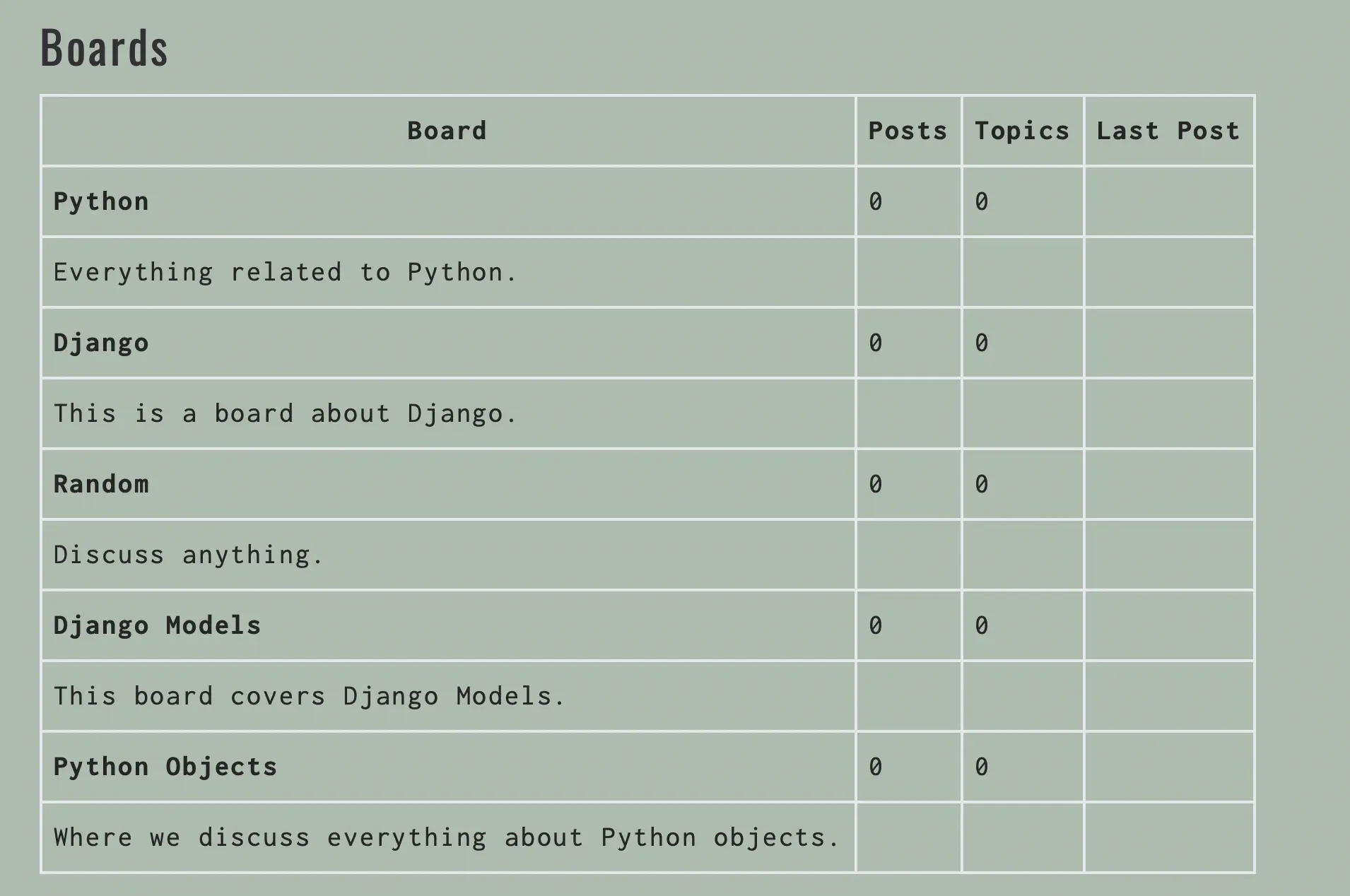
However, I can make the page look better by adding a table to the html markup:
<!DOCTYPE html>
<html>
	<head>
		<meta charset="utf-8" />
		<title>Boards</title>
	</head>
	<body>
		<h1>Boards</h1>

		<table border="1">
			<thead>
				<tr>
					<th>Board</th>
					<th>Posts</th>
					<th>Topics</th>
					<th>Last Post</th>
				</tr>
			</thead>
			<tbody>
				{% for board in boards %}
				<tr>
					<td>
						{{ board.name }}<br />
						<small style="color: #888"
							>{{ board.description }}</small
						>
					</td>
					<td>0</td>
					<td>0</td>
					<td></td>
				</tr>
				{% endfor %}
			</tbody>
		</table>
	</body>
</html>
Which looks something like the following:
Boards
| Board | Posts | Topics | Last Post |
|---|---|---|---|
| Python | 0 | 0 | |
| Everything related to Python. | |||
| Django | 0 | 0 | |
| This is a board about Django. | |||
| Random | 0 | 0 | |
| Discuss anything. | |||
| Django Models | 0 | 0 | |
| This board covers Django Models. | |||
| Python Objects | 0 | 0 | |
| Where we discuss everything about Python objects. |
Testing the index (home) page
Next, I am going to write my first test in the tests.py page inside the boards app:
from django.urls import reverse
from django.test import TestCase
from django.urls import resolve
from .views import index

# Create your tests here.

class IndexTests(TestCase):

  def test_index_view_status_code(self):
    url = reverse('index')
    response = self.client.get(url)
    self.assertEqual(response.status_code, 200)
This is a very basic test in which I am checking the status code of the response. A 200 status code means success.
I can check the status code of the response in the console while the development server is running:
Watching for file changes with StatReloader
Performing system checks...

System check identified no issues (0 silenced).
September 06, 2024 - 18:56:34
Django version 5.1, using settings 'django_boards.settings'
Starting development server at http://127.0.0.1:8000/
Quit the server with CONTROL-C.

[06/Sep/2024 18:56:36] "GET / HTTP/1.1" 200 2097
[06/Sep/2024 18:56:36] "GET /static/css/bootstrap.min.css HTTP/1.1" 200 232803 # I already have bootstrap set up, but I will be going through that step coming up
"GET / HTTP/1.1" 200 2097 and "GET /static/css/bootstrap.min.css HTTP/1.1" 200 232803 tells me that getting index.html AND Bootstrap was successful. 200 status code indicates success.
If you want to learn more about common HTTP status codes, please visit httpstatus which provides an overview of the most common HTTP status codes.
If I had had a mistake in my code like an uncaught exception, syntax error, etc., Django would return a status code of 500. A status code of 500 gives a message of "Internal Server Error". A 500 status code means the server encountered something it didn't expect and was unable to complete the request.
To run my test in tests.py, I run the following command in Terminal:
python3 manage.py test
And the following, for me, was returned:
Found 2 test(s).
System check identified no issues (0 silenced).
EE
======================================================================
ERROR: django_boards.boards (unittest.loader._FailedTest.django_boards.boards)
----------------------------------------------------------------------
ImportError: Failed to import test module: django_boards.boards
Traceback (most recent call last):
  File "/Users/mariacam/.pyenv/versions/3.12.5/lib/python3.12/unittest/loader.py", line 429, in _find_test_path
    package = self._get_module_from_name(name)
              ^^^^^^^^^^^^^^^^^^^^^^^^^^^^^^^^
  File "/Users/mariacam/.pyenv/versions/3.12.5/lib/python3.12/unittest/loader.py", line 339, in _get_module_from_name
    __import__(name)
ModuleNotFoundError: No module named 'django_boards.boards'


======================================================================
ERROR: django_boards.django_boards (unittest.loader._FailedTest.django_boards.django_boards)
----------------------------------------------------------------------
ImportError: Failed to import test module: django_boards.django_boards
Traceback (most recent call last):
  File "/Users/mariacam/.pyenv/versions/3.12.5/lib/python3.12/unittest/loader.py", line 429, in _find_test_path
    package = self._get_module_from_name(name)
              ^^^^^^^^^^^^^^^^^^^^^^^^^^^^^^^^
  File "/Users/mariacam/.pyenv/versions/3.12.5/lib/python3.12/unittest/loader.py", line 339, in _get_module_from_name
    __import__(name)
ModuleNotFoundError: No module named 'django_boards.django_boards'


----------------------------------------------------------------------
Ran 2 tests in 0.000s

FAILED (errors=2)
My test failed because I had added an __init__.py file at the root of my django_boards project. When I removed it, and ran python3 manage.py test, then it went away. According to an answer in a thread entitled ImportError: Failed to import test module: on stackoverflow:
So I got this error because I had an __init__.py file in the same directory as the project root (the same directory that manage.py exists in.) This caused some wierd import issues with the tests code and caused a number of other imports of tests to fail. -- chander answered Sep 27, 2023 at 18:31
Why did I have that __init__.py there? Because in order to generate a UML diagram from Python code, I had to add __init__.py in all my directories, including project and app. However, eventually I should have removed the __init__.py file at the root of the project.
To get back more information about the test, I could set verbosity. Verbosity determines the amount of notification and debug information that will be printed to the console. 0 is no output, 1 is normal output, and 2 is verbose output.
Let's try this out:
python3 manage.py test --verbosity=0
Which returns:
System check identified no issues (0 silenced).
----------------------------------------------------------------------
Ran 2 tests in 0.016s

OK
python3 manage.py test --verbosity=1
Which returns:
Found 2 test(s).
Creating test database for alias 'default'...
System check identified no issues (0 silenced).
..
----------------------------------------------------------------------
Ran 2 tests in 0.008s

OK
Destroying test database for alias 'default'...
python3 manage.py test --verbosity=2
Which returns:
Found 2 test(s).
Creating test database for alias 'default' ('file:memorydb_default?mode=memory&cache=shared')...
Operations to perform:
  Synchronize unmigrated apps: dotenv, graphviz, messages, pylint, staticfiles
  Apply all migrations: admin, auth, boards, contenttypes, sessions
Synchronizing apps without migrations:
  Creating tables...
    Running deferred SQL...
Running migrations:
  Applying contenttypes.0001_initial... OK
  Applying auth.0001_initial... OK
  Applying admin.0001_initial... OK
  Applying admin.0002_logentry_remove_auto_add... OK
  Applying admin.0003_logentry_add_action_flag_choices... OK
  Applying contenttypes.0002_remove_content_type_name... OK
  Applying auth.0002_alter_permission_name_max_length... OK
  Applying auth.0003_alter_user_email_max_length... OK
  Applying auth.0004_alter_user_username_opts... OK
  Applying auth.0005_alter_user_last_login_null... OK
  Applying auth.0006_require_contenttypes_0002... OK
  Applying auth.0007_alter_validators_add_error_messages... OK
  Applying auth.0008_alter_user_username_max_length... OK
  Applying auth.0009_alter_user_last_name_max_length... OK
  Applying auth.0010_alter_group_name_max_length... OK
  Applying auth.0011_update_proxy_permissions... OK
  Applying auth.0012_alter_user_first_name_max_length... OK
  Applying boards.0001_initial... OK
  Applying boards.0002_post_post_liked_topic_topic_liked_postlike_topiclike... OK
  Applying boards.0003_remove_topic_topic_liked_delete_topiclike... OK
  Applying boards.0004_alter_postlike_post_like_value... OK
  Applying sessions.0001_initial... OK
System check identified no issues (0 silenced).
test_index_url_resolves_index_view (boards.tests.IndexTests.test_index_url_resolves_index_view) ... ok
test_index_view_status_code (boards.tests.IndexTests.test_index_view_status_code) ... ok

----------------------------------------------------------------------
Ran 2 tests in 0.010s

OK
Destroying test database for alias 'default' ('file:memorydb_default?mode=memory&cache=shared')...
I like having as much verbosity as possible. It tells me exactly what I have in my application and what specifically passed.
Setting up the static files
Static files consist of HTML, JavaScript, CSS, images, fonts, and anything else I may want to use for the frontend of the site.
Django only serves static files during the development process to make the development workflow easier. Django does provide some features to manage static files. Those features are available in the django.contrib.staticfiles application included in the INSTALLED_APPS configuration in settings.py.
django.contrib.staticfiles
django.contrib.staticfiles collects static files from each of my applications (and any other places I specify) into a single location that can easily be served in production.
The common solution to use for site styling is Bootstrap. Bootstrap is a powerful, extensible, and feature-packed frontend toolkit. I can build and customize with Sass, utilize prebuilt grid systems and components, and bring projects to life with powerful JavaScript plugins.
Creating the static directory
In the django_boards project root directory, alongside the templates directory, I have to create a directory called static where my static files are kept.
Creating the css directory
Inside the static directory, I create another directory called css. Now my Django Boards directory structure should look like the following:
- django-boards/ # top level container for the django boards site
  - .git/
  - .venv/ # gitignored
  - django_boards/ # top level project directory
    - boards/
    - django_boards/
    - static/
      - css/
        - bootstrap.min.css # copied from the bootstrap download
    - templates/
    - db.sqlite3 # .gitignored
    - manage.py
    - venv/ # gitignored
    - .env # gitignored
    - .gitignore
Downloading Bootstrap
Next, I have to download Bootstrap. The current version at the time of writing this post is 5.3.3, and the Compiled CSS and JS version should be downloaded. From there, I should copy the css/bootstrap.min.css to the project's css folder inside the new static directory (as shown above).
Configuring the static directory in settings.py
Next, I have to let Django know where the static files are located. In order to do this, I have to go into settings.py and add the following as the values of STATIC_URL and STATICFILES_DIRS:
STATIC_URL = 'static/'

STATICFILES_DIRS = [
    os.path.join(BASE_DIR, 'static'),
]
STATIC_URL tells Django to append static to the base url, which in development for me is http://127.0.0.1:8000, when searching for static files.
The STATICFILES_DIRS list tells Django where to find static files that are not linked to a particular app. Here I am telling Django to look for static files in my root folder, not in any particular app (i.e., the board app).
The collectstatic command
Among its core components, Django's django.contrib.staticfiles app provides management commands. One of them is the collectstatic command. This command collects static files from various locations like /board/static/ or directories in STATICFILES_DIRS setting in settings.py, and copies them to the STATIC_ROOT directory.
The collectstatic command is a built-in Django management command that collects all static files from a Django project, including files from each installed app, and places them in a single location, specified by the STATIC_ROOT setting in settings.py. This is the location where my web server will look for static files to serve to the end users in production.
Loading the static Bootstrap CSS file in the index.html template
Next, I have to load the Bootstrap CSS file inside my index.html template:
{% load static %}<!DOCTYPE html>
<html lang="en">
	<head>
		<meta charset="UTF-8" />
		<meta name="viewport" content="width=device-width, initial-scale=1.0" />
		<title>Boards</title>
		<link rel="stylesheet" href="{% static 'css/bootstrap.min.css' %}" />
	</head>
	<body>
		<!-- Body excluded for brevity -->
	</body>
</html>
The {% load static %} is Django's special template tag syntax telling the template engine to use the files in the static directory in the index.html template. Without this special tag, Django would not know to load the static files like CSS, JS, and any images that might be stored there. The site would contain no styling, media assets, or JS functionality! That's why so many backend-centric developers like Bootstrap. It's an all inclusive CSS (with some JS) framework.
{% static 'css/bootstrap.min.css' %} returns /static/css/bootstrap.min.css.
Editing the index.html template to include Bootstrap styling
{% load static %}<!DOCTYPE html>
<html lang="en">

  <head>
    <meta charset="UTF-8">
    <meta name="viewport" content="width=device-width, initial-scale=1.0">
    <title>Boards</title>
    <link rel="stylesheet" href="{% static 'css/bootstrap.min.css' %}">
  </head>

  <body>
  <div class="container">
    <ol class="breadcrumb my-4">
      <li class="breadcrumb-item active">
      Boards
      </li>
    </ol>
    <table class="table">
      <thead class="thead-inverse">
        <tr>
          <th>Board</th>
          <th>Posts</th>
          <th>Topics</th>
          <th>Last Post</th>
        </tr>
      </thead>
      <tbody>
        {% for board in boards %}
        <tr>
          <td>
            {{ board.name }}<br>
            <small class="text-muted d-block">{{ board.description }}</small>
          </td>
          <td class="align-middle">0</td>
          <td class="align-middle">0</td>
          <td></td>
        </tr>
        {% endfor %}
      </tbody>

    </table>
    </div>
  </body>

</html>
Which renders the following in the browser:
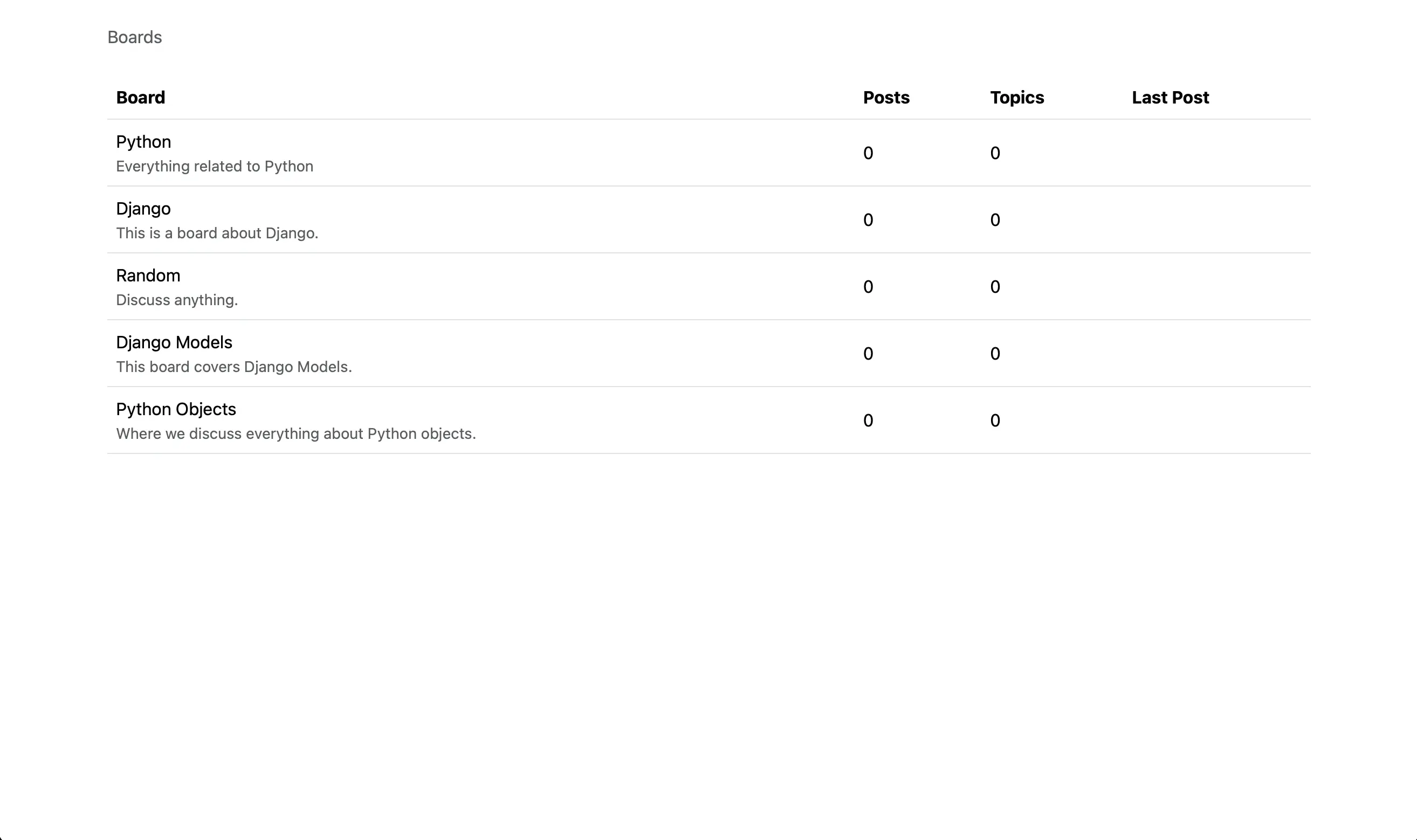
Board with Bootstrap CSS
Conclusion
In this section, I add an index.html template to a directory called static, test the index (home) page, set up the static files, download Bootstrap, configure the static directory in settings.py, discuss the collectstatic command, load the Bootstrap CSS file in index.html, and edit index.html to include Bootstrap styling.
Related Resources
- Working with Static and Media Files in Django: by Amal Shaji, testdriven.io
- getbootstrap
- Everything About Django collectstatic Command: Geeks for Geeks