Storage Fun with Forms Rebuild: Testing the Code
Social Share:
Sunday, June 28, 2026 at 5:24 PM | 17 min read
Last modified on Sunday, June 28, 2026 at 5:24 PM
#macOS, #coverage, #istanbul, #javascript, #series, #tests, #unit testing, #vanilla template, #vite, #vitest

Photo by Parinaz Mirhosseini on unsplash.com
Table of Contents
- Testing the renderFooter function
- Modularizing the Storage Fun with Forms rebuild
- Testing the withHash function
- Adding test coverage to the Storage Fun with Forms rebuild
- Installing Istanbul in Storage Fun with Forms rebuild
- The complete coverage report (index.html)
- Conclusion
- Related Resources
- Related Posts
- Footnotes
In the previous section of this series, I wired up the Storage Fun with Forms rebuild to use Vitest for JavaScript unit testing. I made several attempts to write a viable test until I finally wrote one which tested actual Storage Fun with Forms rebuild code, and it was the following:
/* test/localStorageSupport.test.js */
import { localStorageSupport } from '../src/modules/localStorageSupport.js'

describe('localStorageSupport', () => {
	it('returns true when Storage is available', () => {
		expect(localStorageSupport()).toBe(true)
	})
})
This is a simple test which tests the localStorageSupport function and returns true if localStorageSupport is available in the active browser. To get a full explanation of the test code, please visit Storage Fun with Forms Rebuild: Working through the Code.
Testing the renderFooter function
Next, I decided to test the renderFooter function to make sure that it rendered as expected in the code.
First, I created a file inside the test directory called renderFooter.test.js.
Then I had to determine how to describe what I expected from the renderFooter function and then create a test around it.
The footer renders two swords to either side of the copyright symbol and my name:

Storage Fun with Forms rebuild footer
I wrote the following test:
// test/renderFooter.test.js
import { expect, test } from 'vitest'
import { renderFooter } from '../src/modules/renderFooter.js'

describe('It renders two sword symbols, a copyright symbol, the dynamic year, and the name Maria D. Campbell', () => {
	it('Displays two sword symbols, a copyright symbol, a dynamic year, and the name Maria D. Campbell when the footer is present', function () {
		const footer = document.getElementById('site-footer')
		const year = new Date().getFullYear()
		expect(renderFooter()).toMatchSnapshot(
			`✝ © ${year} Maria D. Campbell ✝`,
		)
	})
})
The code being tested looks like the following:
// src/modules/renderFooter.js
/** Updates the footer's copyright year and author credit. */
export function renderFooter() {
	const footer = document.getElementById('site-footer')
	if (!footer) return
	const year = new Date().getFullYear()
	footer.innerHTML = `✝ © ${year} Maria D. Campbell ✝`
}
And then I ran npm test renderFooter.test.js, and I got back:
npm test renderFooter.test.js

> storage-fun-with-forms@2.0.0 test
> vitest renderFooter.test.js


 DEV  v4.1.9 /Users/mariacam/Development/storage-fun-with-forms-rebuild

 ✓ test/renderFooter.test.js (1 test) 2ms
   ✓ It renders two sword symbols, a copyright symbol, the dynamic year, and the name Maria D. Campbell (1)
     ✓ Displays two sword symbols, a copyright symbol, a dynamic year, and the name Maria D. Campbell when the footer is present 1ms

  Snapshots  1 written
 Test Files  1 passed (1)
      Tests  1 passed (1)
   Start at  16:10:02
   Duration  630ms (transform 18ms, setup 21ms, import 8ms, tests 2ms, environment 484ms)

 PASS  Waiting for file changes...
       press h to show help, press q to quit
Which is great, but since I had to use the .toMatchSnapshot() method which created a snapshot for me, and which let me know whether the real footer or an undefined object was being tested, I decided to check out what the "truth" about my test!
I ran cat test/__snapshots__/renderFooter.test.js.snap to print out the contents of the snapshot in Terminal:
cat test/__snapshots__/renderFooter.test.js.snap
// Vitest Snapshot v1, https://vitest.dev/guide/snapshot.html

exports[`It renders two sword symbols, a copyright symbol, the dynamic year, and the name Maria D. Campbell > Displays two sword symbols, a copyright symbol, a dynamic year, and the name Maria D. Campbell when the footer is present > ✝ © 2026 Maria D. Campbell ✝ 1`] = `undefined`;
The renderFooter function returned undefined. For the purposes of rendering to the web page, my code was fine. I shared a screenshot to show how it rendered to the page. But for the purpose of testing or reusability of the module, the current code was not enough. So I added a line of code to take care of the "undefined" issue:
/** Updates the footer's copyright year and author credit. */
export function renderFooter() {
	const footer = document.getElementById('site-footer')
	if (!footer) return
	const year = new Date().getFullYear()
	footer.innerHTML = `✝ © ${year} Maria D. Campbell ✝`
	return footer.innerHTML // new
}
Then I ran the test again and got back the following:
npm test renderFooter.test.js

> storage-fun-with-forms@2.0.0 test
> vitest renderFooter.test.js


 DEV  v4.1.9 /Users/mariacam/Development/storage-fun-with-forms-rebuild

 ✓ test/renderFooter.test.js (1 test) 2ms
   ✓ It renders two sword symbols, a copyright symbol, the dynamic year, and the name Maria D. Campbell (1)
     ✓ Displays two sword symbols, a copyright symbol, a dynamic year, and the name Maria D. Campbell when the footer is present 2ms

  Snapshots  1 written
 Test Files  1 passed (1)
      Tests  1 passed (1)
   Start at  16:51:03
   Duration  418ms (transform 17ms, setup 19ms, import 7ms, tests 2ms, environment 281ms)

 PASS  Waiting for file changes...
       press h to show help, press q to quit
And then I ran the cat test/__snapshots__/renderFooter.test.js.snap:
cat test/__snapshots__/renderFooter.test.js.snap
// Vitest Snapshot v1, https://vitest.dev/guide/snapshot.html

exports[`It renders two sword symbols, a copyright symbol, the dynamic year, and the name Maria D. Campbell > Displays two sword symbols, a copyright symbol, a dynamic year, and the name Maria D. Campbell when the footer is present > ✝ © 2026 Maria D. Campbell ✝ 1`] = `undefined`;
It still returned undefined. Why? Because the test ran before a footer with the id of #site-footer could be created in the DOM. That's why document.getElementById('site-footer') returns null inside the function and exits at if (!footer) return;, which means it never reaches return footer.innerHTML in the real code. This is why undefined is returned in the snapshot.
So what I actually had to add to the test was the following:
import { expect, test, beforeEach } from 'vitest' import { renderFooter } from '../src/modules/renderFooter.js' describe('It renders two sword symbols, a copyright symbol, the dynamic year, and the name Maria D. Campbell', () => { // new beforeEach(() => { document.body.innerHTML = '<div id="site-footer"></div>' }) it('Displays two sword symbols, a copyright symbol, a dynamic year, and the name Maria D. Campbell when the footer is present', function () { const footer = document.getElementById('site-footer') const year = new Date().getFullYear() expect(renderFooter()).toMatchSnapshot( `✝ © ${year} Maria D. Campbell ✝`, ) }) })
Why the beforeEach function before the test? It injects a div with the id of "site-footer", creating an actual element with the id matching that of the actual footer before the test runs. By the time the test does run, there is an actual element with a #site-footer id to compare against, and this time, cat test/__snapshots__/renderFooter.test.js.snap returned the following:
cat test/__snapshots__/renderFooter.test.js.snap
// Vitest Snapshot v1, https://vitest.dev/guide/snapshot.html

exports[`It renders two sword symbols, a copyright symbol, the dynamic year, and the name Maria D. Campbell > Displays two sword symbols, a copyright symbol, a dynamic year, and the name Maria D. Campbell when the footer is present > ✝ © 2026 Maria D. Campbell ✝ 1`] = `"✝ © 2026 Maria D. Campbell ✝"`;
This time undefined was not returned. "✝ © 2026 Maria D. Campbell ✝" was. And notice how the swords, the copyright symbol, and the year rendered instead of a display the raw html template literal? That's because now, when the symbols and template literal are assigned to .innerHTML. there already is a DOM element with the id of "site-footer", and the DOM parses them into their actual characters immediately. Then footer.innerHTML, being a getter, reads back the parsed result. The appearance of the parsed HTML confirms that there indeed is a real footer present and not an undefined object.
After analyzing the results, I decided that the code could use a bit of a cleanup:
import { expect, test, beforeEach } from 'vitest' import { renderFooter } from '../src/modules/renderFooter.js' describe('It renders two sword symbols, a copyright symbol, the dynamic year, and the name Maria D. Campbell', () => { beforeEach(() => { document.body.innerHTML = '<div id="site-footer"></div>' }) it('Displays two sword symbols, a copyright symbol, a dynamic year, and the name Maria D. Campbell when the footer is present', function () { // const footer = document.getElementById('site-footer') const year = new Date().getFullYear() expect(renderFooter()).toMatchSnapshot( `✝ © ${year} Maria D. Campbell ✝`, ) }) })
const footer = document.getElementById('site-footer') is dead code. With beforeEach creating the div with the id of "site-footer" before the test runs, const footer = document.getElementById('site-footer') is never reached and therefore useless.
Now that I knew what the test would return, there no longer was any need for the .toMatchSnapshot() method. I could replace it with the .toBe() method. The cleaned up test code looks like:
import { expect, test, beforeEach } from 'vitest' import { renderFooter } from '../src/modules/renderFooter.js' describe('It renders two sword symbols, a copyright symbol, the dynamic year, and the name Maria D. Campbell', () => { beforeEach(() => { document.body.innerHTML = '<div id="site-footer"></div>' }) it('Displays two sword symbols, a copyright symbol, a dynamic year, and the name Maria D. Campbell when the footer is present', function () { const year = new Date().getFullYear() expect(renderFooter()).toBe( `✝ © ${year} Maria D. Campbell ✝`, ) }) })
I ran the npm test renderFooter.test.js script again to make sure that my changes were indeed solid and got back the following:
 ✓ test/renderFooter.test.js (1 test) 6ms
   ✓ It renders two sword symbols, a copyright symbol, the dynamic year, and the name Maria D. Campbell (1)
     ✓ Displays two sword symbols, a copyright symbol, a dynamic year, and the name Maria D. Campbell when the footer is present 5ms

 Test Files  1 passed (1)
      Tests  1 passed (1)
   Start at  17:24:38
   Duration  17ms

 PASS  Waiting for file changes...
       press h to show help, press q to quit
Then I ran the cat test/__snapshots__/renderFooter.test.js.snap script:
exports[`It renders two sword symbols, a copyright symbol, the dynamic year, and the name Maria D. Campbell > Displays two sword symbols, a copyright symbol, a dynamic year, and the name Maria D. Campbell when the footer is present > ✝ © 2026 Maria D. Campbell ✝ 1`] = `"✝ © 2026 Maria D. Campbell ✝"`;
And the test still passed.
Modularizing the Storage Fun with Forms rebuild
But you may be wondering, "Why is Maria able to create individual tests on individual functions? I thought that was not possible when all the JavaScript resided in one file."
Well, all the JavaScript no longer resides in one file. I chopped it up into several files. This is the JavaScript architecture right now:
/src
    /modules
        clearStorage.js
        emptyStorage.js
        localStorageSupport.js
        populateStorage.js
        renderFooter.js
        restoreNote.js
        setStyles.js
        withHash.js
    constants.js
    index.js
The contents of clearStorage.js:
import { STORAGE_KEYS, textAreaInput } from '../constants.js'
/** Clears only the saved note, both from the textarea and from storage. */
export function clearStorage() {
	textAreaInput.value = ''
	localStorage.removeItem(STORAGE_KEYS.note)
}
The contents of emptyStorage.js:
import { textAreaInput } from '../constants.js'
/** Empties all app data from localStorage and resets the note field. */
export function emptyStorage() {
	textAreaInput.value = ''
	localStorage.clear()
}
The contents of localStorageSupport.js:
/** Detects basic Web Storage API support. */
export function localStorageSupport() {
	return typeof Storage !== 'undefined'
}
The contents of populateStorage.js:
import {
	STORAGE_KEYS,
	bgColorInput,
	fontStyleSelect,
	imageSrcSelect,
	fontColorInput,
	textAreaInput,
	storageQuotaMsg,
} from '../constants.js'
import { localStorageSupport } from './localStorageSupport.js'
import { setStyles } from './setStyles.js'
/**
 * Writes all current form selections to localStorage, then applies them.
 * Guards against quota errors the way the original did, but actually
 * inspects the thrown error rather than constructing a fresh, blank one.
 */
export function populateStorage() {
	if (!localStorageSupport()) {
		storageQuotaMsg.textContent =
			'Sorry. No HTML5 local storage support here.'
		return
	}

	try {
		localStorage.setItem(STORAGE_KEYS.bgColor, bgColorInput.value)
		localStorage.setItem(STORAGE_KEYS.fontFamily, fontStyleSelect.value)
		localStorage.setItem(STORAGE_KEYS.image, imageSrcSelect.value)
		localStorage.setItem(STORAGE_KEYS.fontColor, fontColorInput.value)
		localStorage.setItem(STORAGE_KEYS.note, textAreaInput.value)
		setStyles()
	} catch (error) {
		if (
			error instanceof DOMException &&
			(error.name === 'QuotaExceededError' ||
				error.name === 'NS_ERROR_DOM_QUOTA_REACHED')
		) {
			storageQuotaMsg.textContent = 'Local Storage Quota Exceeded!'
		} else {
			throw error
		}
	}
}
The contents of renderFooter.js (again):
/** Updates the footer's copyright year and author credit. */
export function renderFooter() {
	const footer = document.getElementById('site-footer')
	if (!footer) return
	const year = new Date().getFullYear()
	footer.innerHTML = `✝ © ${year} Maria D. Campbell ✝`
	return footer.innerHTML
}
The contents of restoreNote.js:
import { STORAGE_KEYS, textAreaInput } from '../constants.js'
/** Restores the saved note text into the textarea, if one exists. */
export function restoreNote() {
	const savedNote = localStorage.getItem(STORAGE_KEYS.note)
	if (savedNote) {
		textAreaInput.value = savedNote
	}
}
The contents of setStyles.js:
import {
	bgColorInput,
	htmlElem,
	pElem,
	imageElem,
	fontStyleElem,
	fontStyleSelect,
	imageSrcSelect,
	fontColorInput,
	STORAGE_KEYS,
} from '../constants.js'
import { withHash } from './withHash.js'
/** Reads saved selections from localStorage and applies them to the form and page. */
export function setStyles() {
	const currentBgColor = localStorage.getItem(STORAGE_KEYS.bgColor)
	const currentFont = localStorage.getItem(STORAGE_KEYS.fontFamily)
	const currentImage = localStorage.getItem(STORAGE_KEYS.image)
	const currentFontColor = localStorage.getItem(STORAGE_KEYS.fontColor)

	if (currentBgColor) {
		bgColorInput.value = currentBgColor
		htmlElem.style.backgroundColor = withHash(currentBgColor)
	}
	if (currentFont) {
		fontStyleSelect.value = currentFont
		pElem.style.fontFamily = currentFont
	}
	if (currentImage) {
		imageSrcSelect.value = currentImage
		imageElem.setAttribute('src', currentImage)
	}
	if (currentFontColor) {
		fontColorInput.value = currentFontColor
		fontStyleElem.style.color = withHash(currentFontColor)
	}
}
The contents of withHash.js:
/** Normalize a hex color string to always include a leading '#'. */
export function withHash(hex) {
	return hex.startsWith('#') ? hex : `#${hex}`
}
The contents of constants.js:
// ---- Element references ----
export const htmlElem = document.querySelector('html')
export const pElem = document.querySelector('p.font-color')
export const fontStyleElem = document.querySelector('.font-style')
export const imageElem = document.querySelector('img.image')

export const bgColorInput = document.querySelector('#bgcolor')
export const fontColorInput = document.querySelector('#fontcolor')
export const fontStyleSelect = document.querySelector('#font')
export const imageSrcSelect = document.querySelector('#image')
export const textAreaInput = document.querySelector('#textArea')

export const noteBtn = document.querySelector('#note-btn')
export const getNoteBtn = document.querySelector('#get-note-btn')
export const clearStorageButton = document.querySelector('.clear')
export const emptyStorageButton = document.querySelector('.empty')
export const storageQuotaMsg = document.getElementById('storage-quota-msg')

// ---- Storage keys ----
export const STORAGE_KEYS = {
	bgColor: 'bgcolor',
	fontColor: 'fontcolor',
	fontFamily: 'fontfamily',
	image: 'image',
	note: 'note',
}
And finally, the contents of index.js:
import './style.scss'
import '@melloware/coloris/dist/coloris.css'
import Coloris from '@melloware/coloris'
import {
	STORAGE_KEYS,
	bgColorInput,
	fontColorInput,
	fontStyleSelect,
	imageSrcSelect,
	textAreaInput,
	noteBtn,
	getNoteBtn,
	clearStorageButton,
	emptyStorageButton,
} from './constants.js'
import { withHash } from './modules/withHash.js'
import { localStorageSupport } from './modules/localStorageSupport.js'
import { clearStorage } from './modules/clearStorage.js'
import { emptyStorage } from './modules/emptyStorage.js'
import { populateStorage } from './modules/populateStorage.js'
import { setStyles } from './modules/setStyles.js'
import { restoreNote } from './modules/restoreNote.js'
import { renderFooter } from './modules/renderFooter.js'

// ---- Coloris setup ----
Coloris.init()
Coloris({
	el: '.coloris',
	theme: 'large',
	themeMode: 'light',
	format: 'hex',
})

// ---- Init ----
const hasSavedSelections =
	localStorage.getItem(STORAGE_KEYS.bgColor) &&
	localStorage.getItem(STORAGE_KEYS.fontFamily) &&
	localStorage.getItem(STORAGE_KEYS.image) &&
	localStorage.getItem(STORAGE_KEYS.fontColor)

if (hasSavedSelections) {
	setStyles()
} else {
	populateStorage()
}

restoreNote()
renderFooter()

// ---- Event listeners ----
noteBtn.addEventListener('click', () => {
	localStorage.setItem(STORAGE_KEYS.note, textAreaInput.value)
})

getNoteBtn.addEventListener('click', () => {
	textAreaInput.value = localStorage.getItem(STORAGE_KEYS.note) ?? ''
})

clearStorageButton.addEventListener('click', (event) => {
	event.preventDefault()
	clearStorage()
})

emptyStorageButton.addEventListener('click', (event) => {
	event.preventDefault()
	emptyStorage()
})

bgColorInput.addEventListener('change', populateStorage)
fontColorInput.addEventListener('change', populateStorage)
fontStyleSelect.addEventListener('change', populateStorage)
imageSrcSelect.addEventListener('change', populateStorage)
textAreaInput.addEventListener('change', populateStorage)
Testing the withHash function
Next, I tested the withHash function and started with:
import { expect, it } from 'vitest'
import { withHash } from '../src/modules/withHash.js'

describe('withHash adds a hash tag in front of hex code if there is not already one', function () {
	it('Displays a # followed by hex code', function () {
		const hex = `ff0000`
		expect(withHash(hex)).toContain(`#`)
	})
})
It returned:
npm test withHash.test.js
> storage-fun-with-forms@2.0.0 test
> vitest withHash.test.js
 DEV  v4.1.9 /Users/mariacam/Development/storage-fun-with-forms-rebuild
 ✓ test/withHash.test.js (1 test) 2ms
   ✓ withHash adds a hash tag in front of hex code if there is not already one (1)
     ✓ Displays a # followed by hex code 1ms
 Test Files  1 passed (1)
      Tests  1 passed (1)
   Start at  19:16:13
   Duration  441ms (transform 18ms, setup 20ms, import 8ms, tests 2ms, environment 299ms)
 PASS  Waiting for file changes...
       press h to show help, press q to quit
Which is all well and good, but then I discussed it with Claude, and this is what we decided about this test:
The .toContain() method was too weak in this instance. Why? Just because the test passed, does not mean that it tested for the robustness of the code. .toContain() tests whether something in particular is present. It is not strict enough to test whether the hex code is 6 characters long, less than six characters, or more that six characters. It also doesn't test whether there is more than one hash present. It just tests whether a hash is present or not.
So I went back to the test-writing block and came up with:
import { expect, it } from 'vitest'
import { withHash } from '../src/modules/withHash.js'

describe('withHash adds a hash tag in front of hex code if there is not already one', function () {
	it('Displays a # followed by hex code', function () {
		const hex = `/^[0-9A-F]{6}$/i.test('AABBCC')`
		expect(withHash(hex)).toMatch(`#${hex}`)
	})
})
There were some issues with test code, even though it passed. The value passed to the hex constant is not actually a regex pattern. It is a regex pattern set to a template string. The reason why I set it up this way, albeit incorrect, was because the hex passed to withHash had to be a string. And the value passed to .toMatch() also had to be a string. But since the value of the hex constant was not a regex pattern but a string representation of one, it did not achieve what it was supposed to.
My next attempt at the test code was the following:
import { expect, it } from 'vitest'
import { withHash } from '../src/modules/withHash.js'

describe('withHash adds a hash tag in front of hex code if there is not already one', function () {
	const hex = /^[0-9A-F]{6}$/i.test('AABBCC')
	it('Displays a # followed by hex code', function () {
		expect(withHash(`${hex}`)).toMatch(`#${hex}`)
	})
})
This time, the value of hex returned a boolean and not a matching string. And .toMatch() converted #${hex} into the string "true". That is why the test passed. But it still was not achieving what it was meant to achieve.
My next attempt looked like the following:
import { expect, it, describe } from 'vitest'
import { withHash } from '../src/modules/withHash.js'

describe('withHash adds a hash tag in front of hex code if there is not already one', function () {
	it('adds a # when the hex code does not already have one', function () {
		const hex = 'AABBCC'
		expect(withHash(hex)).toMatch(/^#[0-9A-F]{6}$/i)
	})
})
And the following was returned in Terminal:
npm test withHash.test.js

> storage-fun-with-forms@2.0.0 test
> vitest withHash.test.js


 DEV  v4.1.9 /Users/mariacam/Development/storage-fun-with-forms-rebuild

 ✓ test/withHash.test.js (1 test) 2ms
   ✓ withHash adds a hash tag in front of hex code if there is not already one (1)
     ✓ adds a # when the hex code does not already have one 1ms

 Test Files  1 passed (1)
      Tests  1 passed (1)
   Start at  08:50:12
   Duration  432ms (transform 17ms, setup 18ms, import 8ms, tests 2ms, environment 293ms)

 PASS  Waiting for file changes...
       press h to show help, press q to quit
I used the .toMatch() method to check if a string matched a regular expression. It allowed me to assert that the string contained a specific pattern defined by the regex.
This time, I did not have to worry about whether what was passed to .toMatch() was a string. I was already passing a string to the hex constant, and then passing that same string to withHash(hex). So this time, I correctly passed the regex pattern to the .toMatch() method.
In addition, Claude pointed out that .toMatch() was okay to use here because:
hex isn't something that gets mutated by a test or needs to be reset between tests — it's just a fixed string. For values like that, declaring once at the describe level is totally safe.
Which is what I did originally. I placed the hex constant at the describe level instead of the it level.
They went on to state that:
Where it can bite you: if a test ever mutates something shared like this (e.g., pushing into an array, or a DOM element from beforeEach that gets changed by renderFooter()), declaring it once at the top and reusing it across multiple it() blocks can leak state between tests — one test's leftover changes affect the next. That's part of why the footer test uses beforeEach instead of a plain const outside the tests — beforeEach re-runs before every it(), giving each test a clean, fresh DOM rather than one shared element that accumulates changes across tests.
And they ended with:
So the rule of thumb: a const at the describe level is fine for read-only, unchanging values (like your hex string). The moment something needs to be fresh/reset per test, it belongs in beforeEach instead.
However, since my describe stated:
describe('withHash adds a hash tag in front of hex code if there is not already one', function () {})
I had to also check whether or not the function would add a hash if one was already present. So I added a second test inside the describe:
it('does not add a second # when one is already present', function () {
	const hex = '#AABBCC'
	expect(withHash(hex)).toMatch('#AABBCC')
})
And this test returned:
npm test withHash.test.js

> storage-fun-with-forms@2.0.0 test
> vitest withHash.test.js


 DEV  v4.1.9 /Users/mariacam/Development/storage-fun-with-forms-rebuild

 ✓ test/withHash.test.js (1 test) 2ms
   ✓ withHash adds a hash tag in front of hex code if there is not already one (1)
     ✓ does not add a second # when one is already present 1ms

 Test Files  1 passed (1)
      Tests  1 passed (1)
   Start at  09:14:17
   Duration  420ms (transform 16ms, setup 18ms, import 8ms, tests 2ms, environment 283ms)

 PASS  Waiting for file changes...
       press h to show help, press q to quit
It passed, and it did not add a second hash. This was because when hex was passed to withHash, withHash did not add another hash. It matched the hex code string and single hash passed to .toMatch().
But then Claude pointed out that there was still another test that could be implemented on withHash. What if a non-string was passed to withHash? in fact, I did inadvertently run a test in which that was the case:
it('adds a # when the hex code does not already have one', function () {
	const hex = /^#[0-9A-F]{6}$/i
	expect(withHash(hex)).toMatch(`/^#${hex}`)
})
Which resulted in:
npm test withHash.test.js

> storage-fun-with-forms@2.0.0 test
> vitest withHash.test.js


 DEV  v4.1.9 /Users/mariacam/Development/storage-fun-with-forms-rebuild

 ❯ test/withHash.test.js (1 test | 1 failed) 3ms
   ❯ withHash adds a hash tag in front of hex code if there is not already one (1)
     × adds a # when the hex code does not already have one 2ms

⎯⎯⎯⎯⎯⎯⎯⎯⎯⎯⎯⎯⎯⎯⎯⎯⎯⎯⎯⎯⎯⎯⎯⎯⎯⎯⎯⎯⎯⎯⎯⎯⎯⎯⎯⎯⎯⎯⎯⎯⎯⎯⎯⎯⎯⎯⎯⎯⎯⎯⎯⎯⎯⎯ Failed Tests 1 ⎯⎯⎯⎯⎯⎯⎯⎯⎯⎯⎯⎯⎯⎯⎯⎯⎯⎯⎯⎯⎯⎯⎯⎯⎯⎯⎯⎯⎯⎯⎯⎯⎯⎯⎯⎯⎯⎯⎯⎯⎯⎯⎯⎯⎯⎯⎯⎯⎯⎯⎯⎯⎯⎯

 FAIL  test/withHash.test.js > withHash adds a hash tag in front of hex code if there is not already one > adds a # when the hex code does not already have one
TypeError: hex.startsWith is not a function
 ❯ withHash src/modules/withHash.js:3:16
      1| /** Normalize a hex color string to always include a leading '#'. */
      2| export function withHash(hex) {
      3|     return hex.startsWith('#') ? hex : `#${hex}`;
       |                ^
      4| }
 ❯ test/withHash.test.js:8:24

⎯⎯⎯⎯⎯⎯⎯⎯⎯⎯⎯⎯⎯⎯⎯⎯⎯⎯⎯⎯⎯⎯⎯⎯⎯⎯⎯⎯⎯⎯⎯⎯⎯⎯⎯⎯⎯⎯⎯⎯⎯⎯⎯⎯⎯⎯⎯⎯⎯⎯⎯⎯⎯⎯⎯⎯⎯⎯⎯⎯⎯⎯⎯⎯⎯⎯⎯⎯⎯⎯⎯⎯⎯⎯⎯⎯⎯⎯⎯⎯⎯⎯⎯⎯⎯⎯⎯⎯⎯⎯⎯⎯⎯⎯⎯⎯⎯⎯⎯⎯⎯⎯⎯⎯⎯⎯⎯⎯⎯⎯⎯⎯⎯⎯⎯⎯⎯⎯[1/1]⎯


 Test Files  1 failed (1)
      Tests  1 failed (1)
   Start at  09:24:58
   Duration  454ms (transform 17ms, setup 19ms, import 8ms, tests 3ms, environment 302ms)

 FAIL  Tests failed. Watching for file changes...
       press h to show help, press q to quit
So I added a third test to the describe block:
it('throws when given a non-string input', function () {
	expect(() => withHash(123)).toThrow()
})
And it resulted in the following:
npm test withHash.test.js

> storage-fun-with-forms@2.0.0 test
> vitest withHash.test.js


 DEV  v4.1.9 /Users/mariacam/Development/storage-fun-with-forms-rebuild

 ✓ test/withHash.test.js (1 test) 2ms
   ✓ withHash adds a hash tag in front of hex code if there is not already one (1)
     ✓ throws when given a non-string input 1ms

 Test Files  1 passed (1)
      Tests  1 passed (1)
   Start at  09:27:03
   Duration  436ms (transform 16ms, setup 18ms, import 9ms, tests 2ms, environment 293ms)

 PASS  Waiting for file changes...
       press h to show help, press q to quit
This was a straightforward test. It stated that if a non-string, such as 123, was passed to withHash, it would throw an error. The fact that the test passed meant that passing the non-string 123 would throw an error. If, however, I had transformed 123 into a string, '123', the following would have (and did) happen:
pm test withHash.test.js

> storage-fun-with-forms@2.0.0 test
> vitest withHash.test.js


 DEV  v4.1.9 /Users/mariacam/Development/storage-fun-with-forms-rebuild

 ❯ test/withHash.test.js (3 tests | 1 failed) 5ms
   ❯ withHash adds a hash tag in front of hex code if there is not already one (3)
     ✓ adds a # when the hex code does not already have one 1ms
     ✓ does not add a second # when one is already present 0ms
     × throws when given a non-string input 3ms

⎯⎯⎯⎯⎯⎯⎯⎯⎯⎯⎯⎯⎯⎯⎯⎯⎯⎯⎯⎯⎯⎯⎯⎯⎯⎯⎯⎯⎯⎯⎯⎯⎯⎯⎯⎯⎯⎯⎯⎯⎯⎯⎯⎯⎯⎯⎯⎯⎯⎯⎯⎯⎯⎯ Failed Tests 1 ⎯⎯⎯⎯⎯⎯⎯⎯⎯⎯⎯⎯⎯⎯⎯⎯⎯⎯⎯⎯⎯⎯⎯⎯⎯⎯⎯⎯⎯⎯⎯⎯⎯⎯⎯⎯⎯⎯⎯⎯⎯⎯⎯⎯⎯⎯⎯⎯⎯⎯⎯⎯⎯⎯

 FAIL  test/withHash.test.js > withHash adds a hash tag in front of hex code if there is not already one > throws when given a non-string input
AssertionError: expected [Function] to throw an error
 ❯ test/withHash.test.js:14:39
     12|     })
     13|     it('throws when given a non-string input', function () {
     14|         expect(() => withHash(`123`)).toThrow()
       |                                       ^
     15|     })
     16| })

⎯⎯⎯⎯⎯⎯⎯⎯⎯⎯⎯⎯⎯⎯⎯⎯⎯⎯⎯⎯⎯⎯⎯⎯⎯⎯⎯⎯⎯⎯⎯⎯⎯⎯⎯⎯⎯⎯⎯⎯⎯⎯⎯⎯⎯⎯⎯⎯⎯⎯⎯⎯⎯⎯⎯⎯⎯⎯⎯⎯⎯⎯⎯⎯⎯⎯⎯⎯⎯⎯⎯⎯⎯⎯⎯⎯⎯⎯⎯⎯⎯⎯⎯⎯⎯⎯⎯⎯⎯⎯⎯⎯⎯⎯⎯⎯⎯⎯⎯⎯⎯⎯⎯⎯⎯⎯⎯⎯⎯⎯⎯⎯⎯⎯⎯⎯⎯⎯[1/1]⎯


 Test Files  1 failed (1)
      Tests  1 failed | 2 passed (3)
   Start at  09:31:40
   Duration  436ms (transform 16ms, setup 18ms, import 8ms, tests 5ms, environment 294ms)

 FAIL  Tests failed. Watching for file changes...
       press h to show help, press q to quit
This confirmed that the test accomplished what it had set out to do. It confirmed that passing a non-string to withHash would throw an error. When I passed a string to withHash, the test failed.
Adding test coverage to the Storage Fun with Forms rebuild
Next, I wanted to add test coverage to the Storage Fun With Forms rebuild. Vitest supports native1 code coverage with V8, and instrumented2 code coverage with Istanbul. I went with Istanbul. It has been around for a long time and is well established. It is also the kind of testing I am acquainted with.
Installing Istanbul in Storage Fun with Forms rebuild
First, I had to install Istanbul as a devDependency in the Storage Fun with Forms rebuild:
npm i -D @vitest/coverage-istanbul
It subsequently appeared in my package.json:
"devDependencies": {
  "@vitest/coverage-istanbul": "^4.1.9",
  "jsdom": "^28.1.0",
  "sass": "^1.101.0",
  "vite": "^8.1.0",
  "vitest": "^4.1.9",
  "vitest-localstorage-mock": "^0.1.2"
}
Then I added test coverage configuration to vite.config.js:
test: {
    setupFiles: ['vitest-localstorage-mock'],
    globals: true,
    environment: "jsdom",
    coverage: {
      provider: 'istanbul'
    },
  },
Then I added the test coverage script to package.json:
"scripts": {
    "dev": "vite",
    "build": "vite build",
    "preview": "vite preview",
    "test": "vitest",
    "coverage": "vitest run --coverage"
  },
Then I ran the coverage script and got back the following:
npm run coverage

> storage-fun-with-forms@2.0.0 coverage
> vitest run --coverage


 RUN  v4.1.9 /Users/mariacam/Development/storage-fun-with-forms-rebuild
      Coverage enabled with istanbul

 ✓ test/localStorageSupport.test.js (1 test) 2ms
 ✓ test/withHash.test.js (3 tests) 2ms
 ✓ test/renderFooter.test.js (1 test) 6ms

  Snapshots  1 written
 Test Files  3 passed (3)
      Tests  5 passed (5)
   Start at  09:45:01
   Duration  526ms (transform 269ms, setup 74ms, import 240ms, tests 10ms, environment 901ms)

 % Coverage report from istanbul
------------------------|---------|----------|---------|---------|-------------------
File                    | % Stmts | % Branch | % Funcs | % Lines | Uncovered Line #s
------------------------|---------|----------|---------|---------|-------------------
All files               |    87.5 |       75 |     100 |     100 |
 localStorageSupport.js |     100 |      100 |     100 |     100 |
 renderFooter.js        |   83.33 |       50 |     100 |     100 | 4
 withHash.js            |     100 |      100 |     100 |     100 |
------------------------|---------|----------|---------|---------|-------------------
The coverage script created a coverage directory in the root of the local Git repository and contains:
/coverage
    base.css
    block-navigation.js
    clover.xml
    coverage-final.json
    favicon.png
    index.html
    localStorageSupport.js.html
    prettify.css
    prettify.js
    renderFooter.js.html
    sort-arrow-sprite.png
    sorter.js
    withHash.js.html
The only files that I concerned myself with were index.html, localStorageSupport.js.html, renderFooter.js.html, and withHash.js.html. index.html displays the coverage report for all three tests, and the rest are the individual coverage reports for the individual tests.
The complete coverage report (index.html)
My complete coverage report, or the index.html, looks like the following:
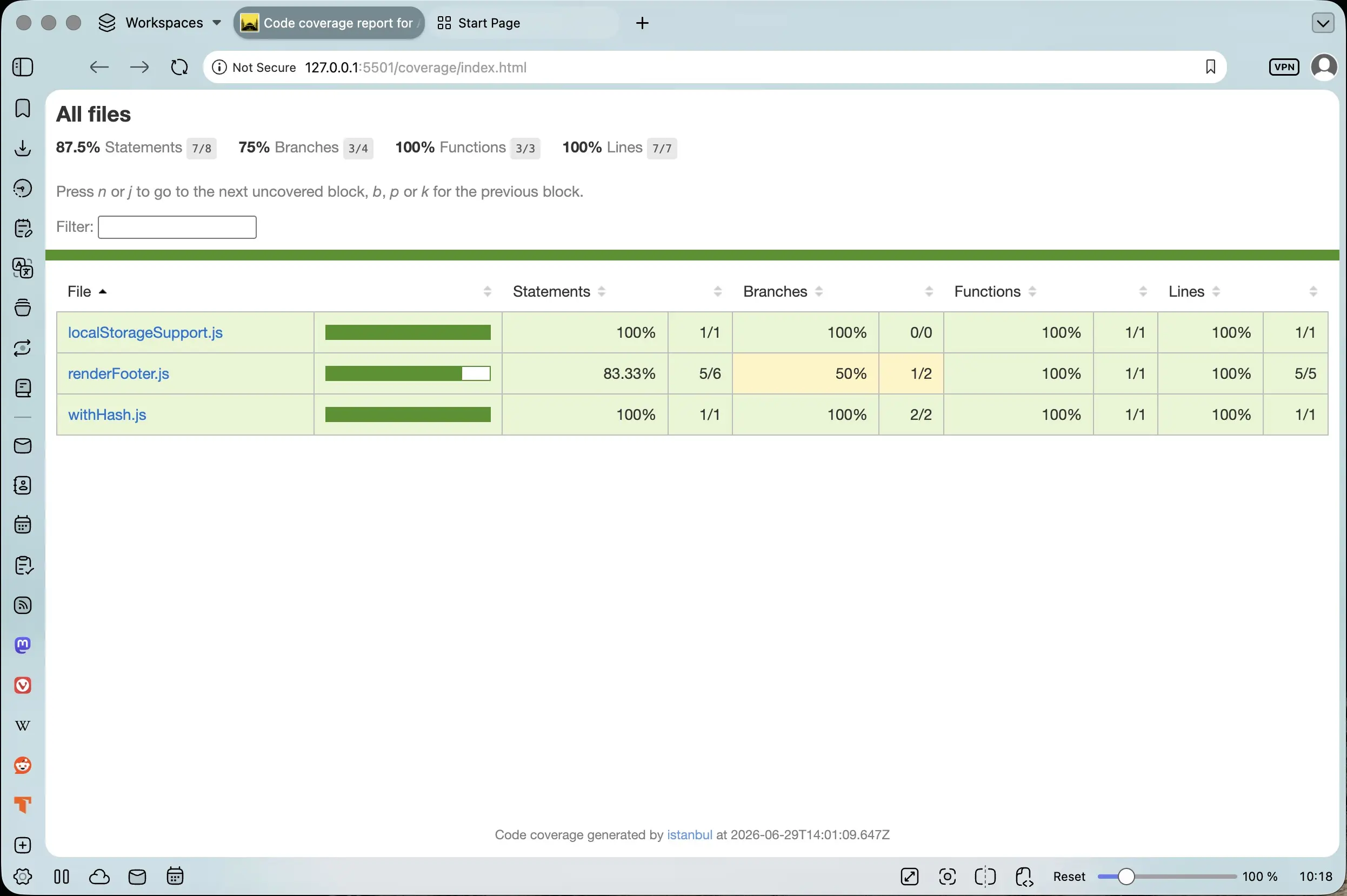
The complete test coverage report of the localStorageSupport, renderFooter, and withHash tests in the browser
This is the visual representation of the output of running the npm run coverage script in Terminal. It is a bit more detailed than the result returned to Terminal. At the top left of the screenshot, 87.5% total test coverage, just as in Terminal, is displayed. To the right of that, 7 of 8 statements is also included. This means that 7 of 8 statements present in the three functions being tested were covered.
I could get even more detailed information about the statement that was not covered by going into the individual test coverage files.
Analyzing the localStorageSupport.js.html test coverage report
When I opened localStorageSupport.js.html in the browser, this is what it looked like:
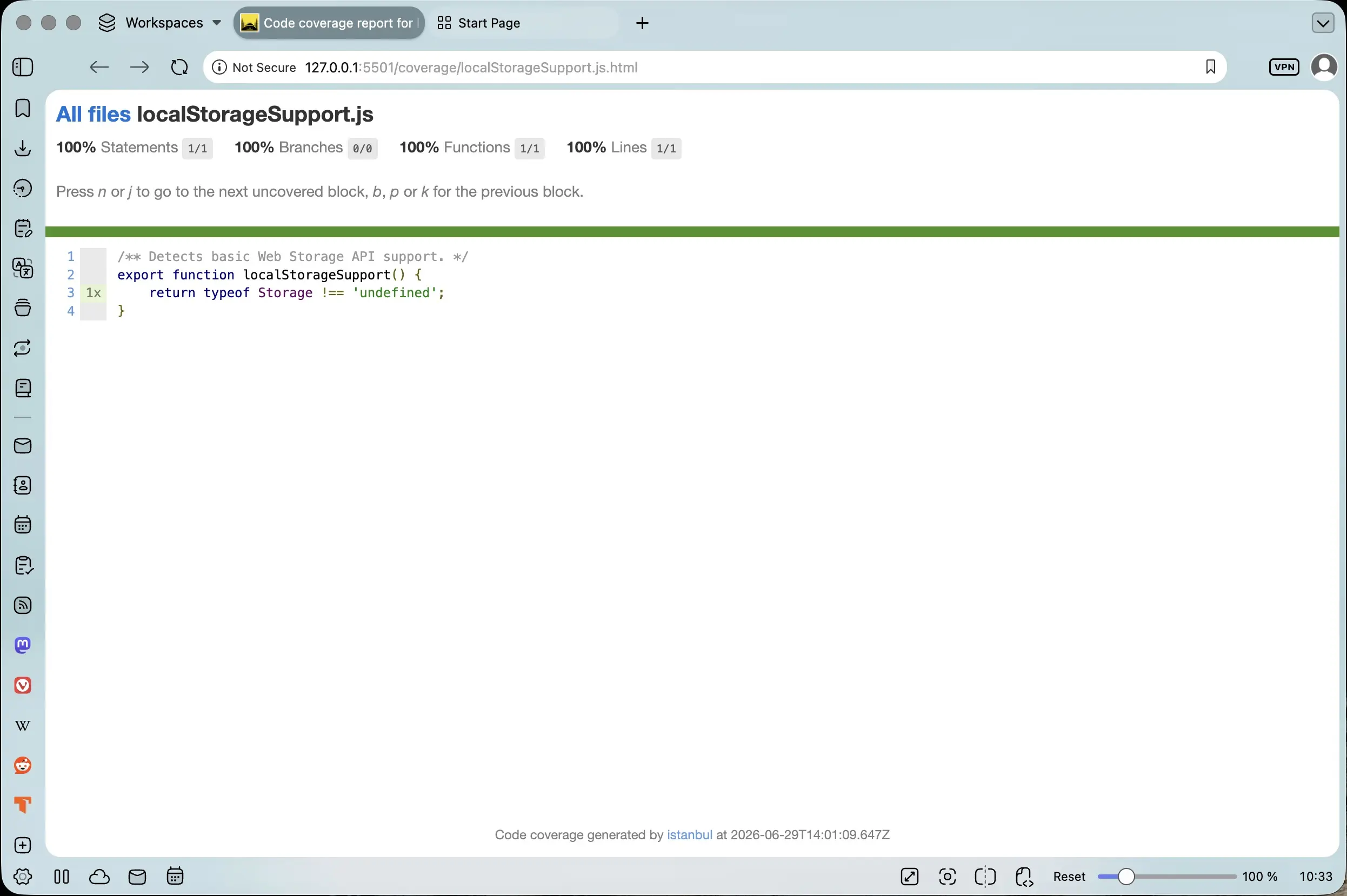
The test coverage of the localStorageSupport function in the browser
This information just displays what was shown in the complete coverage report in the browser, but in more detail. Again, it includes the number of statements in the localStorageSupport function that were covered. Here, it indicates 1 of 1 statements, or that 100% of the function was covered in the localStorageSupport test.
Analyzing the renderFooter.js.html test coverage report
When I opened renderFooter.js.html in the browser, this is what appeared:
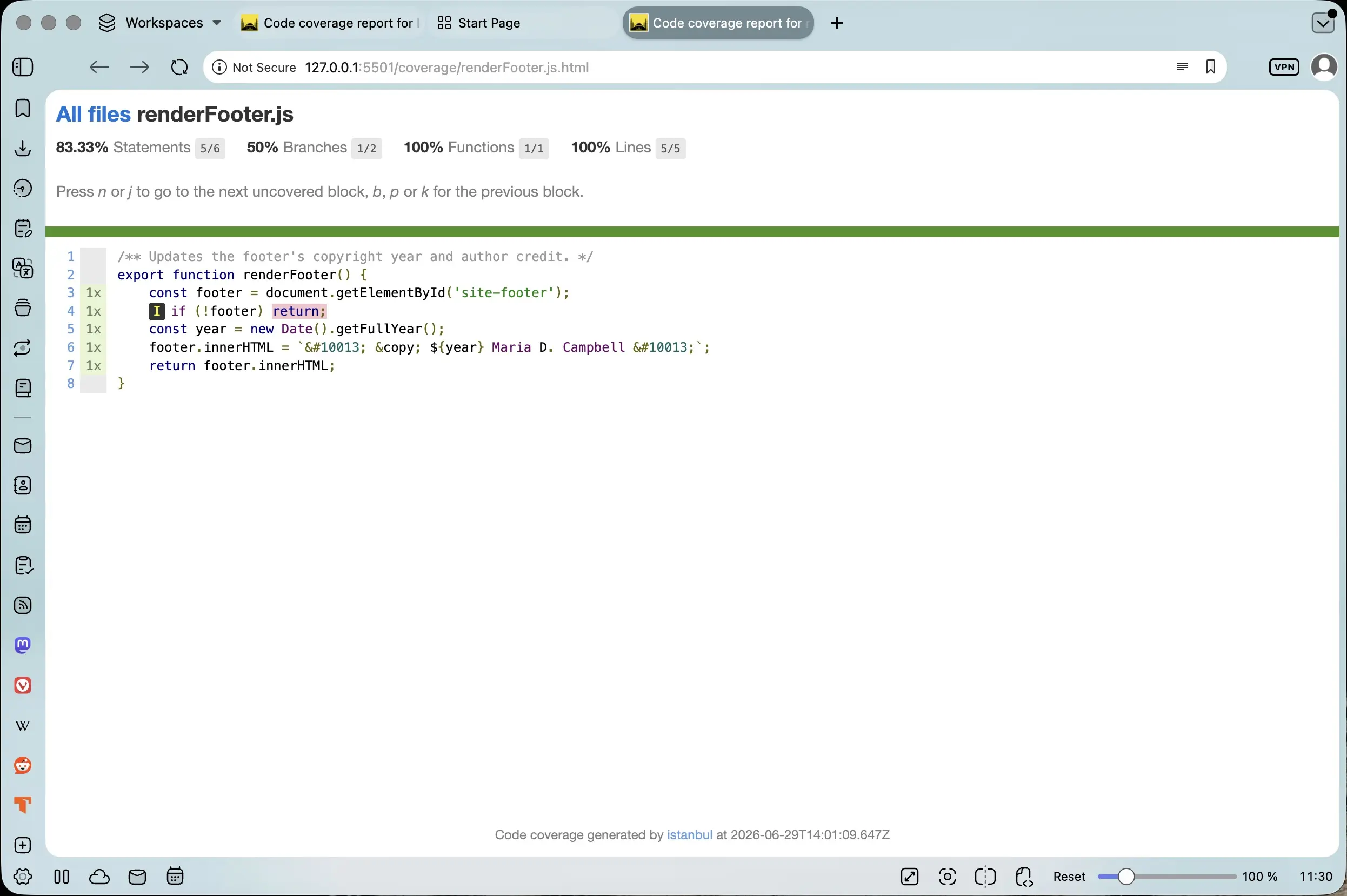
The renderFooter.js.html test coverage report in the browser
Here is where I found the specific culprit. I already knew that there was 83.33% test coverage for renderFooter. I didn't necessarily know what specifically was not being covered in the function. But now I knew for sure:
if (!footer) return
And in the upper-left corner of the screenshot, it stated that 5 of 6 statements were covered.
Analyzing the withHash.js.html test coverage report
When I opened withHash.js.html in the browser, I got the following:
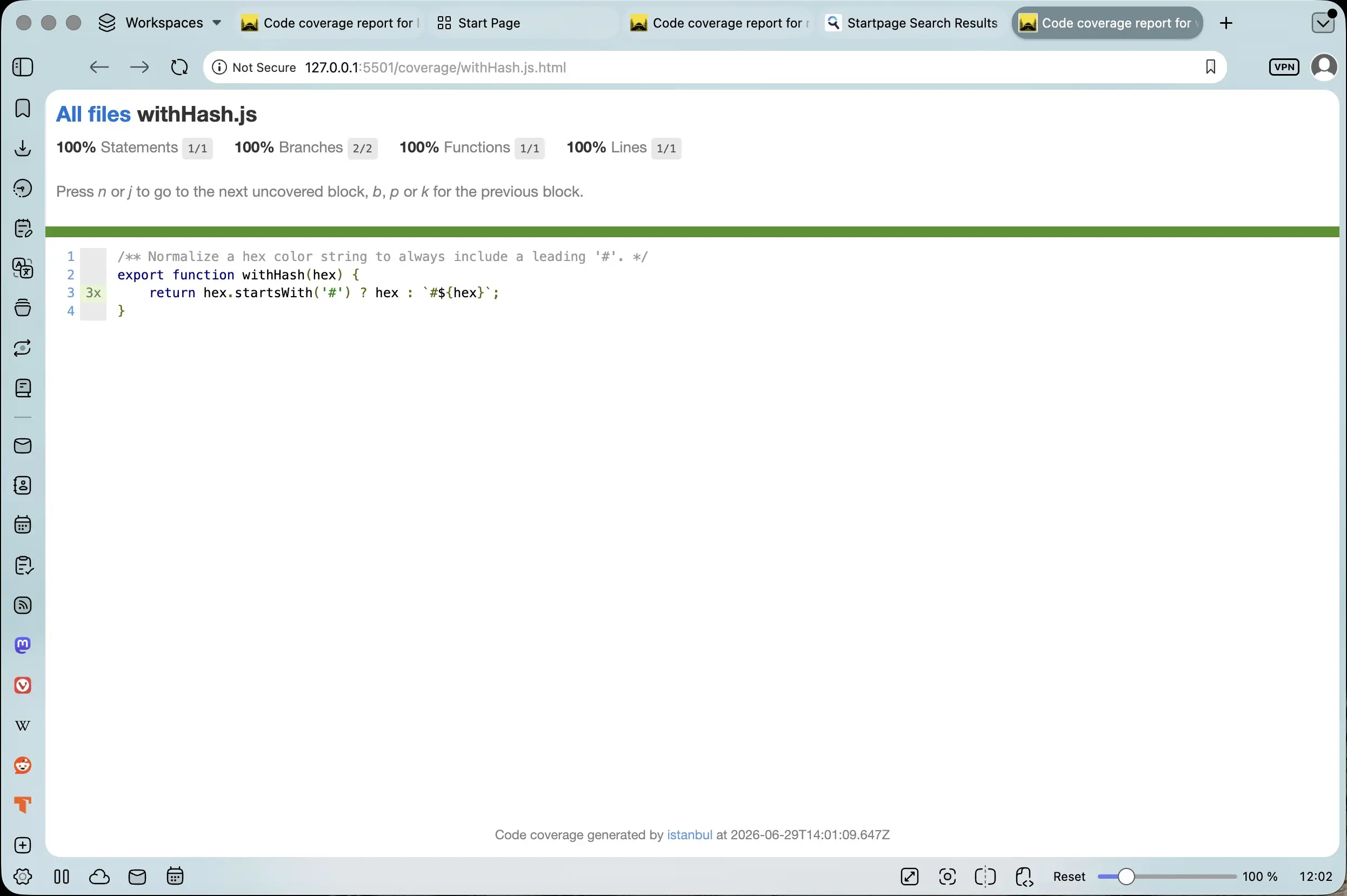
The withHash.js.html test coverage report in the browser
The report showed that the test for withHash.js provided 100% coverage, or 1 of 1 statements.
Conclusion
In this post, I discuss how I divided the Storage Fun with Forms rebuild into reusable parts. With this division, I was also able to target individual functions in testing to determine their viability. Did they actually do what they set out to do and was the code robust? I also had to make sure that the tests were robust. I added test coverage to the project using Istanbul, a JavaScript test coverage tool, to see what parts of the code being tested were actually covered. However, it is not just about writing as many tests as possible to cover as much code as possible. The tests have to be valid and strict. In the next part of the series, I will compare the approach I took in building the original Storage Fun with Forms application to the Storage Fun with Forms rebuild. Come by and check it out!
Related Resources
- Local Storage Session Storage Fun Form Public Archive: Publicly Archived repository on GitHub
- Storage Fun with Forms rebuild: GitHub repository
- Vitest Coverage: Vitest documentation
- How to check if a string is a valid hex color representation?: Stack Overflow
- Understanding Test Coverage: A Complete Guide for Modern QA Teams: tectdock.io
- What is Code coverage? Definition, Types & Best Practices: codecademy.com
- V8 Coverage vs Istanbul: Performance and Accuracy: by Steve Zhang, dev.to
- JavaScript code coverage: v8.dev
Related Posts
-
Storage Fun with Forms Rebuilt: A Modern Pass with Claude Table of Contents: mariadcampbell.com
Footnotes
-
Native code coverage, as relates to Vitest, uses Vitest's V8 native code coverage tool to collect code coverage data directly from the V8 JavaScript engine during runtime. This allows for faster execution and accurate coverage reports without the need for pre-instrumentation of source files, as with Istanbul. This method is the default option in Vitest and is designed to work with JavaScript runtimes like Node.js and Chromium-based browsers. ↩
-
Instrumented code coverage refers to measuring which parts of a project's code are executed during testing as done in Istanbul test coverage and shown here. ↩