How to add tables to React Markdown
Social Share:
Tuesday, September 3, 2024 at 1:33 AM | 4 min read
Last modified on Sunday, June 14, 2026 at 4:28 AM
#macOS, #react markdown, #remark gfm, #rehype-raw, #tables, #scss
Example of a table in React Markdown
Table of Contents
- Tables not supported natively in React Markdown
- Conclusion
- Related Resources
- Footnotes
Note 6.13.26: This post was first published September 3, 2024. At that time, as mentioned here, I was using React Markdown 8.0.7 and remark-gfm 3.0.1. However, the latest versions have definitely changed. I added the tables feature to this site, and since have upgraded both Next.js and React. The site is currently using Next.js ^16.2.6, React ^19.2.6, React Markdown ^8.0.7 (still), and remark-gfm ^3.0.1 (still). Given my workflow, those are the versions I should be using. But that does not mean that they are the ones you should be using. To check out my set up on GitHub, please visit the Next.js Fullstack Blog repository.
Tables not supported natively in React Markdown
Recently I was writing an article in React Markdown, and I wanted to add a table. However, it did not render! I didn't realize until I further researched the issue that React Markdown does not support adding tables in Markdown natively. According to an issues thread in the React Markdown GitHub repository from December 22, 2020,
Tables, and all other GFM have moved to a plugin. You can see an example of usage with tables here: react-markdown README and the note in the release notes here: 5.0.0 - 2020-10-19
The website accurately reflects that by default, react-markdown follows the CommonMark standard, which does not have Tables. -- ChristianMurphy commented on Dec 22, 2020
Installing latest remark-gfm to make tables available in React Markdown
I looked at the example of usage with tables, and it seemed pretty straightforward. I followed the example and imported the remark-gfm npm package into my post-content.js file after installing it. Then I added it to the ReactMarkdown component. But it didn't work. I kept on getting TypeError Cannot set properties of undefined (setting 'inTable'). I did a Google Search and came up with a thread on stackoverflow entitled ReactMarkdown + remarkGfm: everything renders as expected, EXCEPT tables - typeError?.
Installing remark-gfm 3.0.1 to work with React Markdown 8.0.7
First I found out that it was only with React Markdown 9.0 that I could use the latest version of remark-gfm. I, however, am using React Markdown 8.0.7. According to the answer that solved my issue, React Markdown 8.0.7 works with remark-gfm version 3.0.1.
So I uninstalled my current version of remark-gfm with npm uninstall remark-gfm1 and re-installed it with npm i remark-gfm@3.0.1 -S. Then I did the following inside my post-content.js file which is the component that renders the markdown content of my posts on this site:
import remarkGfm from 'remark-gfm'
import rehypeRaw from 'rehype-raw'
;<ReactMarkdown
	components={customRenderers}
	rehypePlugins={[rehypeRaw]}
	remarkPlugins={[remarkGfm]}
	remarkRehypeOptions={{ passThrough: ['link'] }}
>
	{post.content}
</ReactMarkdown>
Installing rehype-raw to make tables compatible with custom components in React Markdown
I also installed and imported the rehype-raw npm package, and passed options to remarkRehypeOptions because in the same thread, another user stated:
Helping hand - I discovered using the remarkGfm had a knock-on effect when using custom components in react-markdown. Though remarkGfm fixed the table layout, it stripped content (e.g. class names) from html tags when used in markdown (which is valid). As such applying remarkRehypeOptions > passThrough allowed both the tables to render correctly and links to use custom components. -- Chris GW Green answered Mar 13 2024 at 13:39
Then he added a code snippet of how he added the two packages to React Markdown:
<Markdown
   remarkPlugins={[remarkGfm]}
   rehypePlugins={[rehypeRaw]}
   remarkRehypeOptions={{ passThrough: ['link'] }}
    ...
Basically the same as the snippet I shared, and his snippet is where I also got guidance.
I also added some simple styling for my tables in my post-content.module.scss file:
/* Markdown table styling */
.content table {
	border-spacing: 0 !important;
	border-collapse: collapse !important;
	border-color: inherit !important;
	display: block !important;
	margin: 0 auto !important;
	width: 100% !important;
	max-width: 100% !important;
	overflow: auto !important;
}

.content tbody,
.content td,
.content tfoot,
.content th,
.content thead,
.content tr {
	border-color: inherit !important;
	border-style: solid !important;
	border-width: 2px !important;
	padding: 0.5rem;
}
Styling the td element to force long filenames to break
Note 6.13.26: I just updated a post entitled How to measure test coverage in Django, and in that post, I have a very large and wide table consisting of a Django project coverage report. It bothered me that I had to use a scrollbar to view 3 out of 4 of the table columns, so I added the following style to the td element so as to force the filenames to wrap:
// post-content.module.scss
.content td {
	word-break: break-all;
}
Now, no matter what the width of the browser window, all the table columns are visible.
Adding styling to the table element in dark mode
If you are a Next.js and Tailwind CSS user, I also added a bit of styling for dark mode in my (global) post-content.scss file:
.dark .content table {
	color: $white;
}
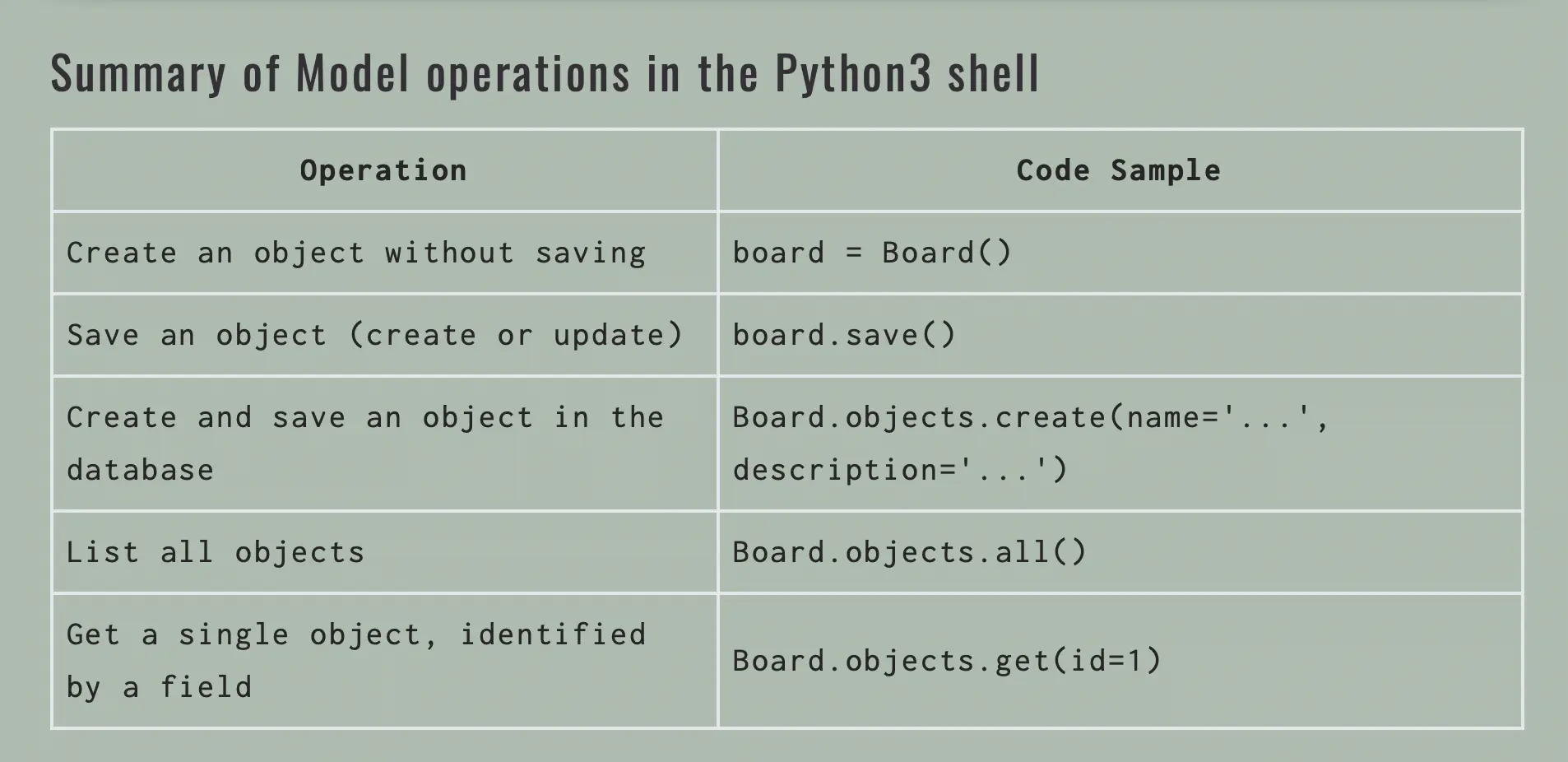
This is what the table I created looks like:
Screenshot of table used in How to create a fullstack application using Django and Python part 7
Conclusion
Even though tables are not supported in React Markdown by default, I found a way to make it happen, and without having to install the latest versions of React Markdown and remark-gfm. And as a bonus, I added styling I had applied to fix the rendering of a table in another post to enhance the content here.
Related Resources
- Tables not working on website #526: react-markdown GitHub repository
- remarkjs/react-markdown example usage: remarkjs/react-markdown GitHub repository
- ReactMarkdown + remarkGfm: everything renders as expected, EXCEPT tables - typeError?: stackoverflow
Footnotes
-
gfm stands for GitHub Flavored Markdown. ↩