How to create a fullstack application using Django and Python Part 7
Social Share:
Sunday, September 1, 2024 at 5:19 PM | 12 min read
Last modified on Thursday, July 16, 2026 at 12:38 PM
#macOS, #django, #fullstack development, #makemigrations, #migrate, #model operations, #model manager, #python3, #python3 shell, #queryset, #series
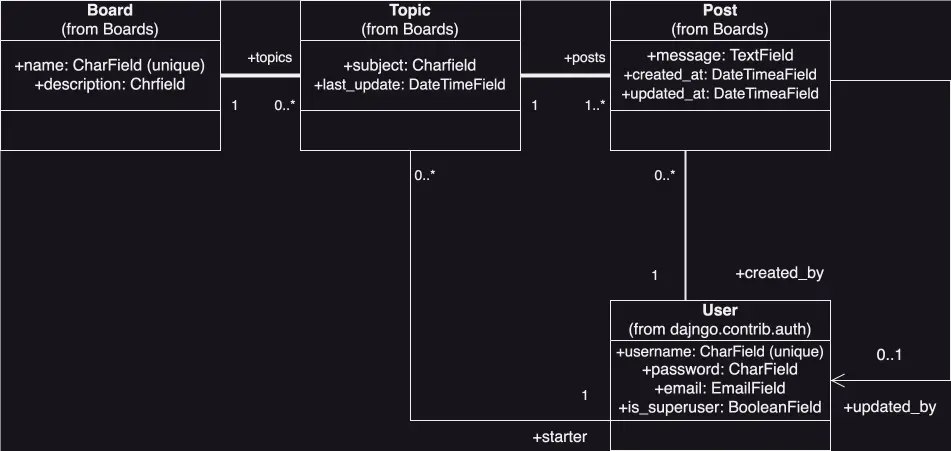
UML class diagram
Important Note: Before committing anything to Git or pushing anything to remote, please visit How to create a fullstack application using Django and Python Part 4 where I discuss how to add the python-dotenv package to the Django site and why it is crucial to do it. This article assumes you have a working knowledge of Git.
Table of Contents
- Building the Django Boards models
- Comparing the UML class fields diagram to the models.py source code
- Migrating the models with the makemigrations command
- Applying the migration I generated to the database with the migrate command
- Tinkering with the Models API
- The Django model Manager
- Conclusion
- Footnotes
- Related Resources
- Related Posts
Update (July 2026): This walkthrough was written against Django 5.1, which reached full end-of-life in December 2025 and is no longer receiving security patches. Run python -m django --version to check which version you have.
I wrote this series as a live process, so sometimes it might seem confusing, but it all works out in the end.
Building the Django Boards models
Now it is time to build the Django Boards Board, Topic, and Post models. The User model is already included in the built-in django.contrib.auth.models, which appears in INSTALLED_APPS in settings.py as django.contrib.auth.
Model basics
A Django model is the single source of information about the data I am working with. It contains the necessary fields and functionalities of the data I am storing. Each model maps to a single database table.
- Each model is a Python class that subclasses django.db.models.Model.
- Each attribute of a model represents a database field.
- Once I have created my Django models, Django automatically provides me with a database-abstraction API that lets me create, get (read), update, and delete objects (CRUD operations).
An example of sub-classing django.db.models.Model in the Board, Topic, and Post classes in the boards app code is:
# in models.py from django.db import models

class Board(models.Model): ... class Topic(models.Model): ... class
Post(models.Model):
boards/models.py
I will be adding the models-related code inside the boards app models.py file:
# in boards/models.py
from django.db import models
from django.contrib.auth.models import User

# Create your models here.

class Board(models.Model):
  name = models.CharField(max_length=30, unique=True)
  description = models.CharField(max_length=100)

  def __str__(self):
    return self.name

class Topic(models.Model):
  subject = models.CharField(max_length=255)
  last_updated = models.DateTimeField(auto_now_add=True)
  board = models.ForeignKey(Board, on_delete=models.CASCADE, related_name='topics')
  starter = models.ForeignKey(User, on_delete=models.CASCADE, related_name='topics')

class Post(models.Model):
  message = models.TextField(max_length=4000)
  topic = models.ForeignKey(Topic, on_delete=models.CASCADE, related_name='posts')
  created_at = models.DateTimeField(auto_now_add=True)
  updated_at = models.DateTimeField(null=True)
  created_by = models.ForeignKey(User, on_delete=models.CASCADE, related_name='posts')
  updated_by = models.ForeignKey(User, on_delete=models.CASCADE, null=True, related_name='+')
The Board class model
In the Board class model, the name field (class attribute name) contains the unique built-in field validation property which is set to true. In other words, name = models.CharField(max_length=30, unique=True). Whatever value I assign to this field has to be unique. Django won't let me save two boards with the same name.
The description field is simply made up of alpha characters describing the board, and therefore does not have to be unique. However, I have to set a max_length property. The CharField() method has a max_length of 255 characters, but I set it to 100. I set the max_length of the name field to 30 characters.
I use the __str__() function in Board class to convert the name object into its string representation. def __str__(self): return self.name dynamically sets the name of a board. When I write the code, I don't know yet what the admin user is going to call any particular board. I also have to return the name object inside the __str__() method to make it available elsewhere, especially in django.contrib.auth where the User model resides.
The Topic class model
In the Topic class model, I set the subject field value to models.CharField() with a max_length of 255, which is the highest max_length value I can set to the models.CharField() method. There is no need for more anyway, since the subject line does not have to be too long!
For the last_updated field, I set its value to models.DateTimeField(auto_now_add=True). Passing the auto_now_add=True option to models.DateTimeField() method sets the current date and time only when the model (topic) instance is created. This is good for when I want the time the instance was created to be displayed, like a date_created timestamp. As opposed to the auto_now option, which would set the value of the last_updated field every time the model instance is saved, regardless of whether it is being created or updated/saved.
I set the board field to models.ForeignKey(Board, on_delete=models.CASCADE, related_name='topics'). I use the models.ForeignKey() method to define the many-to one relationship between the Topic class and the Board class. As shown in my UML class diagram, there can be 0 to many (0..*) topics to exactly 1 board, and a topic can only have exactly one board. The first option I pass to the models.ForeignKey() method, and that is a reference to the Board class. Why do I just pass a reference to the class? Because it is easier to just reference the class inside another class, and then just make changes to the class being referenced inside the class itself. Otherwise, if I added the whole class inside another class, there would be a lot of duplication and it would be hard to keep track of and sync changes.
I am required to pass the on_delete=models.CASCADE option (or argument) to models.ForeignKey() so that if the referenced object (model class) is deleted, then all the other objects that have a ForeignKey to that object will also be deleted. This makes sure that the child objects are deleted when the parent object is deleted.
The related name option is passed to models.ForeignKey() because I am linking Board to Topic using models.ForeignKey(), and I want to give a name to the related name attribute that I use for the relation (reverse relationship1) from the related Board object back to Topic. After defining related_name, I can retrieve the topics of a board with the following:
board.topics.all()
The starter field which represents the user who starts a topic, is structured in the same way as the board field. It is set to the value of starter = models.ForeignKey(User, on_delete=models.CASCADE, related_name='topics'). I use the models.ForeignKey() method to define the many-to-one relationship between the Topic class and the User class. As shown in my UML class diagram, the user can create 0 to many topics (0..*), but a topic can only be associated with exactly one user. Instead of passing Board as the first argument (option) to models.ForeignKey(), I am passing User. The second and third arguments (options), on_delete and related_name are the same.
The Post class model
In the Post class model, I use the models.TextField() method as the value of the message field, and set the max_length to 4000. However, I do not have to set a max_length on a TextField, because Django does not enforce any size limit on a TextField in the database. It's really a matter of preference, and whether I want a user to be able to ramble on and on in a Post.
I set the value of the topic field to models.ForeignKey(Topic, on_delete=models.CASCADE, related_name='posts'). I use the models.ForeignKey() method to define the many-to-one relationship between the Post class and the Topic class. As shown in my UML class diagram, there has to be at least 1 to many (1..*) posts to exactly 1 topic, and one post can only have exactly one topic. The first option I pass to the models.ForeignKey() method, and that is a reference to the Topic class. Why do I just pass a reference to the class? Because it is easier to just reference the class inside another class, and then just make changes to the class being referenced inside the class itself. Otherwise, if I added the whole class inside another class, there would be a lot of duplication and it would be hard to keep track of and sync changes.
I am required to pass the on_delete=models.CASCADE option (or argument) to models.ForeignKey() so that if the referenced object (model class) is deleted, then all the other objects that have a ForeignKey to that object will also be deleted. This makes sure that the child objects are deleted when the parent object is deleted.
The related name option is passed to models.ForeignKey() because I am linking Topic to Post using models.ForeignKey(), and I want to give a name to the related name attribute that I use for the relation (reverse relationship 1) from the related Topic object back to Post. After defining related_name, I can retrieve the posts of a topic with the following:
topic.posts.all()
The created_at field is set to models.DateTimeField(auto_now_add=True). Passing the auto_now_add=True option to models.DateTimeField() method sets the current date and time only when the model (post) instance is created. This is good for when I want the time the instance was created to be displayed, like a date_created timestamp. As opposed to the auto_now option, which would set the value of the created_at field every time the model instance is saved, regardless of whether it is being created or updated/saved.
I set the updated_at field to models.DateTimeField(null=True). Passing null=True to models.DateTimeField() means that a value does not have to initially be set to the updated_at field when first created. In fact, a value never has to be set to it. A user might never update their post.
The created_by field is set to models.ForeignKey(User, on_delete=models.CASCADE, related_name='posts'). This means that a post is created by a user, and if the user is ever deleted, the parent post and all its children will also be deleted. As already mentioned, on_delete=models.CASCADE must be passed to models.ForeignKey(). The related_name option is passed to models.ForeignKey() because I am linking User to Post using models.ForeignKey(), and I want to give a name to the related name attribute that I use for the relation (reverse relationship1) from the related User object back to Post. After defining related_name, I can retrieve the posts of a topic with the following:
created_by.posts.all()
The updated_by field is set to models.ForeignKey(User, on_delete=models.CASCADE, null=True, related_name='+'). The first argument passed to models.ForeignKey() is a reference to the User object. It is the user who created the post that will be able to update it. However, just like with the updated_at field, perhaps the user will never want to edit/update their post, so null=True must be passed as the second argument to models.ForeignKey(). The fourth argument, related_name='+', is new. What this does is prevent a reverse relationship1 from being created. I prevent it from being created for the second reference to the User object passed to updated_by (the first is referenced in the created_by field), because I would have to give a related_name of posts here as well, and a naming conflict would result.
Comparing the UML class fields diagram to the models.py source code
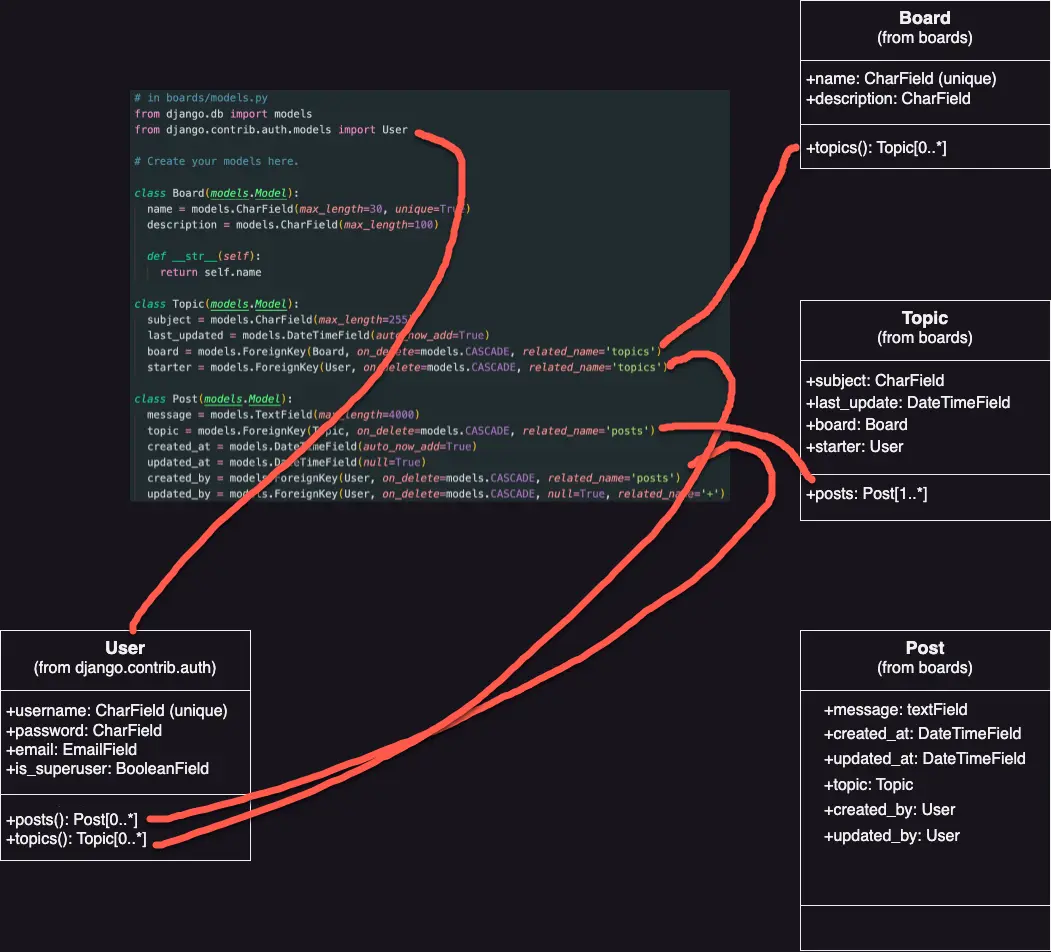
Below is an image of the UML class fields diagram vs the models.py source code:
UML class fields diagram vs the models.py source code
You might notice that there are no primary keys/IDs referenced in the diagram. That is okay, because if I don't specify a primary key for a model, Django will automatically generate one for me.
Migrating the models with the makemigrations command
The next step is to tell Django to create the database for me so I can start using it.
The makemigrations command is responsible for creating new migrations based on the changes I made to my models.
The migrate command applies and un-applies migrations.
In order to makemigrations, I run the following code in Terminal inside the directory that contains the manage.py file:
python3 manage.py makemigrations
Which returns something like the following:
Migrations for 'boards':
  boards/migrations/0001_initial.py
    - Create model Board
    - Create model Post
    - Create model Topic
    - Add field topic to post
    - Add field updated_by to post
Since this is my first migration, Django has created a file called 0001_initial.py inside the boards/migrations/ directory, and it represents the current state of my boards app's models. In the next step (migrate), Django will use this file to create tables and columns. The migrations files are translated into SQL statements. If I want to inspect the SQL instructions that will be executed in the database, I can run the following command:
python3 manage.py sqlmigrate boards 0001
Applying the migration I generated to the database with the migrate command
Next, I run the following command to apply the migration I generated to the database with the makemigrations command from inside the directory that houses the manage.py file:
python3 manage.py migrate
Which returns something like the following in Terminal:
Operations to perform:
  Apply all migrations: admin, auth, boards, contenttypes, sessions
Running migrations:
  Applying contenttypes.0001_initial... OK
  Applying auth.0001_initial... OK
  Applying admin.0001_initial... OK
  Applying admin.0002_logentry_remove_auto_add... OK
  Applying contenttypes.0002_remove_content_type_name... OK
  Applying auth.0002_alter_permission_name_max_length... OK
  Applying auth.0003_alter_user_email_max_length... OK
  Applying auth.0004_alter_user_username_opts... OK
  Applying auth.0005_alter_user_last_login_null... OK
  Applying auth.0006_require_contenttypes_0002... OK
  Applying auth.0007_alter_validators_add_error_messages... OK
  Applying auth.0008_alter_user_username_max_length... OK
  Applying boards.0001_initial... OK
  Applying sessions.0001_initial... OK
Because this is the first time I am migrating the database, the migrate command also applied the existing migration files from the django.contrib apps in INSTALLED_APPS in settings.py.
Applying sessions.0001_initial... OK is the migration I generated in the previous step. Now my database is ready to be used.
Note about SQLite: SQLite is a production quality database, but just for small sites. High-volume websites, write-intensive applications, very large datasets, or high-concurrency systems should use PostgreSQL or Oracle instead. While I am developing the site locally, using the SQLite database that comes with Django is perfectly fine. But when I deploy my site to production, I will switch to PostgreSQL. For simple websites like the one I am building, it is okay to switch from SQLite to another database, but with more complex sites, I should use the same database in development and production.
Tinkering with the Models API
Python 3 has an interactive shell I can use during Python development. It's a great way to try new things and experiment with Python libraries and APIs.
The following command starts up the Python 3 shell in Terminal:
python3 manage.py shell
The command returns the following:
Python 3.12.5 (main, Aug 26 2024, 07:35:37) [Clang 15.0.0 (clang-1500.3.9.4)] on darwin
Type "help", "copyright", "credits" or "license" for more information.
(InteractiveConsole)
>>>
This is similar to simply running python3, which returns:
Python 3.12.5 (main, Aug 26 2024, 07:35:37) [Clang 15.0.0 (clang-1500.3.9.4)] on darwin
Type "help", "copyright", "credits" or "license" for more information.
>>>
When I run python3, it starts the Python interpreter. Running python3 manage.py shell within a Django project sets the DJANGO_SETTINGS_MODULE environment variable, which provides Django with the Python import path to my django_boards/settings.py file. This means I can do the following within the Python 3 shell instead of in models.py:
(InteractiveConsole)
>>>from boards.models import Board
Then I can create a new board object:
>>>board = Board(name="Django Models", description="This board is all about Django Models.")
To persist this object in the database, I run the following command:
board.save()
The save() method both creates and updates objects. Here, it created a new board, and once the object is saved to the database, Django automatically gives it an id. So when I run:
board.id
Something like the following is returned:
4
In my case, I already created three boards, so this is board number 4. I can also access all the other board attributes. The board name for example:
board.name
Which returns:
'Django Models'
And the board description:
board.description
Which returns:
'This board is all about Django Models.'
I can also modify (update) the board description:
board.description = "This board covers Django Models."
when I run board.description again, the following is returned:
'This board covers Django Models.'
And then, if I want to save these changes, I have to run board.save() again.
The Django model Manager
According to the Django documentation,
A Manager is a Django class that provides the interface between database query operations and a Django model.
The Manager interacts with the database. When I want to retrieve objects from the database, I need to construct a QuerySet via the Manager on my model class. By default, the Manager is available through the Model.objects property. This Manager is the django.db.models.Manager.
I can use django.db.models.Manager directly to create a new Board object via the Python 3 shell:
board = Board.objects.create(name="Python Objects", description="Where we discuss everything about Python objects.")
Then I run board.save() to save this new board instance to the database. After that, when I run board.id, the following is returned:
5
Now I have five boards. If you want to catch up with me and create more boards, it would be great practice!
Next, if I run Board.objects.all(), the following is returned in the shell:
<QuerySet [<Board: Python>, <Board: Django>, <Board: Random>, <Board: Django Models>, <Board: Python Objects>]>
The above is a QuerySet. A QuerySet is a collection of data from a database. A QuerySet is basically a list of objects from the database. Here, I am able to read the actual names of the Boards. That is because of the __str__() method inside the Board model in models.py:
class Board(models.Model):
  name = models.CharField(max_length=30, unique=True)
  description = models.CharField(max_length=100)

  def __str__(self):
    return self.name
As mentioned in the Board class model section, I use the __str__() function in Board class to convert the name object into its string representation. def __str__(self): return self.name dynamically sets the name of a board. When I write the code, I don't know yet what the admin user is going to call any particular board. I also have to return the name object inside the __str__() method to make it available elsewhere, especially in django.contrib.auth where the User model resides. If I hadn't yet added the __str__() function, the following would be returned in the QuerySet:
<QuerySet [<Board: Board object>, <Board: Board object>, <Board: Board object>, <Board: Board object>, <Board: Board object>]>
Treating the QuerySet like a list
I can treat QuerySets like lists. If I want to iterate over all my Board.objects, I can run the following in the Python 3 shell:
>>>boards_list = Board.objects.all()
>>>for board in boards_list:
...    print(board.description)
...
Everything related to Python
This is a board about Django.
Discuss anything.
This board covers Django Models.
Where we discuss everything about Python objects.
>>>
I can also use the model Manager to return a single object. For that I use the get() method:
django_board = Board.objects.get(id=3)
Then I run django_board.name, and it returns the following:
'Random'
Which is the name of the board with the id of 3.
On the other hand, if I try to get an object with a non-existent id in the shell, an exception will be thrown. For example, if I try to get a board with an id of 6 (no such id in my case), something like the following happens:
Traceback (most recent call last):
  File "<console>", line 1, in <module>
  File "/Users/mariacam/.pyenv/versions/3.12.5/lib/python3.12/site-packages/django/db/models/manager.py", line 87, in manager_method
    return getattr(self.get_queryset(), name)(*args, **kwargs)
           ^^^^^^^^^^^^^^^^^^^^^^^^^^^^^^^^^^^^^^^^^^^^^^^^^^^
  File "/Users/mariacam/.pyenv/versions/3.12.5/lib/python3.12/site-packages/django/db/models/query.py", line 649, in get
    raise self.model.DoesNotExist(
boards.models.Board.DoesNotExist: Board matching query does not exist.
I can use the get() method with any model field, but it is better to get the model instance with a field that can uniquely identify the object, like an id or a unique name. Otherwise, the query might return more than one object, which would also cause an exception.
get() queries are also case sensitive. If a board name is 'Random', for example, but I run the following:
Board.objects.get(name="random")
Something like the following is returned:
 File "<console>", line 1, in <module>
  File "/Users/mariacam/.pyenv/versions/3.12.5/lib/python3.12/site-packages/django/db/models/manager.py", line 87, in manager_method
    return getattr(self.get_queryset(), name)(*args, **kwargs)
           ^^^^^^^^^^^^^^^^^^^^^^^^^^^^^^^^^^^^^^^^^^^^^^^^^^^
  File "/Users/mariacam/.pyenv/versions/3.12.5/lib/python3.12/site-packages/django/db/models/query.py", line 649, in get
    raise self.model.DoesNotExist(
boards.models.Board.DoesNotExist: Board matching query does not exist.
But if I run:
Board.objects.get(name="Random")
The following is returned:
<Board: Random>
Summary of model operations in the Python 3 shell
| Operation | Code Sample |
|---|---|
| Create an object without saving | board = Board() |
| Save an object (create or update) | board.save() |
| Create and save an object in the database | Board.objects.create(name='...', description='...') |
| List all objects | Board.objects.all() |
| Get a single object, identified by a field | Board.objects.get(id=1) |
Conclusion
In this section, I discuss the Django model basics, I compare the UML Class Fields Diagram to the models.py source code, I migrate the models with the makemigrations command, apply the model migrations with the migrate command, play with the Models API, and discuss the Django model Manager.
Related Resources
- django-admin and manage.py: Django Documentation
Related Posts
Footnotes
-
For a reverse relationship refresher, please visit the UML class diagram which visualizes fields (and not relationships) section in part 6 of this series. ↩ ↩2 ↩3 ↩4