How to create a fullstack application using Django and Python Part 10
Social Share:
Sunday, September 8, 2024 at 3:03 AM | 3 min read
Last modified on Thursday, July 16, 2026 at 11:51 AM
#macOS, #django, #fullstack development, #python3, #series, #uml class diagram, #uml, #wireframe

Photo by picjumbo.com on pexels.com
Important Note: Before committing anything to Git or pushing anything to remote, please visit How to create a fullstack application using Django and Python Part 4 where I discuss how to add the python-dotenv package to the Django site and why it is crucial to do it. This article assumes you have a working knowledge of Git.
Table of Contents
- Updating the UML class diagrams
- Updating the boards wireframe(s)
- Clarifying the concepts of "topic" and "post"
- Conclusion
- Related Resources
- Related Posts
- Footnotes
Update (July 2026): This walkthrough was written against Django 5.1, which reached full end-of-life in December 2025 and is no longer receiving security patches. Run python -m django --version to check which version you have.
I wrote this series as a live process, so sometimes it might seem confusing, but it all works out in the end.
Updating the UML class diagrams
I had mentioned that I added a PostLike class model to my model schema. Now I am going to share the UML Class Diagrams to include the PostLike model. This way, I can determine if everything truly is the way I want it, or if I have to make further changes. I am also including the wireframe reflecting the class diagram changes, which will confirm whether I've built what I wanted thus far!
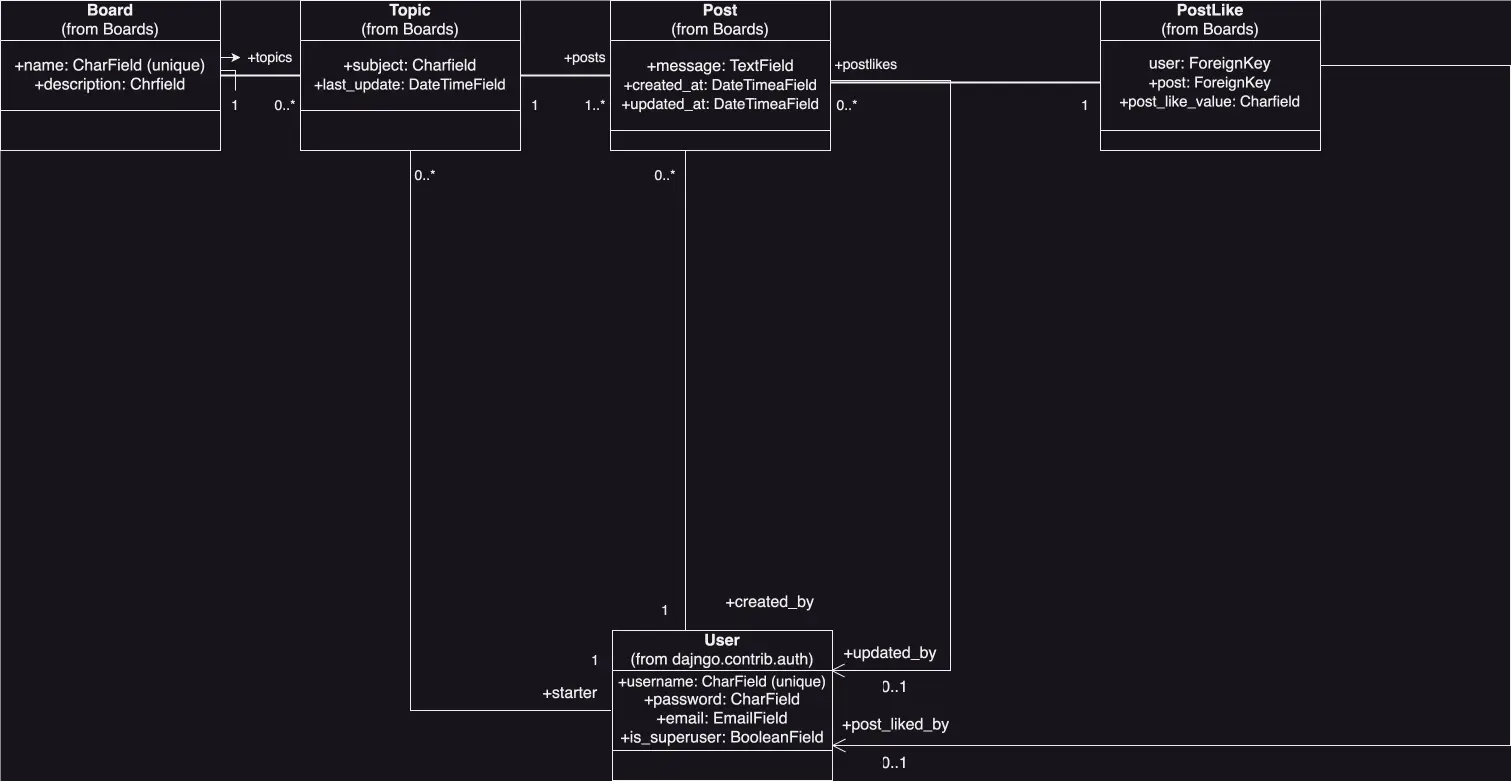
UML class diagram including PostLike
The UML class diagram including PostLike with a focus on fields now looks like the following:
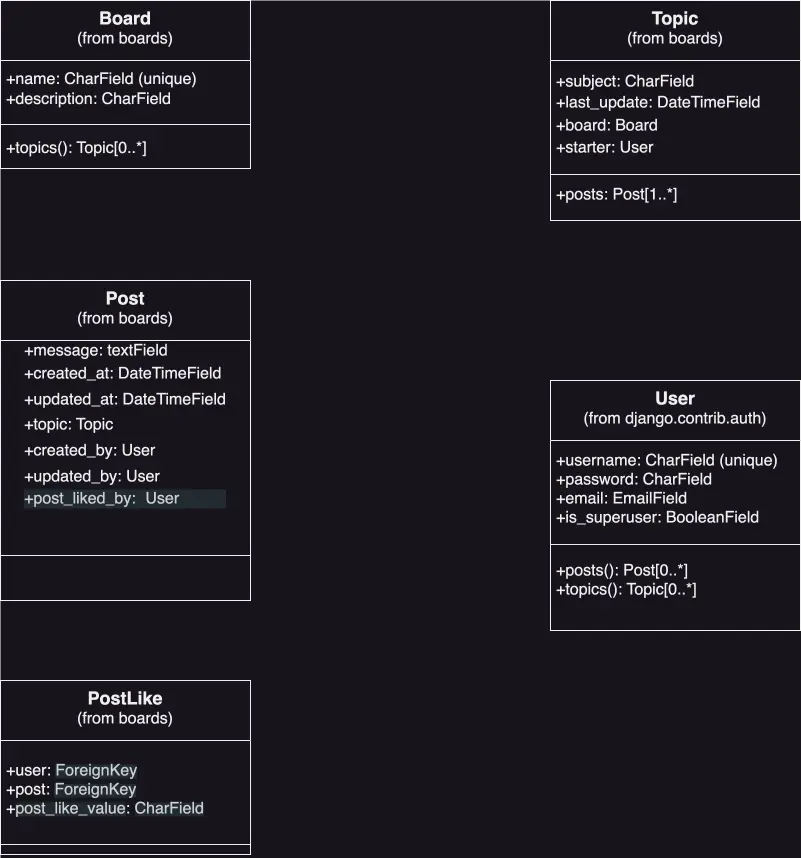
UML class diagram fields including PostLike
To re-review the relations between the classes (still the same here), you can refer to the UML Class Fields Diagram under the section heading Comparing the UML Class Fields Diagram to the models.py source code in How to create a fullstack application using Django and Python Part 7.
There is no direct relationship between the user and the PostLike. There isn't even a direct relationship between the Post and PostLike, but the User object is passed as an argument to ManyToManyField()1, because the user is the one to "like" the topic post. I will go over this in detail later. This section is about updating the UML diagrams and wireframe(s) to include the PostLike model.
Updating the boards wireframe(s)
Below is the updated wireframe including the post likes as well as a link button to copy the link to the post to make it easy to share elsewhere:
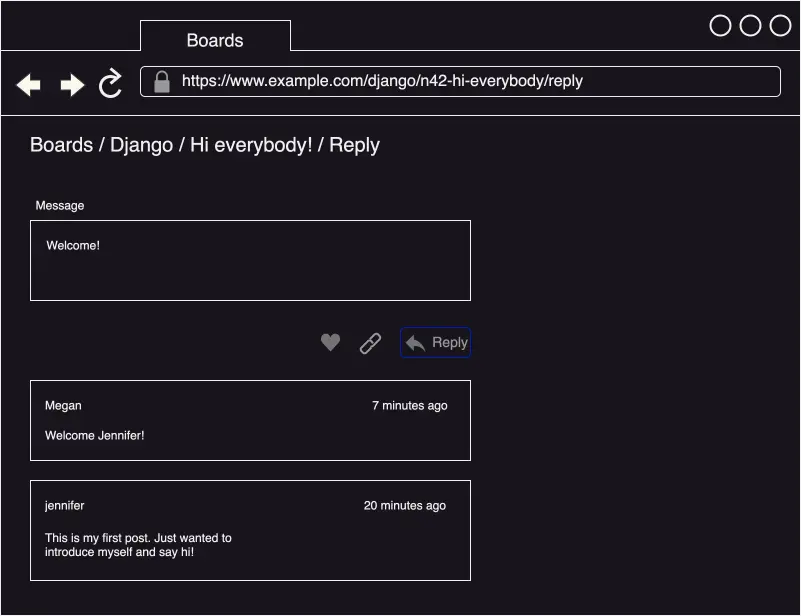
Django Board topic replies including post like button and link button wireframe
Clarifying the concepts of "topic" and "post"
The concepts of "topic" and "post" here may seem a bit confusing. It was a bit confusing to me at first. Perhaps it was all in the naming. But then I studied the actual Django Forum, and it became clearer to me. A topic can be regarded as the start of a board thread, like on stackoverflow, for example. A person starts a topic, which is the name of the thread, and is accompanied by their initial "subject" (post) regarding the topic, and then others reply to that subject with their own views on the subject. So the posts are really replies to the topic subject.
Conclusion
In this section, I update the UML Class Diagrams and wireframe(s) to include the PostLike Model, and I clarify the concepts of "topic" and "post".
Related Resources
Related Posts
Footnotes
-
The ManyToManyField set to post_liked_by in the Post class model describes the relationship between the User and the PostLike, which is ManyToMany. One user can like many posts, and one post can be liked by many users. The PostLike class model, on the other hand, has a OneToMany or ForeignKey relationship with the Post. A PostLike instance connects a specific user to a specific post they liked. This is reflected by the ForeignKey on the post field in the PostLike model. Many thanks to @WarnerSmith on the Django Forum for clarifying ManyToMany for me! To view his response there, please visit Warner Smith reply to my post topic "Trying to figure out what the relationship between my post topic and post like would be". You do have to join the Django Forum in order to view it! ↩